


Table of Contents Show
Digital tools have transformed how architects design, visualize, and execute their projects. From the initial concept to the final construction, digital architectural tools have become indispensable in the creation of innovative, efficient, and sustainable designs. In this article, we will see the significance of architectural toolkits, focusing on aspects such as creating architectural diagrams, producing 3D realistic renderings, and the digital modeling of architectural projects.

Creating Architectural Diagrams
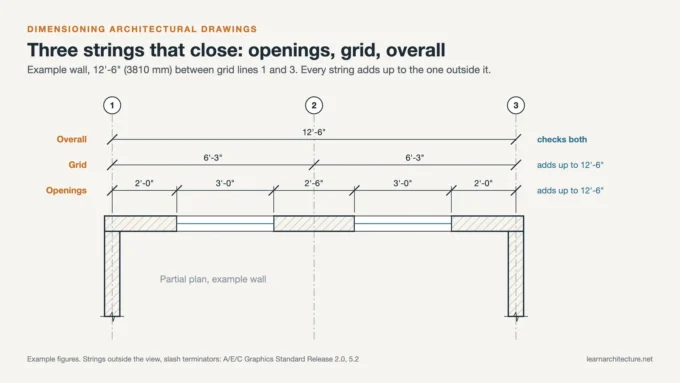
Architectural diagrams are vital for communicating the concepts and details of a project. They provide a clear and simplified overview of complex structures, enabling architects, clients, and builders to understand the spatial relationships and functional arrangements within a building. With an architectural toolbox, creating these diagrams may become more efficient and precise in your design process.
For instance, there are many architectural toolboxes for Adobe Illustrator or Photoshop that allow architects to produce detailed diagrams to easily access their ideas. These assistants enhance collaboration among project designers and facilitate the exploration of alternative solutions, leading to more refined and coherent designs.
Digital Modeling of Architectural Projects
One of the subjects that architectural toolkits are most helpful in is 3D modeling. Every step of developing an architectural project requires care, but modeling is critical for final presentations. Your detailed work on the models increases the value of your project. For this reason, when doing 3D modeling, you can get help from a toolbox such as 2D/3D Rendering Box, which contains many 3D objects, textures and materials.
Digital modeling goes beyond visual representation, allowing architects to build comprehensive digital versions of their projects. This process involves the use of Building Information Modeling (BIM) software such as Revit and ArchiCAD, which integrate detailed information about each component of the building, from structural elements to materials specifications.

3D Realistic Renderings
Here is the final point!
Especially when it comes to professional production in architectural design, your job will be much easier with an assistant such as Floor Plan Rendering Toolkit for rendering. During the rendering phase, architects’ lives become easier with rendering toolboxes or toolkits that include all pre-prepared materials, lights or render scenes.
Software like Enscape, Lumion, and V-Ray enable architects to create immersive visuals that can be used for presentations, marketing, and design evaluation. This not only helps in securing client approval and attracting investors but also assists in identifying potential design issues before construction begins, saving time and resources.

The importance of digital architectural tools and toolkits in modern architecture cannot be overstated. They revolutionize the way architects conceive, visualize, and realize their projects, offering unprecedented levels of precision, flexibility, and collaboration. By leveraging these tools, architects can create more innovative, efficient, and sustainable designs that meet the demands of today’s rapidly changing world. As technology continues to advance, the potential for further enhancements in architectural practice remains vast, promising even more exciting possibilities for the future of design and construction.
In summary, these toolkits bridge the gap between the theoretical knowledge of digital architectural tools and their practical application, empowering students and architects to produce work that stands out in both academic and professional arenas. By integrating these specialized resources into their workflow, users not only refine their design and presentation skills but also gain a competitive edge in the fast-paced world of architecture.
More Benefits of Digital Tools
- Faster iteration: changes that once took hours of redrawing can be tested in minutes, so more options get explored.
- Better coordination: BIM models let architects, engineers, and contractors work from one source of truth and catch clashes before construction.
- Stronger client communication: realistic renders, walkthroughs, and VR help clients understand and approve a design with confidence.
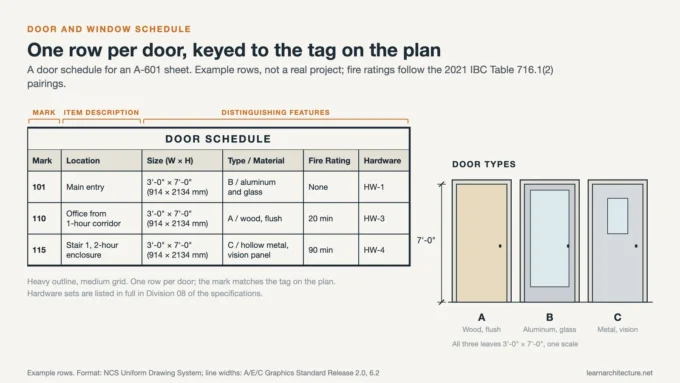
- Improved accuracy: digital documentation reduces errors in drawings, schedules, and quantities.
- Support for sustainability: simulation tools analyze daylight, energy, and airflow so performance can be improved before a single wall is built.
Conclusion
Digital architectural toolkits have become essential to modern practice, supporting everything from concept diagrams and 3D modeling to realistic rendering and performance analysis. They speed up the work, improve accuracy and coordination, and help communicate ideas clearly. Architects who master these tools, while keeping their design judgment at the center, are best placed to deliver innovative, efficient, and sustainable buildings.
- 3D modeling for architects
- and collaborative architecture software
- Architectural Design Tools
- architectural productivity software
- Architectural Toolkit
- Architectural Toolkits
- architectural visualization tools
- Architecture Design Software
- architecture software benefits
- benefits of architectural software
- BIM tools in architecture
- CAD software for architecture
- cloud-based architectural tools
- Digital Architectural Toolkits
- digital architecture software
- digital planning tools for architects
- Toolkit
- Using Digital Toolkits
- virtual reality in architecture










Leave a comment