


Table of Contents Show
Architectural concept diagrams are visual tools that translate an abstract design idea into a communicable form before a single wall is drawn. At their core, they distill a project’s driving intent into simple shapes, lines, and annotations so that clients, engineers, and collaborators can grasp the design logic at a glance. Mastering them is one of the most transferable skills in architectural practice.

What Is an Architectural Concept Diagram?
A concept diagram in architecture captures the fundamental idea behind a project. Unlike floor plans or construction documents, it operates at a high level of abstraction. It does not show how something is built; it shows why it is shaped the way it is. Diagrammatic thinking is one of the most foundational skills a designer can build, and it stays useful at every stage of a career.
The concept diagram sits at the very beginning of the architecture design process diagram, before bubble diagrams, program layouts, or schematic drawings. It answers a single question: what is the governing idea? That idea might be about the relationship between public and private zones, the path of sunlight across a site, or the tension between an existing structure and a new intervention.
💡 Pro Tip
Keep your first concept diagram to a single A4 sheet and limit it to three visual elements. If you cannot explain the core idea with three marks on paper, the concept itself may need more clarity before you move into spatial planning. Experienced architects often revisit this constraint even on complex competition entries.

Why Architectural Concept Diagrams Matter in the Design Process
Strong architectural concept diagrams do more than summarize a project for presentations. They function as a design compass. When decisions about form, program, or material arise mid-project, a clearly stated concept diagram gives the team a shared reference point to evaluate options against. Firms like Bjarke Ingels Group (BIG) have made their massing and concept diagrams a recognizable part of their public communication, demonstrating that diagrammatic clarity can itself become a design asset.
Beyond internal use, concept diagrams bridge the gap between technical teams and non-technical stakeholders. A client who cannot read a section drawing can often understand a well-made concept diagram immediately. This reduces miscommunication during early design stages, which is where costly project changes most often originate.
📌 Did You Know?
According to a Researchscape study cited by Lucidchart, 69% of workers say that visuals are extremely or very important for collaboration. In architecture specifically, this dynamic is amplified: a single concept diagram shown at the start of a client meeting can prevent weeks of design revisions caused by misaligned expectations.
Key Architectural Diagram Types Explained
Not all diagrams serve the same purpose. Understanding which type of diagram to use at each design stage is essential. Below is a comparison of the most common architectural diagram types used in practice.
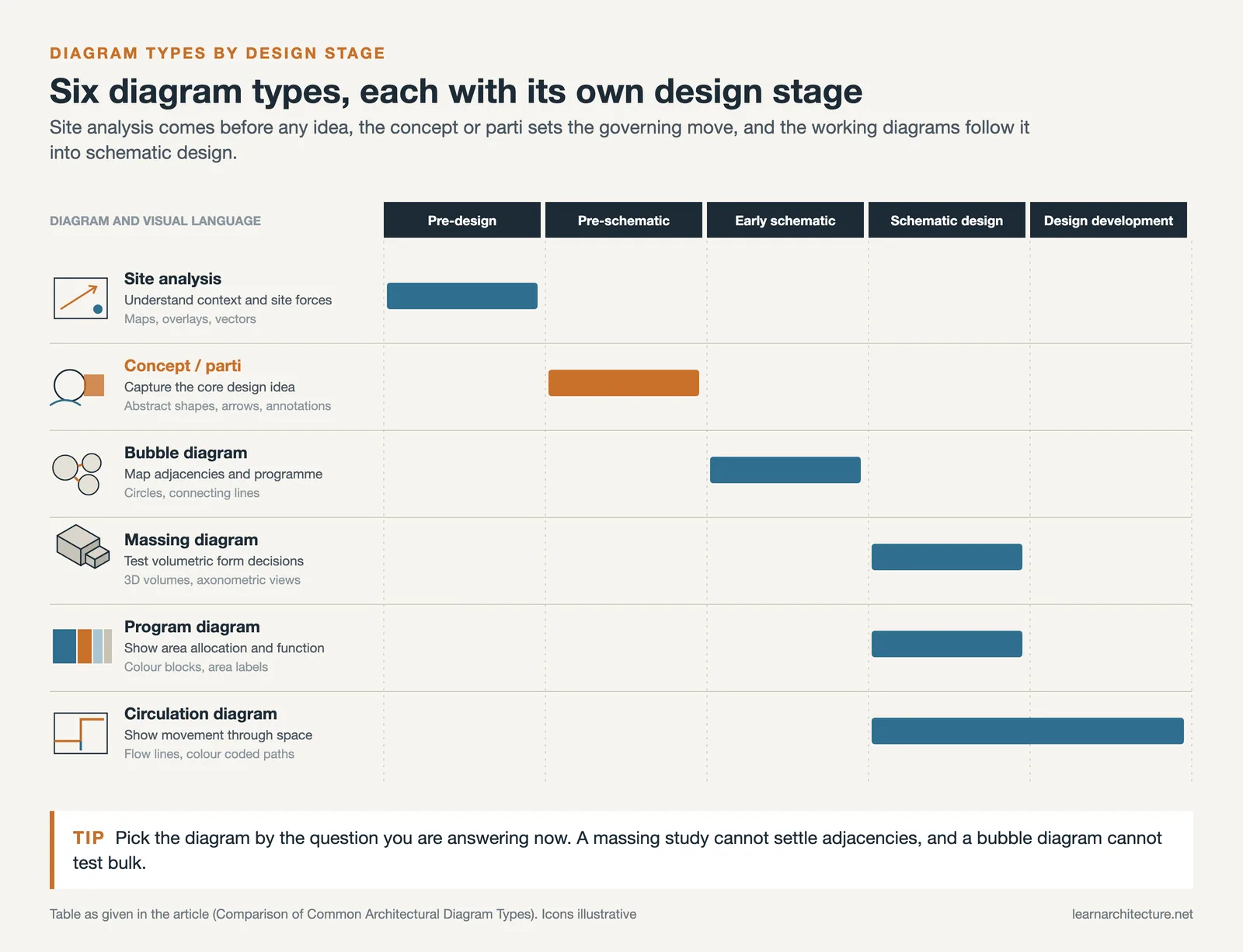

Comparison of Common Architectural Diagram Types
The following table outlines the purpose, timing, and typical visual language of each diagram type:
| Diagram Type | Primary Purpose | Design Stage | Visual Language |
|---|---|---|---|
| Concept / Parti | Capture the core design idea | Pre-schematic | Abstract shapes, arrows, annotations |
| Bubble Diagram | Map spatial adjacencies and program | Early schematic | Circles, connecting lines |
| Site Analysis | Understand context and site forces | Pre-design | Maps, overlays, vectors |
| Massing Diagram | Test volumetric form decisions | Schematic design | 3D volumes, axonometric views |
| Circulation Diagram | Show movement patterns through space | Schematic to design development | Flow lines, color-coded paths |
| Program Diagram | Show area allocation and function | Schematic design | Color blocks, area labels |
Site Analysis Diagram in Architecture: Where Every Concept Begins
Before a concept can form, the site must be understood. A site analysis diagram architecture teams produce typically maps solar orientation, prevailing winds, pedestrian flows, neighboring building heights, views, and access points. These forces then inform the concept, making the design responsive rather than arbitrary.
A well-executed site analysis diagram does more than gather information. It prioritizes. Not every site factor carries equal weight, and part of the architect’s judgment is deciding which forces the concept should respond to most directly. At ArchDaily, published site analysis examples from leading firms consistently show a selective, hierarchy-driven approach rather than an exhaustive checklist.
🏗️ Real-World Example
BIG’s 8 House (Copenhagen, 2010): The concept diagram for this mixed-use project showed a simple loop lifting from the ground on one side and descending on the other, resolving the tension between a residential courtyard and a public park at street level. That single diagram governed the project’s entire section logic, rooftop garden placement, and circulation strategy, demonstrating how a clear architecture concept diagram can drive decisions across all scales of design.

How to Make an Architecture Concept Diagram: Step by Step
Knowing how to make an architecture concept diagram is a skill built through iteration. The process below reflects the workflow used across professional practice, from small studios to large firms.

Step 1: Define the Design Intent in One Sentence
Before picking up a pen, articulate the concept verbally. “The building mediates between the busy street and the quiet garden behind it” is a concept. “A modern sustainable building” is not. That sentence becomes the test against which every diagram decision is evaluated.

Step 2: Identify the Site Forces That Inform the Concept
Return to your site analysis. Identify two or three dominant forces (solar path, pedestrian pressure, view corridor) that the concept responds to. These become the inputs your concept diagram translates into architectural moves.
Step 3: Sketch Rapidly, Without Committing to Tools
The first round of concept sketches should be fast and analog. Use a thick marker on tracing paper, which forces abstraction by making fine detail difficult. Aim for ten variations in twenty minutes, not one perfect drawing.
Step 4: Test the Diagram Against the Brief
Once you have a promising sketch, read the project brief again. Does the diagram address the client’s core requirements? Does it resolve the primary site tension? If not, revise before moving to refined visuals.
Step 5: Refine Digitally Using the Right Tools
For digital refinement, architects typically use Adobe Illustrator, Rhino, or AutoCAD for concept diagrams. Illustrator works well for 2D abstract diagrams; Rhino is preferred for three-dimensional massing work. Keep the graphic language clean: limit the color palette to two or three hues and use line weight to indicate hierarchy.
💡 Pro Tip
When refining a concept diagram in Illustrator, set your canvas to the same proportions as your final presentation sheet before starting. This prevents common scaling problems where a diagram that looks clear at A3 becomes unreadable when embedded in an A1 board. Thinking about presentation context early saves significant rework.

What Makes a Strong Architectural Concept Diagram?
Looking at strong concept diagram architecture examples from firms like Snøhetta, Kengo Kuma, or SANAA, several shared qualities emerge. They are legible at a small scale. They use the minimum number of elements needed to tell the story. They show a transformation, not just a static state. And they are honest about what the diagram does not show, rather than trying to communicate everything at once.
Poor concept diagrams, by contrast, tend to be overcrowded with information, rely on complex 3D renders when a simple plan axon would work better, or fail to establish a visual hierarchy between primary and secondary ideas. For architecture students specifically, the temptation to make diagrams look polished before the concept itself is clear is one of the most common traps.
⚠️ Common Mistake to Avoid
Many architecture students confuse a concept diagram with a rendered axonometric or an exploded view. Concept diagrams are meant to communicate intent, not form. Adding shadows, textures, or material colors to a concept diagram often obscures the idea it is supposed to convey. Save the visual richness for later-stage presentation drawings, and keep your concept diagram as stripped back as possible.
How to Create Concept Diagrams for Specific Design Challenges
Different project types call for slightly different diagrammatic approaches. A residential project might focus the concept diagram on the relationship between private and shared space. An urban intervention would likely center on movement and threshold. A cultural building might diagram the tension between landmark presence and public accessibility.
When you are working on a project with a complex program, it helps to produce a series of concept diagrams rather than a single one. Each diagram in the series addresses a different design parameter, and together they tell the full story of the concept. This approach is common in competition entries, where Dezeen and other architecture publications consistently highlight multi-diagram concept sequences as a mark of sophisticated design communication.
For guidance on translating these diagrams into a full design development workflow, see the related article on architectural concept development on this site, which covers how concept diagrams connect to schematic design and design development phases. You may also find the deep-dive on architecture parti diagrams useful for understanding how a single governing idea is distilled into its simplest visual form.
🎓 Expert Insight
A diagram is not only a way to communicate an idea; it is also a way to think one through.
Eisenman’s work placed diagrammatic logic at the center of the design process itself, arguing that how architects draw their ideas shapes the ideas themselves. For students and professionals, this reframes the concept diagram not as an afterthought for presentations, but as a generative tool that should precede and guide every spatial decision.

Architecture Diagram Ideas: Beyond the Standard Toolkit
Once you are comfortable with the core diagram types, there is room to develop a more personal diagrammatic language. Some architects favor hand-drawn concept diagrams for their immediacy; others build parametric diagram sequences that update automatically as the design evolves. Hybrid approaches, mixing analog sketches photographed and then refined digitally, are increasingly common in studio practice.
Exploring architecture diagram ideas beyond the defaults also means looking outside the discipline. Information design, data visualization, and cartography all offer techniques that translate well to architectural diagramming. Edward Tufte’s principles of information density and clarity, for example, are directly applicable to how architects present concept-to-form sequences in competition entries and design reviews. Resources from RIBA on design communication and the academic journal The Journal of Architecture provide further frameworks for evaluating diagram quality in professional contexts.
For more on visual communication in architecture, the article on architecture presentation board inspiration covers how to sequence diagrams within a full project board layout.
✅ Key Takeaways
- An architectural concept diagram communicates design intent, not construction detail. It answers why a project is shaped the way it is, not how it is built.
- Site analysis is the foundation of any strong concept. Identifying two or three dominant site forces before sketching prevents arbitrary formal decisions.
- The best concept diagrams are legible at a small scale, use minimal visual elements, and show a transformation or design move rather than a static state.
- Rapid analog sketching before digital refinement produces stronger concepts. Committing to tools too early narrows creative options.
- Different projects require different diagram types. A series of diagrams addressing separate parameters often communicates more effectively than a single complex image.
Massing Diagrams: Turning the Concept into Volume
A massing diagram is where a concept stops being an idea about relationships and becomes a quantity of building. It shows the volume (its bulk, its height, how it is broken up and where it sits on the site) with everything else stripped out. No windows, no materials, no detail. Grey blocks, and the decisions those blocks encode.

What a massing diagram answers
It is the first drawing that has to obey reality. Three questions get settled here:
- Does the programme fit? Floor area is volume divided by storey height. If the brief needs 4,000 m² and the permitted envelope holds 3,100, the massing diagram is where that is discovered rather than at planning submission.
- What shape does the site allow? Setbacks, height limits, daylight angles and rights of light all cut into the block before design begins. Drawing the maximum permitted envelope first, then subtracting, is faster than designing and then testing.
- How does the bulk break down? One block or several, stepped or flat, split by a courtyard or a circulation spine. This is the decision that determines how the building meets the street and how daylight reaches its middle.
The standard sequence
Massing studies read best as a progression rather than as a single image. Start from the permitted envelope: the maximum the site and code allow. Subtract for setbacks, daylight, views and access. Split or step the remaining volume for the reasons your concept gives. Refine the result against the programme. Four or five frames of that sequence, shown side by side with a one-line caption each, explain a scheme faster than any amount of prose.
The captions carry the argument, not the blocks. “Stepped back on the south to keep the neighbouring courtyard in sun” is a design decision; “stepped massing” is a description.
Common mistakes
- Adding detail. Windows and materials on a massing diagram defeat its purpose, which is to make volume legible on its own.
- Skipping the envelope. A massing study that never shows what was permitted cannot show what was chosen.
- One frame instead of a sequence. A single final block tells the reader the answer without the reasoning, which is the part being assessed.
- Treating it as a rendering exercise. Massing is a thinking tool; the moment it takes an afternoon it has stopped being one.
Massing sits between the organisational diagrams and the drawn scheme. For where it falls in the wider sequence, see the architectural diagrams reference, and for the stage before it, zoning diagrams.
Frequently Asked Questions
What is an architectural concept diagram used for?
An architectural concept diagram communicates the core design idea behind a project. It is used during early design stages to align the design team and client on the governing intent before spatial planning begins. It also serves as a reference point throughout the project, helping teams evaluate later design decisions against the original concept.
How do you create a concept diagram in architecture?
Start by defining the design intent in one clear sentence, then identify the dominant site forces that the concept responds to. Sketch rapidly and abstractly using a thick marker on tracing paper, produce multiple variations, and test each against the project brief. Refine the strongest sketch digitally using tools like Adobe Illustrator or Rhino, keeping the graphic language simple and the color palette limited to two or three hues.
What is the difference between a concept diagram and a parti diagram?
In most practice contexts, the terms are used interchangeably. Strictly speaking, a parti (from the French “parti pris,” meaning a decision taken) refers to the single governing idea that organizes the entire project, often expressed as the simplest possible diagram. A concept diagram may be slightly broader, sometimes addressing multiple related ideas. Both sit at the most abstract end of the architectural diagramming spectrum.
- architectural concept diagrams
- Architectural Diagram Types
- architecture concept diagram
- architecture design process diagram
- architecture diagram ideas
- concept diagram architecture examples
- concept to form architecture
- how to create concept diagrams
- how to make architecture concept diagram
- site analysis diagram architecture










Leave a comment