


Table of Contents Show
Parametric design tools let architects define relationships between variables instead of drawing fixed shapes, so an entire model updates when a single input changes. The leading parametric design software in 2026 includes Grasshopper for Rhino, Dynamo for Revit, SideFX Houdini, Autodesk Forma, and Blender Geometry Nodes, each suited to different scales, budgets, and workflows.
What Is Parametric Design in Architecture?
Parametric design is a computational approach where geometry is generated by algorithms and variable inputs rather than manual drawing. Architects define a set of parameters such as structural loads, solar angles, panel sizes, or circulation distances, and the software produces forms that satisfy those rules in real time. Adjusting one parameter updates the entire model, which is what separates parametric design from traditional CAD.
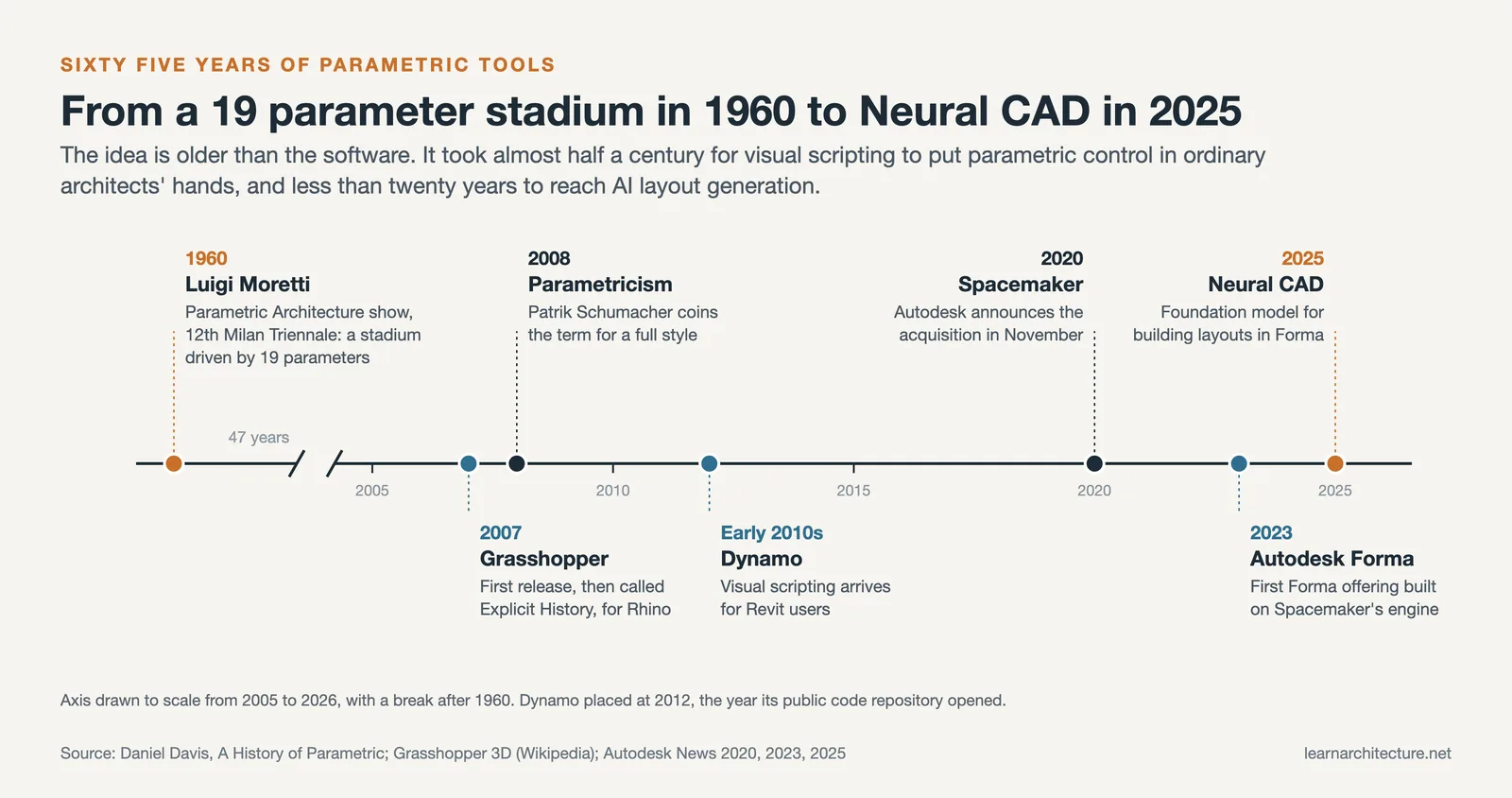
The term parametric architecture was first used publicly by Italian architect Luigi Moretti in 1960, when he displayed a stadium model driven by 19 measurable parameters at a Milan exhibition. The visual scripting tools that made this approach widely accessible came later: Grasshopper for Rhino in 2007, and Dynamo for Revit in the early 2010s. By 2026, parametric and generative workflows sit inside the standard toolkit of most mid-to-large firms.
For a deeper look at the philosophy and history behind the field, see our introduction to parametric architecture.
🎓 Expert Insight
“Parametricism is the great new style after modernism. It permeates all avant-garde architecture and is about the design of complex, continuously differentiated environments.”, by Patrik Schumacher, Principal, Zaha Hadid Architects
Schumacher coined the term parametricism in 2008 to describe this computational design movement as a full architectural style, not just a software workflow. The argument shows how parametric tools have changed the way architects think about spatial complexity and differentiation.
The Best Parametric Design Tools at a Glance
The table below summarizes the leading parametric design programs in 2026, comparing focus, learning curve, and pricing. Detailed notes on each follow in the sections below.
| Tool | Best For | Learning Curve | Pricing |
|---|---|---|---|
| Grasshopper (Rhino) | Free-form geometry, facades, form-finding | Moderate to steep | Included with Rhino 8 (~$995 perpetual) |
| Dynamo (Revit) | BIM automation, documentation, MEP | Moderate | Free with Revit subscription |
| Autodesk Forma | Site planning, generative massing, AI analysis | Low to moderate | ~$185/month or AEC Collection |
| SideFX Houdini | Procedural modeling, large-scale geometry | Steep | Apprentice free; commercial subscription |
| Blender Geometry Nodes | Procedural modeling, visualization | Moderate | Free, open source |
Grasshopper for Rhino: The Industry Standard
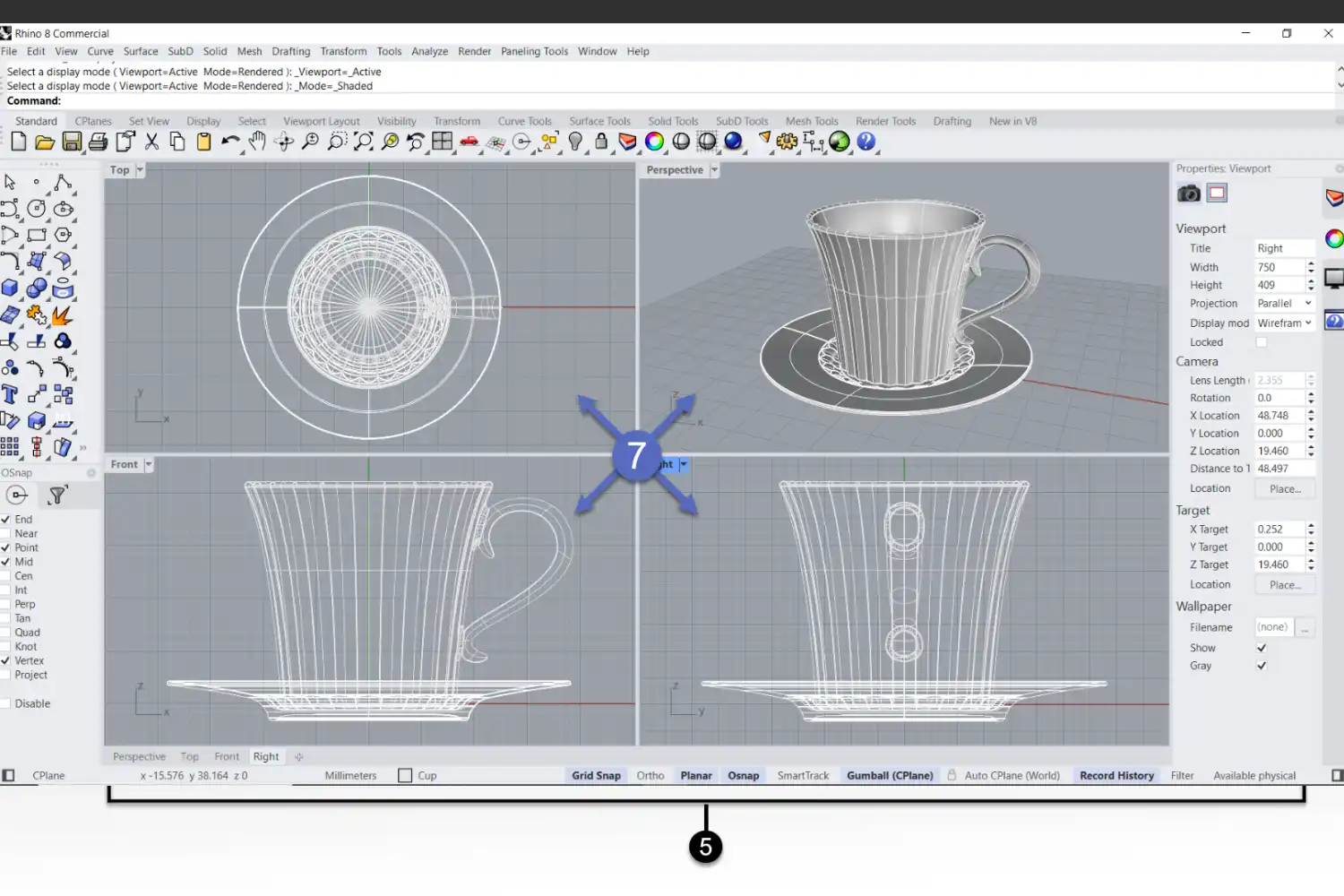
If you ask ten parametric architects what they use, at least eight will say Grasshopper. Built into Rhino by David Rutten at Robert McNeel and Associates, Grasshopper is a node-based visual programming environment that turns Rhino into a full computational design platform. You drag components onto a canvas, wire their outputs to inputs of other components, and watch geometry update in real time as you adjust sliders.
Grasshopper dominates facade rationalization, form-finding, and complex geometry. Its plugin ecosystem is what really sets it apart: Ladybug Tools for environmental analysis, Karamba3D for structural simulation, Galapagos for evolutionary optimization, and Kangaroo for physics-based form-finding. These add-ons let you build a single definition that explores daylight, structural performance, and material use all at once.
💡 Pro Tip
When starting a Grasshopper definition, build your geometry logic and analysis logic as separate clusters before connecting them. Mixing form generation and performance evaluation in one tangled canvas makes debugging painful, and you will end up rebuilding the file when the project scope changes.
Rhino 8 brought tighter integration through new Grasshopper data types, letting you bake geometry with custom attributes, control blocks, and update existing Rhino objects directly from a definition. Pricing sits at roughly $995 for a perpetual Rhino 8 license that includes Grasshopper, with a 90-day free trial and educational discounts for students.
Dynamo for Revit: Parametric Design Inside BIM
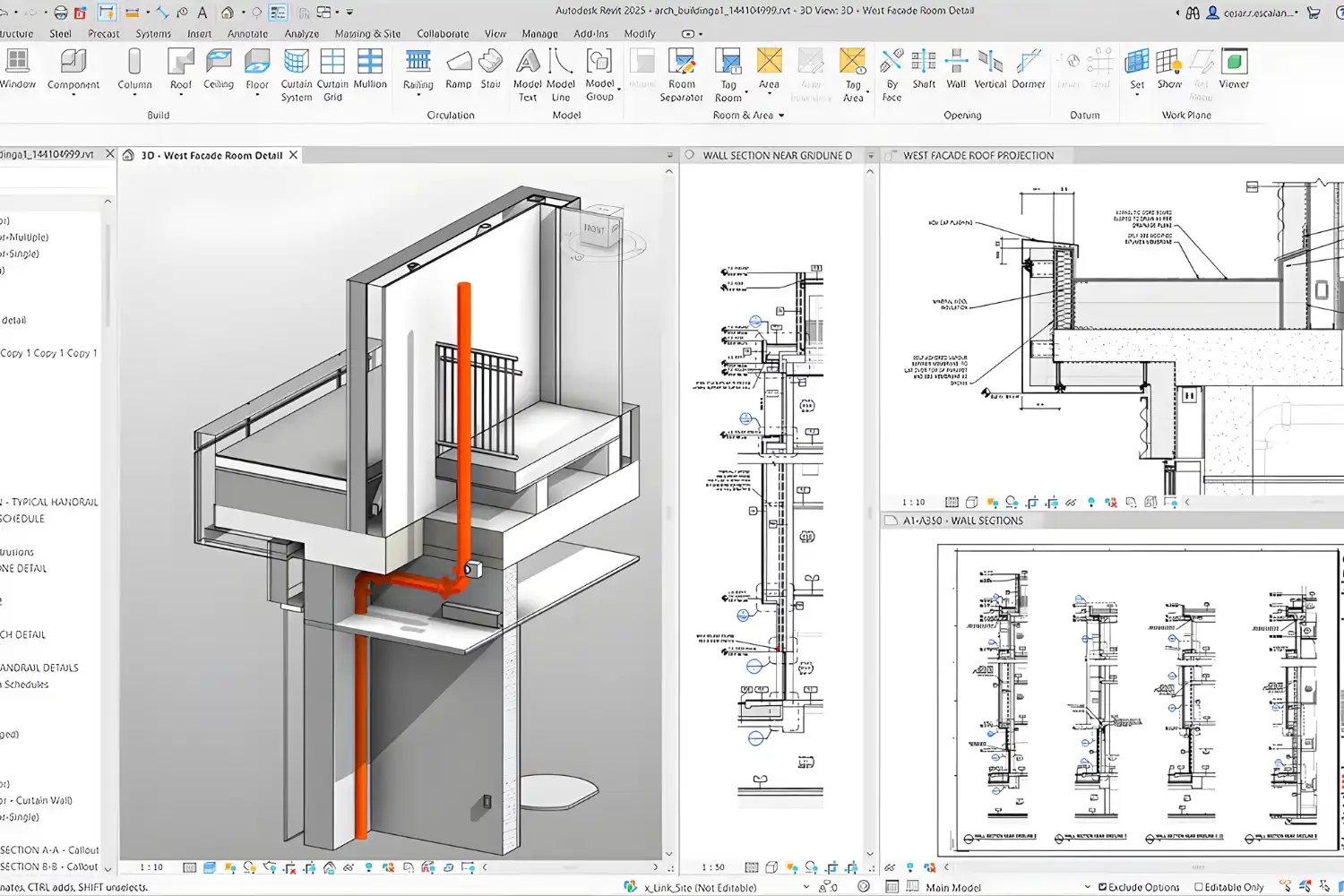
Dynamo is Autodesk’s open-source visual programming tool, built directly into Revit. Like Grasshopper, it uses a node canvas, but its strength is BIM data manipulation rather than free-form geometry. Architects use Dynamo to place hundreds of facade panels, batch-update room schedules, automate sheet creation, and run quality checks across entire models.
Autodesk discontinued Dynamo Studio in 2022, so the tool now lives entirely inside Revit and is included with any Revit subscription. For firms already on the Autodesk stack, this makes Dynamo the natural starting point. The trade-off is geometric flexibility: Dynamo’s native geometry kernel is less robust than Rhino’s NURBS engine, so it is not ideal for sculpting complex curved surfaces.
⚖️ Grasshopper vs Dynamo at a Glance
✔️ Grasshopper: Stronger NURBS geometry, larger plugin ecosystem, better for free-form facades and form-finding
✔️ Dynamo: Native BIM data access, free with Revit, better for documentation automation and MEP workflows
Many firms run both. The Rhino.Inside.Revit project lets Grasshopper definitions execute inside the Revit environment, so designers can do form-finding in Rhino and push the result into BIM elements without leaving the model.
Autodesk Forma: Generative Design and AI Analysis
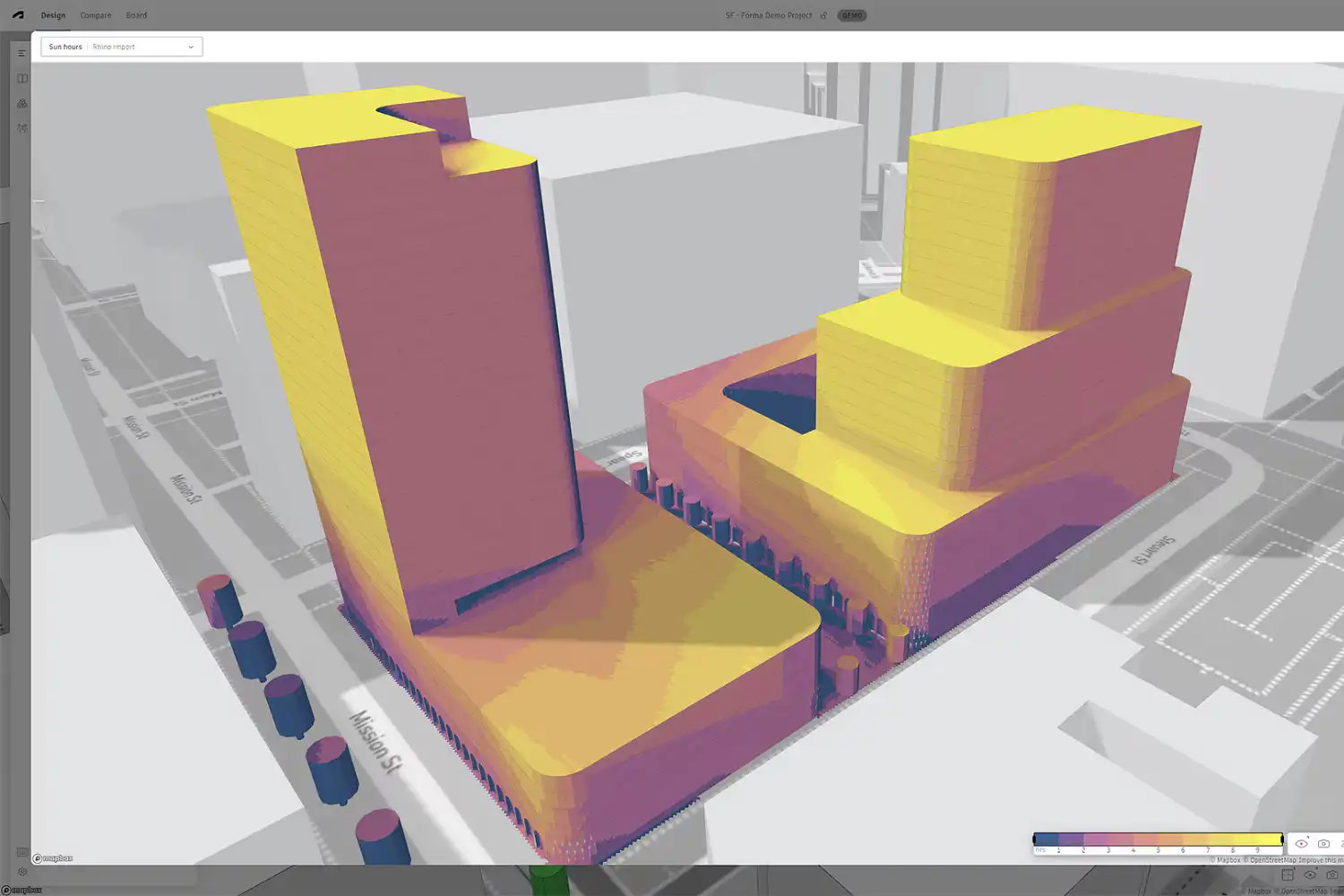
Autodesk Forma is the cloud-based successor to Spacemaker, which Autodesk acquired in 2020 and rebranded in 2023. It runs entirely in a browser and focuses on early conceptual work: site planning, generative massing, environmental analysis, and rapid feasibility studies. Where Grasshopper asks you to script your own logic, Forma comes with built-in AI tools that generate site layouts and analyze sun, wind, noise, and embodied carbon in seconds.
Standalone Forma Site Design pricing starts at approximately $185 per month or $1,500 per year, and it is included at no extra cost with the Autodesk AEC Collection. Students and educators get free access through Autodesk’s education program.
🏗️ Real-World Example
Baker Barrios Architects: After scaling up Forma adoption for early-stage feasibility work, the firm reported that tasks previously requiring 40 hours of analysis now take four hours or less, a tenfold reduction in cycle time on schematic site studies.
At Autodesk University 2025, the company demonstrated Neural CAD inside Forma, an AI foundation model trained specifically on architectural data. In a live demo, setting building type to residential multi-family and structural material to wood generated a complete interior layout with 36 units. Adjusting the footprint and re-running produced a 56-unit layout in seconds. Forma also integrates with Revit, Rhino, and Dynamo.
SideFX Houdini and Blender Geometry Nodes
Houdini comes from the visual effects world, but a growing community of computational designers, including teams at Zaha Hadid Architects, has adopted it for architectural form generation. Its node-based procedural environment handles geometry at a scale that Grasshopper struggles with, useful for urban-scale procedural cities and complex panelization. The trade-off is the steepest learning curve in this list. SideFX offers Houdini Apprentice for free non-commercial use.
Blender’s Geometry Nodes have evolved into a credible procedural modeling system. Blender is not AEC-native and does not produce IFC files out of the box, but its free, open-source nature and growing architectural community make it relevant for parametric exploration and visualization. Cycles, the integrated photorealistic renderer, eliminates the need for a separate rendering pipeline. For students and small studios, Blender with Geometry Nodes offers a viable parametric design programs option at zero cost.
What Is Parametric Urban Design?
Parametric urban design applies the same algorithmic logic to city-scale problems: street networks, density distributions, solar access across blocks, view corridors, and zoning compliance. Tools like Autodesk Forma, Hypar, and TestFit have made this work accessible by automating the underlying analysis. A planner defines site constraints, building typologies, and target densities, then lets the software generate dozens of valid configurations to compare quantitatively.
📌 Did You Know?
According to the U.S. Energy Information Administration, buildings consume about 40% of total U.S. energy use. The U.S. Department of Energy estimates that improving envelope and HVAC performance, the kind of optimization parametric tools enable in early design, could reduce building energy use by more than 30%.
How to Choose the Right Parametric Design Software
The best parametric design tool for you depends on three factors: what your office already runs on, what you are designing, and how much time you can invest in learning.

Office ecosystem. If your firm runs on Revit for documentation, Dynamo is the path of least friction. If your work demands complex free-form geometry, Rhino with Grasshopper is the natural choice. ArchiCAD users can connect Grasshopper through the Live Connection add-on, as covered in our ArchiCAD vs SketchUp comparison.
Project type. Free-form roofs and facades push you toward Grasshopper. BIM coordination favors Dynamo. Site planning with environmental analysis points to Forma. Stadium-scale procedural geometry justifies the Houdini investment.
Budget and learning time. Dynamo and Blender Geometry Nodes are free. Grasshopper ships with Rhino’s perpetual license. Houdini Apprentice is free for non-commercial use. Match your budget to the level of capability you genuinely need.
For a related comparison of design philosophies, see our piece on organic vs parametric design.
✅ Key Takeaways
- Grasshopper for Rhino remains the industry standard for free-form parametric design and has the largest plugin ecosystem in 2026.
- Dynamo is the default choice for firms working primarily in Revit, since it is free with the subscription and excels at BIM automation.
- Autodesk Forma has matured into a credible cloud-based platform for site-scale generative design, with new Neural CAD AI features rolling out through 2026.
- Houdini serves specialized large-scale use cases and demands significant learning investment.
- Blender Geometry Nodes is the strongest free, open-source option for students and small studios exploring parametric workflows.
- Tool choice should follow your office ecosystem, project scale, and the time you can realistically invest in learning.
Pricing figures cited in this article are approximate and reflect publicly listed information at the time of writing. Rates may vary by region, license type, and currency, and software vendors update their plans regularly.








Leave a comment