


Table of Contents Show
Choosing between ArchiCAD vs SketchUp is one of the most common dilemmas for architecture students and professionals alike. Both programs have earned loyal followings in the design world, yet they serve very different purposes. ArchiCAD is a full-scale BIM platform built for professional architectural workflows, while SketchUp is a lightweight 3D modeling tool known for speed and simplicity. Your choice between them will shape how you design, document and present your projects.
In this comparison, we break down the core differences between these two popular tools so you can make a confident decision based on your project needs, skill level and budget.

What Is Graphisoft ArchiCAD?
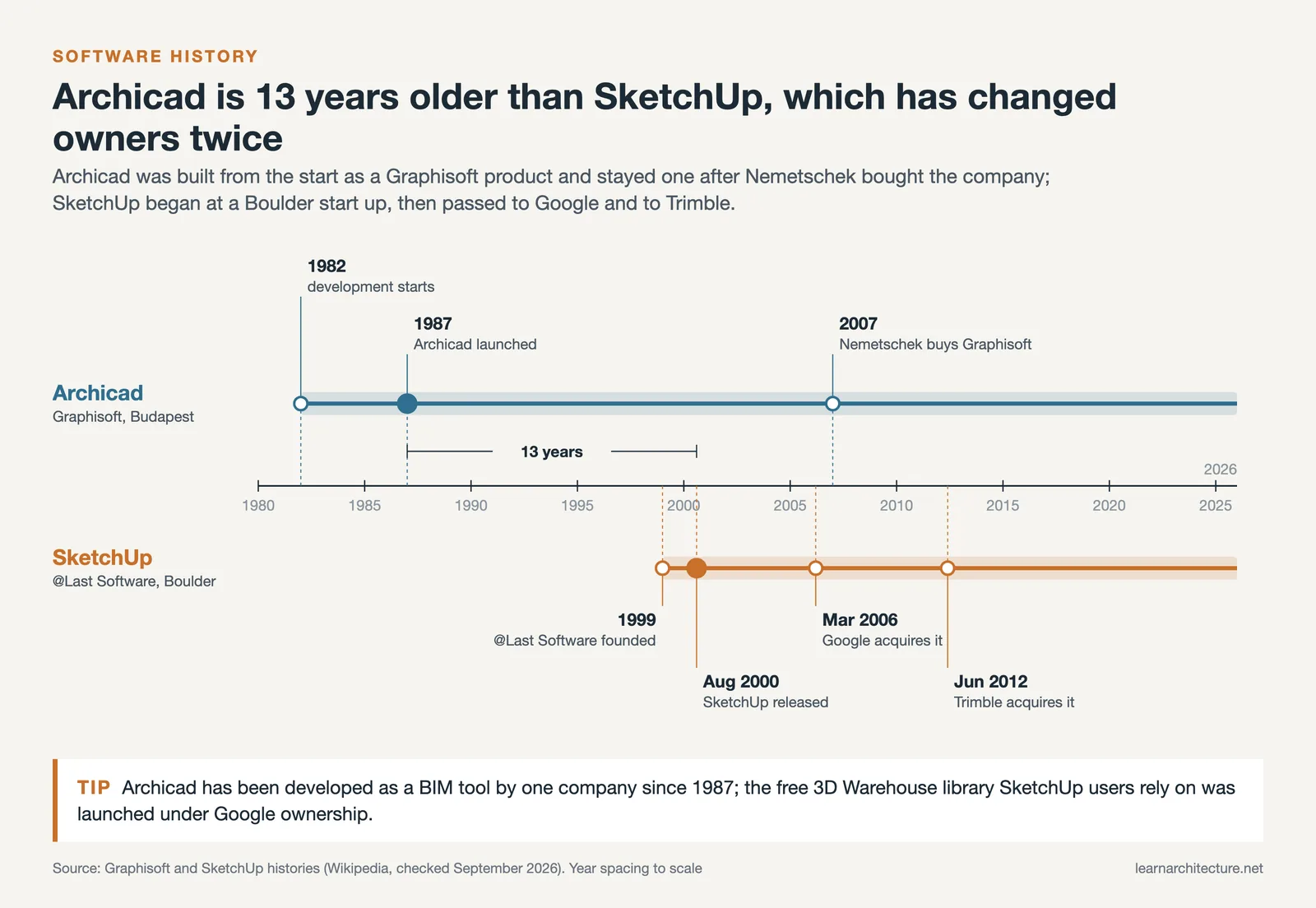
ArchiCAD is a building information modeling (BIM) software developed by Graphisoft, a Hungarian company that first released the program in 1987. It was one of the earliest BIM platforms on the market, and it continues to evolve with regular updates focused on design efficiency, collaboration and documentation.
Graphisoft ArchiCAD online resources, tutorials and its active community make it easier for new users to get started, although the learning curve is notably steeper than simpler CAD tools. The software allows architects to create detailed 2D drawings and 3D models simultaneously, generate construction documents directly from the model, and run energy performance analyses. Its Teamwork feature enables multiple users to collaborate on the same project file through BIMcloud, which is particularly valuable for mid-size and large firms working on complex buildings.
ArchiCAD belongs to a category of building information modeling programs that treat every element in a project (walls, slabs, roofs, windows) as intelligent objects carrying data about materials, dimensions and performance. This data-rich approach sets BIM softwares apart from traditional CAD drafting tools.

What Is SketchUp?
SketchUp started in 2000 as a simple 3D modeling tool created by @Last Software. Google acquired it in 2006, and Trimble took ownership in 2012. Today it is widely used in architecture, interior design, landscape design and even film production.
What makes SketchUp architecture workflows so popular is the program’s intuitive push-and-pull modeling approach. You can go from a blank canvas to a recognizable 3D form in minutes, which makes it ideal for early-stage concept design and client presentations. The software’s 3D Warehouse gives users access to millions of free SketchUp 3D models, from furniture and fixtures to full building components, saving hours of modeling time.
SketchUp offers several pricing tiers, including a free browser-based version that makes it one of the most accessible free architectural design software options available. SketchUp Pro and SketchUp Studio add desktop tools, LayOut for documentation and rendering integrations.
ArchiCAD vs SketchUp: User Interface and Learning Curve
The user interface is where these two programs diverge most sharply. ArchiCAD presents a professional-grade workspace packed with toolbars, palettes and menus designed for detailed architectural production. New users often need several weeks of dedicated practice (or formal training) before they feel comfortable with the interface. The payoff, however, is significant: once you learn ArchiCAD, you can handle an entire project from schematic design through construction documentation within a single environment.
SketchUp takes the opposite approach. Its toolbar is minimal, and the learning curve is remarkably gentle. Architecture students regularly pick up the basics within a few hours. The iconic push/pull tool lets you extrude 2D shapes into 3D forms with a single click, and the orbit, pan and zoom controls feel natural from the start. This simplicity is both a strength and a limitation. While SketchUp is fantastic for quick visualization, it lacks the built-in documentation and BIM capabilities that professional practice demands.

BIM Capabilities and CAD for Architecture
If your work requires true BIM functionality, ArchiCAD is the clear winner in this comparison. As a dedicated archi cad platform, it stores intelligent data within every building element. Change a wall’s material, and the schedules, sections and elevations update automatically. This parametric behavior saves enormous time on large projects and reduces errors in construction documentation.
SketchUp, by contrast, is primarily a surface modeler. The geometry you create in SketchUp does not carry embedded data about materials, quantities or performance unless you add third-party plugins like PlusSpec or Quantifier Pro. While these extensions can push SketchUp closer to BIM territory, the experience is not as seamless as working in a native BIM environment. For firms that need integrated CAD for architecture and documentation, ArchiCAD provides a more complete solution.
That said, many architects use both tools at different project stages. SketchUp handles rapid concept exploration, and ArchiCAD takes over when the design moves into development and documentation. The two programs work well together since SketchUp files can be imported into ArchiCAD with relative ease.
Comparison of ArchiCAD vs SketchUp Key Features
The following table summarizes the main differences between these two architecture tools:
| Feature | ArchiCAD | SketchUp |
|---|---|---|
| Primary Purpose | Full BIM design and documentation | 3D conceptual modeling |
| BIM Support | Native, full IFC support | Limited, via third-party plugins |
| Learning Curve | Steep, requires training | Gentle, beginner-friendly |
| 2D Documentation | Automatic from 3D model | Manual via LayOut (Pro/Studio) |
| 3D Model Library | Built-in object libraries | 3D Warehouse (millions of models) |
| Collaboration | BIMcloud Teamwork for real-time sharing | Trimble Connect for file sharing |
| Rendering | Built-in CineRender, Twinmotion link | V-Ray, Enscape plugins available |
| Pricing (Annual) | From $2,414/year for Archicad Studio (as of September 2026) | Free version; Pro from $399/year (as of September 2026) |
| Best For | Professional firms, complex projects | Students, concept design, small projects |
SketchUp 3D Models and the 3D Warehouse
One area where SketchUp has a major advantage is its model ecosystem. The 3D Warehouse is the largest free library of user-generated 3D content in the world. You can search for anything from a specific chair model to an entire building facade, download it and place it into your project within seconds. This resource is a huge time-saver for architects preparing client presentations or populating a site model with context buildings.
ArchiCAD also includes object libraries, and Graphisoft provides additional downloadable content through BIMcomponents.com. However, the variety and volume of available models is smaller compared to what you will find in the 3D Warehouse. For quick sketchup architecture visualizations, this library alone can justify choosing SketchUp for early design phases.

Pricing and Accessibility
Budget is often the deciding factor for students and small firms. SketchUp offers a genuinely useful free version that runs in any web browser, making it one of the best free architectural design software options for anyone getting started with 3D modeling. SketchUp Pro costs $399 per year, and SketchUp Studio (which adds V-Ray, Scan Essentials and a Revit importer) is priced at $859 annually, as of September 2026.
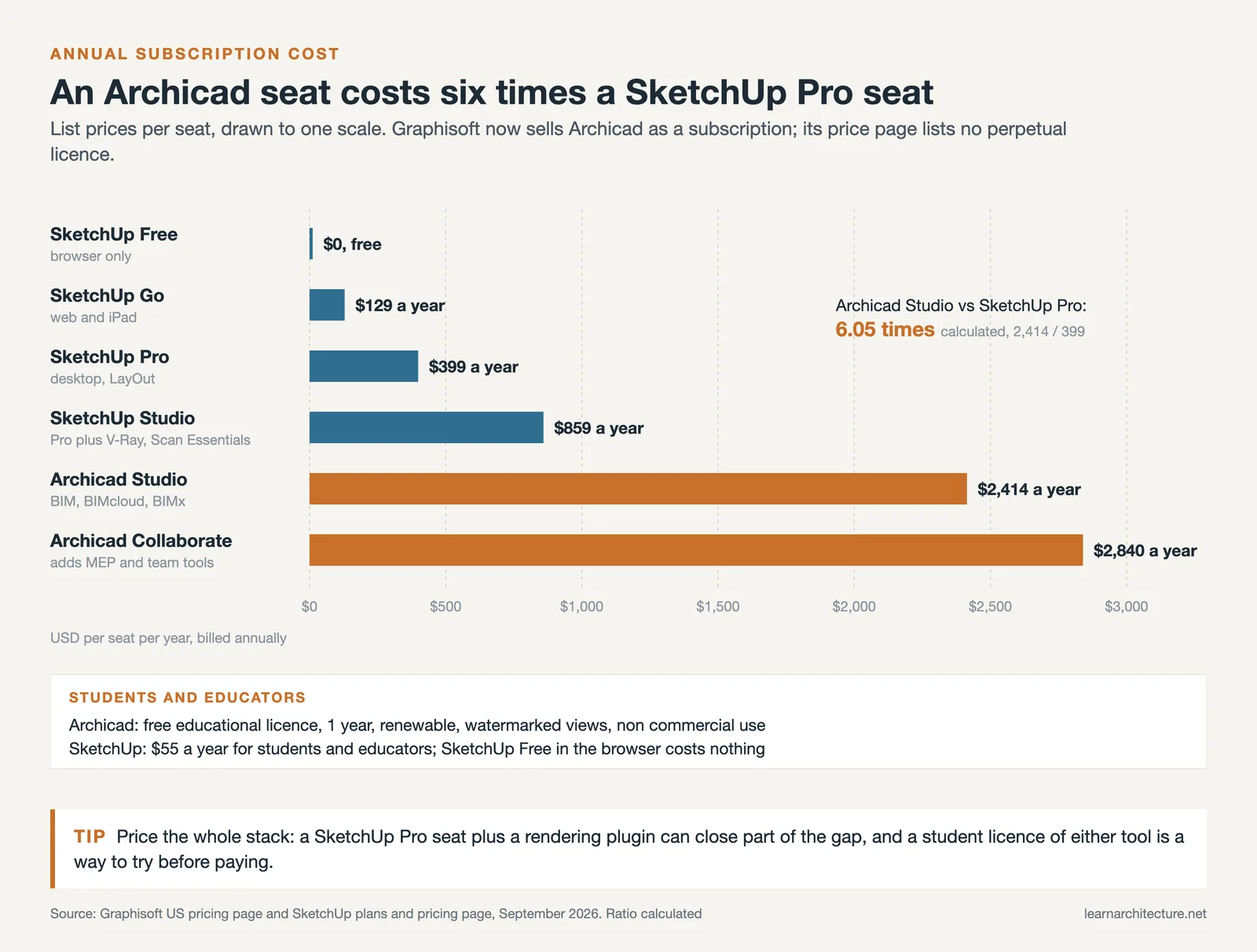
ArchiCAD sits at a significantly higher price point. Annual subscriptions start at $2,414 per seat for Archicad Studio and $2,840 for Archicad Collaborate, as of September 2026; Graphisoft’s price page no longer lists a perpetual license. Graphisoft does offer free educational licenses for students and teachers, which is an excellent way to learn the software without financial commitment. If you are a student exploring architectural software options, both ArchiCAD and SketchUp provide educational access, though SketchUp’s free tier removes the barrier entirely.
For professional firms evaluating return on investment, ArchiCAD’s higher cost is typically offset by the time saved on documentation and coordination. The BIM workflow reduces repetitive drawing tasks and catches coordination issues early, which translates to fewer errors on site and lower overall project costs.
Performance and System Requirements
SketchUp runs smoothly on modest hardware, and even older laptops can handle typical projects without trouble. ArchiCAD demands more from your machine. Detailed BIM models, energy analyses and complex section generation all require solid processing power, adequate RAM (8 GB minimum; Graphisoft recommends 16 GB for residential work and 32 GB for mid-size buildings) and a dedicated graphics card. Graphisoft has optimized the software to handle mid-size projects efficiently, and many users report it performs well relative to other BIM platforms like Revit.

Which Software Should You Choose?
The right choice depends on where you are in your career and what your projects require. Here is a practical breakdown:
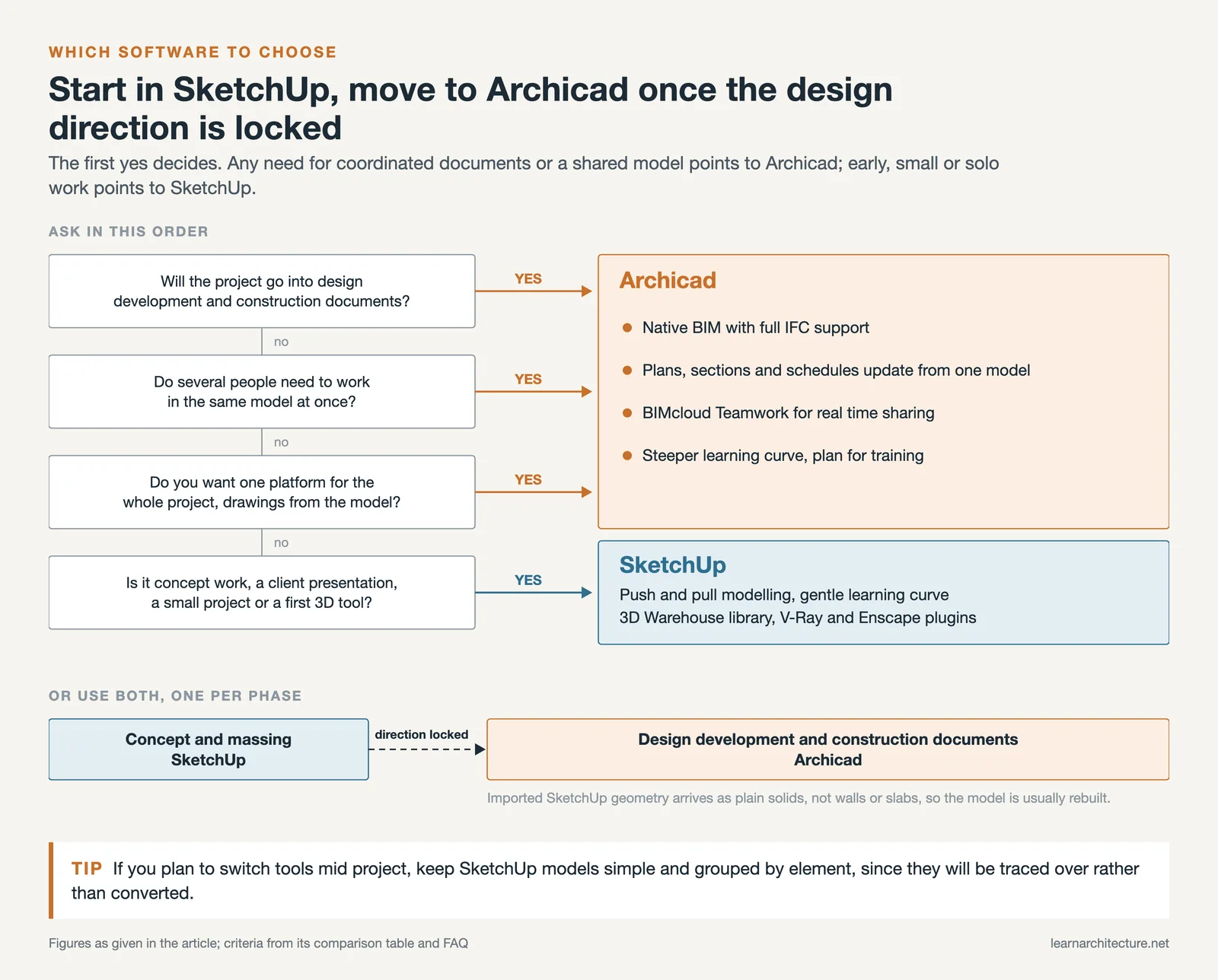
Choose ArchiCAD if you work in a professional architecture firm, handle projects that go through design development and construction documentation, need real-time collaboration with team members, or want a single platform that covers the full project lifecycle. ArchiCAD is especially well-suited to architects who value integrated BIM workflows and want to produce high-quality documentation directly from their 3D model.
Choose SketchUp if you are a student learning 3D modeling for the first time, need a quick tool for concept design and client presentations, work on smaller projects where full BIM documentation is not required, or want access to a massive library of free 3D models through the 3D Warehouse. SketchUp pairs well with rendering plugins like V-Ray or Enscape for producing polished visuals.
Many professionals find that the best approach is to use both. Start with SketchUp for rapid ideation, then move to ArchiCAD (or another BIM platform) once the design direction is locked in. The two programs complement each other well, and developing skills in both will make you more versatile in the job market. Organizations like the American Institute of Architects (AIA) increasingly emphasize BIM literacy as a core professional competency, so investing time in ArchiCAD or a similar platform is worth considering regardless of your current workflow.
Whichever tool you pick, start building. Software is a means to an end. Explore both options, take advantage of free trials and educational licenses, and let your project needs guide your decision.
Frequently Asked Questions
Which is easier to learn, ArchiCAD or SketchUp?
SketchUp, and not by a small margin. Its push-pull modelling is close to intuitive and most people are producing usable geometry within a day. ArchiCAD asks you to understand building elements (walls, slabs, zones) before you can draw anything at all, so the first week is slower. The trade-off arrives later: SketchUp’s simplicity stops helping once a project needs schedules and coordinated drawings, while ArchiCAD’s structure starts paying for itself.
Is SketchUp free, and is ArchiCAD free for students?
SketchUp has a free browser version that is genuinely usable for modelling, with paid desktop tiers for professional features such as LayOut and importing or exporting CAD formats. ArchiCAD has no free commercial tier, but Graphisoft offers a full educational licence to students and educators at no cost. For a student, both are therefore effectively free, which means the choice should be made on what you want to learn rather than on price.
Can you use both together?
Yes, and many practices do. The common pattern is SketchUp for early massing and design exploration, where speed matters more than data, then ArchiCAD once the scheme is settled and the project needs a coordinated model. Geometry moves between them reasonably well, though it arrives in ArchiCAD as dumb solids rather than as intelligent building elements, so the model is usually rebuilt rather than imported wholesale.
Which one is actually BIM?
ArchiCAD. A BIM model carries information as well as geometry: a wall knows its construction, its fire rating and its area, and a change to it updates every drawing and schedule that references it. SketchUp models geometry: a wall is a set of faces. Plugins add some data capability, but the underlying model is not a building information model, and that difference is what decides whether documentation stays coordinated.
Which is better for construction documents?
ArchiCAD, clearly. Plans, sections, elevations and schedules are views of one model, so they cannot disagree with each other. SketchUp produces documents through LayOut, which works for smaller projects and presentation sets but requires manual updating as the design changes, and manual updating is where drawing sets drift out of sync.
Which do architecture firms actually use?
It depends on where the practice sits. Small studios and early-stage design teams lean on SketchUp because it is fast and the learning cost is near zero. Practices that produce their own construction documents run a BIM tool: ArchiCAD or Revit depending on the region, with ArchiCAD stronger in Europe. A large number of offices run both, for the reasons above.
If you are choosing between modelling tools more broadly, see our comparison of Revit and ArchiCAD and the guide to SketchUp versus Rhino.










This article provides some useful information about ArchiCAD and SketchUp. It seems like both programs have their own strengths and weaknesses. I appreciate the breakdown of features, but I’m still not sure which one would be best for me.