


Table of Contents Show
mnml.ai is a web-based AI rendering platform built specifically for architects and interior designers, powered by its proprietary ArchDiffusion engine. It converts hand-drawn sketches, SketchUp screenshots, Revit exports, and Blender viewport captures into photorealistic renders in seconds, without requiring any manual lighting setup or 3D scene configuration. With 12+ specialized tools, 40+ rendering styles, and 8K upscaling via its Render Enhancer, it has become one of the most widely adopted sketch-to-render tools in the architecture industry.

What Is mnml.ai and How Does It Work?
mnml.ai (pronounced “minimal”) is a cloud-based platform developed to compress the architectural visualization pipeline. Traditional rendering workflows using V-Ray, Lumion, or Enscape require detailed scene setup, material assignment, and ray-trace processing that can take hours. mnml.ai replaces that cycle with an AI diffusion model trained specifically on architectural imagery.
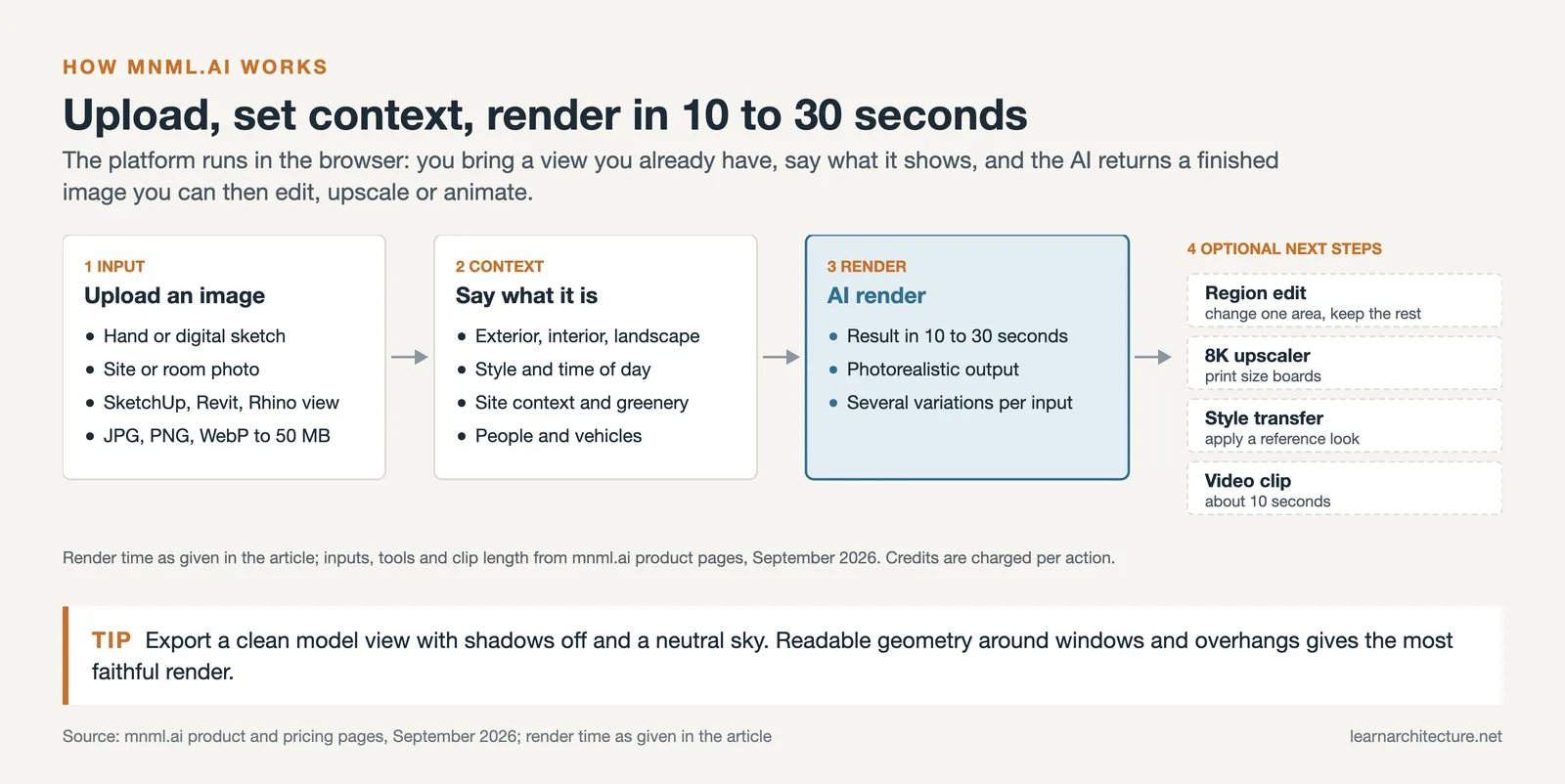
You upload an image (a rough sketch, a SketchUp viewport screenshot, or even a photograph of an existing building) and select a rendering style, time of day, site context, and other parameters. The ArchDiffusion engine (with ARX technology, v4.5 as the default engine as of September 2026) processes the input and returns a photorealistic render in roughly 10 to 30 seconds. Multiple variations can be generated from a single input, giving design teams a fast way to explore options before committing to a direction.
The platform is entirely browser-based. There is nothing to install, and it works with any operating system. Output images can be exported for use in presentations, marketing materials, or further editing in Photoshop.
💡 Pro Tip
For the cleanest sketch-to-render results, use a clean SketchUp or Blender viewport screenshot with shadows turned off and a neutral sky background. The ArchDiffusion engine performs better when the input geometry is clearly readable, particularly around window reveals, overhangs, and facade articulation. Noisy or low-contrast inputs tend to produce less accurate structural output.

mnml.ai Core Tools: What Does the Platform Offer?
The platform is organized around 12+ individual tools, each targeting a specific workflow stage. Here is what each major tool does in practice:
Sketch to Image is the core feature. Upload any hand-drawn or digital sketch, set a style (photorealistic, CGI, watercolor, ink, etc.), and the AI returns a fully rendered visualization. It works with rough napkin sketches as well as precise CAD exports, though the fidelity of the output improves with cleaner input geometry.
Exterior AI is designed specifically for facade and building exterior work. You can control time of day (morning, golden hour, night), weather, site context (urban, suburban, nature), greenery density, and whether to include people or vehicles. Since version v4.3 Ultra, long descriptive prompts are no longer required; short, targeted descriptions produce better results.
Interior AI handles room visualization with 20+ professional interior styles. You can upload a photo of an existing room and reimagine it in Japandi, Scandinavian, industrial, Mediterranean, or dozens of other aesthetics.

Render Enhancer accepts outputs from Lumion, Enscape, V-Ray, and other traditional renderers and improves them using AI post-processing. The main capability here is upscaling: the tool can bring renders up to 8K resolution while improving lighting realism, color accuracy, and material detail. This is useful when a fast, low-quality draft render from Enscape needs to be elevated for a client presentation without re-rendering from scratch.
Style Transfer applies the visual aesthetic of a reference image to any render. If a client provides a precedent photograph with a specific material palette, light quality, or design character, Style Transfer replicates that look across your own design. It is one of the more precise tools on the platform, particularly for exterior facade work.
Video AI converts still renders into 10-second cinematic animations at 1080p. The camera movement is AI-generated rather than manually keyframed, making it useful for quick presentation clips.
Masterplan AI transforms 2D site plans into aerial-view visualizations, a tool category that most competing platforms do not offer. It is particularly useful for urban design presentations and planning submissions.
Canvas AI (inpainting tool) allows you to mask specific areas of a render and prompt changes (replacing a facade material, adding landscaping, inserting furniture, or removing unwanted elements) without regenerating the entire image.
🔢 Quick Numbers
- 2.5 million+ designers use the platform worldwide (vendor figure, mnml.ai pricing page, September 2026)
- 40+ rendering styles across exterior, interior, landscape, and masterplan categories (mnml.ai product documentation, 2025)
- 56% of design professionals now actively use AI rendering tools in their workflows (Chaos/Architizer State of Architectural Visualization Report, 2024/25)
mnml.ai vs Midjourney for Architecture Rendering
Midjourney is the tool most architects reach for when they want AI-generated concept imagery, but the comparison with mnml.ai reveals very different use cases rather than a direct competition.
| Feature | mnml.ai | Midjourney |
|---|---|---|
| Input type | Sketch, 3D model screenshot, photo | Text prompt (image reference optional) |
| Geometry fidelity | High: preserves your design intent | Low: may invent structural details |
| Software compatibility | SketchUp, Revit, Blender, 3ds Max, Lumion, V-Ray | None (standalone platform) |
| 8K upscaling | Yes (Render Enhancer) | No |
| Style transfer | Yes (dedicated tool) | Partial (via image reference) |
| Interior design tools | 20+ dedicated interior styles | General purpose only |
| Video generation | Yes (10-sec animation, 1080p) | No |
| Starting price | $29/month (Lite, as of September 2026) | $10/month (Basic) |
The core difference comes down to geometry control. Midjourney produces visually striking atmospheric imagery, but it invents structural details freely. A render of your actual SketchUp model from Midjourney may have proportions the model does not, windows in locations you did not place, or materials that do not reflect your specification. mnml.ai preserves the underlying geometry of your input because it starts from your actual file, making it far more appropriate for client presentations where the design intent needs to be accurately communicated.
For early-stage mood boards and conceptual exploration disconnected from a specific project, Midjourney remains a strong tool. For anything that needs to reflect your actual design, mnml.ai is the more professional choice. Our broader roundup of best AI tools for architectural visualization in 2026 covers how both tools fit into a complete workflow.
⚠️ Common Mistake to Avoid
Many architects use mnml.ai renders as final deliverables for construction documentation or planning submissions. AI renders from any sketch-to-render platform, including mnml.ai, are visualization tools, not technically accurate representations. They are best suited for concept presentations and early-stage client communication. For planning applications or marketing imagery requiring pixel-perfect accuracy, pair AI renders with a traditional renderer like V-Ray or Lumion for the final output.

How Does 8K Upscaling Work in mnml.ai?
The Render Enhancer tool handles both enhancement and upscaling. It accepts images from any source (outputs generated within mnml.ai, exports from Lumion or Enscape, or renders from V-Ray) and applies AI-driven post-processing to sharpen material details, improve lighting realism, and increase resolution.
Upscaling to 8K is included in every paid plan and in the one-time credit pack (as of September 2026). The process works by the AI predicting and synthesizing additional detail at the pixel level rather than simply stretching existing pixels, which is why the results look sharper and more detailed than conventional upscaling methods. According to mnml.ai’s own documentation, the Render Enhancer is particularly effective for low-quality draft renders that need rapid improvement before a client meeting.
A practical use case: render at a lower quality setting in Lumion (which is fast), then run the output through Render Enhancer to bring it to presentation quality. This saves hours of render farm time on projects where the deadline is tight.
mnml.ai Pricing: Plans and Credit System
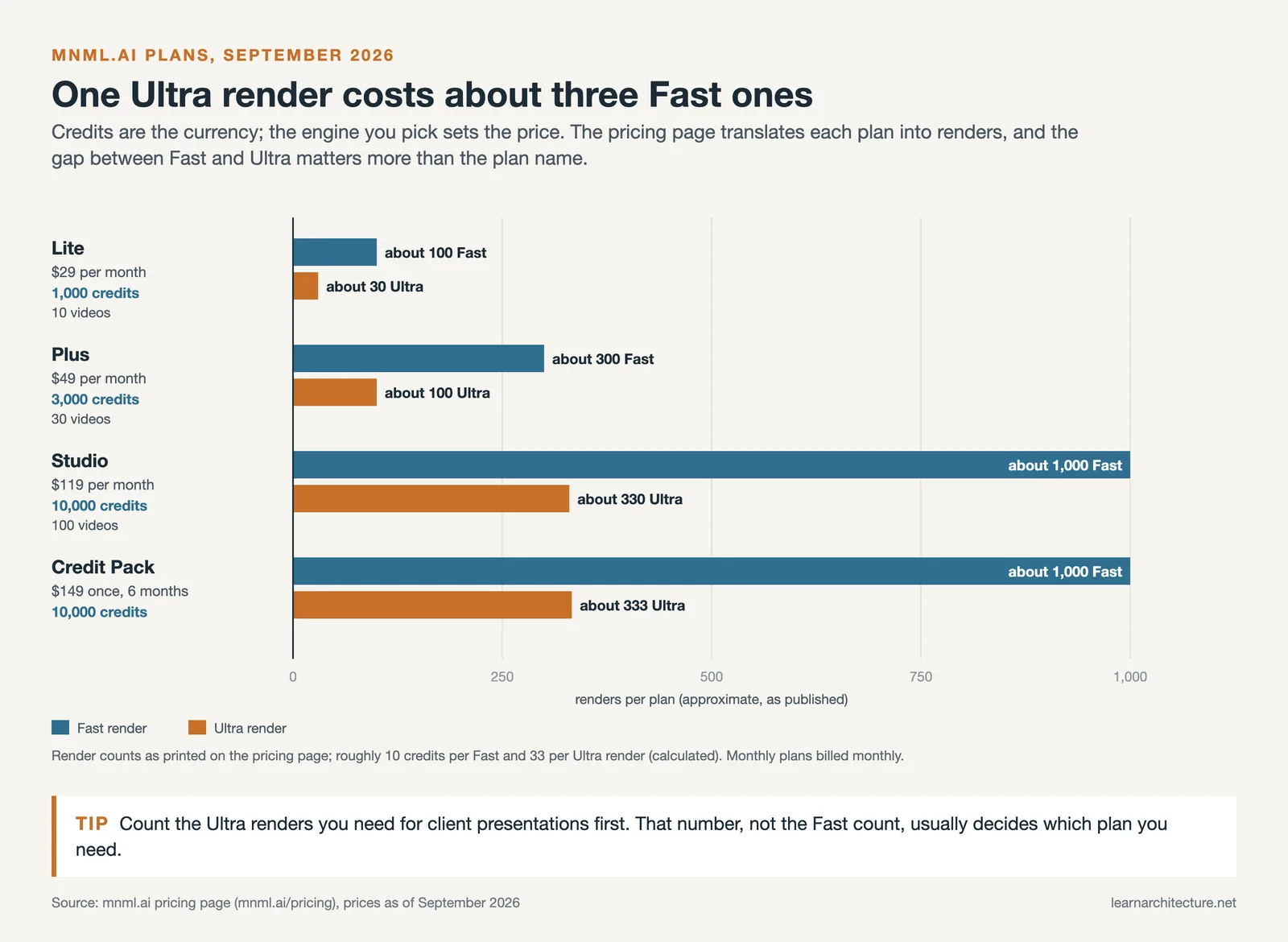
mnml.ai uses a credit-based system across all paid plans. Credits are consumed per render action, with high-resolution outputs and upscaling consuming more credits than standard generations. New users receive free credits on signup to test the tools before committing to a subscription.
| Plan | Monthly Price | Credits | Best For |
|---|---|---|---|
| Lite | $29/month (as of September 2026) | 1,000 credits (~100 Fast or ~30 Ultra renders) | Freelancers and students |
| Plus | $49/month | 3,000 credits (~300 Fast or ~100 Ultra renders) | Active practices and studios |
| Studio | $119/month | 10,000 credits (~1,000 Fast or ~330 Ultra renders) | High-volume visualization work |
| Enterprise | From $199/month | Custom | Firms and large studios |
| Credit Pack (one-time) | $149 one-time, valid 6 months | 10,000 credits | Occasional users |
A commercial license is included in every plan. Verified students and educators get 30% off every plan. Annual billing reduces the monthly cost further on all plans.
The credit burn rate is worth understanding before committing to a plan. Each engine has a set price, shown on the button before you spend, and the pricing page works out to roughly 10 credits per Fast render and about 33 per Ultra render (as of September 2026). For a practice generating 20 to 30 client-ready renders per month, the Lite plan at $29 (about 30 Ultra renders) is generally sufficient.
💡 Pro Tip
Before purchasing a subscription, map out your monthly render volume. Count how many client presentations you typically produce and estimate the renders per presentation. If you primarily use Fast renders, the Lite plan covers approximately 100 renders per month, or about 30 at Ultra quality. If you regularly use Ultra renders, the credit math shifts significantly and the Plus plan becomes the more cost-effective option.

Who Should Use mnml.ai for Architecture Rendering?
The platform targets several distinct user types, and the right fit depends on where you sit in the design process.
Architectural practices at the concept and schematic design stages benefit most. The speed advantage over traditional rendering is largest during early design, when many variations need to be explored quickly and precision is less critical than communication. Being able to show a client six facade options in one meeting rather than sending them three renders two days later changes the nature of client relationships.
Interior designers working on residential renovation and commercial fit-out projects find the Interior AI tool particularly useful. The ability to upload a photograph of an existing space and visualize it with 20+ different material and style combinations in seconds accelerates client approval processes considerably.
Real estate developers and agents use mnml.ai for property marketing. Renders generated from basic SketchUp massing models can produce images suitable for sales brochures and online listings, without the cost of a dedicated visualization studio.
Students and architecture educators use the platform for design exploration and presentation boards. The Lite plan at $29/month (as of September 2026) provides enough credits for regular studio use, and education discounts bring the cost down further. For a broader view of how AI is reshaping design education and practice, see our guide to AI-powered architecture design software.
Visualization specialists who work primarily with V-Ray or Lumion on final production renders can also use mnml.ai as a complementary tool, using it for draft-stage iterations and running polished final renders through the Render Enhancer to add quality without re-rendering.
mnml.ai Strengths and Limitations
⚖️ Pros & Cons at a Glance
✔️ Pros: Architecture-specific AI model (not a general-purpose tool), preserves input geometry accurately, 8K upscaling via Render Enhancer, broad software compatibility (SketchUp, Revit, Blender, 3ds Max, Lumion, V-Ray), dedicated style transfer and masterplan tools, video generation in one click
✖️ Cons: Credit-based model can become costly for high-volume output, prompt control over specific details is limited compared to BIM-integrated tools like Veras, auto-generated concept statements require heavy editing, no native plugin for direct BIM workflow integration
The most common user complaint from reviews and community forums is prompt adherence. When the input image is ambiguous or the text prompt is very specific about a detail, the AI sometimes ignores the instruction or applies changes inconsistently across iterations. This requires multiple render attempts to get close to the desired result, which burns credits. The platform’s community documentation and prompt guide are worth reading before committing to a paid plan.
Compared to tools like traditional AI-supported architectural rendering software, mnml.ai’s main differentiator is its focus. Where Lumion and V-Ray require full 3D scene management, mnml.ai starts from images you already have and returns a photorealistic result without scene setup. That trade-off (less control, dramatically more speed) defines the tool’s positioning in the market.
✅ Key Takeaways
- mnml.ai is a purpose-built AI rendering platform for architects, not a general-purpose image generator. Its ArchDiffusion engine is trained specifically on architectural imagery, which makes it more reliable for design work than tools like Midjourney.
- The Render Enhancer supports upscaling to 8K resolution, making it useful for elevating draft renders from Lumion or Enscape without re-rendering full scenes.
- Style Transfer is one of the platform’s most precise tools, allowing architects to apply a reference image’s visual character to their own renders for client-matching or branding consistency.
- Pricing starts at $29/month for the Lite plan (as of September 2026). High-volume or Ultra quality use requires the Plus ($49) or Studio ($119) tiers to avoid running out of credits mid-project.
- The platform works best as a complement to traditional rendering tools, not a full replacement. Use it for concept-stage speed and client iteration; use V-Ray or Lumion for final production renders.
You can explore mnml.ai’s full tool suite and current pricing directly at mnml.ai. For context on how it compares within the wider AI rendering landscape, the mnml.ai rendering software comparison page provides a side-by-side breakdown against Lumion, V-Ray, Enscape, and Twinmotion. If you are evaluating how AI rendering tools fit into different project stages, our guide to enhancing architectural designs with AI rendering tools covers practical workflow integration in more depth.









Leave a comment