


Table of Contents Show
Real-time rendering is a GPU-driven visualization method that converts a 3D architectural model into a photorealistic image as fast as you can move the camera, change a material, or adjust the sun. Instead of waiting hours for a single offline frame, architects see fully lit scenes update at interactive speeds, which transforms how design decisions are tested, presented, and approved.
What Is Real-Time Rendering and Why Does It Matter for Architecture?
Real-time rendering produces shaded, lit, and textured images at speeds the human eye reads as motion, typically 30 frames per second or higher. The same scene that an offline engine like V-Ray might calculate over many minutes is computed continuously by a real-time engine, which lets you orbit, walk, or fly through the model while the visuals update on the fly.
For architects, the appeal is not just speed. The deeper value is feedback. When a material change, a daylight study, or a façade revision shows up in seconds, the renderer becomes a thinking tool instead of a presentation step at the end of the project. According to a 2025 industry analysis from Mordor Intelligence, architectural visualization still accounts for roughly 41.9% of total 3D rendering market revenue, with real-time engines and ray tracing identified as the technologies driving most of the growth.
Three things make this possible today: GPU power, hardware ray tracing, and tighter integration with BIM and CAD software. Modern graphics cards from NVIDIA, AMD, and Intel have dedicated cores that handle ray-traced lighting calculations, while real-time engines tap into APIs like DirectX 12 and Vulkan to drive those calculations efficiently.
💡 Pro Tip
When you start using a real-time engine inside a BIM tool, do not rebuild materials from scratch in your modeling software just to please the renderer. Set up a clean, neutral material library in Revit or ArchiCAD with simple base colors, then handle reflectivity, roughness, and texture mapping inside the real-time engine. This separation keeps your BIM model clean for documentation and your rendered scenes flexible for visualization.
How Does Real-Time Rendering Actually Work?

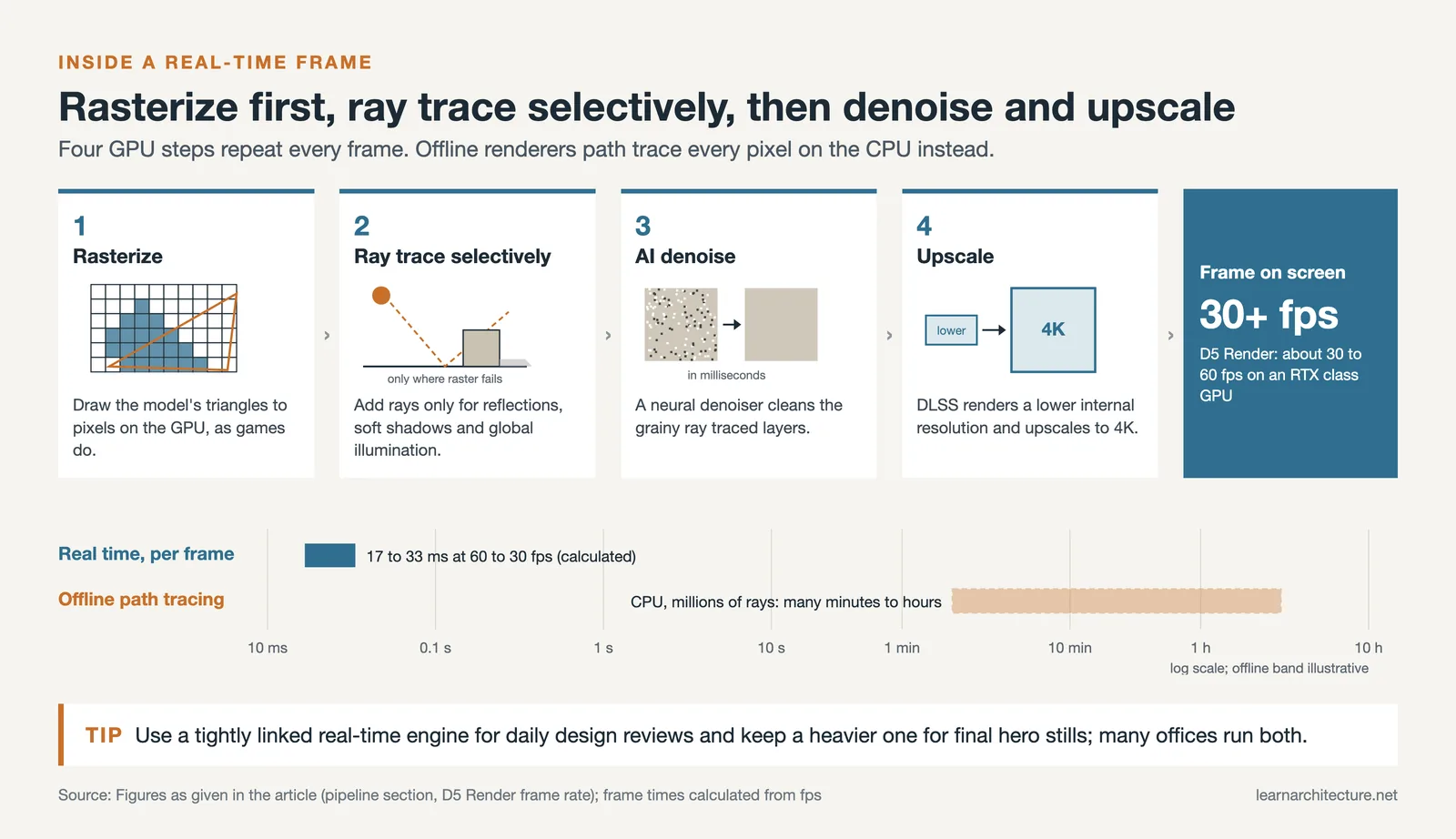
Traditional offline rendering treats every pixel as a math problem solved by the CPU, often using path tracing that fires millions of rays into the scene and waits for them to settle into a noise-free image. Real-time rendering takes a different approach: it leans heavily on the GPU and uses a hybrid of techniques to get acceptable visuals fast, then refines them as the camera holds still.
Rasterization Plus Ray Tracing
Most real-time engines start with rasterization, the same technique video games use to draw triangles to the screen. On top of that, they layer in selective ray tracing for the things rasterization handles poorly: accurate reflections, soft shadows, and global illumination. This hybrid pipeline is what powers tools like D5 Render, which combines DirectX 12 with DirectX Raytracing (DXR) to deliver interactive scenes at roughly 60 frames per second on a modern RTX-class GPU.
Real-Time Path Tracing
The newest generation of architectural engines goes further. Twinmotion 2025.1 added Virtual Shadow Map technology and improved real-time orthographic rendering for accurate plan and elevation views, while D5 Render introduced full real-time path tracing in version 2.10. Path tracing in real time was considered impossible only a few years ago. Now, it runs interactively on consumer hardware thanks to AI denoising, importance sampling, and aggressive use of GPU caches.
AI Denoising and Upscaling
Modern renderers also use neural network technology like NVIDIA DLSS to render at lower internal resolutions and intelligently upscale to 4K. Combined with AI denoisers that clean up grainy ray-traced images in milliseconds, these tools let architects work on laptops and mid-range desktops that would have been useless for visualization five years ago.
🎓 Expert Insight
“Architecture should speak of its time and place, but yearn for timelessness.”
Frank Gehry
Real-time rendering supports this idea in a practical way. By letting architects test how a building reads at different times of day, in different seasons, and from many viewpoints, the technology helps designers verify that their work has presence in its specific context, not just in idealized hero shots.
The Leading Real-Time Rendering Software for Architects

Four engines dominate professional practice: Enscape, Twinmotion, D5 Render, and Lumion. Each has a distinct approach to the BIM workflow, asset library, and balance between speed and photorealism. Here is how the most-used options compare on the criteria architects actually care about.
Comparison of Leading Real-Time Rendering Software
The table below summarizes how the major engines compare across BIM integration, hardware needs, and target use cases. Pricing changes frequently, so always verify current rates with each vendor before committing.
| Software | Core Technology | BIM Integration | Best For | Platform |
|---|---|---|---|---|
| Enscape | OpenGL, Vulkan, hybrid ray tracing | Native plugin: Revit, SketchUp, Rhino, Archicad, Vectorworks | BIM-first studios, fast design reviews | Windows, macOS |
| Twinmotion | Unreal Engine, Lumen, path tracer | Datasmith Direct Link: Revit, ArchiCAD, Rhino, SketchUp | Cinematic visuals, large landscapes | Windows, macOS |
| D5 Render | DirectX 12, DXR, real-time path tracing | LiveSync: Revit, SketchUp, Rhino, ArchiCAD, 3ds Max, Blender, C4D | Photoreal stills, AI workflows | Windows only |
| Lumion | Proprietary engine with ray tracing | LiveSync: Revit, ArchiCAD, SketchUp, Rhino, Vectorworks | Atmospheric exteriors, marketing visuals | Windows only |
Enscape for Revit and Other BIM Tools
Enscape is the deepest integration story in the category. Developed by Chaos and built on OpenGL and Vulkan, the plugin loads directly inside Revit, SketchUp, Rhino, Archicad, and Vectorworks. There is no export step. You hit a button, and a fully rendered window opens next to your CAD application, with bi-directional sync that pushes changes both ways. For firms running Revit as their primary BIM platform, this workflow eliminates the file management overhead that slows down other engines. The trade-off is that Enscape’s photorealism, while strong, does not match a dedicated path tracer for hero close-ups.
You can read more about how it fits into a broader BIM-aware toolkit in our overview of architectural visualization tools and workflows.
Twinmotion: Unreal Engine for Architects
Twinmotion, owned by Epic Games and powered by Unreal Engine, sits in a different niche. Its strength is cinematic environments: weather systems, vegetation that responds to wind, volumetric clouds, and a path tracer for hero stills. The 2026.1 release added Match Perspective for compositing models into photo backplates and Autosoft Edges for softening unrealistic CG corners. Twinmotion is free for individuals and businesses earning under $1 million USD per year, which has made it a popular entry point for students and small studios.
D5 Render: Real-Time Path Tracing
D5 Render, developed by Dimension 5, has gained ground quickly by pushing real-time ray tracing further than its competitors. Built on DirectX 12 with DXR, the software runs at roughly 30 to 60 FPS on RTX-class hardware and offers LiveSync plugins for eight modeling platforms including Revit, SketchUp, ArchiCAD, and Blender. Its integrated AI tools, such as material generation from a single texture map and AI Enhancer for vegetation and people, save real production time. We covered the engine in depth in our D5 Render review.
Lumion for Atmospheric Exteriors
Lumion remains a strong choice for projects where mood and atmosphere matter more than tight BIM integration. Its strength is its asset library, weather effects, and ability to dress sprawling exterior scenes with minimal effort. Lumion 2024 added improved ray tracing for glass and water, claiming up to 5x faster rendering speed than the previous version through more efficient sampling. The detailed feature breakdown is in our Lumion 2024 update guide.
⚠️ Common Mistake to Avoid
Many architects assume they need to pick one rendering engine and stick with it for every project. In practice, the best results often come from using two: a tightly integrated tool like Enscape for daily design reviews and client iterations, and a heavier engine like Twinmotion or D5 for final hero images and animations. The real-time engines are cheap enough and fast enough that running both in parallel pays for itself quickly.
Free Real Time Rendering Software: What’s Worth Trying?

Architects exploring real-time rendering for the first time do not need to commit to a paid subscription on day one. Several capable options are available at no cost, with reasonable functionality.
Twinmotion is free for users earning under $1 million USD per year, which covers most students, freelancers, and small studios. The free version is the same software the paid users get, with no watermarks or feature limits, only the revenue cap on commercial use. D5 Render offers a Community license that is fully featured but restricted to non-commercial work, making it a good way to learn the tool before upgrading. Unreal Engine itself is free to use until your project earns over $1 million USD in lifetime gross revenue, after which a 5% royalty applies. For a deeper look at zero-cost options across the modeling and rendering pipeline, our guide to affordable 3D architectural modeling software covers the broader landscape.
Hardware Requirements for Real-Time Rendering Architecture Workflows
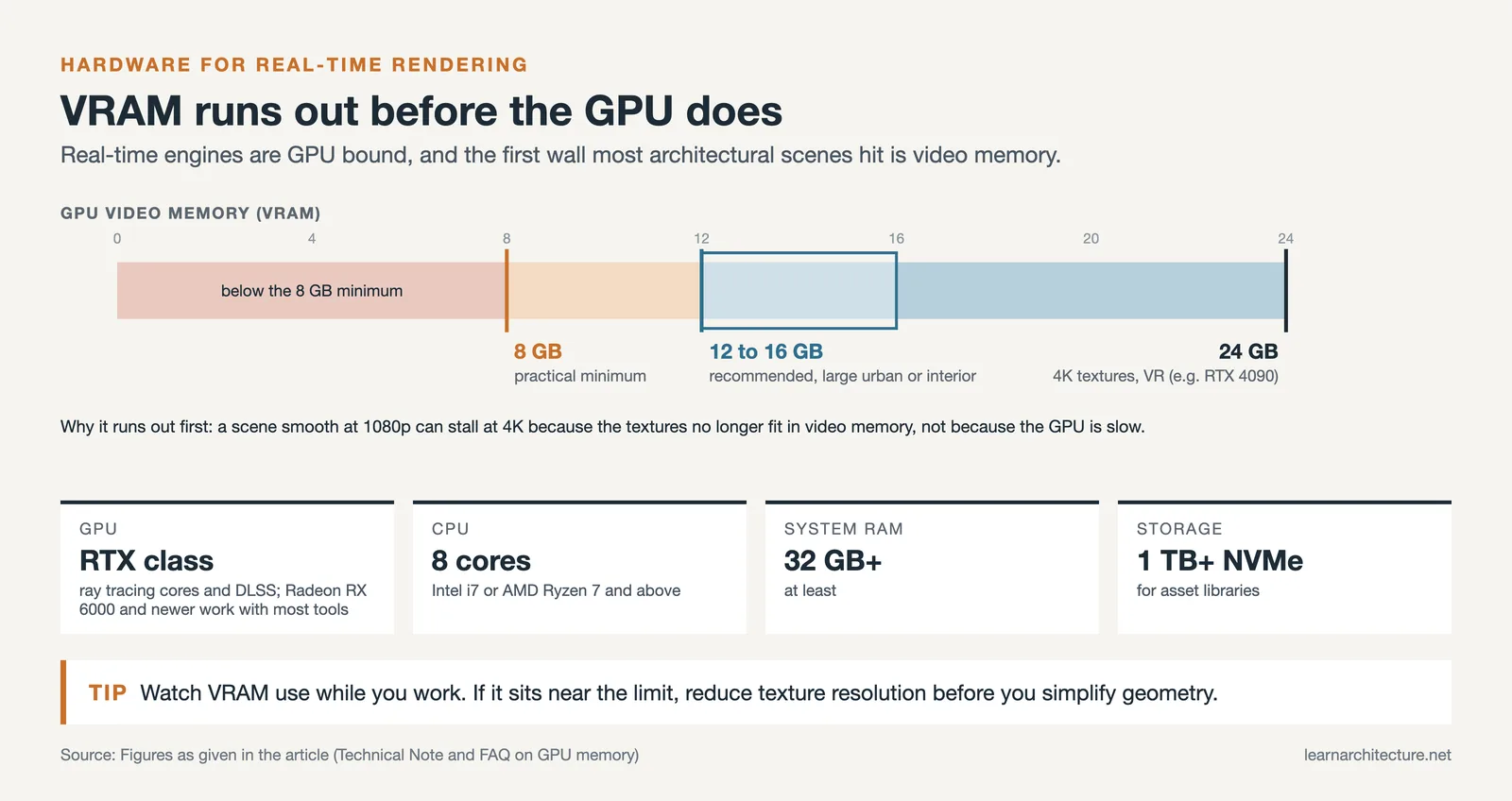
Real-time rendering software is GPU-bound, which means the graphics card matters more than the CPU for almost all workflows. Most professional engines target NVIDIA RTX cards because of their dedicated ray tracing cores and DLSS upscaling support, though AMD Radeon RX 6000 series and newer cards work with most software.
📐 Technical Note
For comfortable real-time ray tracing in scenes typical of architectural projects, plan on a minimum of 8 GB of GPU VRAM, with 12 to 16 GB recommended for large urban or interior scenes with high-resolution textures. CPUs in the 8-core range (Intel i7 or AMD Ryzen 7 and above), at least 32 GB of system RAM, and an NVMe SSD with 1 TB or more for asset libraries cover most production needs. D5 Render and Lumion are Windows-only. Apple’s Metal has supported hardware-accelerated ray tracing since the M3 chips in 2023, but neither engine has been ported to it.
One nuance: GPU VRAM is the silent bottleneck. A scene that runs smoothly at 1080p might choke at 4K not because the GPU is slow but because the texture data exceeds the available video memory. If you regularly hit instability, monitor VRAM use during rendering and consider reducing texture resolution before reducing geometry complexity.
Real-Time Rendering vs Offline Rendering: When to Use Each
The temptation when adopting real-time tools is to abandon offline rendering entirely. That is usually a mistake. The two approaches solve different problems, and most production studios use both.
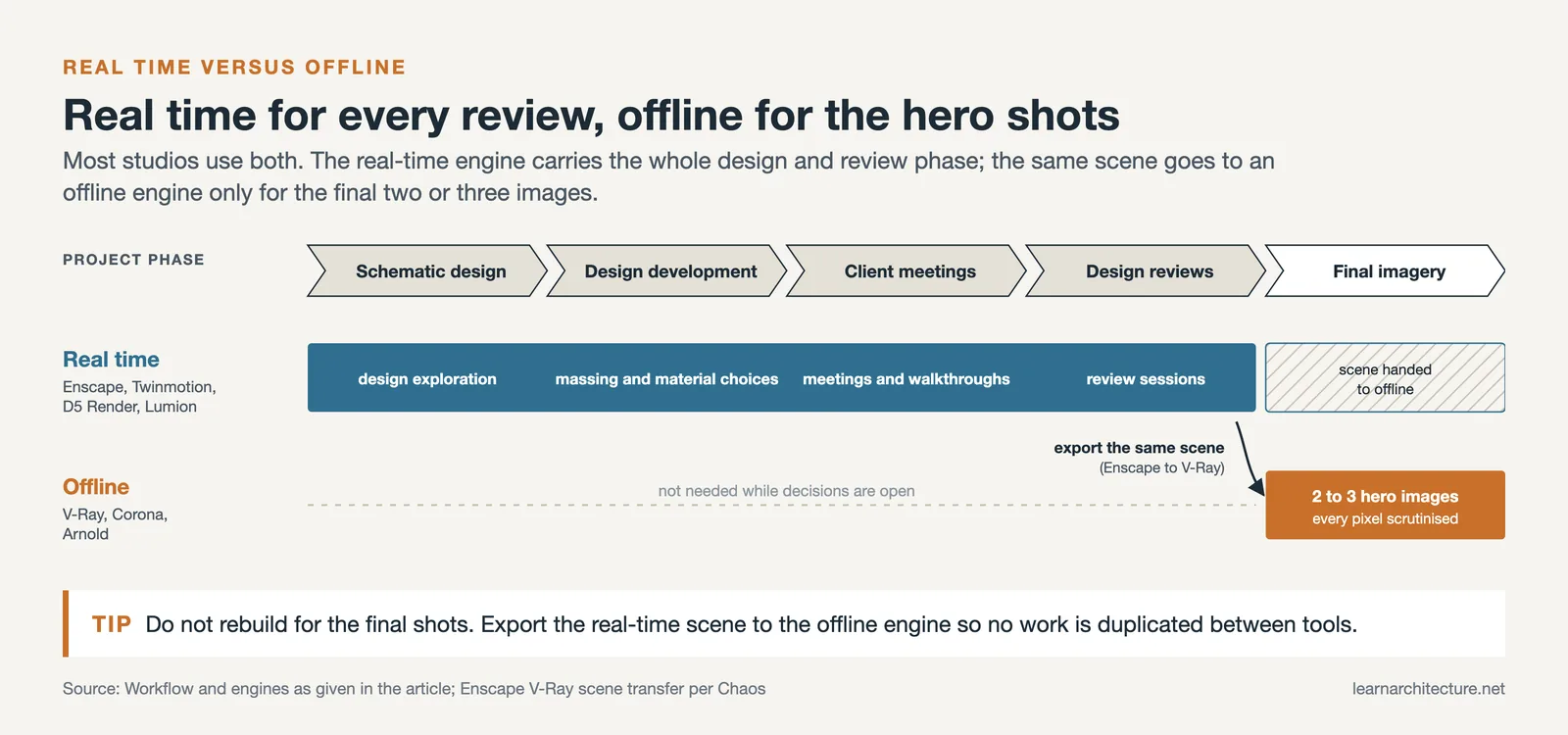
Real-time rendering wins for design exploration, client meetings, walkthroughs, and design reviews where speed of iteration is the dominant variable. Offline engines like V-Ray, Corona, and Arnold still produce more controlled, predictable results for hero exterior shots, complex caustics, and final marketing imagery where every pixel will be scrutinized. The gap is narrowing every year as real-time path tracing matures, but for high-end commercial visualization, offline rendering remains the standard for the final money shot.
A practical workflow that many studios use: real-time engines for the entire design and review phase, then export the same scene to an offline engine like V-Ray for the two or three final hero images. Enscape supports this directly through .vrscene file export to V-Ray and 3ds Max, which avoids duplicating work between tools.
How to Build a Real-Time Rendering Workflow That Actually Works
Adopting a real-time engine is not the same as making real-time rendering part of your studio’s daily process. The software is the easy part. The harder part is building habits and conventions that keep scenes performant and consistent across projects and team members.
Start With BIM Hygiene
Real-time engines inherit whatever you give them. A messy Revit model with overlapping geometry, missing materials, and orphaned families will render messy. Before you start visualization, audit your BIM model for purged unused families, consistent material assignments, and reasonable level-of-detail settings. Time spent here pays back in every render that follows.
Standardize Your Material Library
Most real-time engines ship with hundreds or thousands of PBR materials. Pick a working subset for your studio (say, 30 to 50 materials covering the finishes you actually specify), test them under your common lighting conditions, and treat them as your studio standard. This makes scenes more consistent across projects and lets junior staff produce work that matches the studio’s visual language without starting from scratch.
Use Real-Time for Decisions, Not Just Presentation
The biggest mistake architects make with real-time rendering is treating it as a polished presentation tool that comes out at the end of design development. The real value is using the renderer during schematic design and early DD, when material and massing decisions are still open. If your client cannot see how the south façade reads in late afternoon light until two weeks before the planning submission, you are wasting most of what real-time rendering offers.
💡 Pro Tip
Set up two saved camera views for every project from the first week: a hero exterior and a typical interior. As the design develops, keep returning to these same two views and re-rendering them. The visual continuity makes design drift obvious and gives clients an apples-to-apples comparison across review meetings, instead of a new shot every time that hides what actually changed.
The Future of Real-Time Rendering in Architecture

Three trends are reshaping the field over the next few years. First, real-time path tracing is becoming standard rather than experimental. The visual gap between real-time and offline rendering, which was significant in 2020, will be effectively closed for most architectural use cases by the end of 2026.
Second, AI is moving from a denoising helper to a creative collaborator. Tools like Veras (now part of the Chaos ecosystem alongside Enscape and V-Ray) use generative AI to propose material treatments and styling on top of BIM geometry, while D5’s AI Enhancer and Style Transfer features hint at where the entire category is heading. Our coverage of the best AI tools for architectural visualization in 2026 goes deeper on this shift.
Third, the line between rendering and interactive experience is dissolving. Twinmotion, D5 Render, and Enscape all export web-based or executable walkthroughs that clients can explore on their own devices. As VR headsets become cheaper and more common in client offices, immersive design reviews are starting to replace flat presentations for high-stakes meetings on hospitality, healthcare, and large mixed-use projects.
✅ Key Takeaways
- Real-time rendering converts 3D architectural models into photorealistic, interactive scenes at 30 FPS or higher, replacing the wait-and-render cycle of offline tools.
- The four leading engines for architects are Enscape, Twinmotion, D5 Render, and Lumion, each with different strengths in BIM integration, photorealism, and atmospheric effects.
- Hardware matters: plan on an NVIDIA RTX-class GPU with at least 8 GB of VRAM, 32 GB of system RAM, and an NVMe SSD for serious production work.
- Real-time rendering does not fully replace offline engines like V-Ray, but it transforms the design and review phase by making feedback nearly instant.
- The biggest workflow gain comes from using real-time tools early in design, not just for final presentations.
- Free or low-cost entry points exist (Twinmotion under $1 million revenue, D5 Community license) that let teams trial the technology without large up-front commitments.
Pricing, system requirements, and feature availability for the rendering tools discussed in this guide change frequently. Always verify current details on each vendor’s official website before committing to a purchase or upgrade.
Frequently Asked Questions About Real-Time Rendering
What is real-time rendering in architecture?
Real-time rendering is a GPU-driven technique that produces photorealistic images of architectural 3D models at interactive speeds, typically 30 frames per second or faster. It uses a hybrid of rasterization and ray tracing along with AI denoising to deliver scenes that update instantly when you move the camera, change a material, or adjust lighting.
Is Enscape better than Lumion for Revit users?
For Revit-centric workflows, Enscape’s native plugin and bi-directional live sync usually feel smoother because there is no export step and changes appear in both directions. Lumion has stronger atmospheric exteriors and a richer asset library, but it requires LiveSync exports and runs as a standalone application. The right pick depends on whether you value workflow integration or atmospheric polish more.
How much GPU memory do I need for real-time rendering?
For typical architectural scenes, 8 GB of GPU VRAM is the practical minimum and 12 to 16 GB is recommended. Large urban scenes with 4K textures or VR walkthroughs benefit from 24 GB cards like the RTX 4090. VRAM is usually the bottleneck before raw GPU speed in architectural workloads.
Can I use real-time rendering on a Mac?
Options are limited. Enscape and Twinmotion both support macOS, while D5 Render and Lumion are Windows-only; Apple’s Metal has offered hardware-accelerated ray tracing since the M3 chips, but neither engine has been ported to it. Mac users with serious visualization needs typically run Windows in Parallels, on Boot Camp (on Intel Macs), or on a separate Windows workstation.
What is the difference between real-time rendering and ray tracing?
Ray tracing is a rendering technique that simulates the physical behavior of light. Real-time rendering is a category of software that produces images fast enough to feel interactive. Modern real-time engines use ray tracing as one of several techniques alongside rasterization and AI denoising. The terms overlap but are not the same: you can have real-time rendering without ray tracing (older engines) and ray tracing without real-time performance (offline path tracers like V-Ray).






Leave a comment