


Table of Contents Show
If you have been searching for a rendering tool that balances photorealistic output with real-time feedback, this D5 Render review breaks down exactly what the software delivers for architects and visualization professionals. D5 Render is a real-time ray tracing renderer built for architecture, interior design, and landscape visualization. It connects directly with SketchUp, Revit, Rhino, ArchiCAD, 3ds Max, Blender, and Cinema 4D through free LiveSync plugins, letting you see material and lighting changes applied instantly as you work.
What sets D5 Render apart from offline engines like V-Ray or Corona is speed. You are not waiting hours for a single frame. Instead, D5 combines rasterization with ray tracing to produce images, videos, and panoramas in seconds or minutes. The software earned the top position across all G2 categories for architectural rendering and 3D rendering software in 2024, and eight of the world’s ten largest architecture firms now use it in production, according to D5 Render’s official announcement.

How D5 Render Architecture Workflows Actually Function
D5 Render software operates on a DirectX 12-based real-time rendering pipeline. The core technology is DXR (DirectX Raytracing), which handles soft shadows, reflections, refractions, global illumination, and skylight calculations on the GPU. Unlike traditional offline renderers that process everything in a queue, D5 lets you orbit a scene, adjust sun angles, swap materials, and see results at roughly 30 FPS on an RTX 3060 or higher.
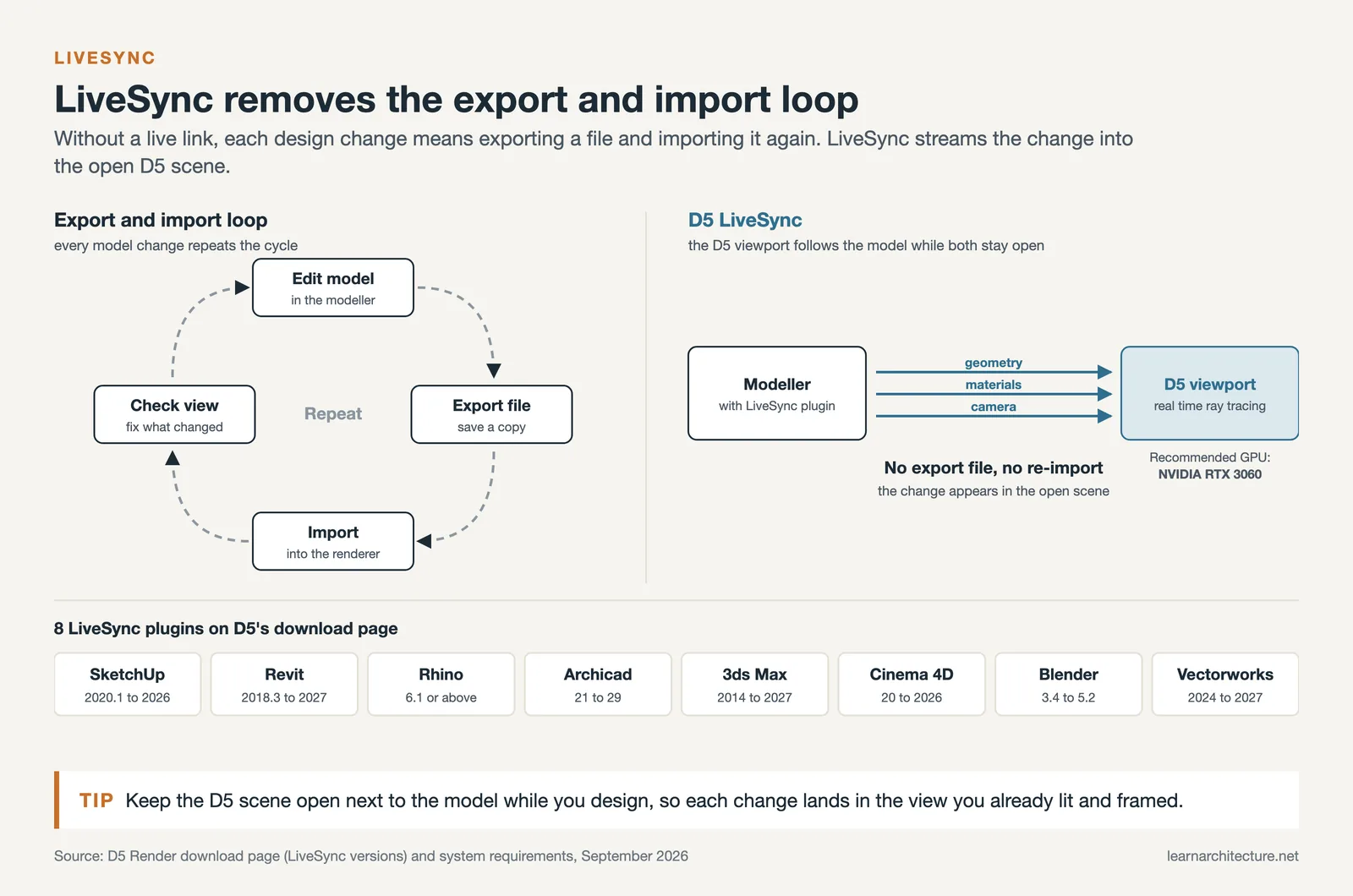
The LiveSync feature is where D5 Render’s integration with architectural modeling tools becomes practical. When you modify geometry or materials in your modeling software, changes appear in the D5 viewport without manual export steps. This eliminates the export-import cycle that slows down workflows whenever a renderer has no live link to the model. For firms running Revit or ArchiCAD as their primary BIM platform, this sync capability removes a significant bottleneck during design development.
The asset library is another core component. The free Community edition includes access to over 2,100 official assets (as of September 2026). Upgrading to Pro expands that to 16,000+ items covering furniture, vegetation, vehicles, people, and PBR materials. The D5 features page lists additional tools like D5 Scatter for procedural vegetation placement, terrain sculpting brushes, and a dynamic ocean system introduced in version 3.0.

AI D5 Render Features That Change the Visualization Process
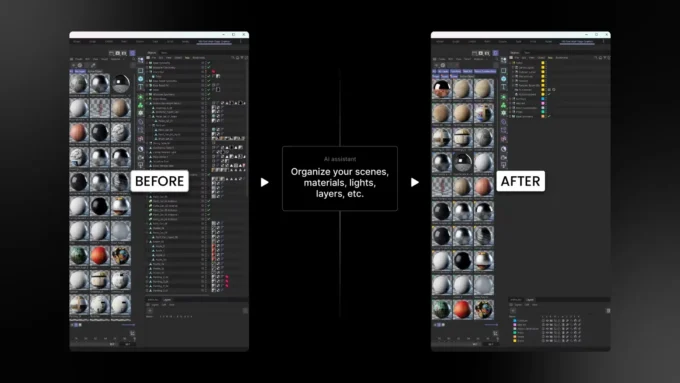
The AI tools in D5 represent one of the most significant recent additions. These are not gimmicks buried in a submenu. They address specific, time-consuming tasks that architects deal with on every project. If you are exploring how AI rendering tools enhance architectural designs, D5’s implementation is one of the most practical examples available.
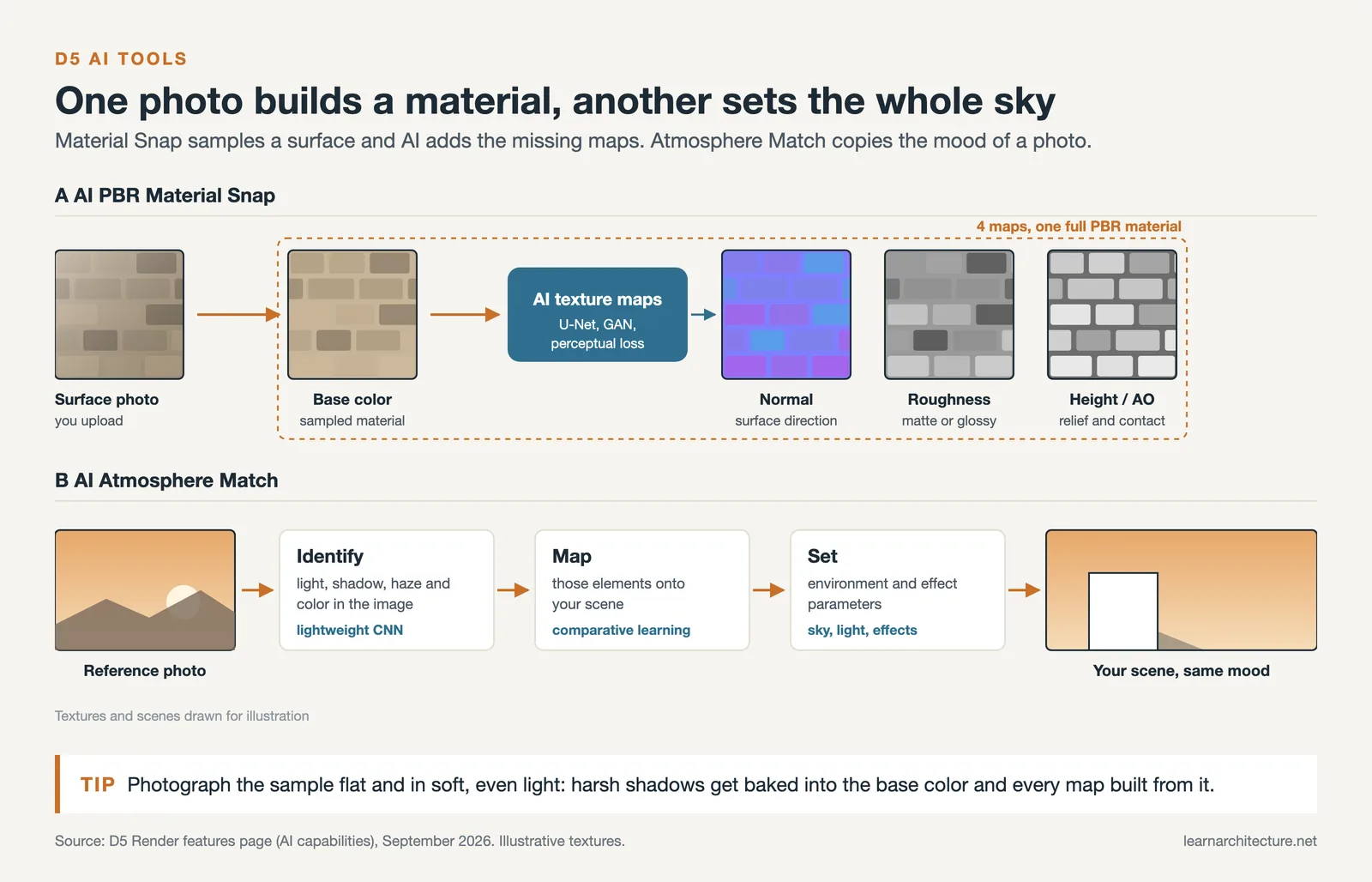
AI Atmosphere Match lets you upload a reference photograph, and the software analyzes the lighting temperature, shadow softness, atmospheric haze, and color grading. It then replicates those conditions in your scene by configuring the Geo&Sky system or selecting an appropriate HDRI. According to the D5 user manual, the algorithm uses lightweight convolutional neural networks for feature identification and comparative learning algorithms for spatial mapping. In practical terms, this replaces 30 to 60 minutes of manual HDRI rotation and exposure tweaking with a 10 to 15-second automated process.
AI PBR Material Snap generates full physically based rendering materials from a single reference image. The system produces base color, normal, roughness, and height maps automatically. For architects who frequently need custom materials for client presentations (a specific stone finish, a particular wood species), this eliminates the dependency on third-party texture libraries or Substance Designer.
Additional AI tools include the AI Enhancer for selective post-processing, AI Style Transfer for visual style conversion, AI Inpainting for sky and vegetation areas, and Ultra HD Texture upscaling to 4K. According to D5’s 2024 year-in-review, one in five D5 users actively relies on these built-in AI features.
D5 Render Performance and System Requirements
D5 Render is a GPU-dependent application. Performance scales almost linearly with VRAM availability, and the CPU plays a secondary role handling scene loading, mesh processing, and interaction threads.

Minimum and Recommended Hardware
The following table summarizes the hardware requirements based on D5’s official system requirements page:
| Component | Minimum | Recommended |
|---|---|---|
| GPU | NVIDIA GTX 1060 6GB / AMD RX 6400 / Intel Arc 3 series | NVIDIA RTX 3060 Ti or higher (8GB+ VRAM) |
| RAM | 16 GB | 32 GB |
| Operating System | Windows 10 v1809 | Windows 10 21H2 or Windows 11 |
| DirectX | DirectX 12 | DirectX 12 |
| CPU | Multi-core processor | Modern multi-core (single-core speed matters) |
One critical limitation: D5 Render runs only on Windows. There is no macOS version, and the team has not announced plans for one due to the DirectX 12 dependency. Architects working on Mac hardware will need Boot Camp, Parallels, or a cloud-based GPU service to run D5. The software also does not support multi-GPU setups; it uses a single dedicated graphics card.
D5 Render Interior Design and Landscape Capabilities
For interior visualization, interior design workflows in D5 Render benefit from the real-time global illumination engine (D5 GI). Indoor scenes with complex light bounces, which traditionally require hours of calculation in offline engines, preview almost instantly. For a broader look at visualization techniques, our guide on understanding archviz covers the fundamentals. The material editor handles PBR properties including roughness, metallic response, and displacement. Users can apply round edges to soften geometry corners without adding polygons, and use decals for realistic surface wear like smudges, cracks, or stains.
D5 Render landscape architecture tools have expanded significantly with the terrain system and D5 Scatter. The terrain tool includes sculpting brushes and heightmap presets, while Scatter automates vegetation placement with density masking, scale randomization, and species layering. Version 3.0 added a dynamic ocean system with wave controls, foam adjustment, and automatic coastline generation with caustics. For landscape architects working on coastal or waterfront projects, this eliminates hours of manual texture painting.

D5 Render Software Pricing and Plans
D5 keeps its pricing structure straightforward with three tiers. Here is how they break down:
| Plan | Price | Key Features | Best For |
|---|---|---|---|
| Community | Free | 2,100+ assets, 16K image output, 4K video, LiveSync, unlimited projects | Students, learning, personal projects |
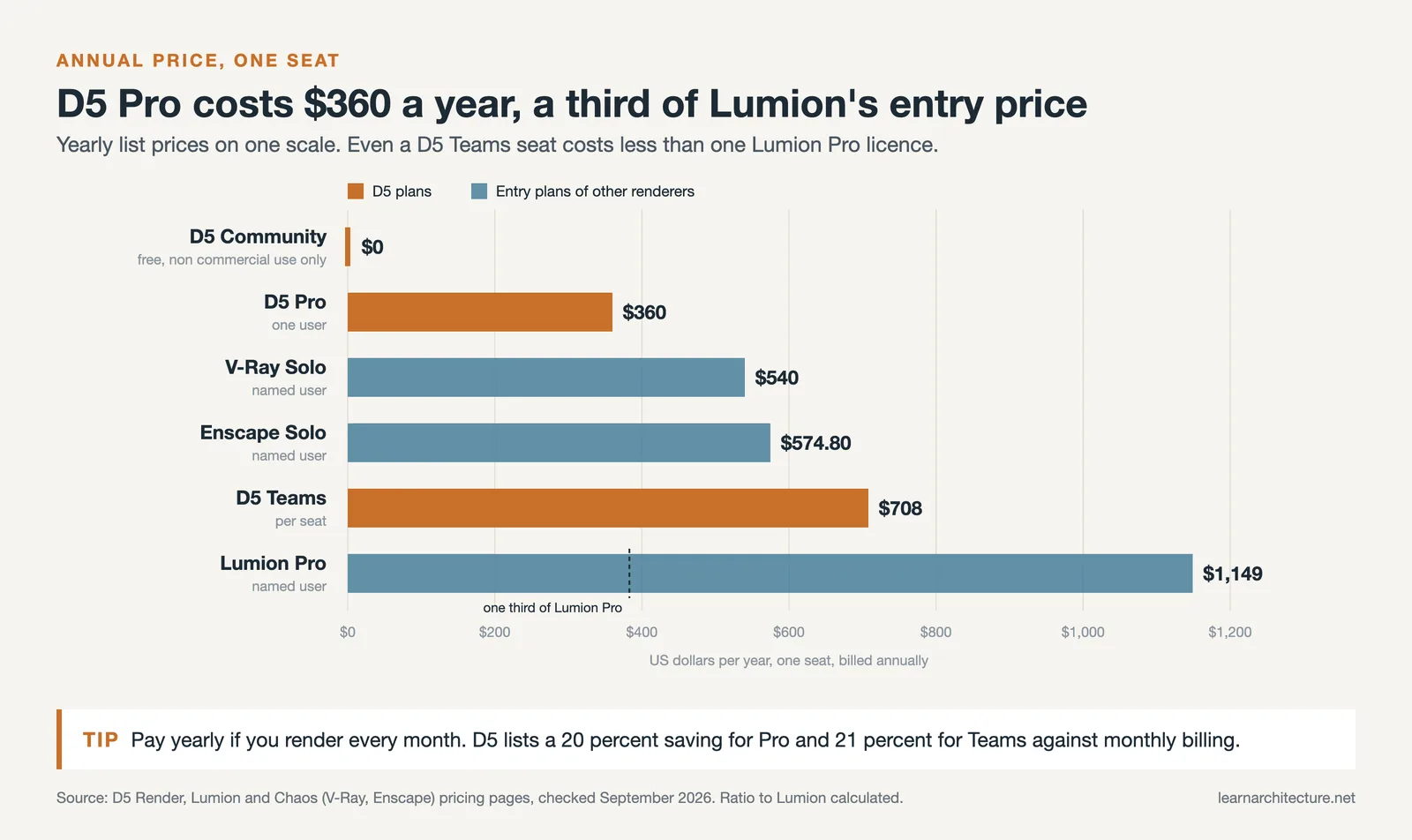
| Pro | $38/month or $360/year | 16,000+ assets, unlimited AI features, VR, color grading, commercial use | Individual professionals, freelancers |
| Teams | $75/month per seat ($708/year) | Shared projects, version syncing, 100GB cloud workspace, team management | Studios, multi-person firms |
The Community plan is genuinely usable for non-commercial work. Unlike trial versions that expire or cripple output quality, D5’s free tier includes full rendering capabilities and LiveSync. As of September 2026, the Pro plan at $360 per year is notably cheaper than Lumion Pro ($1,149 a year), Enscape (from $574), and V-Ray (from $540). Annual billing saves 20% on Pro and 21% on Teams compared to monthly payments.
One important distinction: the Community license restricts use to non-commercial purposes. Any revenue-generating or professional work requires Pro. The Pro license is also fixed to a single computer, which can be a limitation for architects who work across office and home machines.
Pros and Cons of D5 Render
After examining user reviews across G2, Capterra, and Software Advice (where D5 holds a 4.8 overall rating), the strengths and weaknesses in this D5 Render review reflect consistent patterns from practicing architects:
On the positive side, D5’s real-time rendering speed is the most frequently cited advantage, with users achieving realistic results in minutes rather than hours. The intuitive interface has a short learning curve. LiveSync integration with SketchUp, Revit, and other tools eliminates tedious export steps. The asset library is extensive and growing. The free Community version is generous enough for evaluation, and regular updates introduce meaningful features.
On the negative side, the software is Windows-only with no macOS support. Large scenes demand a powerful GPU and can cause instability when VRAM exceeds 95%. Some features and premium assets require Pro. The AI tools have resolution limits (6K max for AI Enhancer) and certain functions remain in beta. Material customization depth does not yet match V-Ray or Corona for extreme close-up work. Artificial lights do not auto-dim based on time-of-day, requiring manual adjustment for day-to-night animations.

How D5 Compares to Lumion and Enscape
Architects evaluating D5 Render against alternatives typically compare it with Lumion and Enscape. Lumion has stronger atmospheric effects but costs significantly more and requires more manual tweaking for close-up materials. Enscape integrates tightly into BIM workflows (especially Revit) and runs lighter on hardware, but lacks D5’s AI toolset depth and asset library size. D5 sits between these two: better photorealistic quality than Enscape, lower price than Lumion, and AI features neither competitor currently matches.
Who Should Use D5 Render
D5 Render works best for architects and visualization artists who need fast, high-quality output without the learning curve of Unreal Engine or the render times of offline engines. It fits workflows centered on SketchUp, Revit, Rhino, or ArchiCAD. Students benefit from the free Community edition. Small firms and freelancers get strong value from Pro at $360 per year.
The software is less ideal if you work on macOS, need absolute maximum quality for extreme close-up product shots, or require multi-GPU rendering for massive urban-scale models.
Pricing and feature availability are based on information available at the time of writing and may vary. Check D5 Render’s official pricing page for the most current details.







Leave a comment