


Table of Contents Show
Architectural visualization has shifted dramatically over the past two years. What once required hours of manual scene setup, texture mapping, and render farm processing can now happen in seconds. According to the 2024/25 State of Architectural Visualization report by Chaos and Architizer, generating concept images and early design ideas is the most common use of AI among architects, cited by 44% of respondents. Choosing the right AI tool for architecture rendering depends on your project stage, software stack, and output requirements. If you are new to AI in building design, this guide will help you navigate the options.
This guide covers 10 of the best AI tools for architectural visualization, organized by workflow fit: BIM-integrated plugins, standalone sketch-to-render platforms, and general-purpose image generators.

How AI Is Changing Architecture Rendering Workflows
Traditional rendering required building detailed 3D scenes, assigning materials, configuring lighting, and waiting for ray-traced output. AI rendering tools for architects compress that pipeline. Some generate photorealistic visuals from text descriptions, while others sit inside your BIM software and apply style and atmosphere to live model geometry.
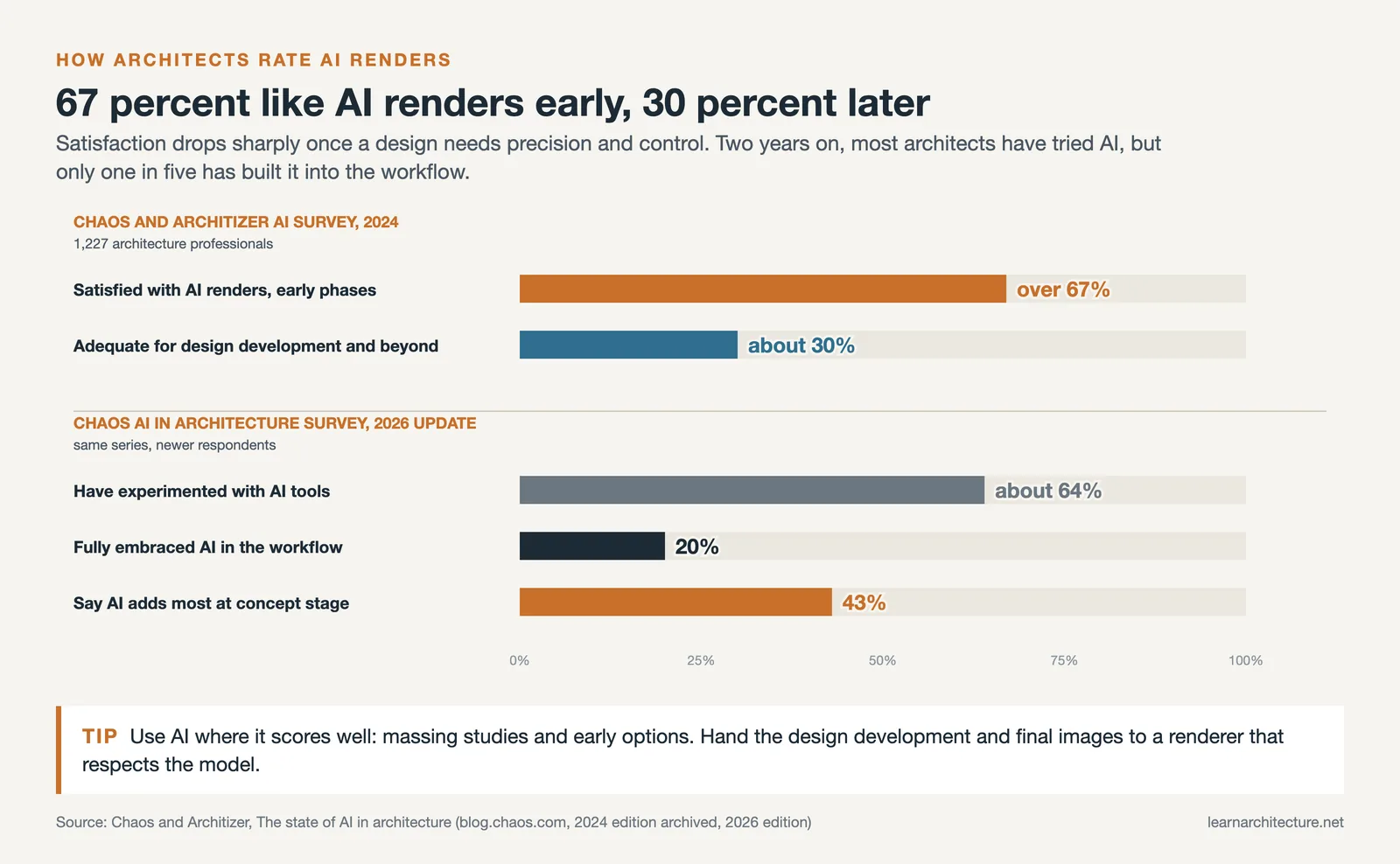
Concept presentations that once needed a visualization specialist can now be handled by the design team. According to a Chaos and Architizer survey of 1,227 architecture professionals, over 67% expressed satisfaction with AI renderings during initial design phases, though only 30% found them adequate for later stages.
Most firms benefit from a hybrid approach: AI for early concepts, traditional renderers for final marketing shots.

Best AI Tools for Architectural Visualization Compared
Quick Comparison Table
This table summarizes features across all 10 tools to help you match them with your workflow.
| Tool | Type | Best For | Software Integration | Free Option |
|---|---|---|---|---|
| Veras (Chaos) | BIM plugin | Design exploration inside BIM | Revit, Rhino, SketchUp, Archicad | Free trial |
| Midjourney | Text-to-image | Concept art and mood boards | Standalone (Discord/Web) | No |
| D5 Render | Real-time renderer | Fast photorealistic stills and video | Revit, SketchUp, Rhino, 3ds Max | Free community version |
| Stable Diffusion | Open-source image AI | Customizable architecture models | Local install or plugins | Yes (open-source) |
| MyArchitectAI | Sketch-to-render | Rapid client presentations | Browser-based (upload images) | 10 free renders |
| Enscape + AI Enhancer | Real-time renderer + AI | Everyday BIM visualization | Revit, SketchUp, Rhino, Archicad | Free trial |
| LookX AI | AI rendering assistant | Early-concept style iterations | Web-based | Limited free tier |
| PromeAI | Sketch-to-render | Sketch and diagram rendering | Browser-based | Free plan |
| Adobe Firefly | Generative AI | Textures, concepts, post-production | Photoshop, Illustrator | Free credits |
| Archicad AI Visualizer | BIM-native AI | Archicad users, design reviews | Archicad only | Free with Archicad preview |
BIM-Integrated AI Rendering Tools
These tools plug directly into your modeling software. They offer the strongest geometry control because they read your actual 3D model data.
1. Veras by Chaos
Veras connects to Revit, Rhino, SketchUp, Archicad, and Vectorworks through a plugin. You describe atmosphere, materials, and style via text prompts, and Veras applies those instructions to your model using diffusion-based AI. The Geometry Override Slider controls how much the AI deviates from your design, while Render Same Seed keeps iterations consistent.
Since early 2025, Veras has been part of the Chaos ecosystem alongside V-Ray and Enscape, making it a natural fit for firms already using AI-powered design software.

2. Enscape with Chaos AI Enhancer
Enscape is a staple in many architecture offices for real-time walkthroughs. The Chaos AI Enhancer, included for active subscribers, improves entourage asset quality (people, vegetation) through cloud-based AI processing. It also includes the AI Material Generator, which converts photographs into PBR-ready materials for direct scene application.
For firms using Enscape daily, the AI Enhancer adds polish without switching tools. Studios with RTX graphics cards see the most noticeable improvements.
3. Archicad AI Visualizer
Built on computational design technology, this native Archicad feature generates presentation-ready visuals from your live BIM model using prompt-based controls. Plan and section changes update automatically since everything stays within the Archicad environment. It ships free with the Technology Preview build and works best for design reviews rather than final marketing renders.
Standalone AI Rendering Platforms
These platforms operate independently of your modeling software. Upload images, sketches, or model screenshots and receive AI-generated renders back.

4. MyArchitectAI
MyArchitectAI converts CAD exports, sketches, and line drawings into photorealistic renders in under 10 seconds. The browser-based platform requires no local hardware. Style Transfer blends your design with reference images, and the AI editing mode applies material and lighting changes without full re-renders.
It suits smaller studios that need client-ready visuals quickly without a dedicated visualization team. New users receive 10 free renders.
5. LookX AI
LookX focuses on early-concept iteration. Upload reference images or massing model screenshots, and the AI generates styled variations. Features like Style Adapter and Vocab Template give control over AI interpretation, while a Prompt Assistant helps refine descriptions for architectural accuracy.
The trainable model is its distinguishing feature. You can upload precedent images to teach the system your preferred aesthetic, useful for firms with a consistent design language.
6. PromeAI
PromeAI transforms hand-drawn sketches, 3D model screenshots, and rough diagrams into detailed renders with selectable architectural styles. No installation required. It supports high-resolution output and background transparency for presentation boards. Results can be inconsistent with complex geometry, making it best suited for rapid ideation in the earliest design phases.
Text-to-Image AI Tools for Architecture
General-purpose image generators remain popular for concept art, mood boards, and visual brainstorming. They offer creative freedom at the cost of architectural precision.

7. Midjourney
Midjourney remains one of the most widely adopted ai tools for architectural visualization among design professionals. Its image quality has a distinctive artistic character suited for atmospheric concept renders, design visualization techniques, and style exploration.
The limitation is that outputs are disconnected from your actual model. Midjourney may alter proportions or introduce structural impossibilities. It requires a paid subscription and runs through a Discord or web interface.
8. Stable Diffusion
As an open-source alternative, Stable Diffusion offers the highest level of customization. Architects can train or use specialized model checkpoints tuned for architectural styles. Several architecture-specific plugins, including the Archicad AI Visualizer, are built on this technology. Firms working with parametric design workflows have found Stable Diffusion particularly useful for visualizing algorithmic forms.
Running it locally gives you full data privacy control and eliminates subscription costs, but it requires a powerful GPU and technical setup. For architects comfortable with configuration, it is one of the most flexible ai tools for rendering available.
9. Adobe Firefly
Adobe Firefly integrates into Photoshop and Illustrator through Generative Fill and other AI features. For architects, it is most useful in post-production: extending backgrounds, swapping materials, generating textures, and creating concept art from text prompts.
Because Firefly sits inside tools many architects already use for presentation boards, it adds AI capability without a new platform. Adobe offers free generative credits with Creative Cloud subscriptions.

Real-Time Rendering with AI Features
10. D5 Render
D5 Render combines GPU-accelerated real-time rendering with AI features: generated texture maps, an AI enhancer, style transfer, atmosphere matching, and inpainting. It syncs live with SketchUp, Revit, Rhino, 3ds Max, and Archicad.
A free Community version makes D5 accessible to students and freelancers. The Pro subscription unlocks over 13,000 assets. D5’s balance of speed, quality, and price has made it popular among small and mid-sized studios looking for a real-time rendering solution with built-in AI capabilities.
How to Choose the Right AI Tool for Your Practice
Selecting the best ai tools for architectural visualization depends on project stage, existing software, and output expectations.
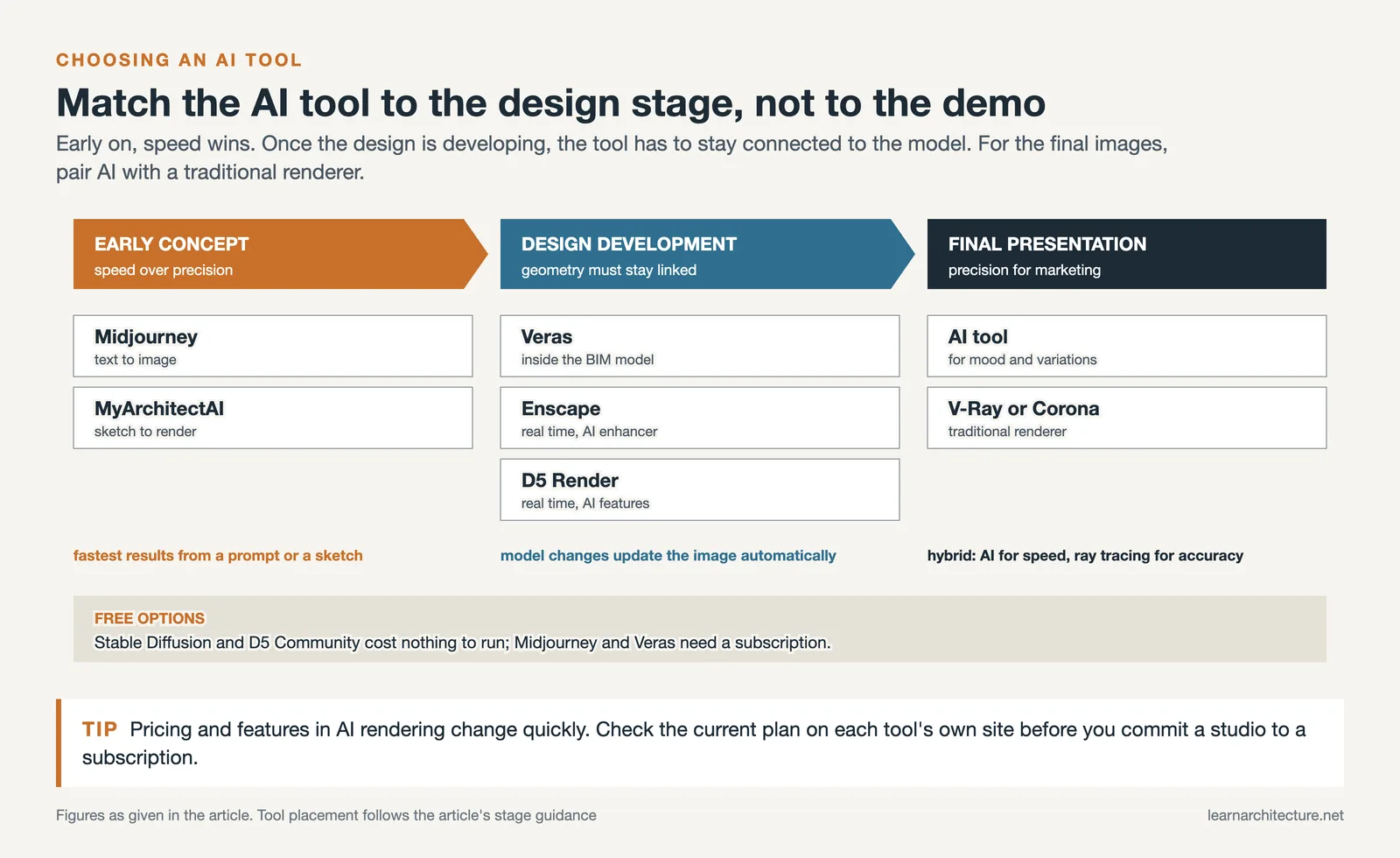
For early concept design, text-to-image tools like Midjourney or sketch-to-render platforms like MyArchitectAI deliver the fastest results. For design development, BIM-integrated options like Veras, Enscape, or D5 Render maintain geometry connection so model changes update automatically.
For final presentations, pair an AI tool with a traditional renderer like V-Ray or Corona. Many firms report this hybrid approach reduces visualization time while maintaining precision. Budget-wise, Stable Diffusion and D5 Community are free, while Midjourney and Veras require subscriptions. For a broader overview of modeling tools that pair well with these AI renderers, see our guide to AI rendering tools for architects.
Pricing and feature availability for AI rendering tools change frequently as these platforms evolve. Always verify current plans on the official websites before committing to a subscription.

FAQ
What is the best AI tool for architecture rendering in 2026?
Veras is the top choice for BIM-connected workflows in Revit or Rhino. For standalone concept art, Midjourney produces the most atmospheric results. Your choice depends on whether you need model-linked output or free-form visual exploration.
Can AI replace traditional architectural rendering software?
Not yet for final production. AI excels at concept-stage visuals and rapid iteration, but most firms still rely on V-Ray or Corona for marketing-quality deliverables. A hybrid workflow is the current industry standard.
Are there free AI rendering tools for architects?
Yes. Stable Diffusion is open-source and free. D5 Render has a free Community version. PromeAI and Adobe Firefly offer limited free tiers. MyArchitectAI provides 10 complimentary renders to new users.
How accurate are AI-generated architectural renders?
BIM-integrated tools like Veras maintain geometric accuracy by referencing your model. Text-to-image tools like Midjourney can produce structural impossibilities, making them better suited for mood and concept rather than documentation.
- ai rendering tools for architects
- ai tool for architecture rendering
- ai tool for rendering
- ai tools for architectural visualization
- ai tools for architectural visualization 2025
- ai tools for architecture visualization
- ai tools for rendering
- best ai tools for architectural visualization
- best ai tools for architectural visualization 2026







Leave a comment