


Table of Contents Show
YouTube channels for architecture visualization have become one of the most reliable ways for students and practicing designers to learn rendering, modeling, and post-production skills outside the classroom. The best channels combine free tutorials with industry-grade techniques, covering software like Lumion, V-Ray, D5 Render, Enscape, and SketchUp through projects you can actually replicate.
Architectural visualization sits at the intersection of design thinking, software fluency, and visual storytelling. Schools rarely teach all three with the depth that practice demands. That gap is exactly why a small group of YouTube creators have built audiences in the hundreds of thousands among architects, students, and 3D artists. The channels listed below are the ones that consistently produce useful, watchable content rather than reposted asset showcases or thin product demos.
Below you will find eight architecture YouTube channels worth subscribing to right now, organized by what they do best. Whether you are trying to render your first studio project, refine a portfolio piece, or learn an entirely new render engine, the right channel can shorten the learning curve dramatically.
What Makes a YouTube Channel Worth Following for Architecture Visualization?
A useful architecture YouTube channel does more than upload finished renders set to music. The strongest channels share repeatable workflows, explain the reasoning behind each step, and update content as software evolves. When evaluating which channels deserve a place in your subscription feed, weigh four factors: software coverage, teaching style, project realism, and update frequency.
Software coverage matters because most architecture studios use a combination of tools rather than a single render engine. Channels that cover SketchUp paired with Enscape, Revit with V-Ray, or Rhino with D5 Render reflect how real practices actually operate. Teaching style separates a quick demo from genuine instruction. The best creators slow down on lighting, materials, and composition, which are the elements that distinguish a portfolio render from a screenshot.
Project realism is also worth weighing. Tutorials based on a small interior or a single facade are easier to follow than ambitious masterplan renders, but you still want enough scope that the techniques transfer to your own work. Update frequency is the final factor. Render engines like Lumion and D5 release major updates yearly, and channels that keep pace stay relevant much longer than those that go quiet. If you are still deciding which engine to focus on first, the focused guide to Lumion visualization essentials for architects on this site is a good starting point.
💡 Pro Tip
When building a YouTube learning playlist, group videos by software rather than by creator. Watching three different artists tackle the same task in V-Ray, for instance, exposes you to multiple workflows and helps you spot which technique fits your project. A common mistake is following one channel exclusively, which can lock you into a single visual style early on.

Best YouTube Channels for Architecture Visualization
The eight channels below cover the spectrum of what architecture visualization demands today: real-time rendering, photoreal stills, post-production, and conceptual representation. Each is run by either a practicing architect, a visualization studio, or a dedicated rendering instructor, and each has built a substantial audience among architecture students and professionals.
1. Show It Better
Founded in 2016 by Bogota-based architect Steven Rubio, Show It Better focuses on architectural representation across rendering, diagramming, collage, and portfolio design. The channel teaches techniques in Photoshop, Lumion, Enscape, SketchUp, and increasingly D5 Render, with an emphasis on visual storytelling rather than software mechanics alone. Tutorials cover everything from adding fog and atmosphere to rendered scenes to building presentation boards in InDesign. Rubio has also collaborated directly with Chaos on tutorials covering Enscape and V-Ray workflows, which adds a layer of vendor-grade technical accuracy to his content.
What sets Show It Better apart is how seriously it treats the post-production stage. Many channels stop the moment the render finishes. Rubio routinely walks through the Photoshop layering, color grading, and scene composition that turn a flat render into a portfolio piece. The channel also features regular portfolio reviews and short student-facing advice clips, which makes it especially useful for those still in school.
For an introductory look at the channel’s teaching style, the Show It Better D5 Render walkthrough below covers the full beginner workflow from import to final animation in roughly 35 minutes.
Video: Show It Better D5 Render Beginner Tutorial
Steven Rubio takes you step-by-step through the entire D5 Render interface, including materials, lighting, vegetation, AI atmosphere matching, and how to render both still images and animations. It is one of the cleanest beginner walkthroughs of D5 Render currently available on YouTube. For a deeper analysis of the software itself, including pricing tiers and a feature comparison against Lumion and Enscape, the in-depth D5 Render review on this site is worth pairing with the video.
2. Upstairs
Upstairs, founded by Brazilian architect Oliver Uszkurat, has grown into one of the largest architectural representation channels on YouTube, with more than 400,000 subscribers as of 2026. The channel publishes short, focused tutorials covering rendering, post-production, and visualization techniques across multiple render engines, including Lumion, Twinmotion, V-Ray, and D5 Render.
Uszkurat is particularly known for his render battles, side-by-side comparisons of how the same scene looks across different render engines. These videos are worth watching even if you are not planning to switch software because they expose how lighting, material handling, and post-production differ between tools. The channel covers Lumion in particular depth, alongside Twinmotion, V-Ray, and D5 Render. Composition, perspective sections, and adding imperfections like dirt and weathering to renders are recurring themes, which are exactly the details that separate amateur output from professional work.
Beyond YouTube, Upstairs runs a structured learning platform at learnupstairs.com with paid courses for those who want a more linear curriculum. The free YouTube content alone, however, covers most of what an architecture student needs to start producing portfolio-grade visualizations.
3. The Rendering Essentials
Run by Justin Geis, The Rendering Essentials is the sister channel to The SketchUp Essentials and focuses entirely on producing 3D renderings from SketchUp models using tools like V-Ray, Lumion, Enscape, Twinmotion, and Unreal Engine. The format is methodical, with short tutorials that break down a single technique or feature at a time, which makes the channel especially useful for beginners building skills incrementally.
Geis covers practical workflow questions that most other channels skip, such as how to set up PBR materials correctly, when to use Megascans assets in Twinmotion, and how to migrate a SketchUp scene cleanly into Enscape. The pacing is unhurried, the audio is clear, and the screen captures are easy to follow even for someone who has never opened a render engine before.
📌 Did You Know?
According to the 2024/25 State of Architectural Visualization report by Chaos and Architizer, 56% of design professionals now actively use AI tools in their visualization workflows. Many of the YouTube channels covered here have started integrating AI rendering tutorials, particularly for tools like D5 Render’s AI Atmosphere Match and the Lumion Material Generator, into their regular content.
4. Arch Viz Artist
Arch Viz Artist, co-founded by Polish 3D artist Agnieszka Klich, is the channel to follow for high-end interior and exterior visualization in 3ds Max with Corona Renderer or V-Ray. The tutorials are noticeably more advanced than most others on this list, often demonstrating animation pipelines, parametric modeling with RailClone, and detailed material setups for close-up shots.
The channel pairs well with the paid courses at archvizartist.com, which include the Visualization Course, Animation Course, and Advanced Interior Visualizations. The free YouTube content alone covers enough ground to get a 3ds Max user comfortable with both Corona and V-Ray workflows. If your career path leans toward freelance archviz work or a studio specializing in photorealistic stills, this channel is essential.
5. Arqui9 Visualisation
Arqui9 Visualisation is the YouTube arm of the London-based studio founded by Pedro Fernandes. The channel is one of the longest-running dedicated archviz education resources, with a library of tutorials going back to 2014. The teaching philosophy is summed up by their tagline, “do it in post,” which reflects how heavily Fernandes leans on Photoshop and matte painting techniques to push images beyond what raw 3D software produces.
Topics span composition, color theory, mood and atmosphere, value sketching, and matte painting, alongside more practical tutorials on rendering plans, sections, and animations. Arqui9 is less interested in software mechanics and more focused on the artistic side of image-making, which makes it a strong complement to channels like The Rendering Essentials. The studio has worked with clients including Zaha Hadid, BIG, and Heatherwick, so the techniques shown reflect industry-standard practice.
📐 Technical Note
When following YouTube tutorials in render engines like Lumion or D5 Render, check the version shown in the video against your installed software. Render engines update frequently, and interface changes between versions can break the workflow shown on screen. As a baseline, Lumion 2024 requires a DirectX 12 capable GPU with at least 6 GB of memory, 16 GB of RAM (32 GB recommended), and SSD storage for smooth performance.

6. Alex Hogrefe (Visualizing Architecture)
Alex Hogrefe’s YouTube channel is the video extension of his blog Visualizing Architecture, which he launched while a graduate student at Miami University of Ohio in 2009. Hogrefe is unusual among visualization educators in that he uses a relatively simple toolset, primarily SketchUp paired with V-Ray and an extremely heavy Photoshop workflow, to produce some of the most distinctive architectural illustrations on the web.
The channel is smaller than others on this list and updates less frequently, but the content is timeless. Topics include site analysis diagrams, exploded axonometrics, snowy and night-time scenes, ambient occlusion shading without a render engine, and the conversion of basic SketchUp exports into atmospheric portfolio images. For students who want to build a recognizable graphic style rather than chase photorealism, Hogrefe’s approach is a strong alternative.
7. Adam Z: Learn ArchViz
Adam Z runs the Learn ArchViz channel, which doubles as a YouTube companion to the website learnarchviz.com. The focus is firmly on the 3ds Max plus V-Ray pipeline, with detours into Unreal Engine, Marvelous Designer, Substance Designer, Quixel Megascans, and Forest Pack Pro. This is the channel for someone whose career goal is professional archviz at a studio, where 3ds Max remains the dominant DCC and V-Ray remains the dominant offline renderer.
Tutorials cover both fundamentals (lighting setup, material creation, camera composition) and advanced topics like real-time visualization in Unreal Engine 4. The website hosts more in-depth paid courses, but the free content alone gives a solid foundation. Pair this channel with Arch Viz Artist if you want two different teaching voices on the same toolset.

8. Architecture Inspirations (Minh Pham)
Architecture Inspirations, run by Minh Pham, focuses on architectural rendering and visualization tips, with substantial coverage of Enscape, SketchUp, and Photoshop post-production. The channel sits in the Macro tier with around 315,000 subscribers, and it tends to attract an audience of students and early-career architects looking for fast, applicable techniques.
One of the channel’s strengths is its work on materials, particularly realistic wood, glass, and concrete in Enscape, plus practical tutorials on building atmosphere through lighting and scene composition. The presentation is calm and unhurried, and the videos are short enough to consume during a coffee break, which is part of why the channel has grown steadily since 2016.
How to Choose the Right YouTube Channel for Your Software Stack
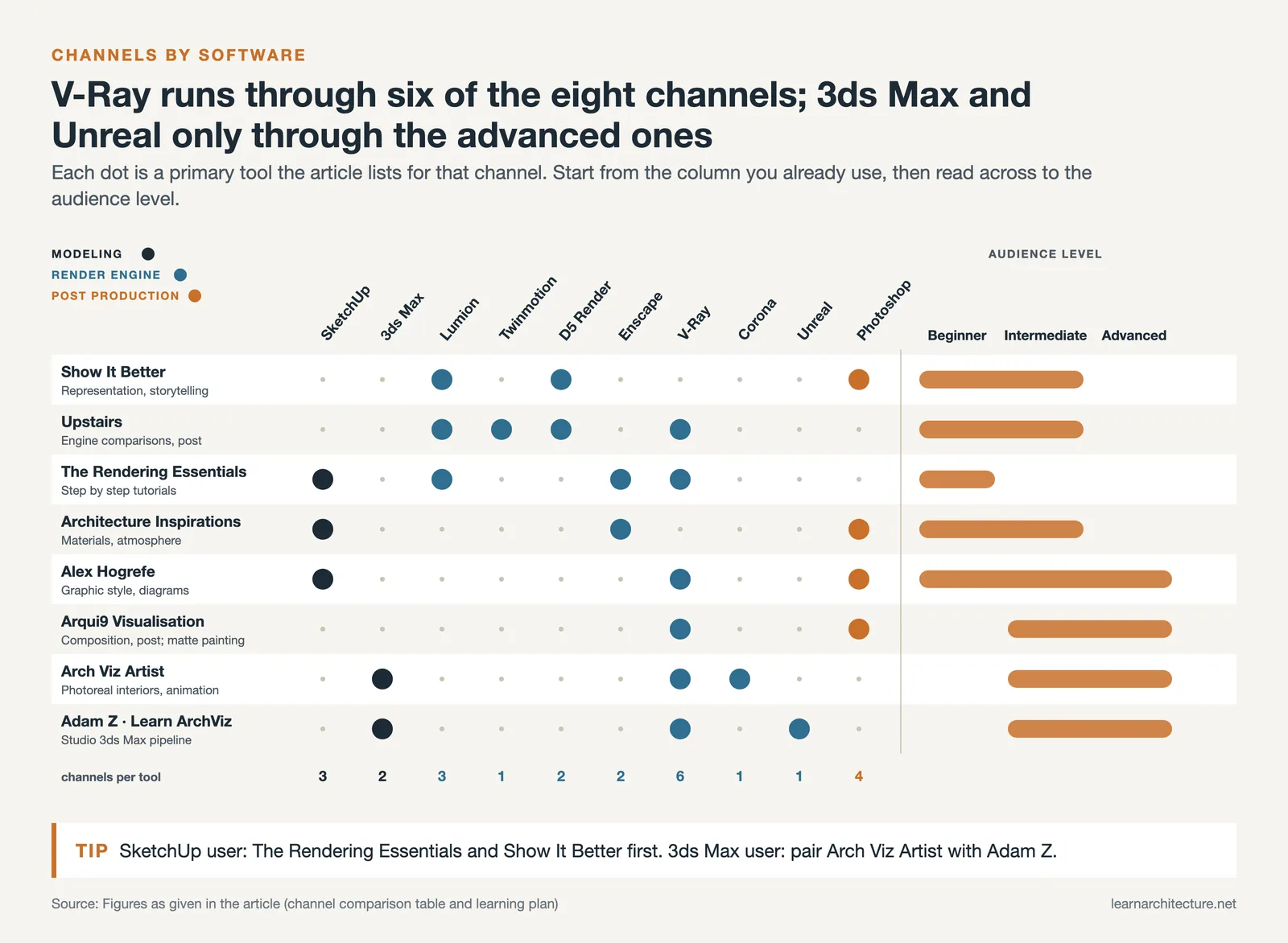
Picking the right channel depends on what you already use and what you are trying to learn. The table below maps the eight channels above to their primary software focus, audience level, and core strength so you can match them to your current workflow.
Comparison Table: Architecture YouTube Channels by Software and Strength
| Channel | Primary Software | Audience Level | Core Strength |
|---|---|---|---|
| Show It Better | Lumion, Photoshop, D5 Render | Beginner to intermediate | Representation and storytelling |
| Upstairs | Lumion, Twinmotion, D5 Render, V-Ray | Beginner to intermediate | Render engine comparisons and post |
| The Rendering Essentials | SketchUp, V-Ray, Enscape, Lumion | Beginner | Step-by-step software tutorials |
| Arch Viz Artist | 3ds Max, Corona, V-Ray | Intermediate to advanced | Photoreal interiors and animations |
| Arqui9 Visualisation | Photoshop, V-Ray, matte painting | Intermediate to advanced | Composition and post-production |
| Alex Hogrefe | SketchUp, V-Ray, Photoshop | All levels | Distinct graphic style and diagrams |
| Adam Z: Learn ArchViz | 3ds Max, V-Ray, Unreal Engine | Intermediate to advanced | Studio-grade 3ds Max pipeline |
| Architecture Inspirations | Enscape, SketchUp, Photoshop | Beginner to intermediate | Materials and scene atmosphere |
If you are still in school and using SketchUp as your primary modeling tool, start with The Rendering Essentials and Show It Better. If you have moved to a 3ds Max workflow, Arch Viz Artist and Adam Z’s Learn ArchViz are the strongest pair. For everyone, Arqui9 and Alex Hogrefe are worth following for the artistic perspective they bring on top of whatever software you happen to use.
How to Build a Learning Plan from These Architecture YouTube Channels
A subscription list does little on its own. The students who actually improve their visualization skills tend to follow a simple rhythm: pick one render engine, watch one full beginner tutorial end to end, then replicate the workflow on their own studio model before moving on. Learning by browsing rarely works.
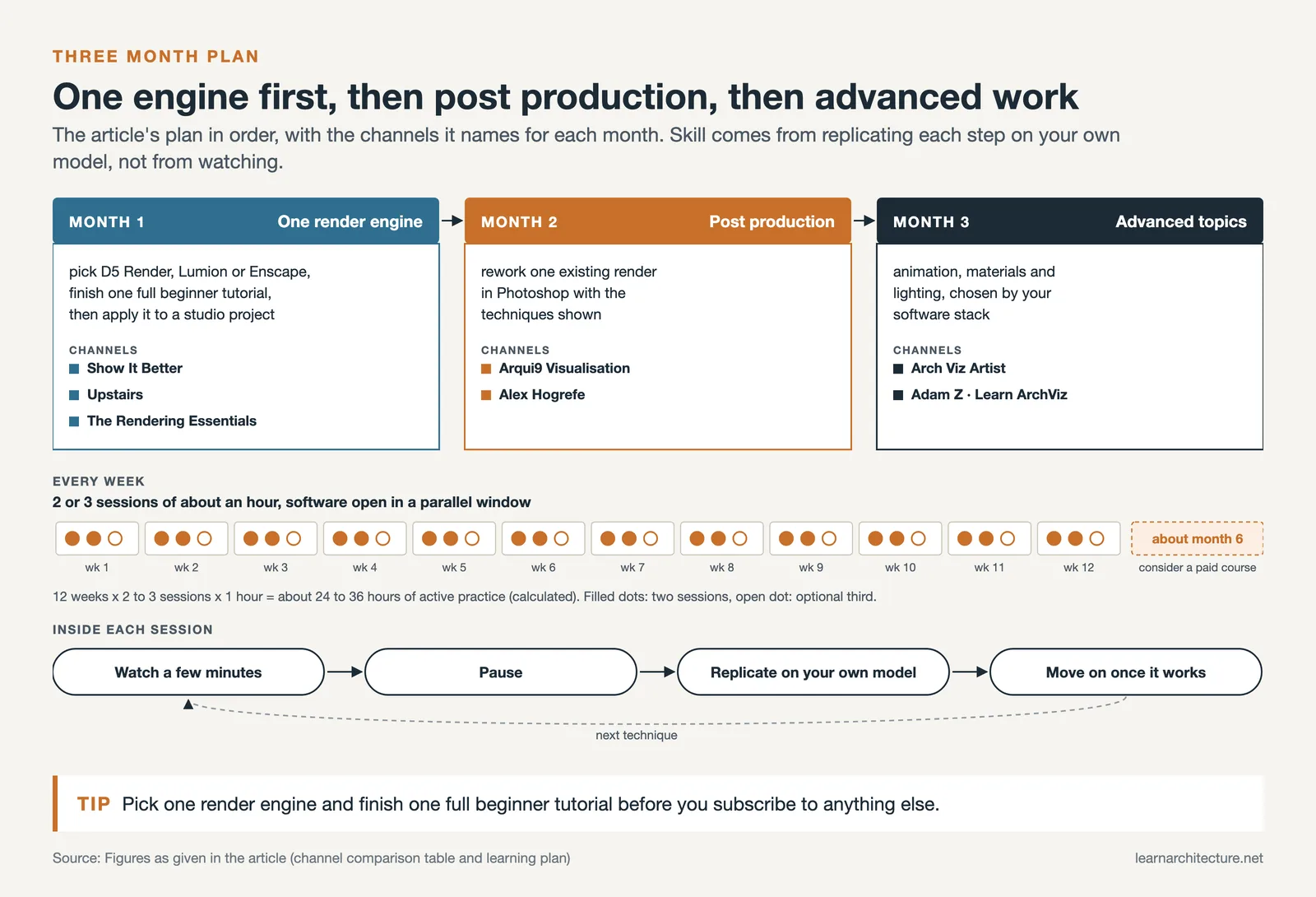
A reasonable three-month plan might look like this. In month one, focus on a single render engine like D5 Render, Lumion, or Enscape, and complete a full beginner tutorial from Show It Better, Upstairs, or The Rendering Essentials. Apply the workflow to a current studio project. In month two, study post-production by watching Arqui9 and Alex Hogrefe tutorials and rework one of your existing renders in Photoshop using the techniques shown. In month three, move on to advanced topics like animation, materials, and lighting, drawing from Arch Viz Artist or Adam Z’s channel depending on your software stack.
Throughout this process, keep notes on what works for your particular projects rather than treating every tutorial as a checklist. The goal is to build a personal library of techniques you trust under deadline, not to master every tool any creator has ever covered.
⚠️ Common Mistake to Avoid
Many students binge tutorials without ever opening their software in parallel. Watching a full Lumion course passively builds almost no usable skill. The reliable approach is to pause every few minutes, replicate the step on your own model, and only move on once the technique works in your scene. Architecture visualization is a craft skill, and it improves through repetition rather than through hours of watching.

Why YouTube Beats Most Other Free Architecture Visualization Resources
YouTube is not the only free resource available to architecture students learning visualization. Render engine vendors all maintain extensive documentation, official tutorial libraries, and active community forums. Software-specific blogs, vendor case studies, and architecture publications also publish technical articles regularly.
YouTube wins for two reasons. The first is pacing. Watching an architect actually use a tool, narrate the choices, and respond to mistakes in real time conveys workflow knowledge that written documentation simply cannot. The second is breadth. The same project rendered by three different YouTubers exposes you to three distinct philosophies of light, material, and composition, which builds visual judgment far faster than reading a single style guide. Mainstream architecture publications like ArchDaily regularly publish written tutorials and case studies that complement the YouTube content well.
That said, YouTube has limits. Algorithm-driven discovery surfaces popular content but can hide more advanced channels that publish less frequently. Older tutorials may show outdated software interfaces. And there is a real ceiling to free content. At some point, structured paid courses from creators like Arch Viz Artist or Upstairs deliver a more linear curriculum than scattered tutorials can. For a complementary overview before committing to a specific render engine, the architectural visualization tools and workflow guide on this site is a useful read.
✅ Key Takeaways
- The best YouTube channels for architecture visualization combine genuine teaching with practical project workflows, not just finished render reels.
- Match the channel to your software stack: SketchUp users should start with Show It Better and The Rendering Essentials, while 3ds Max users benefit more from Arch Viz Artist and Adam Z’s Learn ArchViz.
- Channels like Arqui9 and Alex Hogrefe focus on composition and post-production, which strengthen any rendering workflow regardless of the engine you use.
- Use YouTube tutorials as active practice sessions rather than passive videos. Replicate every workflow on your own studio model to build durable skills.
- Free YouTube content has limits. After roughly six months of structured self-study, paid courses from these same creators tend to deliver faster progress than scattered tutorials.
Final Thoughts on Choosing the Best YouTube Architecture Channels
The eight YouTube architecture channels covered here represent the strongest free education currently available for visualization, ranging from beginner SketchUp plus Enscape workflows up through advanced 3ds Max plus Corona pipelines. The right starting point depends on the software your studio or program uses, but the long-term goal is the same: building a personal visual style and a reliable workflow that produces portfolio-grade images under deadline.
Subscribe to two or three channels rather than ten. Consume them actively, alongside your own software open in a parallel window. And revisit the comparison table above whenever your software stack changes, because the channel that suited you as a SketchUp beginner is rarely the same one you will rely on three years into a 3ds Max career.
Frequently Asked Questions
What is the best YouTube channel for architecture students learning visualization?
For architecture students just starting out with visualization, Show It Better and The Rendering Essentials are the strongest entry points. Both teach in clear, step-by-step formats and cover beginner-friendly software combinations like SketchUp with Enscape or D5 Render. Show It Better also covers diagrams, portfolio design, and presentation boards, which makes it useful beyond pure rendering.
Which YouTube channel is best for learning V-Ray and 3ds Max?
Arch Viz Artist and Adam Z’s Learn ArchViz are the two strongest channels for the 3ds Max plus V-Ray pipeline. Arch Viz Artist focuses heavily on photoreal interiors and animation, while Learn ArchViz covers a wider toolset including Unreal Engine, Marvelous Designer, and Substance. Pairing both gives you two distinct teaching voices on the same software stack.
Are these YouTube tutorials enough to replace a paid visualization course?
Free YouTube tutorials can take you from absolute beginner to producing decent portfolio renders, particularly if you stay disciplined about replicating workflows. However, structured paid courses from creators like Arch Viz Artist, Upstairs, or Show It Better deliver a more linear curriculum and tend to compress months of scattered self-study into a few weeks. Most architects benefit from starting on YouTube, then investing in one targeted paid course once they know which software they want to specialize in.
How often should I watch architecture visualization YouTube videos?
Treat YouTube as a working tool rather than a content stream. A useful rhythm is two or three focused sessions per week, each lasting around an hour, with the relevant software open in a parallel window. Consistent active practice over three to six months builds far more skill than passive binge-watching, regardless of how many channels you subscribe to.
- architectural youtube channel
- architecture channels on youtube
- architecture youtube channels
- best architecture channels on youtube
- best architecture youtube channels
- best youtube architecture channels
- best youtube channel for architecture
- best youtube channel for architecture students
- top architecture youtube channels
- youtube architecture channels











Leave a comment