


Table of Contents Show
AI tools for architecture have changed what a solo student or a small firm can accomplish in 48 hours. When a competition brief drops, the bottleneck is rarely ideas; it’s turning those ideas into convincing visuals, coherent diagrams, and polished presentation boards before the clock runs out. The right AI rendering and design software can compress days of work into hours without sacrificing the output quality that juries expect.

Why Architecture Competitions Demand a Different Workflow
Standard project timelines allow iteration. Competition timelines do not. You might have three to ten days from brief release to submission, which means every step in your workflow (concept sketching, 3D modeling, rendering, layout) needs to run as efficiently as possible. Traditional rendering pipelines break down under this pressure. Setting up a V-Ray scene from scratch, configuring lighting, and waiting through multi-hour render queues simply doesn’t fit when you’re also writing a design narrative and producing technical drawings at the same time.
AI tools address this mismatch directly. AI architectural rendering platforms can take a rough SketchUp model or even a hand sketch and return a photorealistic image in seconds. Concept generators can help you explore ten spatial ideas in the time it used to take to model one. The tools covered here are organized by where they fit in the competition workflow, from early concept through final board layout.
💡 Pro Tip
Before you open any AI tool, spend 30 minutes mapping your competition timeline backward from the submission deadline. Assign specific output targets to each day (for example, concept visuals by day two, developed renders by day four). This prevents the common trap of spending too long on early-stage exploration and then rushing the final boards.
🔢 Quick Numbers
- 56% of design professionals now actively use AI tools in their workflows (Chaos and Architizer State of Architectural Visualization Report, 2024/25)
- Over 67% of architecture professionals reported satisfaction with AI renderings during initial design phases (Chaos and Architizer survey of 1,227 professionals, 2024/25)
- AI adoption excitement among firms rose 20% compared to 2024, with 11% already integrating AI into design processes (Architizer and Chaos survey, 2025)

The 7 Best AI Tools for Architecture Competitions in 2026
Each tool below is selected for a specific role in a competition workflow. Using all of them at once would be counterproductive; the goal is knowing which one to reach for at each stage.
1. Midjourney: Concept Mood and Visual Direction
Midjourney remains the go-to tool for establishing visual character early in a competition. When you have a brief but no clear design language yet, generating 20 atmospheric concept images from text prompts takes minutes. This is not about geometric accuracy at this stage. Midjourney excels at producing evocative images that help you and your team agree on mood, materiality, and spatial feeling before committing to a 3D model. According to the learnarchitecture.net guide on AI tools for architectural visualization, Midjourney’s output has a distinctive artistic quality suited for atmospheric concept renders and style exploration, though it can introduce structural impossibilities, making it best suited to early ideation rather than documentation.
For competitions, use it to generate hero mood images for your narrative board. These can run alongside, not instead of, your actual design geometry.

2. Veras: AI Rendering Directly Inside Your BIM Model
Veras plugs into Revit, Rhino, SketchUp, Archicad, and Vectorworks. You describe atmosphere, materials, and style through text prompts, and the AI applies those instructions to your actual 3D model geometry. The Geometry Override Slider controls how much the AI deviates from your design, a critical feature for competition work where you need images that actually represent your proposal. Since early 2025, Veras has been part of the Chaos ecosystem, sitting alongside V-Ray and Enscape.
For competition use, Veras is strongest in the developed-design phase when you have a working model and need multiple rendered views quickly without leaving your modeling environment. The Render Same Seed function keeps iterations visually consistent, which matters when you’re producing a series of images for a board layout.
3. MyArchitectAI: Fast Iteration Without Heavy Hardware
MyArchitectAI runs entirely in the browser. You upload a screenshot or export from any CAD software, optionally describe the aesthetic, and the platform handles modeling, texturing, and lighting. No GPU required on your end. This makes it particularly useful for competition teams where not everyone has a workstation capable of running V-Ray or Lumion at speed.
The platform is cloud-based and returns output up to 4K resolution. Users report that it delivers approximately 90% of the quality of traditional rendering in 10% of the time, which precisely matches what competition timelines demand. For more on how AI rendering tools like this fit into a broader design workflow, see the full breakdown on AI rendering tools in architectural design.

4. D5 Render: Real-Time Rendering for Developed Designs
D5 Render connects directly to SketchUp, Revit, Rhino, Blender, 3ds Max, Cinema 4D, Archicad, and Vectorworks, preserving materials, cameras, and lights with live synchronization. Changes in your model update in D5 in real time, eliminating the export-import cycle that kills time on deadline days. For complex scenes on an RTX 3060 or better, D5 achieves around 30 frames per second during navigation while one-click 4K stills often render in under two minutes, according to 2024/25 benchmarks.
D5 is the strongest choice when your competition entry has reached a developed stage and you need presentation-quality exterior and interior views with accurate daylighting. Its GEO and Sky mode simulates realistic sun and sky conditions based on location and time, which is useful when a competition brief specifies a real site.
⚠️ Common Mistake to Avoid
Many competition entrants default to a single AI rendering tool for every task. Text-to-image tools like Midjourney are not suited for producing accurate views of your actual design; they will invent details that don’t exist. Use them for concept mood boards only, and switch to a BIM-connected platform like Veras or D5 Render once you have a working model. Mixing up these roles is one of the most common workflow errors in competition submissions.
5. PromeAI: Sketch-to-Render for Early Concepts
PromeAI converts hand-drawn sketches or rough wireframe views into photorealistic images. According to ArchDaily’s coverage of AI rendering workflows, PromeAI provides fast and highly controllable architectural image rendering, designed specifically to address common bottlenecks at the concept phase. Tasks that previously took hours or days (converting sketches to coherent rendered images) can be completed in minutes.
This makes PromeAI particularly valuable in the first 24 hours of a competition when you want to visualize spatial ideas before committing to a full 3D model. Upload a sketch, adjust style parameters, and iterate until the direction is clear. You can explore more on how AI is reshaping architecture at both concept and production stages.

6. Stable Diffusion: Customizable Rendering for Technical Users
Stable Diffusion is open-source and free to run locally. Architects comfortable with technical setup can train or use model checkpoints tuned specifically for architectural styles and output types. Several architecture-specific plugins, including the Archicad AI Visualizer, are built on this platform. Running it locally gives full data privacy control and eliminates subscription costs, relevant for university-sponsored competitions where commercial tool licenses may be restricted.
For parametric or computationally generated designs, Stable Diffusion is particularly flexible. You can define very specific visual parameters that generic platforms don’t expose. The tradeoff is that setup time is significant and a capable GPU is required.
7. Adobe Firefly (via Photoshop Generative Fill): Board Layout and Post-Production
Adobe Firefly’s integration into Photoshop’s Generative Fill feature has become a practical tool for competition board finishing. Adding entourage, extending skies, filling in landscape context, adjusting material colors in rendered images (tasks that used to require significant manual Photoshop work) can now be completed through text-prompt-driven fill commands. Firefly offers a limited free tier, and most architecture students and professionals already have Photoshop access.
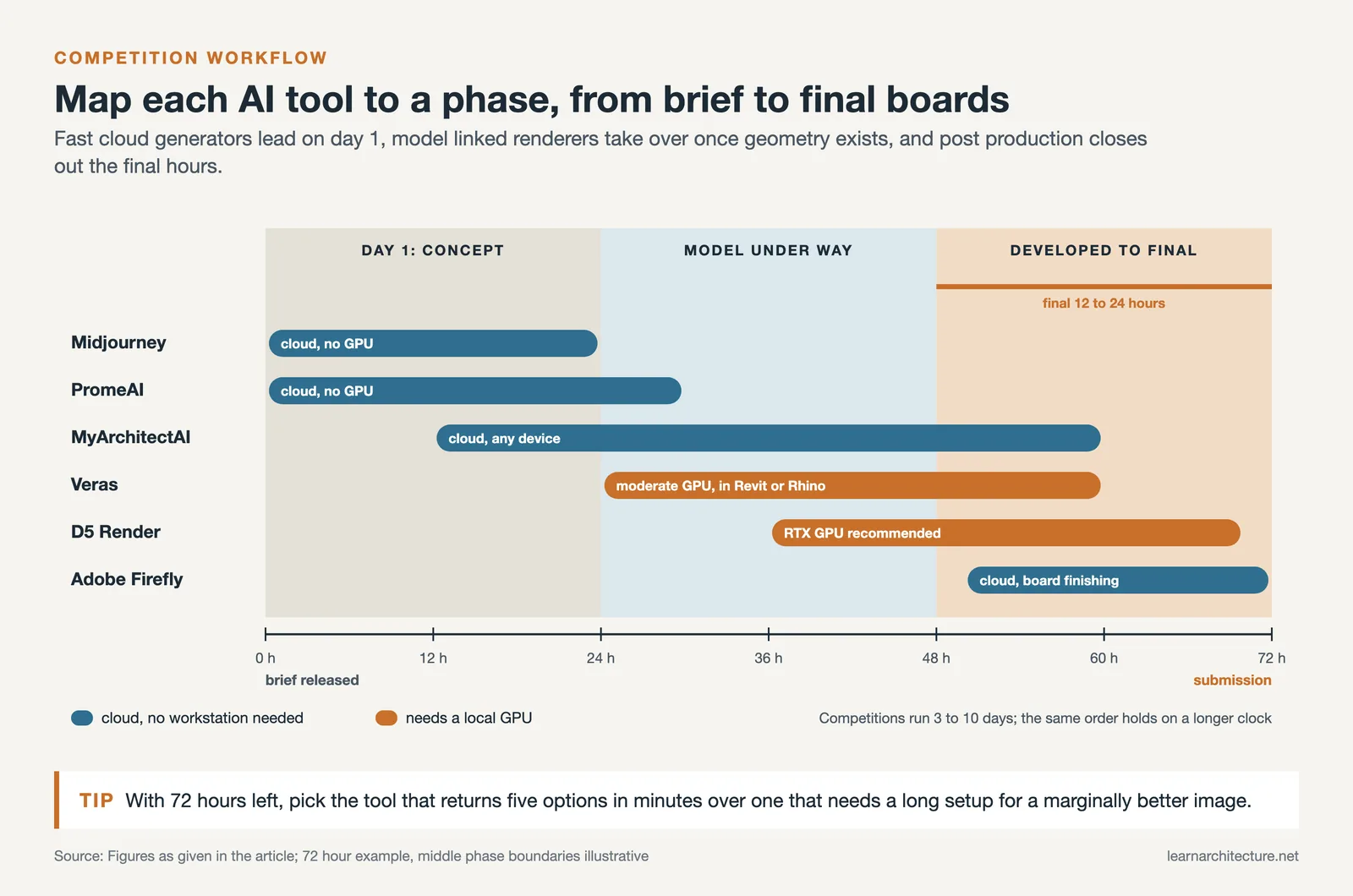
Use it in the final 12 to 24 hours of a competition to polish your rendered images before placing them on boards. It is not a rendering tool in itself, but as a post-production step it materially improves the finished quality of images that came out of your primary rendering pipeline.
💡 Pro Tip
When using Midjourney or Stable Diffusion for presentation boards, always place your actual floor plans, sections, or axonometric drawings alongside the AI-generated visuals. This anchors the jury’s reading in your real design geometry and prevents attention from drifting to invented details in the atmospheric images.

How to Choose the Right AI Rendering Tool for Your Competition
The decision comes down to three variables: the stage of your design, your hardware setup, and how much geometric accuracy the output requires.
Workflow Stage Matching
If you are in the first day of a competition and exploring spatial concepts, Midjourney and PromeAI give you the fastest return. Once you have a 3D model underway, Veras and MyArchitectAI can start generating model-linked renders. For final presentation-quality images with complex lighting, D5 Render is the strongest option in the mid-to-large project category, while MyArchitectAI covers smaller-scale or faster-turnaround needs with less hardware dependency. For anyone working on AI-powered design software more broadly, the overview of AI-powered architecture design software provides useful context on how these tools have evolved.
What to Prioritize When Time Is the Constraint
With 72 hours to submission, speed of iteration matters more than absolute image quality. A tool that gives you five render options in 10 minutes is more useful than one that produces a marginally better result after 45 minutes of setup. This is where cloud-based platforms like MyArchitectAI and PromeAI outperform heavier local rendering engines in a competition context, even if those engines might win on pure output quality for a standard project with a longer timeline.
🎓 Expert Insight
“Architects and designers now have access to more advanced and precise tools that optimize both conceptualization and design processes. Tasks that used to take hours or even days can now be completed in minutes, achieving photorealistic visuals from the earliest stages of design.”
ArchDaily editorial, March 2025 (covering PromeAI workflows)
This shift is particularly significant for competitions, where the gap between concept and presentation-ready visual has historically been one of the biggest time costs in the workflow.

AI Rendering Tools for Architecture Competitions: Feature Comparison
The table below summarizes how each tool maps to competition workflow needs:
| Tool | Best For | Competition Stage | Hardware Required |
|---|---|---|---|
| Midjourney | Mood, atmosphere, style exploration | Day 1 concept | None (cloud) |
| PromeAI | Sketch-to-render, early visualization | Early concept | None (cloud) |
| MyArchitectAI | Fast iteration, any device | Concept to developed | None (cloud) |
| Veras | BIM-connected rendering in Revit/Rhino | Developed design | Moderate GPU |
| D5 Render | Real-time, final-quality renders | Developed to final | RTX GPU recommended |
| Stable Diffusion | Custom, open-source, parametric use | Any stage | Capable GPU required |
| Adobe Firefly | Post-production, board finishing | Final 12-24 hours | None (cloud) |
Where AI Rendering Fits in Architecture Competition Submissions
It’s worth being clear about what AI rendering does and does not replace in a competition submission. Juries evaluate spatial thinking, programmatic resolution, and design coherence, none of which an AI tool provides. What AI architecture rendering replaces is the production time cost of translating good design thinking into compelling visual communication.
The architecture competition landscape has shifted accordingly. According to the 2024/25 State of Architectural Visualization report by Chaos and Architizer, while 67% of professionals were satisfied with AI rendering quality at initial design phases, only 30% considered it adequate for later stages. This reinforces a hybrid approach: AI tools at concept and iteration stages, with traditional or semi-traditional methods for final submission-quality output where jury expectations are highest.
For a broader understanding of how the profession is integrating these platforms, the guide on AI in architecture covers the full scope of applications from design generation through project management.
✅ Key Takeaways
- Match your AI tool to the workflow stage: text-to-image generators for concept mood, BIM-connected plugins for developed designs, cloud renderers when hardware is the bottleneck.
- Midjourney and PromeAI are fastest for early concept visualization but should not represent your actual design geometry; always pair them with real plans and sections.
- D5 Render and Veras offer the strongest model-linked output for developed designs, with live sync eliminating the export-import cycle that wastes hours on deadline days.
- Cloud-based tools like MyArchitectAI and PromeAI level the playing field for teams without high-end GPU workstations.
- AI rendering tools handle visualization speed; they do not replace the design thinking, spatial resolution, and concept clarity that competition juries actually evaluate.








Leave a comment