


Table of Contents Show
AI rendering refers to the use of artificial intelligence to generate photorealistic architectural visuals from 3D models, sketches, or text prompts, often in seconds rather than hours. As firms of every size integrate these tools into their workflows, the ability to produce quality AI architectural renderings is fast becoming a baseline expectation rather than a specialist skill.
Why AI Rendering Is Changing the Profession

For most of architectural history, producing a convincing rendered image meant significant investment: hours of manual modeling, lighting setup, material assignment, and post-production work. That pipeline still exists, but AI rendering software has carved out a parallel track that is faster, cheaper, and accessible to practitioners without deep rendering expertise.
According to the 2024/25 State of AI in Architecture report by Chaos and Architizer, 86% of more than 1,200 architecture professionals believe AI will play a significant role in the future of the field, and 74% said they planned to increase their use of AI tools within the next year. These are not hypothetical intentions. The survey found that image generation has moved from novelty to utility across most firms, with architects already using AI rendering at every project stage from massing to client presentation.
For architects who still rely solely on traditional rendering pipelines, the competitive gap is widening. Clients increasingly arrive at briefing meetings having already seen AI-generated concept images of their projects pulled from competing firms. The speed advantage alone is enough to shift project decisions.
💡 Pro Tip
When presenting AI architectural renderings to clients in early design stages, always show two to three style variations from the same geometry. Clients are far more likely to give decisive feedback when they can compare options side by side rather than reacting to a single image. Tools like Veras and mnml.ai make this possible in under five minutes.
What Makes AI Rendering Different from Traditional Rendering

Understanding the distinction helps clarify where AI rendering fits in the broader architectural visualization process. Traditional rendering engines, like V-Ray, Enscape in standard mode, or Lumion, work by physically simulating how light interacts with surfaces. The quality depends on how accurately you set up the model, materials, and lighting. The process is precise but time-consuming.
AI architecture rendering takes a different approach. Rather than simulating light from scratch, the AI applies learned patterns from vast datasets of architectural imagery to transform an input, whether a rough SketchUp model, a Revit export, or even a hand-drawn sketch, into a polished photorealistic output. The tradeoff is that you surrender some geometric precision in exchange for significant speed gains.
This does not mean AI replaces traditional rendering for all deliverables. Most experienced visualization professionals now use both. AI rendering handles early-stage exploration and rapid client feedback cycles, while traditional engines handle final construction-documentation-quality images and animations. Understanding which tool fits which phase is itself a professional skill worth developing. Our guide on understanding architectural visualization covers this broader pipeline in detail.
📌 Did You Know?
A customer story published by Autodesk in 2023 reports that the architectural firm Patriarche cut the time for a feasibility study from two days with a traditional method to 1.5 hours with Autodesk Forma, an AI supported early design tool. That is a time reduction of more than 90% for a single task that recurs across every project phase.
How to Choose the Right AI Rendering Software

The best ai rendering software depends on how your practice is already structured. Architects working primarily inside BIM environments will find plugin-based tools like Veras or Enscape’s AI Enhancer the most practical because they generate AI visuals without requiring a file export. Those who sketch by hand or work across multiple platforms often prefer browser-based tools that accept any image as input.
Here is a quick comparison of the major categories of ai rendering architecture tools currently in use:
AI Rendering Tools by Workflow Type
The following table shows how common platforms map to different professional needs:
| Tool | Best For | Input Type | BIM Integration |
|---|---|---|---|
| Veras (Chaos) | BIM-based concept exploration | Revit, SketchUp, Rhino, model | Yes (plugin) |
| mnml.ai | Rapid style iteration | Sketch, model export, image | No (browser-based) |
| ArchiVinci | All-in-one, low learning curve | Sketch, moodboard, image | No (browser-based) |
| MyArchitectAI | Client feedback cycles | SketchUp, Revit export, image | No (browser-based) |
| ReRender AI | Free-tier entry point | Revit, SketchUp, Rhino export | No (browser-based) |
For a deeper look at each platform, including output examples and pricing, our roundup of the top AI rendering tools for architects in 2026 covers all major options in detail.
Why This Is Now a Career Skill, Not Just a Software Preference

The shift to ai architectural rendering is not purely about efficiency. It is changing what architects are expected to deliver and when. Developers, municipal clients, and institutional buyers now routinely expect AI-augmented feasibility visualizations early in the procurement process. Firms that cannot produce them quickly are losing bids, not because their designs are weaker, but because their communication tools are slower.
Stjepan Mikulić, an AI in AEC consultant and former Project BIM Lead at Bjarke Ingels Group, put it plainly in Chaos and Architizer’s State of AI report: “AI is a must-have skill for any future AEC professional.” That framing, positioning AI rendering as a professional skill rather than a software feature, reflects where the industry has landed after several years of experimentation.
At the same time, the skill is not just about knowing which buttons to press. It involves understanding prompt engineering, knowing when AI-generated outputs need correction, and being able to combine AI-generated concept visuals with traditionally rendered deliverables in a single presentation workflow. These are judgment skills that tools alone cannot replace.
🎓 Expert Insight
“AI doesn’t replace jobs but rather distinct tasks. Computers generate and humans decide.”
Nisheeth Vishnoi, Computer Scientist, Yale University
This distinction matters practically for architects learning AI rendering. The goal is not to hand over creative judgment but to offload the mechanical parts of visualization (material testing, lighting variation, quick concept exploration) so that the designer can focus on the decisions that actually require expertise.
Where AI Rendering Fits in the Design Workflow

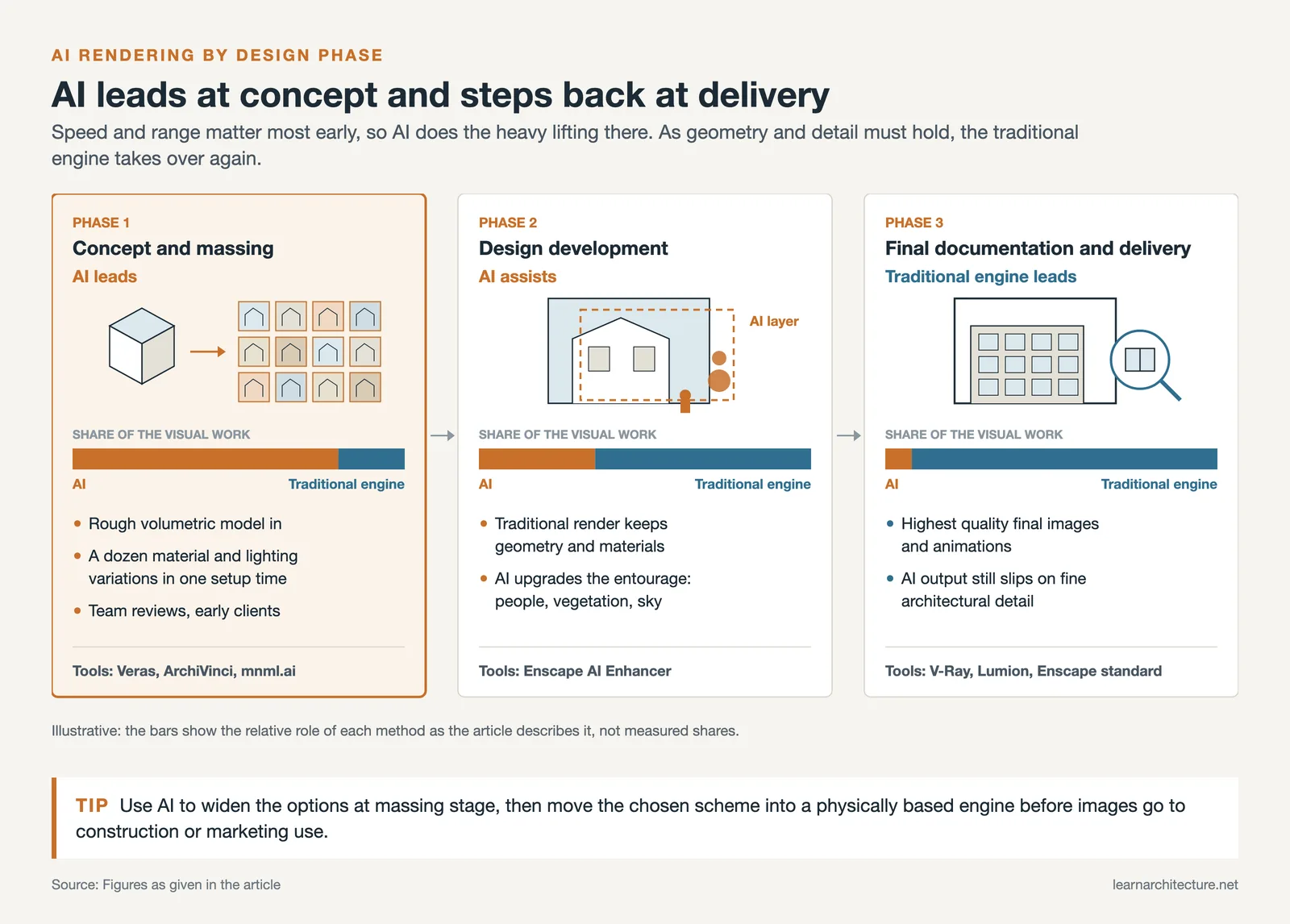
Architecture ai rendering is most powerful when used at the right phase. Understanding where it adds the most value helps you build a workflow rather than simply replacing one tool with another.
In early concept and massing stages, AI rendering excels. You can feed a rough volumetric model into a tool like Veras or ArchiVinci and generate a dozen material and lighting variations in the time it used to take to set up a single traditional render. This is particularly useful for internal team reviews and early client presentations where polish matters less than speed and range of options.
In design development, AI rendering plays a supporting role. Tools like Enscape’s AI Enhancer can take an already-rendered image and upgrade the entourage (people, vegetation, sky) to photorealistic quality without rebuilding the scene. This is a practical middle ground that many mid-size firms have adopted: keep the control of traditional rendering for geometry and materials, add AI on top for finishing.
In the final documentation and delivery phase, most firms still rely on traditional rendering engines for the highest-quality final images. AI outputs at this stage tend to have inconsistencies in fine architectural details that are not acceptable in construction or marketing deliverables. Knowing this limitation is as much a part of the skill as knowing when AI works well.
💡 Pro Tip
When using AI 3D rendering tools for client-facing early-stage visuals, always add a short verbal caveat during presentations: “These are AI-generated concept images and do not represent final materials or finishes.” This manages client expectations and protects you from misunderstandings about what the images commit you to. Most experienced firms have made this a standard practice.
What Skills Does AI Rendering Actually Require?

One reason architects sometimes delay learning ai rendering is an assumption that the tools are complicated. Most current platforms are not. The technical barrier has dropped considerably since 2022. What the skill actually requires is:
Prompt literacy. Even in geometry-based tools, text prompts control style, material, and atmosphere. Knowing how to describe architectural intent precisely (“exposed concrete with warm afternoon light, low angle, urban context” rather than “modern building”) produces dramatically better results.
An understanding of input quality. Architectural rendering ai tools are only as good as what you put in. A well-organized SketchUp model produces cleaner AI outputs than a messy one. This means that good modeling habits, which most architects already have, transfer directly into AI rendering quality.
Critical output evaluation. AI-generated images can look convincing while being structurally inaccurate. Knowing how to spot proportional distortions, impossible geometry, or implausible material behavior is a skill that experienced architects develop quickly, because it draws on the same spatial judgment they already use in design review.
Workflow integration. Knowing which tool handles which phase, how to batch-process variations, and how to combine AI outputs with traditionally rendered images into a single presentation document is where most of the productivity gain actually comes from. This is covered in practical detail in our architectural visualization guide.
⚠️ Common Mistake to Avoid
Many architects assume that because AI rendering is fast, prompt quality doesn’t matter. In practice, vague prompts produce generic, unusable outputs regardless of how good the underlying tool is. The same model fed a precise prompt (“warm morning light through east-facing glazing, Scandinavian pine interiors, slight mist at ground level”) versus a generic one (“nice architectural rendering”) will produce results so different they seem to come from separate tools. Prompt writing is the actual skill that separates strong AI rendering practitioners from casual ones.
How to Start Building This Skill Today
You do not need to overhaul your workflow to begin. The most practical approach is to choose one tool, run it alongside your existing process for two to three projects, and compare results. ReRender AI offers three free renders per day, making it a risk-free starting point. Veras has a free trial that works directly inside SketchUp or Revit, so you can test it without changing how you model.
Start with early-stage massing models rather than trying to produce final-quality images. The goal initially is to understand how much creative control you have over the output and where the tool’s limitations appear. From there, develop a small personal library of prompts that work reliably for your most common project types, whether that is residential interiors, urban mixed-use, or hospitality.
Beyond individual tool use, it is worth studying how architecture ai rendering fits into broader questions of visualization ethics and authenticity. ArchDaily’s coverage of AI’s impact on the profession raises important questions about image ownership, representational accuracy, and the risk of visual overpromise to clients, all of which practitioners need to navigate carefully. The ArchDaily discussion on AI’s impact on architecture is a good starting point for that conversation.
For further reading on authoritative tools, the Chaos Veras platform and mnml.ai both publish workflow guides and case studies that go well beyond their marketing material. The Architizer guide to AI rendering tools offers a useful practitioner perspective on how these platforms compare in real-world use.
For students and early-career architects, the learning curve is genuinely low. AI rendering software was designed to be approachable, and the community around it, on YouTube, Discord, and LinkedIn, is active and sharing real workflows openly. If you are already comfortable with SketchUp or Revit, you likely have everything you need to start producing useful AI renders today.
🔢 Quick Numbers
- 86% of 1,200+ architecture professionals believe AI will significantly shape the future of the field (Chaos & Architizer State of AI Report, 2024/25)
- 74% of surveyed architects plan to increase their use of AI tools within the next year (Chaos & Architizer, 2024/25)
- Autodesk Forma cut feasibility study time from two days to 1.5 hours at Patriarche architecture firm (Autodesk customer story, 2023)
- mnml.ai says it has 2.5 million+ registered architects and designers (vendor figure, September 2026)
✅ Key Takeaways
- AI rendering has crossed from experimental to professional standard: the majority of firms now use it in some capacity, and client expectations are shifting accordingly.
- The skill is not just tool familiarity; it includes prompt literacy, output evaluation, and knowing which phase of the design process benefits most from AI versus traditional rendering.
- Plugin-based tools like Veras are best for BIM-integrated workflows; browser-based platforms like mnml.ai and ArchiVinci suit sketch-to-render and cross-platform needs.
- The entry barrier is low. Free tiers, short trials, and open community resources make it practical to start building AI rendering skills without overhauling your existing workflow.
- AI rendering does not replace traditional visualization for final deliverables, but it dramatically accelerates early-stage design communication and client engagement.













Leave a comment