


Table of Contents Show
AI in architecture design refers to the application of machine learning, generative algorithms, and AI-powered software tools across the building design process, from early concept sketching and floor plan generation to performance simulation and BIM documentation. Architects and design firms are adopting these tools to accelerate workflows, reduce iteration time, and produce more data-informed outcomes without sacrificing creative control.

What Is AI in Architecture Design?
At its core, AI in architectural design means using software that can analyze inputs, such as site data, spatial requirements, or design goals, and generate or refine design outputs automatically. This is different from traditional CAD tools, which require architects to manually create every element. AI tools either automate specific tasks (like tagging floor plan elements in a BIM model) or assist with open-ended design exploration (like generating multiple massing options from a set of constraints).
The practical scope is broad. An AI tool might help you convert a hand sketch into a photorealistic render in seconds, or it might analyze energy performance across fifty facade configurations before you commit to one. Both represent AI at work in the design process, at very different levels of complexity.
📌 Did You Know?
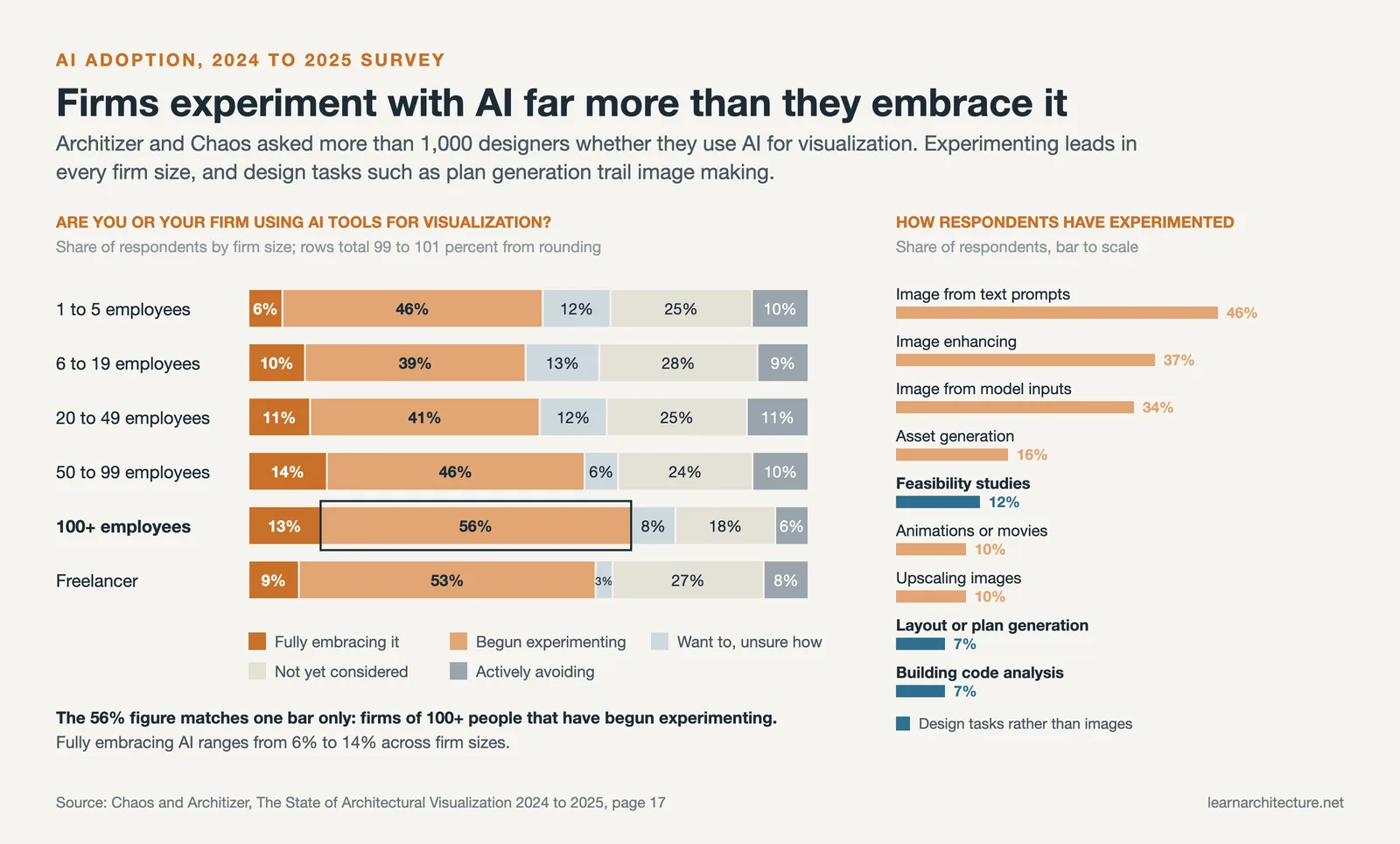
According to a 2024/25 State of Architectural Visualization report by Chaos and Architizer, between 39% and 56% of respondents, depending on firm size, have begun experimenting with AI tools for visualization, while only 6% to 14% say they are fully embracing them. Design tasks lag behind image making: 7% have tried AI for layout or plan generation and 7% for building code analysis, pointing to significant untapped potential.

How to Use AI in Architecture Design: By Stage
The most practical way to approach AI for architectural design is to think by project phase. Different tools address different stages of work, and trying to find one tool that does everything tends to lead to disappointment.
Concept Generation and Early Ideation
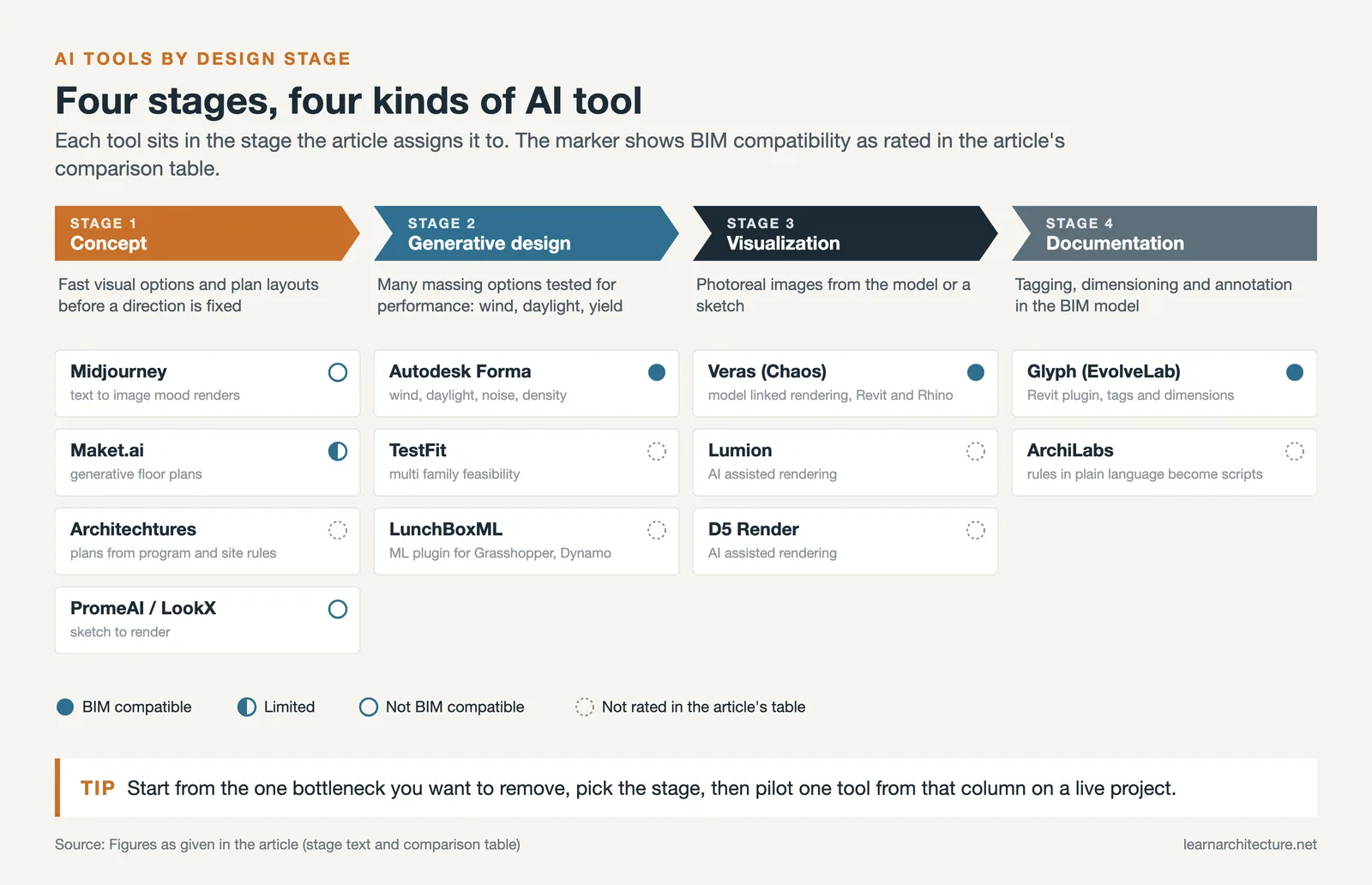
In the earliest design phases, AI tools are most useful for generating visual options fast and exploring directions before committing to a single approach. Text-to-image platforms like Midjourney are widely used by architects to produce atmospheric concept renders from written prompts. You describe a mood, material palette, or spatial idea, and the tool generates a range of visual interpretations in seconds.
For more structured ideation, platforms like Maket.ai and Architechtures allow architects to input program requirements, site boundaries, and basic spatial rules, then generate multiple floor plan layouts automatically. These tools are particularly useful for early feasibility studies on residential and multi-unit projects, where the speed of iteration matters more than design precision.
💡 Pro Tip
When using text-to-image AI tools like Midjourney for client presentations, always pair the AI-generated visuals with your actual floor plans or sections. This keeps the conversation grounded in real geometry and prevents clients from focusing on details the AI invented rather than the actual design. Treat AI concept images as a communication aid, not a design document.
For a broader look at how AI tools perform across visualization workflows, including BIM-connected options and standalone sketch-to-render platforms, see the roundup of best AI tools for architectural visualization on learnarchitecture.net.
Generative Design and Performance Optimization
Generative design is a specific application of AI for architecture design where the software explores a large number of design permutations based on constraints you define. Rather than producing one solution, the system maps out a range of options that satisfy your criteria, whether that means minimizing material use, maximizing daylight, or meeting zoning setbacks.
Autodesk Forma (formerly Spacemaker) is one of the most established tools in this category, focused on early-stage urban and massing analysis. Architects input site parameters, and the platform runs rapid analysis across wind, daylight, noise, and density to inform design decisions before committing to a scheme. TestFit is similarly focused on feasibility, particularly for multi-family residential typologies where unit count and yield need to be verified quickly.
For firms using parametric workflows in Grasshopper or Dynamo, machine learning plugins such as LunchBoxML allow designers to bring predictive modeling directly into their parametric environment. This enables AI-driven optimization within a workflow architects already know, rather than requiring them to switch to a separate platform. Understanding the underlying logic of computational design in architecture is useful context here, since generative AI tools and parametric systems share the same core principle: defining rules rather than drawing forms directly.
The learnarchitecture.net article on generative design as a visual language in architecture explores how this shift, from sketching forms to scripting behaviors, plays out across scales from concept to construction.
🏗️ Real-World Example
Al Bahar Towers (Abu Dhabi, 2012): The Aedas-designed towers use a dynamic facade system of mashrabiya-inspired screens controlled by algorithms that respond to sun position in real time. The responsive shading reduces solar gain on the glazed facade by approximately 50%, cutting the building’s air conditioning demand significantly. Its facade is run by a building management system rather than machine learning, but the project shows how computational logic and performance simulation can be embedded in the design of the building envelope itself, not just applied after the fact.

AI Architecture Design Software: Key Categories
The landscape of AI architecture design software splits broadly into three categories, each suited to a different part of the workflow.
Visualization and Rendering Tools
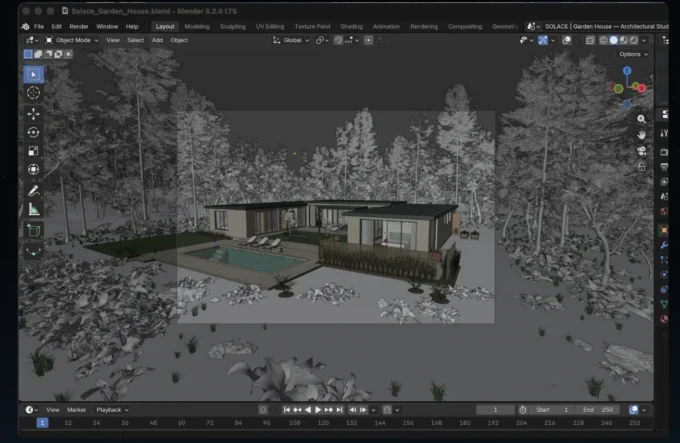
Tools like Veras by Chaos, Lumion, and D5 Render use AI to generate photorealistic visuals from BIM geometry or sketches. Veras is notable for being model-linked, meaning it references your actual Revit or Rhino geometry rather than generating independent images. This matters when accuracy is required for client presentations at design development stage. For a detailed comparison of rendering tools including pricing and workflow fit, the guide to AI rendering tools for architects on learnarchitecture.net is a useful reference.
BIM Copilots and Documentation Automation
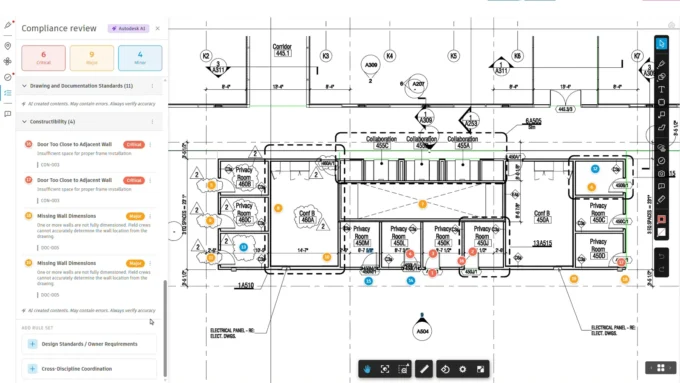
A newer category of AI tool for architecture design focuses on automating the documentation side of BIM work. EvolveLab Glyph is a Revit plugin that uses AI to automate tagging, dimensioning, and floor plan annotation tasks. ArchiLabs goes further, offering a browser-based parametric CAD environment where architects describe design rules in plain language and the AI generates Python-based “Recipes” that execute those rules directly in the model.
These tools address a real pain point in architectural practice: the gap between concept design and construction documentation. BIM work is time-consuming, and the manual effort required to keep a model current as design evolves is a significant drain on capacity. AI copilots reduce that burden without requiring architects to learn scripting.
💡 Pro Tip
When evaluating BIM copilot tools, test them on a real project in a controlled setting before rolling them out firm-wide. AI-generated documentation can introduce errors that are easy to miss if you are not actively reviewing the output. Build a verification step into your workflow, particularly for anything that feeds into drawing sets or structural coordination.
Sketch-to-Render and Image-Based Tools
Platforms like PromeAI, LookX, and MyArchitectAI take uploaded sketches, screenshots, or massing model exports and return styled architectural renders. These tools require no 3D modeling knowledge and produce results in seconds, making them accessible to early-career architects and useful for rapid concept communication in team settings. They are best treated as ideation aids rather than production tools, since the outputs are 2D interpretations of geometry rather than accurate representations of a modeled building.
For an in-depth comparison of these platforms against BIM-integrated alternatives, the overview of AI-powered architecture design software on learnarchitecture.net covers the key distinctions.

What Are the Best AI Tools for Architectural Design in 2026?
There is no single best AI tool for architectural design because the right choice depends on your project type, software stack, and the specific problem you are trying to solve. The table below summarizes the main options by use case to help narrow down the decision.
AI Architecture Design Tools by Use Case
The following table maps leading AI tools to the design phase where they are most effective:
| Tool | Best For | BIM Compatible? | Typical User |
|---|---|---|---|
| Midjourney | Concept visuals and mood boards | No | Design teams, any stage |
| Veras (Chaos) | Model-linked rendering in Revit/Rhino | Yes | Architects, visualization teams |
| Autodesk Forma | Early massing and site analysis | Yes (Revit) | Urban designers, project leads |
| Maket.ai | Generative floor plan layouts | Limited | Residential architects, developers |
| Glyph (EvolveLab) | BIM documentation automation | Yes (Revit) | BIM managers, production teams |
| PromeAI / LookX | Sketch-to-render in early design | No | Junior designers, concept teams |
⚠️ Common Mistake to Avoid
A frequent error is selecting an AI architecture design tool based on output quality in demos or marketing materials, rather than testing it against your actual workflow. Many AI visualization tools produce impressive results on generic inputs but struggle with the specific constraints of your project: unusual site geometry, non-standard materials, or complex program requirements. Always run a small pilot on a real project before committing to a subscription or changing your team’s workflow around the tool.
How Does AI Architecture Design Software Fit Into Existing Workflows?
One of the most practical questions architects have when evaluating AI for architectural design is whether these tools require a wholesale change to how they work. In most cases, they do not. The majority of AI architecture design tools are designed to plug into existing software environments, Revit, Rhino, Grasshopper, SketchUp, or Archicad, rather than replace them.
The more realistic challenge is not technical compatibility but workflow integration. AI tools generate outputs quickly, which can be both an advantage and a risk. Fast iteration is useful in early design, but it can lead to a pattern where teams jump between AI-generated options without developing any of them thoroughly. The architects who use these tools most effectively tend to be disciplined about when to use AI-generated ideas as a starting point and when to set them aside and do the harder thinking manually.
🎓 Key Insight
A useful working principle is to encode your values as constraints and keep humans in the loop, so the results feel both novel and necessary.
This framing captures how leading practitioners approach AI in the design process: not as a tool that makes decisions, but as a system that expands the range of options available for human judgment. The architect’s role shifts from creating single solutions to framing problems well enough for algorithms to propose meaningful alternatives.
For architects moving from parametric and computational design into AI-assisted workflows, the strongest foundation is a clear understanding of how constraint-based systems work. Both parametric tools and AI-powered design software operate on the same principle: the quality of your inputs and the clarity of your objectives determine the quality of the outputs the system can produce.

Ethics, Data and Liability: What to Settle Before You Adopt
Most guidance on AI in architecture stops at what the tools can do. The questions that actually stall adoption inside a practice are the other kind, and they are worth settling deliberately rather than discovering mid-project.
Client data and confidentiality
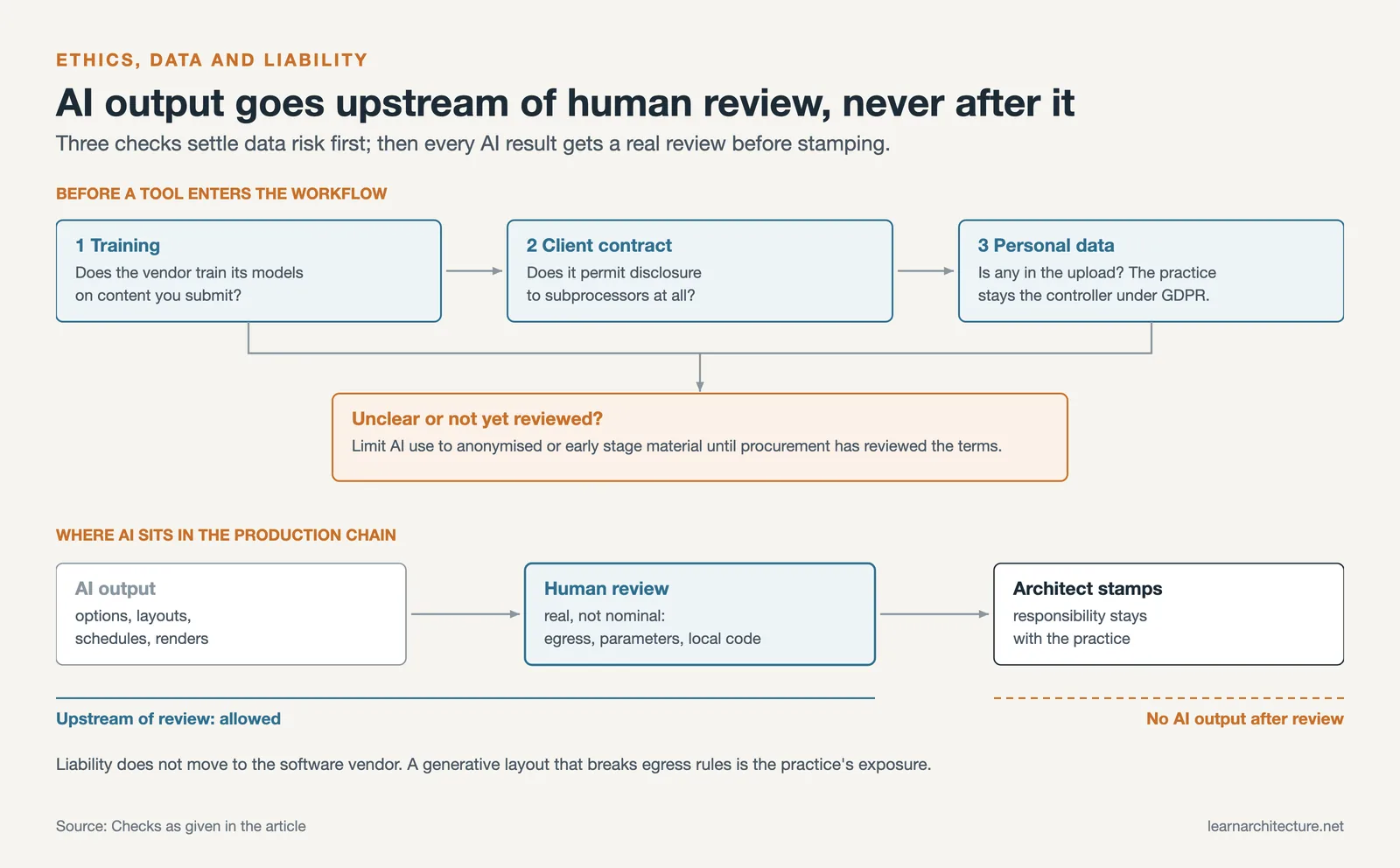
Uploading a project to a cloud AI service means sending it to a third party. Site information, client briefs, drawings and occupancy data can all carry commercially sensitive or personal information, and where personal data is involved the practice remains the controller under regimes such as the GDPR regardless of which vendor processes it. Before a tool enters the workflow, two things need checking: whether the vendor trains its models on submitted content, and whether the contract with your client permits disclosure to subprocessors at all. Several firms handle this by restricting AI use to anonymised or early-stage material until procurement has reviewed the terms.
Bias in the training data
Generative tools reproduce what they were trained on. In practice this means a strong pull toward the building types, climates and aesthetic conventions that dominate the datasets, which are heavily weighted toward North American and Western European precedent. Ask a text-to-image tool for a school and you will tend to get a particular kind of school. This matters less when the output is a mood image and more when the tool is shaping early spatial decisions, since the defaults it offers are not neutral.
Professional liability does not transfer
This is the point most often misunderstood. An architect who stamps a drawing is responsible for it, and no part of that responsibility moves to a software vendor because part of the work was AI-assisted. A generative layout that violates egress requirements, a schedule automated with the wrong parameter, a code check that missed a local amendment: each remains the practice’s exposure. The practical consequence is that AI output belongs upstream of human review, never downstream of it, and the review has to be real rather than nominal.
The employment question
The tasks most exposed to automation are the ones traditionally given to junior staff: tagging, dimensioning, sheet setup, option variants. That is a genuine structural question for the profession rather than a hypothetical one, and the more useful framing is what junior architects learn while doing that work. Practices adopting these tools without replacing that learning path tend to notice the gap two or three years later.
Limitations of AI Tools for Architecture Design
AI architecture design tools have real limitations that are worth understanding before adopting them in practice. The most common issues are accuracy, consistency, and the gap between generated imagery and actual buildable geometry.
Text-to-image tools like Midjourney produce visually compelling outputs that often contain structural impossibilities: beams that float, materials that make no constructional sense, or spatial relationships that could not be built. This is not a flaw in the tool as much as it is the wrong application. These tools were not designed to produce accurate architectural documentation; they were designed to produce compelling images. Using them for concept communication is appropriate. Using them as a design reference for technical development is not.
Generative design tools that work with actual geometry are more reliable for technical decision-making but come with their own constraints. Most are optimized for specific building typologies (primarily residential) and produce solutions that tend toward conventional configurations. They are most useful for early feasibility, not for exploring genuinely novel forms.
The best AI tools for architectural design are ones that clearly declare what problem they solve and are not used for anything beyond that problem. The American Institute of Architects has been actively tracking how firms are integrating AI responsibly, and their guidance emphasizes maintaining clear human oversight over AI-assisted decisions, particularly in safety-critical aspects of building design.
✅ Key Takeaways
- AI in architecture design covers a wide range: from text-to-image concept tools to BIM documentation automation. Matching the right tool to the right phase matters more than finding a single platform that does everything.
- Generative design tools like Autodesk Forma and Maket.ai are most effective for early feasibility and massing studies, not for developing finished architectural design.
- BIM copilots like Glyph and ArchiLabs address the documentation burden in production workflows and offer measurable time savings on tagging, annotation, and model management tasks.
- Text-to-image tools (Midjourney, PromeAI, LookX) are useful for concept communication, not for design documentation. Always pair them with actual geometry during client presentations.
- The architect’s judgment remains central: AI tools expand the option space, but the quality of design decisions depends on the architect framing the problem well and evaluating outputs critically.
Frequently Asked Questions
What is the best AI for architectural design?
There is no single best AI for architectural design. The right choice depends on your project stage and goals. For concept visualization, Midjourney and Veras are widely used. For generative floor plans, Maket.ai and Architechtures are purpose-built options. For BIM documentation, Glyph and ArchiLabs automate the most time-consuming tasks. Start by identifying the one workflow bottleneck you want to address and choose the tool that targets that specific problem.
How is AI used in architecture design?
AI is used across multiple stages of the design process. In early design, it generates concept images, floor plan options, and massing variations from text prompts or spatial constraints. In performance optimization, it analyzes hundreds of configurations for energy, daylight, or structural efficiency. In production, AI-powered BIM tools automate documentation tasks like tagging and dimensioning. The common thread is that AI expands how quickly architects can explore options, though the final design decisions remain with the architect.
Will AI replace architects?
No. AI tools for architecture design function as assistants that accelerate specific tasks, not as replacements for architectural judgment. Generating a floor plan option from spatial constraints is technically possible with current AI. Determining whether that plan serves the needs of the people who will use the building, responds to its site, and meets the full complexity of a real brief still requires an architect. The profession is changing in how it works, not whether it is needed.
What is artificial intelligence in architecture?
Artificial intelligence in architecture refers to software that performs tasks normally requiring human judgement: generating design options from constraints, producing images from text descriptions, analysing building performance across hundreds of variants, or automating repetitive documentation. It is not one technology but several, from text-to-image models to generative layout engines to BIM copilots, and they solve very different problems. The useful question is never whether to use AI but which specific bottleneck in your workflow a given tool addresses.
How is AI used in architecture and engineering?
Architecture and engineering apply it at different points. Architects use it most heavily in early design, for concept imagery, massing options and generative floor plans, and in documentation, where BIM copilots automate tagging and dimensioning. Engineering applications lean toward analysis: structural optimisation, energy and daylight simulation across many configurations, clash detection, and predictive scheduling and cost forecasting drawn from historical project data. The shared pattern is that AI widens the number of options that can be tested, while the decision about which option to build stays with the professional.
Is it safe to upload project files to AI tools?
Not automatically. Uploading a project to a cloud service discloses it to a third party, so two things need checking first: whether the vendor trains its models on submitted content, and whether your client agreement permits disclosure to subprocessors. Where the material includes personal data, the practice remains responsible under regimes such as the GDPR no matter who processes it. Many firms limit AI use to anonymised or early-stage material until the terms have been reviewed properly.
- AI architectural design
- AI architecture design
- AI architecture design software
- AI architecture design tools
- ai for architectural design
- ai for architecture design
- AI in architectural design
- ai in architecture design
- ai tool for architecture design
- ai tools for architecture design
- ai tools for software architecture design
- architectural design AI
- best ai for architectural design












Leave a comment