


Table of Contents Show
We’ve all seen portfolios that look beautiful but don’t land interviews, and the reverse: dense binders that bury great thinking. In this Landscape Architecture Portfolio Guide, we cut through the noise with a pragmatic, design-forward approach. We’ll define purpose, choose the right work, elevate visuals and writing, and handle formats, submission, and interviews with confidence. Think of this as our field-tested playbook for getting your work seen and remembered.
Define Purpose And Audience
Before we lay out a single page, we name the portfolio’s job and who needs to say “yes.” Are we targeting a design-driven studio, a public agency focused on policy and resilience, or a research lab assessing methods and rigor? Each audience scans for different signals.
- Goal: internship, junior designer, lateral move, grad school, or research role.
- Decision-maker: principal/PM (speed and clarity), HR/ATS (keywords, format), faculty/review panel (process and inquiry).
- Success criteria: for studios, craft, iteration, and built/constructible logic: for public sector, stakeholder engagement, codes, budgets, and equity: for research, clear questions, methods, citations, and replicability.
We also define constraints: page count (10 to 20 for applications, up to 30 for interviews), file size limits (often 10 to 20 MB), and deadlines. Purpose anchors every design choice.

What To Include: Core Sections And Project Types
At minimum, we include: a clean cover, contents, a one-page profile (skills, tools, interests), curated projects, and an optional appendix (process, extra visuals). Tailor order to the role: lead with your strongest match.
Project Selection Strategy
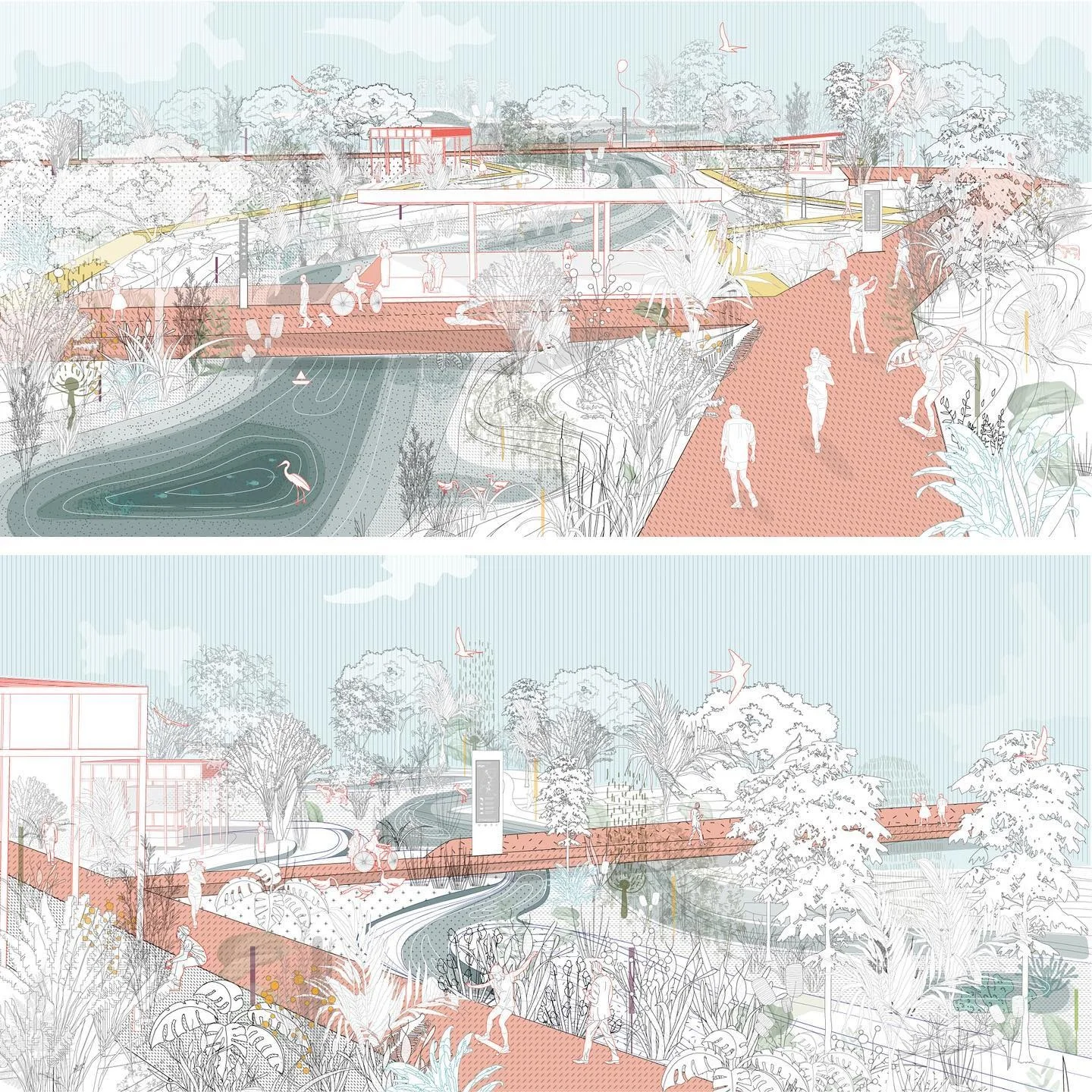
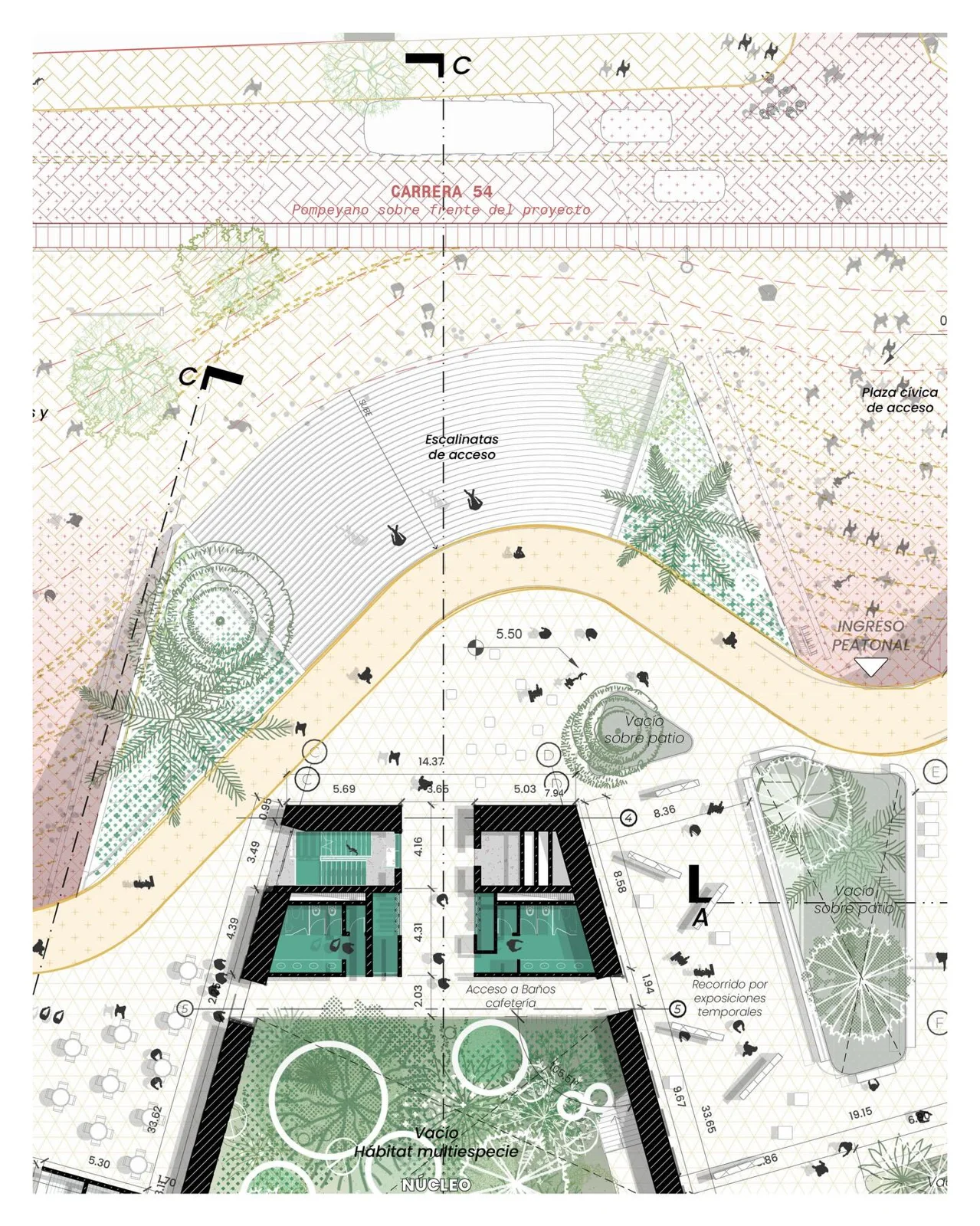
We prioritize projects that show range without diluting focus. Aim for a spectrum: site planning and urban design, planting design and ecology, green infrastructure, public space, and implementation details. Include at least one with real constraints, permits, budgets, or phasing. If we’ve got built work, lead with it. If not, highlight technical depth (grading, sections, planting, stormwater).

Academic Vs. Professional Work
Academic projects showcase exploration, research, and concept clarity. Professional work proves we can deliver, coordination, codes, constructability, and team roles. We label each clearly and avoid NDA conflicts. For confidential projects, anonymize locations and show process elements (diagrams, typical details) that demonstrate skill without exposing sensitive data.
Depth Over Breadth: Number Of Projects And Scope
Four to six well-developed projects beat a dozen thumbnails. Show the arc: brief, constraints, concept, site strategy, key sections/elevations, planting and materials, phasing and metrics, and the outcome. Devote 2 to 4 pages to heroes: single-page “cameos” can round out skills.
Visual Storytelling And Graphics Standards
We design for skimmers first, deep readers second. Each spread should communicate the project’s essence in three seconds, then reward deeper inspection.


Layouts, Grids, And Typography
Use a consistent grid (8pt system or 12-column) with generous margins and gutters. Keep a clear hierarchy: H1/H2 for titles, small-caps or bold for section labels, and body at 9 to 10 pt for print, 11 to 12 pt for screen PDFs. Limit typefaces to two families (e.g., a geometric sans with a humanist sans or serif). Baseline rhythm keeps captions aligned and pages calm.
Diagrams, Plans, Sections, And Photos
- Plans: north arrow, scale bar, legible labels above 6 pt at print scale.
- Sections/elevations: line-weight hierarchy (profiles > cut > context > textures). Add human/vehicular scale figures sparingly.
- Ecological/GS diagrams: flows, catchment areas, and performance callouts, avoid rainbow palettes: use 2 to 3 hues with tints.
- Photos: prioritize context and before/after sequences. Credit photographers.
Consistency, Accessibility, And Color Use
Keep color purposeful, brand a project with one accent. Ensure contrast ratios around 4.5:1 for body text. Don’t rely on color alone: differentiate with line styles and patterns. Repeat legends, scales, and caption styles so viewers don’t relearn conventions on each page.
Tools, Formats, And File Setup
We select tools that fit workflow and fidelity, then export cleanly for screen and print.

Digital Vs. Print: Portfolio Formats
- Screen-first PDF: ideal for email and portals: horizontal or square formats work well.
- Print book: great for interviews, consider Letter or A4, 300 dpi images.
- Hybrid: a short teaser PDF (6 to 10 pages) plus a full version for interviews.
Web Platforms, PDFs, And Interactive Elements
A simple site (Squarespace, Cargo, Notion, or a lightweight custom) boosts discoverability. Keep load times low: compressed images, SVG diagrams where possible. Interactive layers, GIFs for phasing, short video fly-throughs, are helpful online: avoid embedding heavy media in the core PDF. Link to the site with a short URL or QR.
Export Specs: Size, Resolution, Compression, And Naming
- Screen PDFs: 150 to 200 dpi images: target 10 to 20 MB total.
- Print: 300 dpi images: convert to CMYK when required by the printer.
- Compress thoughtfully: flatten transparencies, subset fonts, and use JPEG high/medium quality for photos, PNG/SVG for linework.
- File naming: lastname_firstname_portfolio_role_year.pdf. Keep versioning clean (v1 to v3), not “final_final.”
Writing That Elevates The Work
Strong writing clarifies intent and signals professionalism. Short, specific, and scannable wins.

Project Narrative Template And Captions
Use a repeatable structure:
- One-liner: who/what/where and the core idea.
- Problem: constraints, stakeholders, climate/soil/hydrology context.
- Approach: strategies and alternatives considered.
- Outcome: what changed on the ground or in policy: what we learned.
Captions do the heavy lifting: describe the drawing’s purpose, not just “Site plan.” Example: “Stormwater strategy routes 1.2″ rainfall to bioswales, reducing peak flow 28%.”
Quantifying Impact: Metrics And Outcomes
We add numbers where honest: tree canopy increase (%), runoff reduction (cubic feet or %), habitat area (acres), walk time to transit (minutes), cost ranges, maintenance intensity, and equity/engagement metrics (attendees, languages provided). If modeled, cite the method.
Credits, Roles, And Ethical Attribution
We state our role clearly, concept, grading, planting palette, cost takeoff, rendering, or community meetings. Credit teammates, studios, firms, and photographers. If templates or base data came from others, we say so. Ethical clarity builds trust.
Tailoring, Submission, And Interview Use
One size rarely fits all. We prepare variants aligned to the role and submission channel.

Aligning With Roles: Studio, Public Sector, Or Research
- Studios: lead with concept clarity, iteration, and buildable details.
- Public sector: emphasize policy alignment, community process, maintenance, and cost.
- Research: foreground questions, methods, literature, and reproducible workflows.
Submitting Via Email, ATS, And Portals
Follow instructions exactly. Keep email attachments below stated limits, include a concise note, and place the portfolio link near the top of the resume. For ATS, avoid special characters in filenames and ensure the PDF text is selectable (no image-only pages). Double-check that links work.
Presenting In Interviews And Reviews
We practice a 5 to 8 minute walkthrough and a 2-minute “cut-down.” Lead with a strong opener, then one project that maps to the role. Use a printed copy or offline PDF as backup, Wi‑Fi fails. Invite conversation: “Which aspect is most relevant to your current projects?”
Workflow, Review, And Common Mistakes
A calm process beats last-minute chaos. We plan, iterate, and test on real devices.

Build Timeline And Iteration Checklist
- Week 1: define audience, gather assets, outline projects.
- Week 2: build master grid, typographic styles, and first two spreads.
- Week 3: complete remaining projects, write captions, add metrics.
- Week 4: peer reviews, accessibility pass, export tests, and versioning.
Checklist: consistent legends/scales, alt text on web, link checks, print proof, file size audit.
Seeking Critique And Incorporating Feedback
We ask for targeted feedback: “Does Project 2 prove technical depth?” “Is my role unmistakable?” We compare notes from a designer, a non-designer, and a hiring manager. Conflicting notes happen, solve for the defined audience first.
Pitfalls To Avoid
- Over-stylized graphics that hide data.
- Wall-of-text narratives without hierarchy.
- Too many projects, too few outcomes.
- Missing role/credits: NDA leaks.
- Illegible scales and micro text.
- Bloated PDFs, broken links, or odd page ratios.
Conclusion
A great portfolio is clear on purpose, ruthless in curation, and meticulous in communication. If we align work to the audience, show depth with crisp visuals, quantify impact, and export cleanly, we’ll stand out. Revisit this Landscape Architecture Portfolio Guide whenever roles shift or new projects wrap. Then ship it, iteration happens fastest once it’s in the world.
- best landscape architecture portfolios
- build landscape portfolio
- create a successful landscape portfolio
- how to create a landscape architecture portfolio
- how to get a landscape architecture job
- interview tips for landscape architects
- landscape architect job interview
- landscape architect portfolio guide
- landscape architecture interviews
- landscape architecture portfolio
- landscape architecture portfolio tips
- landscape design portfolio
- landscape portfolio examples
- landscaping portfolio ideas
- portfolio for landscape architects
- portfolio guide for landscaping
- portfolio layout ideas for landscape architects
- portfolio presentation for landscape architecture
- portfolio tips for architects
- tips for landscape architecture portfolio









Leave a comment