


Table of Contents Show
Lumion vs Twinmotion vs Enscape is the most common rendering software debate among architects and designers right now. Lumion delivers the highest photorealistic output for final presentations, Enscape offers the fastest BIM-integrated workflow as a plugin, and Twinmotion sits between the two with strong real-time performance and Unreal Engine technology. Your best choice depends on your project type, budget, and modeling software.
All three tools fall under the “real-time rendering” category, but they approach the job differently. Enscape runs inside your modeling software as a plugin. Lumion is a standalone application where you import your model and build scenes. Twinmotion, powered by Unreal Engine, supports both live sync and standalone scene building. These differences shape everything from daily workflow speed to final output quality.
This comparison covers the areas that matter most for choosing between the three: rendering quality, BIM integration, pricing, ease of use, asset libraries, and ideal use cases. If you are evaluating real-time rendering software for architecture, this breakdown will help you make a practical decision.

What Makes Each Renderer Different?
Enscape is a real-time rendering plugin developed in Germany and first released in 2015. It merged with Chaos (the company behind V-Ray) in 2022. Enscape runs directly inside Revit, SketchUp, Rhino, ArchiCAD, and Vectorworks. You click a button, and a rendered view appears alongside your model. Change a wall, swap a material, or adjust a window, and the Enscape render updates instantly. This live-sync approach makes it extremely popular for design-phase reviews and client meetings.
Lumion is a standalone rendering application built by the Dutch company Act-3D, first released in 2010. You export your 3D model from your CAD software, import it into Lumion, and then build your scene using its library of nearly 10,000 objects, materials, and effects. Lumion software is widely used for polished final presentations, marketing visuals, and animations where output quality is the top priority.
Twinmotion was acquired by Epic Games in 2019 and is built on Unreal Engine technology. It supports live sync with Revit, SketchUp, Rhino, and ArchiCAD through the Datasmith exporter plugin. Twinmotion also integrates with Quixel Megascans, the same texture and asset library used in film and game production. It is available on both Windows and Mac, which sets it apart from Lumion (Windows only).
⚠️ Common Mistake to Avoid
Many architects dismiss Enscape as a “lesser” tool because it runs as a plugin rather than a standalone application. This misses its core strength: because you never leave your modeling software, you get faster iterations with fewer file handoffs. For design-heavy workflows where the model changes frequently, Enscape rendering often outperforms both Lumion and Twinmotion in practical daily use.

Lumion vs Twinmotion vs Enscape: Feature Comparison Table
The table below compares the three tools across the criteria architects and designers care about most when choosing rendering software.
Side-by-Side Comparison of Lumion, Twinmotion, and Enscape
| Feature | Lumion | Twinmotion | Enscape |
|---|---|---|---|
| Type | Standalone application | Standalone with live sync | Plugin (runs inside CAD) |
| Rendering Engine | Proprietary ray tracing | Unreal Engine (path tracing) | Proprietary ray tracing (Chaos) |
| BIM Integration | LiveSync plugin (import-based) | Datasmith exporter (live sync) | Direct plugin (instant sync) |
| Supported Software | Revit, SketchUp, Rhino, ArchiCAD, 3ds Max | Revit, SketchUp, Rhino, ArchiCAD | Revit, SketchUp, Rhino, ArchiCAD, Vectorworks |
| Platform | Windows only | Windows and Mac | Windows and Mac |
| Asset Library | ~10,000 built-in objects | Limited built-in + Quixel Megascans | ~3,000 built-in objects |
| Annual pricing (Sept 2026) | No public list price; quoted by regional reseller | Free under $1M USD revenue; seats quoted above it | €538.80 (Solo) to €694.80 (Collection) |
| Free Student License | Yes | Yes | No (discounted student plan, €134/year in the eurozone as of September 2026) |
| VR Support | 360° panoramas (MyLumion) | VR walkthroughs | Full VR (Meta Quest 3, HTC Vive) |
| Best For | Final presentations, exteriors, marketing | Quick iterations, mixed use, Mac users | Design reviews, BIM workflows, interiors |
Pricing figures are approximate as of 2026 and subject to change. Check each vendor’s website for current subscription rates.
How Does Rendering Quality Compare?
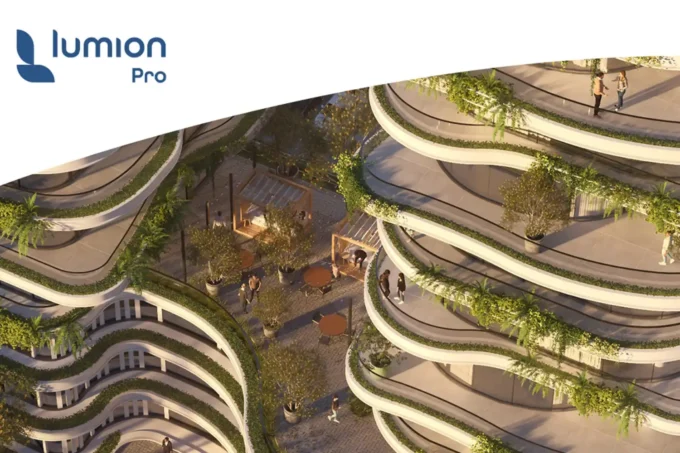
Lumion render quality has long been the benchmark for photorealistic output in architectural visualization. Its post-processing effects, atmospheric controls, and material library give you the most control over the final image. Exterior scenes with vegetation, dramatic skies, and weather effects are where Lumion rendering excels. The Lumion Pro tier includes features like Relight, which lets you adjust lighting after rendering, and access to fine-detail nature objects that add realism to landscapes.
Twinmotion rendering benefits directly from Unreal Engine’s path tracing technology. It produces strong results for both interiors and exteriors, and its connection to Quixel Megascans means you can apply film-quality textures and materials. Twinmotion renders are particularly effective for scenes that need dynamic elements like animated people, moving vehicles, or time-of-day transitions. The quality gap between Twinmotion and Lumion has narrowed considerably in recent versions.
Enscape rendering prioritizes speed and consistency over maximum photorealism. It produces clean, realistic visuals that work well for design reviews and client presentations. Interior scenes are a particular strength, since Enscape’s lighting engine handles enclosed spaces with minimal artifacts. For firms that need “good enough” visuals fast rather than cinematic-quality output, Enscape render quality hits the right balance.
💡 Pro Tip
If your firm needs both fast design-phase visuals and polished final presentations, consider using Enscape for daily design reviews and Lumion for marketing-quality deliverables. Many studios keep both tools in their pipeline rather than forcing one to do everything. The Enscape-to-Lumion handoff works well because both support common file formats from Revit and SketchUp.

Which Tool Has the Best BIM Integration?
Enscape wins this category by a wide margin. Because it runs as a plugin inside your modeling software, there is no export step. You open Enscape within Revit, SketchUp, Rhino, ArchiCAD, or Vectorworks, and it reads your model directly. Material changes, geometry edits, and design adjustments reflect instantly in the rendered view. This direct link is a major reason many architecture firms use Enscape for their visualization needs.
Twinmotion supports live sync with major modeling tools through the Datasmith exporter. The connection works well for most projects, though some firms report that synchronization can be less reliable than Enscape’s direct integration on complex BIM models. Twinmotion’s advantage is that once your model is in the standalone environment, you have more creative freedom to build immersive scenes.
Lumion connects to Revit through its LiveSync plugin, which synchronizes your model in real time. It also supports direct imports from SketchUp, Rhino, ArchiCAD, and 3ds Max. The process works smoothly but does introduce a dependency on file format consistency. After significant model changes, you may need to re-map some materials. For a broader look at architectural visualization workflows, including how rendering tools fit into the larger production pipeline, see our detailed workflow guide.
How Much Does Each Renderer Cost in 2026?
Cost is often the deciding factor for freelancers and small studios, and the three tools price themselves in genuinely different ways: one publishes a list price, one gives itself away to most of this article’s readers, and one will not quote you at all without a conversation.
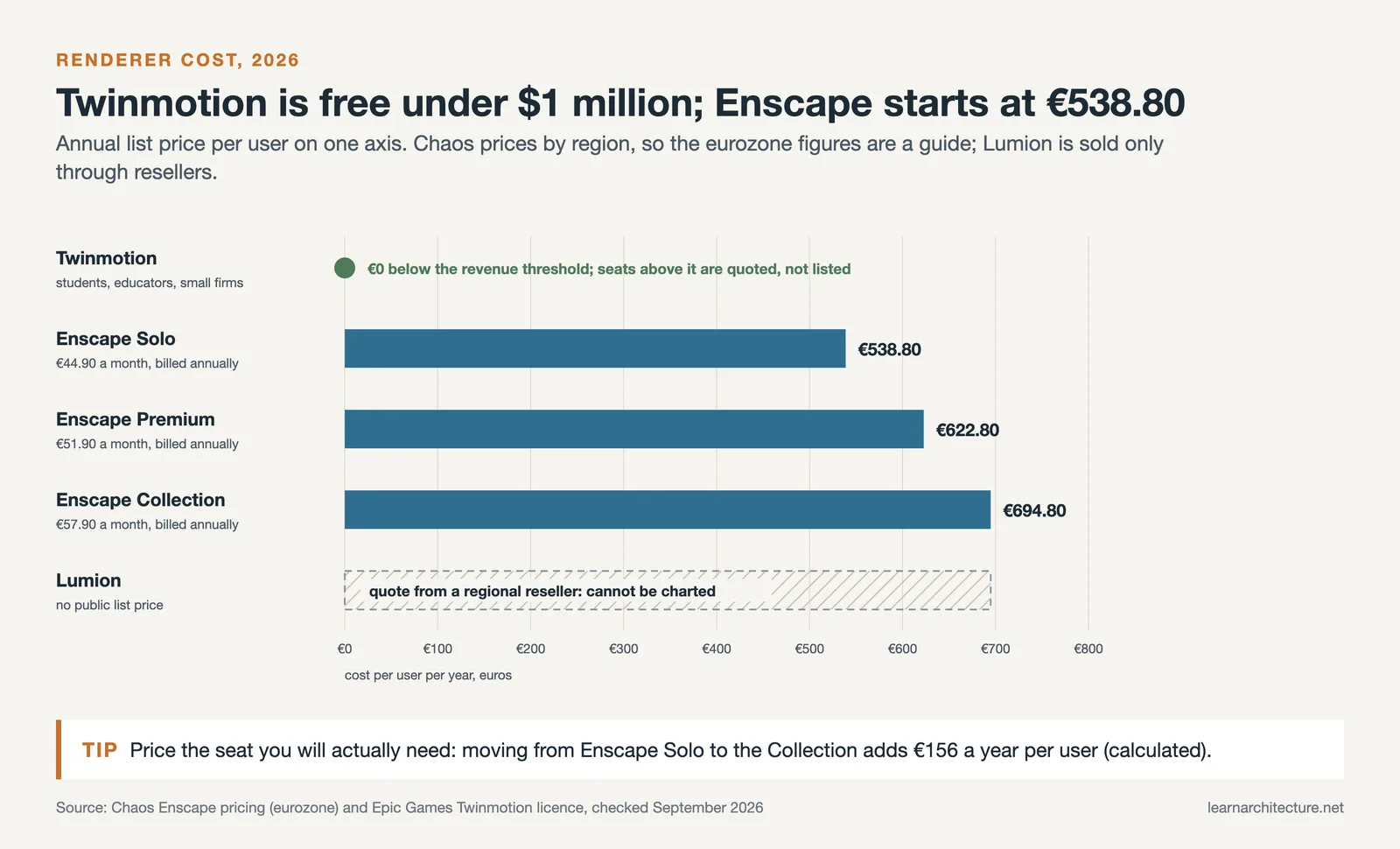
Twinmotion is free for most people reading this. Epic licenses it at no cost to students, educators, hobbyists, and any individual or company whose annual gross revenue is under $1 million USD. Above that threshold, or if you need Twinmotion Cloud, you buy Twinmotion seats, and Epic does not publish a public per-seat price for them. For an individual architect, a student, or a practice under the revenue threshold, the cost of Twinmotion is zero, which no amount of feature comparison can offset.
Enscape publishes a straightforward subscription. Chaos sells it in three tiers, with Enscape Solo as the single-user entry point, then Premium, then the Enscape Collection. Chaos prices regionally: in the eurozone Solo is listed at €44.90 per month, billed annually at €538.80, with Premium at €622.80 and the Collection at €694.80 per year. Expect your local list price to sit near the equivalent of these figures rather than the sub-$500 numbers that circulate in older comparisons.
Lumion does not publish a list price in most territories. It is sold through a regional partner network, so the buying process starts by contacting a local reseller for a quote rather than by reading a price off a page. Lumion has historically been the most expensive of the three, and the reseller model makes it the hardest to budget for in advance. Free student licences are available.
That reshapes the usual conclusion. Enscape is often described as the budget option of the three, but that comparison cannot be checked from public figures: Enscape is the only one of the three with a published subscription price, while Lumion is quoted by regional resellers and Epic does not publish a per-seat price for Twinmotion above its revenue threshold. What is clear is that for students, sole practitioners and studios under the $1 million threshold Twinmotion costs nothing at all. If price is your first constraint, Twinmotion is the honest answer, and the question becomes whether its workflow suits you rather than whether you can afford it.
🔢 Quick Numbers
- Twinmotion: free under $1 million USD annual gross revenue, and free for students and educators (Epic Games, verified September 2026)
- Enscape Solo: €44.90 per month, billed annually at €538.80 (Chaos, verified September 2026)
- Enscape Premium €622.80 per year; Enscape Collection €694.80 per year (Chaos, verified September 2026)
- Lumion: no public list price in most territories; sold through regional resellers
Prices were checked against the vendors’ own pages in September 2026 and are quoted in the currency each vendor displayed. Chaos and Lumion both price regionally, so your local figure will differ. Confirm current pricing with the vendor before purchasing.

Which Renderer Is Easiest to Learn?
Enscape has the smoothest learning curve of the three. Because it runs inside software you already know (Revit, SketchUp, Rhino), there is almost no new interface to learn. The basics can be picked up in a matter of hours. Setting up views is straightforward, and you get immediate visual feedback with every change.
Twinmotion is the next easiest. Its interface uses drag-and-drop logic and gaming-style navigation that feels intuitive. Applying materials, placing objects, and adjusting lighting are all visual processes. Architecture students often learn Twinmotion first because of the free license and low barrier to entry.
Lumion software has a steeper learning curve, but it rewards the investment with greater control. Post-processing effects, advanced material settings, and the large asset library take time to master. If you are looking to build skills in AI-powered visualization tools alongside traditional renderers, our guide covers how these new options fit alongside Lumion, Enscape, and Twinmotion.
💡 Pro Tip
Lumion has far more in-depth tutorials and online courses available compared to Twinmotion. If you are self-teaching, this matters. Twinmotion lacks quality third-party courses, while Lumion and Enscape both have strong tutorial ecosystems on YouTube and dedicated learning platforms.
How Much Hardware Does Each Renderer Need?
Hardware demands separate these tools as sharply as their interfaces do, and the gap decides which ones your existing workstations can actually run.
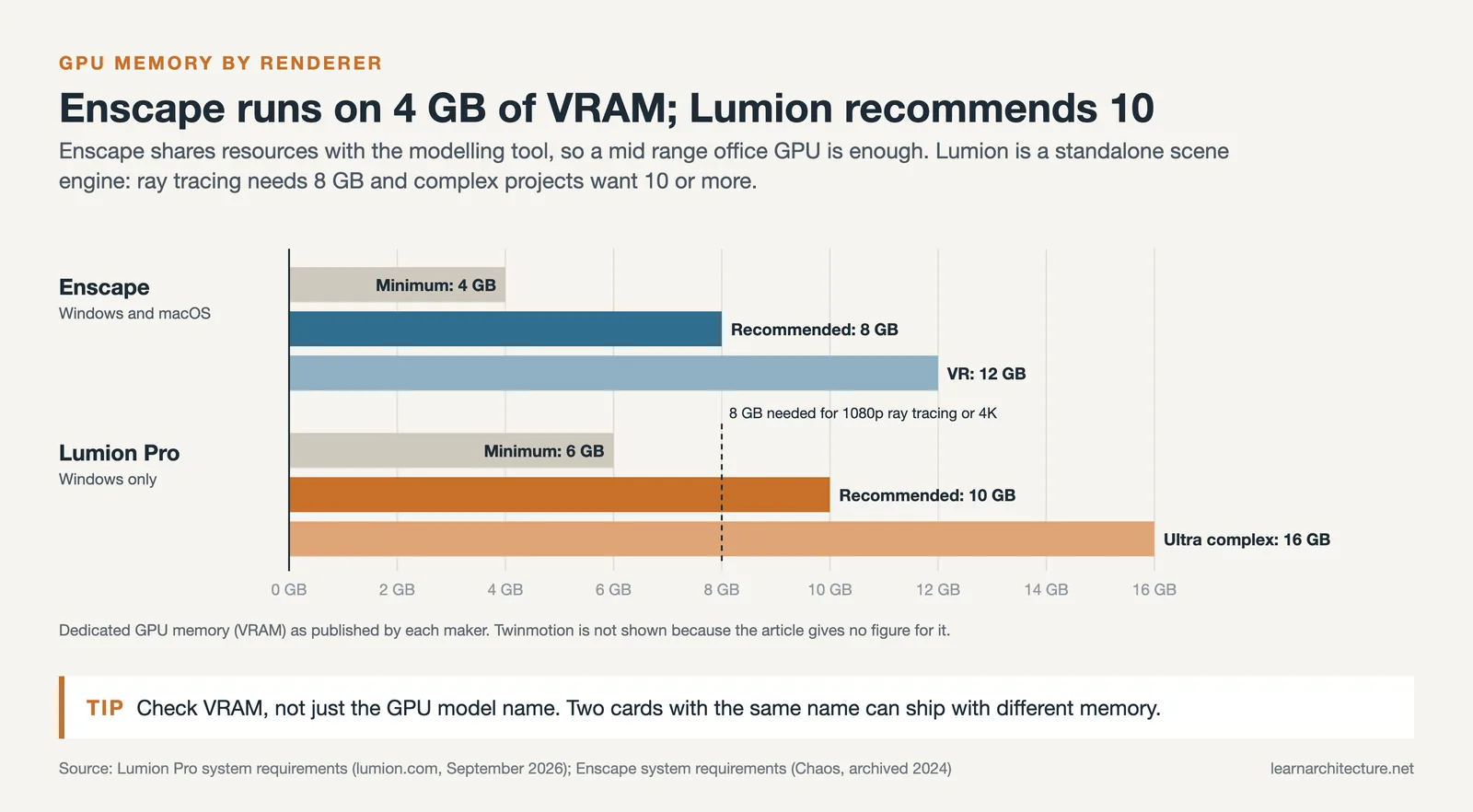
Enscape is the lightest of the three. It asks for a minimum of 4 GB of VRAM and recommends 8 GB. Because it was built as a companion that runs inside your modelling software rather than as a standalone environment, it shares system resources instead of demanding its own dedicated allocation. Most mid-range office workstations from the last three years handle it comfortably.
Lumion is considerably more demanding. Complex scenes with dense vegetation, high-resolution textures, and ray tracing enabled want a GPU with at least 8 GB of VRAM, and Lumion recommends 10 GB or more (such as an NVIDIA GeForce RTX 3060) for complex projects, as of September 2026. Large landscape projects can push GPU memory past 10 GB.
Platform support follows the same pattern. Enscape and Twinmotion both run on Windows and macOS, while Lumion is Windows-only. For a Mac-based studio that alone narrows the field to two.
The practical rule: if your firm works on standard office laptops rather than dedicated rendering workstations, Enscape is the safe choice. Lumion rewards hardware investment with higher visual quality, but that investment is real and it is not optional.
Do You Still Need V-Ray or an Offline Renderer?
V-Ray, owned by Chaos, the same company behind Enscape, is an offline ray-traced renderer built for maximum photorealism. It works as a plugin for SketchUp, Revit, Rhino, 3ds Max, and Cinema 4D. Unlike the three real-time engines compared above, V-Ray does not render live: each image takes minutes to hours depending on complexity and hardware.
The question is less about choosing between real-time and offline than about recognising when each fits. According to a 2024 Chaos Group industry survey, more than 65% of architectural visualisation studios now run both an offline renderer such as V-Ray or Corona and a real-time engine such as Enscape, Twinmotion, or Lumion on the same projects. The typical division of labour is real-time during design development for fast iteration, then offline for final deliverables where image quality is the priority.
For architects without dedicated visualisation specialists, this usually collapses back to a single real-time tool. Firms with in-house visualisation teams more often pair Enscape for daily design work with V-Ray for competition renders and publication imagery. If you want something that sits between the price and complexity points discussed here, the review of D5 Render covers a real-time engine with ray tracing built in.
Which Renderer Should You Choose?
The right choice depends on your workflow, project type, and budget. Here are clear recommendations based on common scenarios:
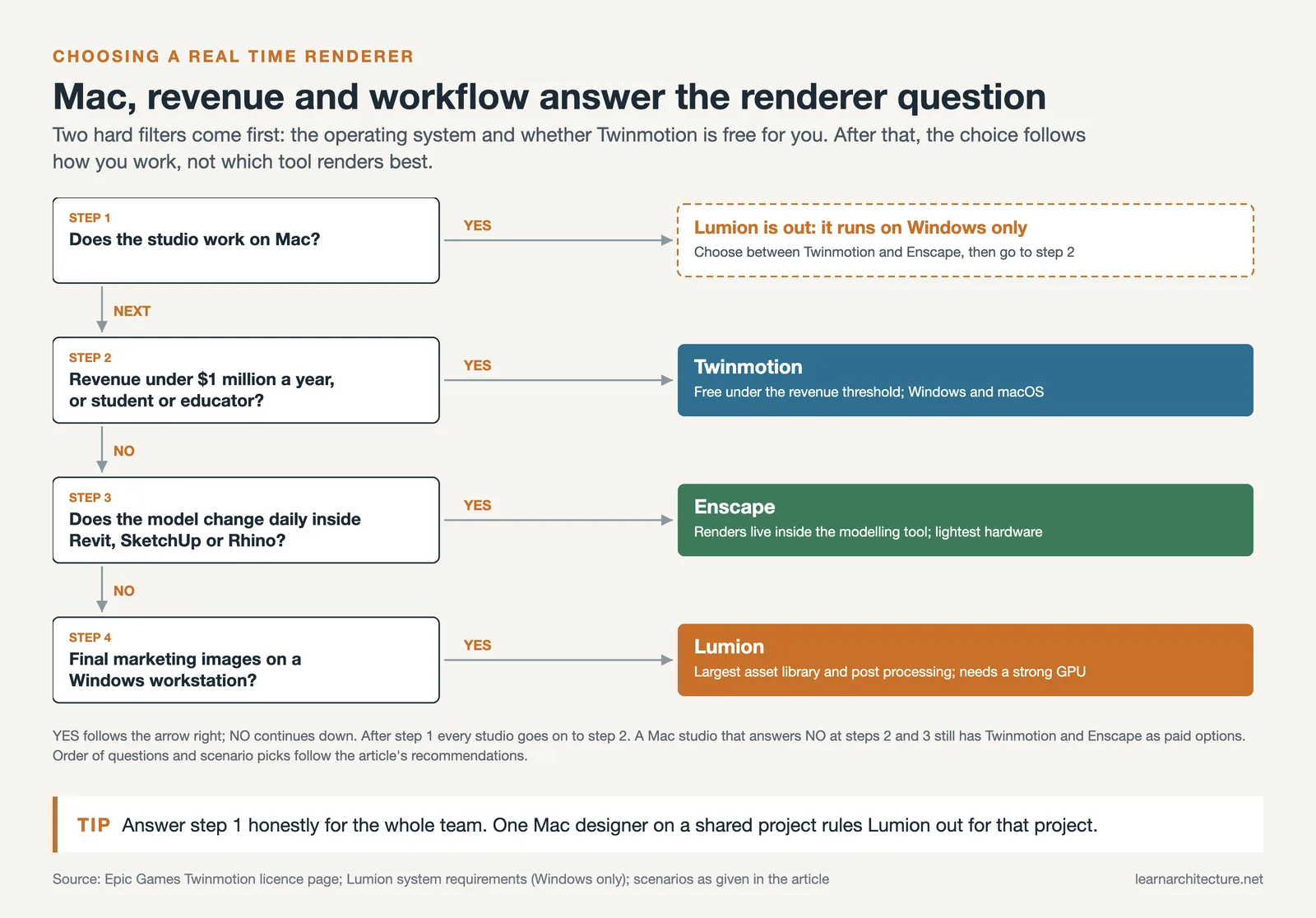
Choose Enscape if your work is design-heavy and you need fast visual feedback during the modeling process. Enscape is ideal for firms that do frequent client reviews, use Revit or SketchUp as their primary tool, and value BIM integration over cinematic output. It is also the strongest option for VR presentations, with direct support for Meta Quest 3 and HTC Vive Pro 2.
Choose Lumion if your priority is polished final presentations, exterior renders, and marketing visuals. Lumion Pro is the right tool when output quality matters more than speed, and when you need access to the largest built-in asset library. Architecture firms billing large projects where a stunning visualization can close the deal will find Lumion render quality worth the higher cost.
Choose Twinmotion if you need a balance between speed and quality at a lower price point. Twinmotion is especially attractive for small studios (free under $1M revenue), Mac users (Lumion is Windows-only), and teams that want Unreal Engine technology without the complexity of Unreal Editor. Twinmotion renders are strong enough for most client presentations and design reviews.
For architects exploring how AI rendering tools complement these traditional renderers, pairing an AI tool with one of these three can speed up early concept visualization while keeping the traditional renderer for final deliverables.
🎓 Expert Insight
“I don’t think it’s about picking one forever. Plenty of studios I know keep both in their toolbox. Enscape for the day-to-day design flow. Twinmotion for the big show.”
Licensed architect and visualization specialist, Vagon.io
This observation reflects a growing trend in the industry. Rather than committing to a single renderer, many firms maintain two tools: one optimized for speed during design and another for presentation-quality output.

Frequently Asked Questions
Which is better, Enscape or Lumion?
They optimise for different moments in a project. Enscape runs inside Revit, SketchUp, or Rhino and updates live as you model, which makes it the better tool during design development when the model changes daily. Lumion is a standalone environment with a far larger asset library and stronger post-processing, which makes it the better tool for final presentation imagery. Enscape also runs on lighter hardware and supports macOS; Lumion is Windows-only and wants a serious GPU.
Enscape vs Twinmotion: which should I choose?
Choose Enscape if your work lives inside a BIM model and you want rendering to follow your edits without exporting anything. Choose Twinmotion if you want a standalone environment with drag-and-drop simplicity, gaming-style navigation, and a generous licence, it is free for students and educators and for studios earning under $1 million a year. Twinmotion is the easier tool to pick up cold; Enscape is the faster tool once you are already modelling.
Which renderer is best for residential brochures and marketing images?
Lumion, in most cases. Brochure imagery is a final deliverable where visual polish matters more than iteration speed, and that is exactly where Lumion’s asset library, post-processing effects, and material control pay off. Twinmotion is a reasonable second choice if budget is tight. Enscape can produce brochure images, but you are using a design-review tool for a presentation job.
Is Twinmotion good for real estate walkthroughs?
Yes, it is one of the strongest choices for that specific task. Twinmotion is built on Unreal Engine, so real-time navigation is smooth, and it exports panoramas, videos, and standalone executables that clients can walk through themselves without owning any software. The free tier for smaller studios makes it particularly practical for real estate work where the rendering budget is thin.
Which renderer needs the least powerful computer?
Enscape, clearly. It asks for a minimum of 4 GB of VRAM and recommends 8 GB, and because it runs inside your modelling software it shares system resources rather than claiming its own. Lumion wants at least 8 GB of VRAM and recommends 10 GB or more for complex projects, with the most demanding scenes calling for 16 GB. If your team works on standard office laptops rather than rendering workstations, Enscape is the safe answer.
Do I still need V-Ray if I use a real-time renderer?
Many studios keep both. A 2024 Chaos Group industry survey found that more than 65% of architectural visualisation studios run an offline renderer such as V-Ray or Corona alongside a real-time engine on the same projects, using real-time for design development and offline for final images. If you have no dedicated visualisation specialist, though, a single real-time tool is usually enough, and adding V-Ray adds render time and complexity you may not need.
Which renderer is easiest for adding people, cars, and vegetation?
Lumion has the deepest built-in library for populating a scene, with thousands of objects and materials available without leaving the application, and placement is a drag-and-drop operation. Twinmotion is close behind and its library is also included. Enscape ships assets too, but its library is smaller, since it is designed to visualise the model you built rather than to build the world around it.
Which of these renderers run on macOS?
Enscape and Twinmotion run on both Windows and macOS. Lumion is Windows-only, with no native Mac version, so Mac-based studios either rule it out or run it through Boot Camp on Intel hardware or a Windows workstation. On Apple Silicon that is not a practical route, which effectively narrows the choice to Enscape and Twinmotion.
Final Thoughts
Lumion vs Twinmotion vs Enscape is not a question with a single correct answer. Each tool serves a different role in the architectural visualization pipeline. Enscape is the fastest path from model to visual. Lumion produces the most polished final images. Twinmotion offers the most flexibility at a competitive price.
If budget is tight, start with Twinmotion (free for small studios) or Enscape (the only one of the three with a published subscription price). If output quality is your top priority and you work on Windows, Lumion Pro remains the industry standard for presentation-ready architectural rendering. And if your workflow revolves around Revit or SketchUp with constant design changes, Enscape’s plugin approach will save you the most time.
Whichever you choose, all three tools continue to improve rapidly. The gap between them narrows with each update, and the real differentiator is how well the tool fits your specific architectural visualization workflow rather than which one is “objectively best.”











Leave a comment