


Table of Contents Show
Revit for architects is Autodesk’s Building Information Modeling (BIM) platform that lets design teams build parametric 3D models where every floor plan, section, elevation, and schedule stays automatically coordinated. It has become the dominant software in mid-to-large architecture practices globally, and understanding how it works is increasingly a baseline expectation in the profession.

What Is Revit and Why Do Architects Use It?
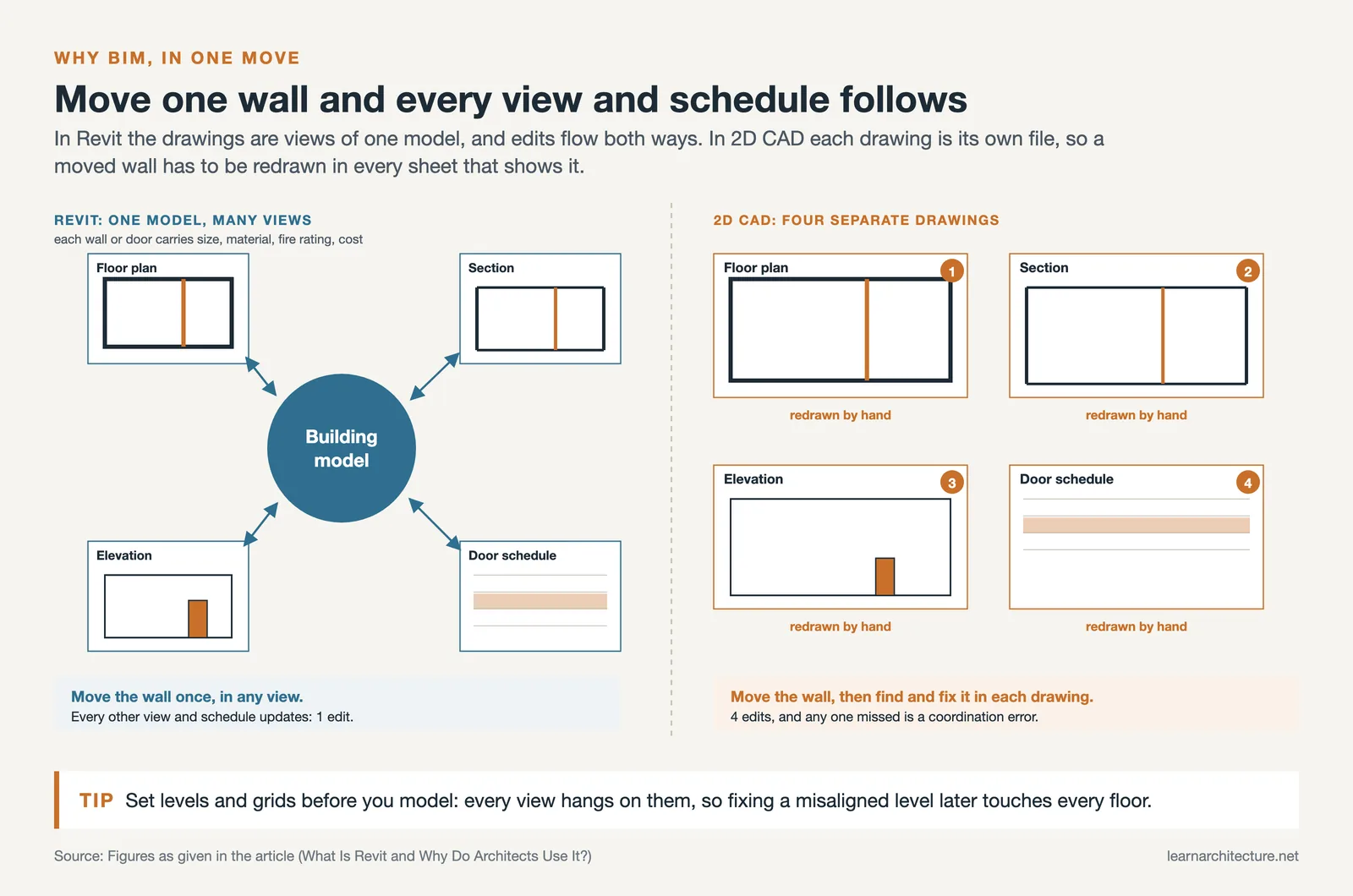
Revit software for architecture is not a drafting tool. It is a BIM environment, which means every element you place (a wall, a window, a staircase) carries data: dimensions, material properties, fire ratings, cost codes. Change the wall height on the floor plan and the section updates instantly. Move a door and every schedule that references it adjusts automatically.
This bi-directional associativity was actually built into the name: Revit is a contraction of “Revise-Instantly.” The original software was developed by Charles River Software, founded in 1997 and acquired by Autodesk in 2002. Since then it has evolved into a 4D BIM application capable of tracking a building from concept through construction and into facility management.
For architects specifically, the core value is documentation efficiency. On a traditional CAD project, a wall that moves in plan has to be updated in section, elevation, and detail drawings separately. In Revit that coordination happens automatically, which reduces errors and frees up time for design decisions.
💡 Pro Tip
When starting your first Revit project, resist the urge to model every detail immediately. Set up your levels and grids correctly before placing any elements. Fixing a misaligned level after you have modeled walls, floors, and roofs across multiple stories is far more time-consuming than getting the project structure right at the outset.

AutoCAD or Revit for Architecture: Which Should You Learn?
The AutoCAD vs. Revit question comes up constantly for students and early-career architects. The honest answer depends on what you are trying to do.
AutoCAD is a 2D (and basic 3D) drafting tool. It produces linework. It does not know that a line represents a wall, or that the wall contains a specific insulation layer, or that the wall connects to a roof at a particular level. Revit knows all of this. That intelligence is the difference.
In practice, most architecture firms still use AutoCAD for some tasks: quick concept sketches, site plans received from surveyors, or detail drawing elements that do not need BIM data. Revit handles everything from design development through construction documentation. Many firms run both, linking AutoCAD files into Revit when needed.
For career purposes: if you are targeting employment at firms working on commercial, institutional, or multi-family residential projects, Revit for architecture is the expected standard. AutoCAD fluency remains useful but is no longer sufficient on its own for most project types above a certain scale.

Comparison: AutoCAD vs. Revit for Architectural Work
The table below summarizes the practical differences between the two tools for architecture workflows:
| Feature | AutoCAD | Revit |
|---|---|---|
| Model type | 2D drafting (3D is limited) | Full 3D parametric BIM model |
| Drawing coordination | Manual across all views | Automatic across all views |
| Element intelligence | Linework only | Walls, doors, windows carry data |
| Schedules and quantities | Created manually | Generated directly from model |
| Collaboration | File-based (xrefs) | Worksharing / BIM 360 cloud |
| Learning curve | Moderate | Steeper, but logic-based |
| Best for | Details, site plans, quick sketches | Full project BIM documentation |
Revit Architecture for Beginners: How to Get Started
For those new to the software, the learning curve in Revit is genuine. The interface feels unfamiliar to AutoCAD users because the underlying logic is different: you are not drawing lines, you are placing building elements. A wall in Revit has a base constraint, a top constraint, a height, and a type containing its layer composition. Understanding this difference early saves a lot of frustration.
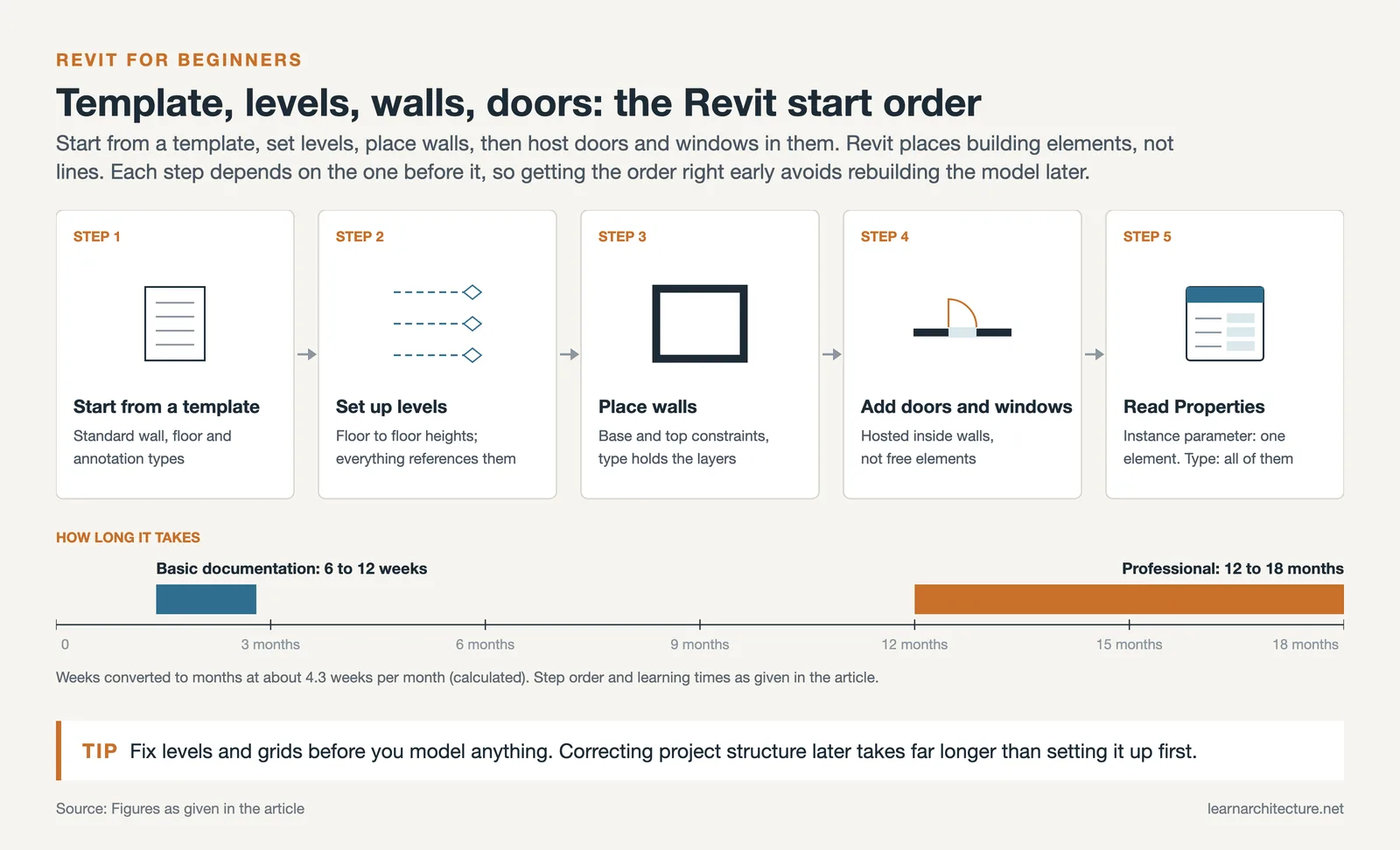
Here is a practical starting sequence for revit architecture for beginners:
- Start with a template. Autodesk provides architectural templates that include standard wall types, floor types, and annotation styles. Do not start from scratch.
- Set up levels first. Levels control floor-to-floor heights. Every floor slab, wall, and roof will reference them.
- Place walls, then add doors and windows. Revit places doors and windows hosted inside walls, not as independent elements.
- Work in plan view for placement, then check 3D views regularly to catch modeling errors early.
- Use the Properties palette constantly. Every element has instance parameters (applying to that one element) and type parameters (applying to all elements of that type). Understanding this distinction is fundamental.
Autodesk’s own learning hub provides structured tutorials organized by skill level, making it a reliable starting point alongside formal courses. For a well-sourced technical overview of how Revit’s parametric engine works under the hood, the Wikipedia entry on Autodesk Revit is worth reading early in your learning process.
📌 Did You Know?
Revit is the most widely used documentation platform in North American architecture practice, and its dominance is strongest at larger firms, which makes Revit fluency effectively non-negotiable at large practice sizes.

Revit for Residential Architecture
A common question among residential architects is whether Revit is worth the investment for smaller projects. The answer depends on project complexity and repetition. For custom one-off residential work, Revit’s setup overhead can feel disproportionate. But for residential developers, multi-unit housing, or firms doing repeated house types, the BIM workflow pays back quickly.
Revit for residential architecture handles the full scope of a house project: modeled walls with insulation and cladding layers, floor assemblies, roof geometry, stair calculations, and room schedules that automatically count areas for planning applications. The family library approach means you build a standard door family once, set all its parameters, and reuse it across every project thereafter.
Where residential Revit work differs from commercial is in the structural irregularity. Complex roof geometry, non-orthogonal plans, and site-specific conditions require more modeling judgment than grid-based commercial buildings. That said, Revit’s in-place modeling tools and conceptual massing environment handle most residential geometric challenges.
⚠️ Common Mistake to Avoid
Many architects new to Revit model complex roof geometry using the “Roof by Footprint” tool but forget to set correct overhangs and fascia heights. This produces a roof shape that looks correct in 3D but does not align with the walls in sections and elevations. Always set your wall top constraints and roof base offsets before finalizing roof placement, and check section views at each eave before moving on.
Revit for Interior Architecture
Revit for interior architecture is increasingly used by interior designers and fit-out specialists, not just building architects. The platform handles ceiling heights, partition layouts, furniture placement, finish schedules, and lighting coordination with the same parametric logic that governs structural elements.
Interior Revit work typically involves linking a base building model (from the architect’s structural model) and overlaying the interior layout as a separate model. This linked model workflow means the interior team can update their work without modifying the base building, and the base building changes are reflected automatically when the linked file updates.
For interior specification, Revit’s material and finish schedule tools are particularly useful. You can tag every floor, wall, and ceiling with a material type, generate a complete finish schedule for the room-by-room handover package, and update it automatically when the design changes. Firms using Revit for interiors consistently report significant time savings on the specification phase compared to manual room data sheets. The AIA’s BIM resource library also covers how BIM delivery requirements are handled in professional contracts, which matters whenever you are delivering interior documentation on a formally contracted project. You can pair Revit with rendering tools like those discussed in our guide to AI tools for architectural visualization to produce client-ready visuals directly from your BIM model.

Best Revit Plugins for Architects
Out of the box, Revit covers most documentation needs. But the plugin ecosystem extends it significantly. The best revit plugins for architects fall into a few categories: productivity, parametric design, sustainability analysis, and rendering.
Dynamo ships with Revit and provides visual scripting for parametric design. If you need to place 200 windows following a facade pattern rule, Dynamo can do it in seconds. It is well worth learning even at a basic level.
pyRevit is an open-source extension that adds dozens of practical tools: batch renaming, sheet management, view duplication, and model cleanup utilities. It is free and widely used in professional practice.
Enscape connects directly to Revit for real-time visualization. Any change in the Revit model updates immediately in the Enscape window. For client presentations and design reviews, this live walkthrough capability is highly effective. A similarly strong option is Veras, an AI-powered rendering plugin that applies style and atmosphere directly to your live Revit geometry via text prompts.
Cove.tool and Green Building Studio provide energy and sustainability analysis as Revit plugins, feeding data back into the BIM model workflow rather than requiring a separate export step.
🎓 Expert Insight
“The firms that get the most value from Revit are not the ones with the most plugins. They are the ones that have disciplined BIM execution standards: consistent naming conventions, clean family management, and a model audit process before each milestone submission.”
Gavin Crump, Licensed Architect and BIM Specialist (Aussie BIM Guru)
This observation reflects a real pattern in practice: technical capability in Revit is secondary to workflow discipline. A well-organized model with modest plugins outperforms a cluttered model with every extension installed.
How to Use Revit for Architecture: Practical Workflow Tips
Understanding how to use Revit for architecture as a working tool means going beyond feature knowledge into workflow habits. A few practices separate efficient Revit users from those who fight the software:

Work in phases. Revit has a built-in phasing system that tracks existing, demolished, and new construction elements. Use it from the start, especially on renovation projects. Retrofitting phasing into a model halfway through a project is painful.
Use view templates consistently. A view template saves graphic overrides, scale settings, and visibility configurations. Apply them to all drawing sheets from the beginning. Without them, making a presentation-quality drawing set from a model becomes a manual process.
Manage your families carefully. The Revit Family Editor is powerful but requires time investment. For standard components (doors, windows, furniture), use manufacturer-supplied families from BIMobject.com or the Autodesk content library rather than building every component from scratch. Save custom families in a controlled library folder that your whole team can access. For a broader look at how Revit fits within a full visualization pipeline, our guide on architectural visualization tools and workflow covers the handoff from BIM model to rendered output in detail.
💡 Pro Tip
Always audit your Revit model before major milestone submissions. Use the built-in Model Checker or pyRevit’s model health tools to identify unhosted elements, warning-heavy families, and oversized linked files that slow performance. A 15-minute audit run can prevent hours of troubleshooting during the coordination phase.
📐 Technical Note
Revit uses a central file / local file worksharing model for multi-user projects. Each team member works on a local copy and synchronizes with the central file at regular intervals. Central files should be stored on a high-speed network drive or Autodesk’s BIM 360 / Autodesk Docs cloud platform. File sizes on complex commercial projects typically run between 150 MB and 600 MB; exceeding 800 MB often signals model management problems such as excessive imported CAD data or unmanaged linked files.

Revit vs. Other Architecture Software
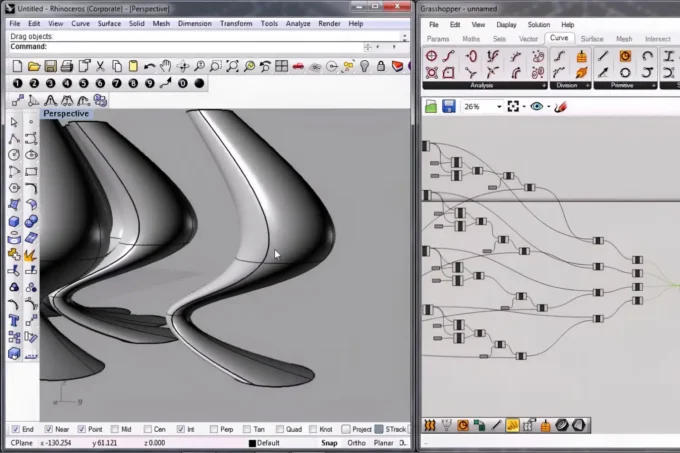
Revit is not the only BIM platform. ArchiCAD (by Graphisoft) covers similar territory with a more architect-focused interface and a lighter file performance profile, particularly on Mac. Vectorworks offers a strong alternative for landscape and entertainment architecture. For purely conceptual early-stage design, tools like Rhino and SketchUp are faster and more fluid, though they lack Revit’s documentation intelligence.
Most practices end up with a mixed toolset: Rhino or SketchUp for early design exploration, Revit for design development and construction documentation, and a rendering tool (Enscape, Lumion, or D5 Render) sitting on top. Understanding how to use revit for architecture within this larger software ecosystem is more practical than treating it as an all-in-one solution.
✅ Key Takeaways
- Revit for architects is a BIM platform, not a drafting tool. Its value is in automatic view coordination and data-rich elements, not just 3D modeling.
- AutoCAD and Revit serve different purposes. For full project documentation on most commercial and institutional projects, Revit has become the industry standard.
- Beginners should set up levels and grids correctly before modeling. Fixing project structure later is significantly more time-consuming than getting it right at the start.
- Revit works for both residential and interior architecture, not just large commercial projects. Interior architects particularly benefit from finish scheduling and linked model workflows.
- The best Revit plugins (Dynamo, pyRevit, Enscape, Cove.tool) extend capability, but workflow discipline and model management matter more than the number of add-ins installed.
FAQ
Is Revit suitable for small architecture firms?
Yes, though the return on investment depends on project type and team size. Revit LT is a more affordable, reduced-feature version designed for smaller firms. It handles architectural modeling and documentation well, though it lacks the worksharing and MEP coordination tools of the full version. For firms doing repetitive residential or commercial fit-out work, even Revit LT pays back quickly in documentation efficiency.
How long does it take to learn Revit?
A beginner can achieve basic project documentation competency in 6 to 12 weeks of structured learning. Reaching professional-level proficiency, where you can manage family creation, worksharing, phasing, and view templates fluently, typically takes 12 to 18 months of active use on real projects. The Autodesk learning hub and channels like Balkan Architect on YouTube offer structured free resources to accelerate this.
Can Revit be used for interior architecture?
Yes. Revit for interior architecture handles partition layouts, ceiling heights, finish schedules, lighting coordination, and furniture placement within the same parametric BIM environment. Interior teams typically work on a separate linked model that references the architect’s base building model, allowing independent updates while maintaining coordination.
What are the best Revit plugins for architects?
The most widely used are Dynamo (visual scripting, included with Revit), pyRevit (free productivity tools), Enscape or Veras (real-time and AI rendering), and Cove.tool (sustainability analysis). The right combination depends on your workflow: firms focused on documentation benefit most from pyRevit, while firms doing early client presentations prioritize Enscape or a similar visualization plugin.
Is Revit better than ArchiCAD for architects?
Both are capable BIM platforms. Revit has broader multi-discipline coordination (MEP, structural) and is more widely used in large commercial practice globally. ArchiCAD has a more intuitive interface, performs better on less powerful hardware, and is preferred in smaller architecture-focused studios. The choice often comes down to what your local market uses and the types of projects your firm handles.













Leave a comment