


Table of Contents Show
Architecture plugins are add-on tools that extend the functionality of design software like SketchUp, Revit, AutoCAD, Blender, Cinema 4D, and 3ds Max. The right plugins can cut hours from repetitive modeling, rendering, and documentation tasks, letting architects focus on design rather than manual processes.
Every architecture studio runs into the same bottleneck: the gap between what your core software does out of the box and what your project actually demands. A rendering engine that plugs directly into your modeler, a parametric tool that automates facade panels, or a BIM add-on that tags hundreds of elements in seconds can shift an entire project timeline. This guide covers 10 architecture plugins worth installing, organized by the software they extend and the specific studio tasks they handle.
Why Architecture Plugins Matter for Studio Productivity

Most design software ships with a general-purpose toolset. Plugins fill the gaps that generic tools leave open. A SketchUp installation without extensions, for example, lacks proper section-cut fills, automated site terrain tools, and decent rendering. Adding three or four targeted architecture plugins turns it into a much more capable platform without the cost of switching to heavier software.
The productivity gain is not abstract. A Revit plugin like pyRevit can batch-rename hundreds of views or sheets in seconds, a task that would take 20 minutes by hand. A Blender add-on like Archipack generates parametric walls, doors, and stairs from a single click rather than manual extrusion and measurement. These are the kinds of time savings that compound across a full project cycle.
Best SketchUp Architecture Plugins
SketchUp’s strength is speed and simplicity, but its stock toolset is limited. The SketchUp Extension Warehouse hosts thousands of add-ons, and a handful of them are essential for any architecture workflow. These are the architecture plugins for SketchUp that make the biggest difference in daily studio use.
V-Ray for SketchUp
V-Ray by Chaos is the industry-standard rendering engine for SketchUp. It supports GPU and CPU rendering, real-time viewport preview via V-Ray Vision, and a massive material library. For studios that need photorealistic output directly from their SketchUp model, V-Ray eliminates the need to export geometry to a separate application. The architecture plugin SketchUp users rely on most for final presentation images is, more often than not, V-Ray.
Profile Builder 3
Profile Builder 3 by MindSight Studios lets you draw walls, floors, slabs, and custom profiles along any SketchUp path. You define a cross-section profile once, and the plugin extrudes it along edges, arcs, or freeform curves. It is especially useful for detailing wall assemblies, floor build-ups, and custom moldings. Compared to SketchUp’s native Push/Pull, Profile Builder offers parametric control over thickness, offset, and material layers.
💡 Pro Tip
Before installing multiple SketchUp extensions, check for conflicts. Some older plugins override the same Ruby API methods, which causes crashes or unexpected geometry. Test each new extension on a copy of your working file first, and keep your Extension Manager organized by disabling anything you do not actively use.
Comparison of Top SketchUp Architecture Plugins
The following table compares the key SketchUp plugins side by side to help you decide which ones fit your workflow.
| Plugin | Primary Use | Price | Free Trial |
|---|---|---|---|
| V-Ray for SketchUp | Photorealistic rendering | Annual subscription (check current Chaos pricing) | Yes (30 days) |
| Profile Builder 3 | Parametric wall/floor assemblies | $69 (one-time) | Yes |
| Enscape for SketchUp | Real-time walkthrough + rendering | Annual subscription (check current Chaos pricing) | Yes (14 days) |
| Curic Section | Advanced section cuts with fills | $49 (one-time) | Yes |
For a broader look at how SketchUp compares against BIM platforms, the ArchiCAD vs SketchUp comparison on learnarchitecture.net covers the differences in modeling approach, documentation, and plugin ecosystems.
Best Revit Architecture Plugins
Revit’s plugin ecosystem revolves around Autodesk’s App Store and community-built open-source tools. The best Revit architecture plugins target the tasks that Revit handles slowly or not at all: batch operations, rendering, and parametric scripting.
pyRevit
pyRevit is a free, open-source rapid application development environment for Autodesk Revit. It bundles dozens of ready-made tools (batch renaming, sheet management, selection filters, element matching) and lets you write custom Python or C# scripts without compiling a full add-in. For BIM managers and project architects, pyRevit is probably the single most time-saving Revit plugin available. It is maintained by Ehsan Iran-Nejad and hosted on GitHub.
Dynamo
Dynamo ships with Revit but is often overlooked. It is a visual programming environment that automates repetitive BIM tasks: placing elements along curves, generating schedules from external data, adapting facade panels to surface curvature, and more. Combined with Python scripting nodes, Dynamo turns Revit into a parametric design tool. For studios already invested in Revit, Dynamo is the most accessible path to computational design without leaving the BIM environment. If you want to go deeper into parametric methods, the parametric design tools guide on learnarchitecture.net covers Dynamo alongside Grasshopper and other platforms.
🎓 Practical Insight
The best Revit add-ins are the ones that remove the friction between thinking and doing. If you spend more time managing the model than designing the building, your toolset needs work.
This observation captures why plugins like pyRevit and Dynamo matter so much. They reduce the mechanical overhead of Revit so architects can spend more time on design decisions.
Best AutoCAD Plugins for Architecture
AutoCAD remains the backbone of 2D drafting in many studios. The best AutoCAD plugins architecture teams reach for address annotation, block management, and drawing cleanup.
MTEXT Fixer and AutoCAD Architecture Toolset
The AutoCAD Architecture toolset (included with AutoCAD subscriptions) adds intelligent wall, door, window, and space objects directly into the drafting environment. These are not simple blocks; they carry data and respond to each other, making plan changes faster. For third-party add-ons, MTEXT Fixer solves one of AutoCAD’s most persistent annoyances: broken multiline text formatting after file exchanges. It cleans stacked formatting errors, resets fonts, and normalizes text height across an entire drawing set in one pass.
Studios still producing 2D construction documents in AutoCAD benefit from the autocad architecture plugins that handle hatch management, layer state switching, and batch plotting. The Architecture toolset alone covers wall cleanup intersections and room tagging that would otherwise require manual drawing in vanilla AutoCAD.
Best Blender Architecture Plugin Options
Blender has grown from a generalist 3D tool into a serious option for architectural visualization, and its plugin ecosystem reflects that shift. The best Blender architecture plugin choices cover both modeling and rendering.
Archipack
Archipack is a parametric architecture toolkit for Blender. It generates walls, windows, doors, stairs, roofs, and fences with adjustable parameters. You click to place a wall, then adjust height, thickness, and openings through a property panel rather than modeling each element by hand. For architects who want to use Blender for design rather than just visualization, Archipack bridges the gap between a general 3D modeler and a dedicated architecture tool.
⚠️ Common Mistake to Avoid
Many architects install a Blender architecture plugin but forget to set their scene units to meters (or feet) before starting the project. Blender defaults to a generic unit system, and parametric add-ons like Archipack rely on correct unit settings to generate accurately sized elements. Always configure your units in Scene Properties before placing any architectural objects.
For a broader look at Blender’s role in the architectural workflow alongside 3ds Max and other tools, the architectural visualization tools and workflow guide on learnarchitecture.net covers how studios integrate multiple software platforms.
Best Cinema 4D Architecture Plugin

Cinema 4D by Maxon is popular among visualization studios for its motion graphics tools and stable rendering pipeline. The leading Cinema 4D architecture plugin is Chaos Corona, a separate renderer plugin from Chaos, alongside third-party environment tools.
Corona Renderer for Cinema 4D
Corona Renderer integrates into Cinema 4D as a plugin and delivers photorealistic output with minimal setup. Its interactive rendering mode lets you adjust materials, lighting, and camera settings while watching the image update live. For architectural interiors, Corona’s light mixing feature is especially useful: you render once with all light sources active, then adjust the intensity of each light in post-production without re-rendering. This saves significant time on interior visualization projects where lighting balance is critical.
Best 3ds Max Architecture Plugin
3ds Max remains the dominant platform for high-end architectural visualization, and the best 3D Max architecture plugin options focus on scene management, scattering, and rendering efficiency.
Forest Pack by iToo Software
Forest Pack is a scattering plugin that places millions of objects (trees, grass, rocks, people, cars) across surfaces with controllable density, distribution, and randomization. For exterior architectural renders, Forest Pack is nearly essential. Manually placing vegetation in a large site model would take hours; Forest Pack handles it parametrically, and the scattered objects are render-time only, keeping viewport performance smooth.
The combination of Forest Pack and RailClone (also by iToo Software) covers two of the most repetitive tasks in archviz: landscape population and facade element distribution. RailClone generates parametric arrays of panels, railings, fences, and other repeating building components along splines, making it the go-to plugin for facade detailing in 3ds Max.
💡 Pro Tip
If you use Forest Pack for large exterior scenes, set the display mode to “Point Cloud” or “Billboard” during modeling. Showing full geometry in the viewport slows everything down. Switch to “Full” only for the final frame check before rendering. This keeps 3ds Max responsive even on scenes with millions of scattered instances.
How to Choose the Right Architecture Plugins for Your Workflow
Picking plugins is not about installing everything available. Each add-on introduces another variable into your file stability, update cycle, and team compatibility. Start by identifying the three biggest time sinks in your current workflow. If rendering takes too long, a GPU renderer plugin is the priority. If BIM documentation eats your hours, look at pyRevit or Dynamo. If you spend days populating site models with vegetation, Forest Pack pays for itself on the first project.
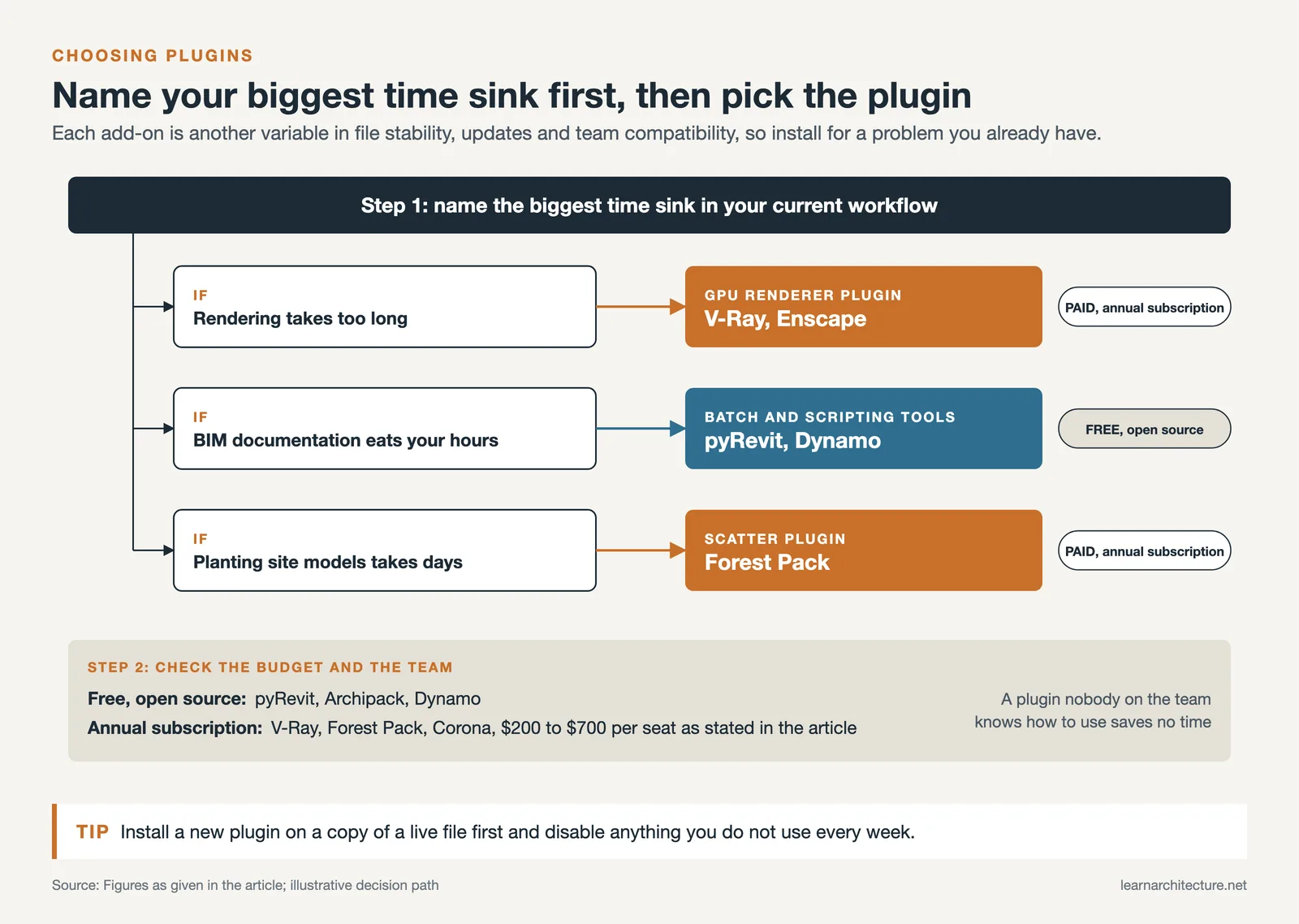
Budget matters too. Open-source plugins like pyRevit, Archipack, and Dynamo cost nothing. Commercial tools like V-Ray, Forest Pack, and Corona require annual subscriptions that range from $200 to $700 per seat. Factor in the learning curve as well: a powerful plugin that nobody on your team knows how to use is not saving anyone time.
For studios weighing which software platform to commit to, the best 3D architectural design software guide on learnarchitecture.net compares SketchUp, Revit, Rhino, and 3ds Max across modeling, rendering, and documentation capabilities.
Video: Top SketchUp Extensions for Architecture
This walkthrough by TheSketchUpEssentials covers 29 SketchUp extensions for architectural modeling, including section tools, site modeling helpers, and rendering integrations.
What About Grasshopper and Parametric Plugins?
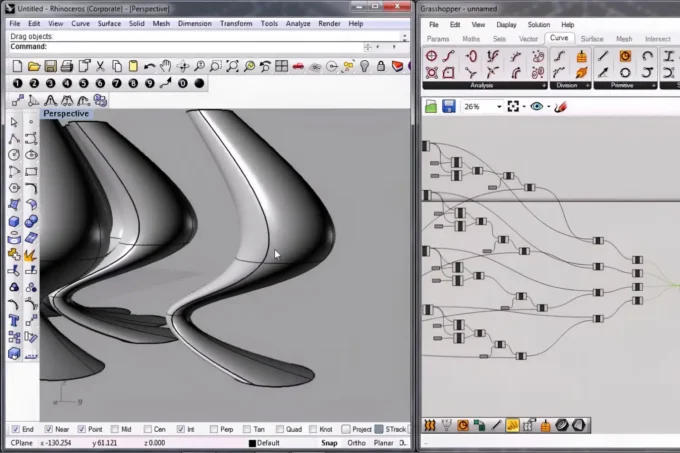
Grasshopper for Rhino deserves a separate mention because it operates differently from typical architecture plugins. Rather than adding a single feature, Grasshopper is a full visual programming environment that turns Rhino into a parametric design platform. Architects use it for facade rationalization, form-finding, environmental analysis (via Ladybug Tools), and structural optimization (via Karamba3D). If your work involves complex geometry or data-driven design, Grasshopper is less a plugin and more a second software layer. The Grasshopper design guide on learnarchitecture.net goes deeper into its applications and plugin ecosystem.
📌 Did You Know?
Grasshopper was originally released in 2007 as an independent project by David Rutten at Robert McNeel and Associates. It started as a generative modeling experiment and has since grown into the most widely used visual programming tool in architecture, with over 500 community-developed plugins available through the food4Rhino platform.
Cross-Platform Architecture Plugins Worth Knowing

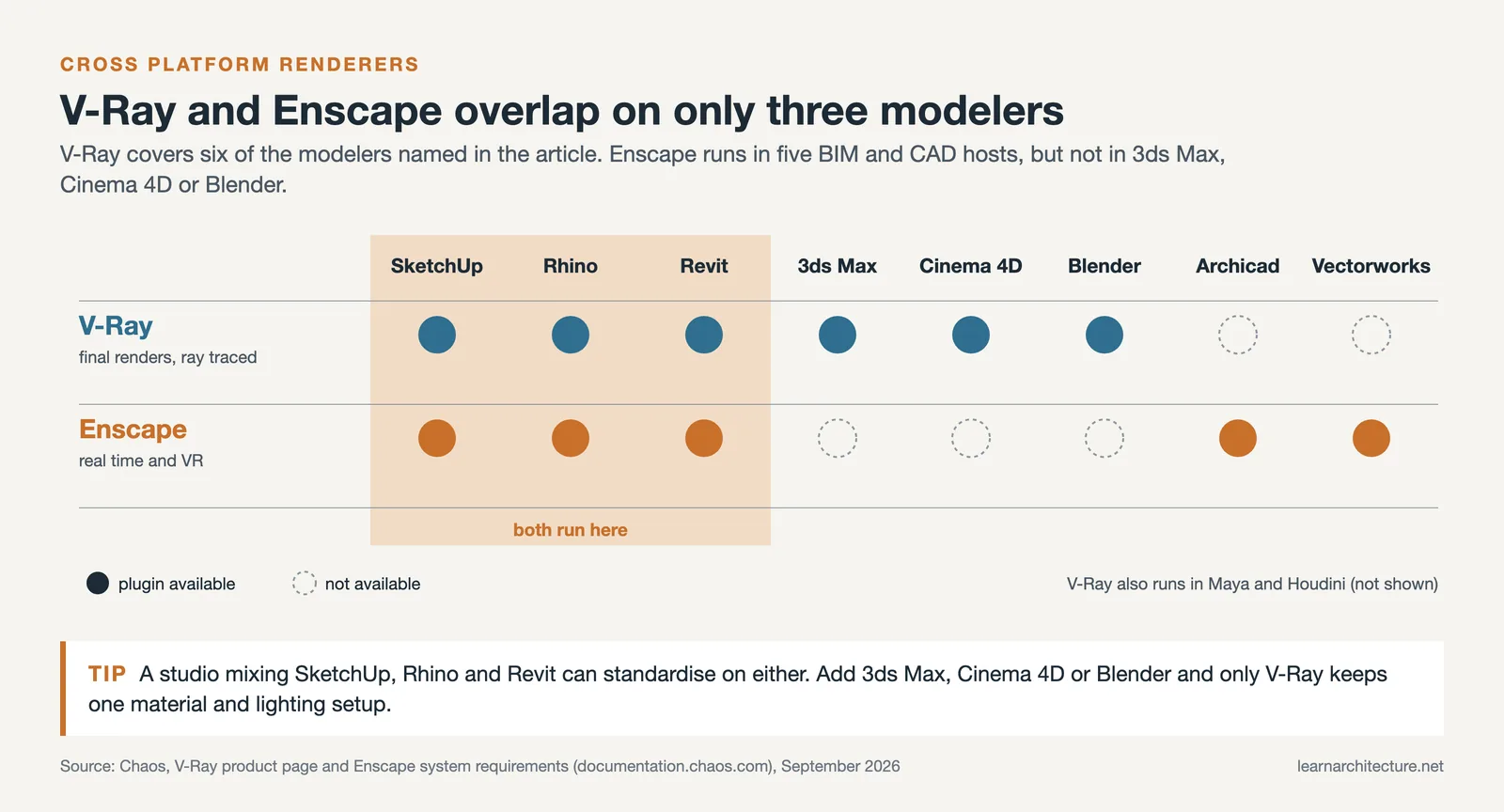
Some plugins work across multiple platforms. Chaos V-Ray, for example, runs on SketchUp, Rhino, Revit, 3ds Max, Cinema 4D, and Blender. If your studio uses more than one modeling tool, a cross-platform renderer means your lighting setups, materials, and render settings stay consistent regardless of which software generated the geometry. Enscape (now also under the Chaos umbrella) offers a similar cross-platform approach for real-time rendering and VR walkthroughs.
For studios exploring AI-powered rendering as an alternative or complement to traditional plugins, the AI architectural visualization tools guide on learnarchitecture.net covers how AI rendering integrations compare with established plugin-based workflows.
✅ Key Takeaways
- Architecture plugins fill the gaps between what your core software offers and what your projects demand. Start with the three biggest time sinks in your workflow.
- V-Ray and Enscape are the most popular rendering plugins for SketchUp and Revit, while Forest Pack dominates exterior scene population in 3ds Max.
- Free, open-source plugins like pyRevit, Dynamo, and Archipack offer major productivity gains at zero cost.
- Cross-platform plugins from Chaos (V-Ray, Enscape) keep render settings consistent across multi-software studios.
- Grasshopper for Rhino operates as a full parametric design environment rather than a simple add-on, making it the most powerful plugin-level tool in the architecture software ecosystem.
Final Thoughts
The right set of architecture plugins can shift your studio from spending most of its time on technical production to spending more of it on design. The plugins listed here are established tools with active development and large user communities, which means support, tutorials, and updates are available when you need them. Install only what you will actually use, keep your plugins updated, and invest the time savings back into better design work.
Plugin pricing and feature sets are subject to change. Always check the official developer website for the most current information before purchasing.












Leave a comment