


Table of Contents Show
Architectural drawings are a language. If we can read the symbols and conventions, we can read the building. This practical guide is for students who want to feel confident navigating plans, sections, and details, whether in studio pin-ups or on real project sets. We’ll unpack the essential architectural symbols, show how they work across CAD/BIM and hand drafting, and share the habits that make our drawings clear, consistent, and professional.

Understanding Architectural Symbols And Conventions
Why Symbols Matter In Design Communication
We use symbols to compress complex information into concise, legible graphics. A door swing tells direction and clearance at a glance: a hatch instantly conveys material. Good symbol use speeds decisions, reduces errors, and keeps teams aligned. In critiques or coordination meetings, clear symbols let our design intent survive translation, between disciplines, between software, and between drawing scales.

Industry Standards And Notation Systems
While offices develop their own styles, we anchor to standards so others can read our work. In the US, the National CAD Standard (NCS) and AIA layer/notation conventions are common. Internationally, ISO 128 guides line types and graphic representation. In BIM, families and view templates enforce symbol consistency. The takeaway: pick a standard, stick to it, and document exceptions in the legend.
The Essential Symbol Sets You Must Know
Plans: Walls, Doors, Windows, Stairs, And Furniture
In plans, walls read with poche or hatches: thicker cuts indicate structural or primary partitions. Doors show swing arcs and handing: windows are centered in walls with types tagged. Stairs use arrows for up/down direction, break lines, and treads/riser count. Furniture blocks communicate layout and scale for programs like studios, classrooms, or clinics, keep them realistic, not just pretty.

Sections And Elevations: Cut Lines, Levels, And Callouts
Section cuts use heavy poche at the cut and lighter linework beyond. Elevations rely on lineweight depth, darkest foreground, faint background, to express hierarchy. Level markers and datum lines anchor vertical control. Detail and section callouts (bubbles with sheet/view references) are the navigational system for your set.
Site And Orientation: North Arrow, Scale, And Grids
A north arrow is non-negotiable: pair it with graphic scales appropriate to sheet size. Site plans show property lines, setbacks, contours, and utilities with distinct line types. Structural grids (A, B, C: 1, 2, 3) provide a universal reference so everyone can say “Grid B/3” and mean the same spot.
Annotations: Dimensions, Leaders, Tags, And Legends
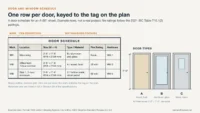
Dimensions should be readable at print scale, placed outside objects where possible. Leaders point cleanly: avoid crossing. Tags identify doors, windows, rooms, and equipment with consistent naming. A legend is your decoder, symbols, line types, and hatches shown once so they don’t need explaining everywhere else.
Lines, Hatches, And Patterns
Line Weights, Line Types, And Graphic Hierarchy
We communicate depth and importance with lineweights. Cuts are heaviest, edges lighter, and beyond lightest. Centerlines, hidden lines, and property lines use distinct dash patterns per standard. If everything is bold, nothing is legible.

Material Hatches And Poché Conventions
Use standard hatches for concrete, masonry, insulation, wood, and earth to avoid guesswork. Poché in sections clarifies what’s cut: structural cores darker, finishes lighter. Keep scale in mind, overly dense hatches moiré at small prints: simplify for half-size sets. If a material is missing from your library, you can make a custom hatch pattern for AutoCAD or Revit in a few minutes.
Transparency, Shadows, And Graphic Clarity
In elevations and diagrams, selective transparency and cast shadows can explain depth and relationships without clutter. Use them intentionally, and keep contrast high enough for printing. When in doubt: fewer effects, stronger hierarchy.
Structural And MEP Basics
Structural Symbols: Columns, Beams, Slabs, And Grids
Columns (round or rectangular) should align with grids: tag sizes and materials. Beam directions and sizes matter for spans and penetrations. Slab edges, control joints, and slopes are shown with arrows/notes. Always reconcile architectural walls with structural framing.

MEP Symbols: Fixtures, Outlets, Diffusers, And Sprinklers
Plan for real systems. Electrical outlets, switches, data ports, and panels have distinct symbols and mounting heights. HVAC diffusers/returns and thermostats must respect ceiling layouts. Plumbing fixtures, floor drains, and vents affect floor and wall builds. Sprinkler heads must satisfy coverage and coordination with lighting.
Coordination Across Disciplines
Conflict happens where systems intersect, beams vs. ducts, doors vs. sprinklers. Use clash detection in BIM and color-coded coordination plans. Cross-reference grids, levels, and view numbers so issues are easy to locate and fix.
How To Read And How To Draft Symbols Effectively
Reading A Set: Title Block, Legend, And Cross-Referencing
Start with the title block for project data, sheet index, and revisions. Then read the legend and general notes. Follow callouts: a plan bubble might jump to A302/5 for a section, then to A702/2 for a detail. We’re not just looking, we’re tracing the logic of the building.
Drafting Best Practices In CAD/BIM And By Hand
Name layers/views clearly, set view templates, and lock lineweight standards. In Revit/ArchiCAD, use native families for doors/windows so tags and schedules stay smart. By hand, keep a limited pen set (e.g., 0.1/0.3/0.5) and plot regularly to check legibility. Print tests beat screen assumptions.

Accessibility, Egress, And Code-Required Symbols
Mark accessible routes, clearances, mounting heights, and turning radii. Egress symbols, exit signs, travel distance paths, door swing direction, must meet code. Fire ratings, smoke partitions, and extinguisher locations need standard line types and tags. Code clarity isn’t optional: it’s life safety.
Common Mistakes And How To Fix Them
Ambiguous Line Weights Or Scales
If a drawing reads flat, audit your lineweights and scale. Create a graphic scale test sheet and standardize pen settings. At small scales, simplify detail: at large scales, add specificity.

Inconsistent Legends And Naming
Changing symbols mid-set confuses reviewers. Centralize your legend and keynotes: use consistent door/window/type tags. In BIM, lock naming with shared parameters and view templates.
Overcrowded Drawings And Poor Layer Control
Too many notes and overlapping leaders kill clarity. Prioritize: what must be read at this scale? Use layers/filters to control visibility per view, and push detail to enlarged callouts. White space is not wasted space.
Conclusion
Architectural symbols are the shorthand that make our drawings work. If we commit to standards, mind our linework, and coordinate across disciplines, we’ll produce sets that read clearly at any scale. Keep your legend honest, your annotations disciplined, and your prints tested, and your design intent will come through, crisply and confidently.
- architectural drafting symbols
- architectural symbol definitions
- architectural symbols guide
- architectural symbols handbook
- architectural symbols tutorial
- architecture drawing symbols
- architecture student resources
- architecture symbols and meanings
- architecture symbols for students
- architecture symbols learning
- basic architecture symbols
- beginner architectural symbols
- fundamentals of architectural symbols
- guide to architectural drawing
- learning architectural symbols
- practical guide architecture students
- student architecture symbol guide
- symbol guide for architecture students
- understanding architectural symbols










Leave a comment