


Table of Contents Show
Choosing the right architecture software can shape every stage of a project, from the first concept sketch to construction documentation. With dozens of programs competing for your attention, it helps to know what each category offers and where specific tools shine. This architecture software guide breaks down the major software types, highlights standout options, and helps you match programs to the way you actually work.

BIM Softwares That Power Professional Workflows
Building Information Modeling has become the backbone of contemporary architectural practice. Unlike traditional CAD drafting, BIM softwares embed real-world data into every element of a 3D model. Walls carry material specifications, doors store manufacturer data, and structural members link to engineering calculations. When you update a plan view, every section, elevation, and schedule updates automatically.
Autodesk Revit remains the most widely adopted BIM platform in North America. Its strength lies in multi-discipline collaboration: architects, structural engineers, and MEP consultants can work on a single coordinated model. According to the American Institute of Architects (AIA), most large firms now use BIM for billable work. Revit’s main limitation is that it runs only on Windows, which forces Mac users to rely on Parallels or Boot Camp.
ArchiCAD by Graphisoft is the go-to alternative, especially for firms that value a design-first interface. Its open BIM workflow supports IFC file exchange, so you can collaborate with consultants regardless of the software they use. ArchiCAD also runs natively on macOS, making it the stronger pick for studios built around Apple hardware. If you need BIM modeling software that balances creative flexibility with documentation rigor, ArchiCAD deserves a close look.

Construction CAD Software for Drafting and Documentation
Before BIM became standard, CAD programs handled every line an architect drew. They still play a vital role, especially when firms need lightweight tools for detailing, site plans, or coordination drawings. Construction CAD software like AutoCAD remains an industry staple for producing precise 2D documentation and simple 3D models.
AutoCAD Architecture adds dedicated building objects (walls, doors, windows) on top of AutoCAD’s core engine. This toolset can speed up drafting by over 60% compared to generic AutoCAD, according to Autodesk. The catch is cost: a subscription runs roughly $2,000 per year. For students and early-career professionals, starting with free or educational licenses is a practical first step before committing to a paid plan.
Rhino Architecture Software and Parametric Design
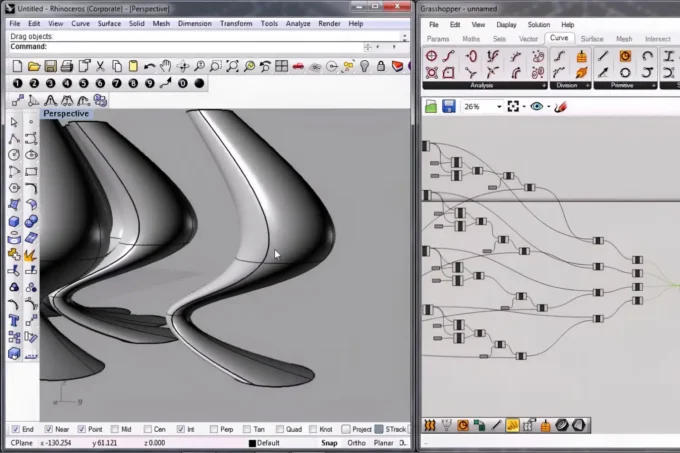
When a project calls for complex geometry, freeform surfaces, or algorithmic form-finding, Rhino architecture software is hard to beat. Rhino 3D handles NURBS modeling with exceptional precision, and its Grasshopper plugin unlocks parametric design workflows that let you drive geometry through data and rules rather than manual modeling.
Firms such as Zaha Hadid Architects and BIG have famously relied on Rhino and Grasshopper to realize buildings that would be nearly impossible to model in conventional BIM tools. The software supports Windows and macOS, carries a one-time license cost (around $995), and reads almost every file format in use today. For architects pushing design boundaries, pairing Rhino with a BIM platform like Revit or ArchiCAD creates a powerful end-to-end workflow. You can learn more about parametric approaches on ArchDaily, which regularly features projects that use these techniques.

Architectural Rendering Programs and 3D Visualization
A well-crafted render can sell a design faster than any drawing set. Architectural rendering programs translate your 3D model into photorealistic images, animations, or virtual-reality walkthroughs that clients and stakeholders can immediately understand.
Lumion is popular for its speed: you can produce high-quality stills and flythrough videos in minutes, not hours. Enscape takes a different approach by embedding a real-time rendering window directly inside Revit, ArchiCAD, or SketchUp, so you see lighting and material updates as you model. Twinmotion, now owned by Epic Games, offers a free tier for individuals and small teams, which makes it an attractive entry point for studios watching their budgets.
V-Ray, developed by Chaos Group, sits at the high end of 3D architectural rendering software. Its physically accurate light simulation produces results that are nearly indistinguishable from photographs. V-Ray plugs into SketchUp, Rhino, Revit, and 3ds Max, giving you flexibility regardless of your modeling platform. The trade-off is a steeper learning curve and longer render times compared to real-time engines.
3D Architectural Visualization Software for Presentations
Visualization goes beyond still images. 3D architectural visualization software now includes interactive walkthroughs, augmented reality overlays, and cloud-based viewers that let clients explore a model on their phone. Tools like Enscape, Twinmotion, and Lumion all support VR headsets, so stakeholders can stand inside a building before ground is broken.
For firms presenting to non-technical audiences, real-time visualization removes the guesswork from material and lighting choices. You can swap a timber facade for brick in seconds and show the impact immediately. This kind of instant feedback loop shortens design review cycles and builds client confidence early in the process.

Top Rated Interior Design Software for Space Planning
Interior-focused projects benefit from tools built around furniture libraries, finish palettes, and room-level detail. Top rated interior design software options include SketchUp (paired with V-Ray or Enscape for rendering), Chief Architect for residential interiors, and Planner 5D for quick conceptual layouts. SketchUp’s 3D Warehouse gives you access to millions of user-created furniture and fixture models, which can cut hours from the modeling phase of a fit-out project.
Free Architectural Design Software Worth Trying
Budget constraints should not keep anyone from learning or practicing design. Several free architectural design software tools offer real capability without a subscription fee.
SketchUp Free runs in a web browser and covers basic 3D modeling for personal projects. FreeCAD is an open-source parametric modeler suited to both architecture and mechanical design, with an active community that publishes tutorials on Dezeen and YouTube. LibreCAD handles 2D drafting on Windows, Mac, and Linux at zero cost. Blender, while primarily known for animation, has grown into a capable free 3D architectural design software tool thanks to its modeling, rendering, and compositing features.
The table below compares several popular options across key criteria so you can narrow down the right fit for your needs.

Architecture Software Comparison
Here is a quick side-by-side look at widely used architecture programs:
| Software | Category | Platform | Price (approx.) | Best For |
|---|---|---|---|---|
| Revit | BIM | Windows | $2,930/yr | Large-scale BIM projects |
| ArchiCAD | BIM | Windows, macOS | $2,414/yr (as of September 2026) | Design-focused BIM on Mac |
| AutoCAD | CAD | Windows, macOS | $2,095/yr (as of September 2026) | 2D drafting, documentation |
| Rhino 3D | 3D Modeling | Windows, macOS | $995 (one-time) | Complex geometry, parametric |
| SketchUp Pro | 3D Modeling | Windows, macOS, Web | $399/yr (as of September 2026) | Quick concept modeling |
| Lumion | Rendering | Windows | $1,149/yr (as of September 2026) | Fast photorealistic renders |
| Blender | 3D Modeling/Rendering | Windows, macOS, Linux | Free | Budget-friendly 3D work |
| FreeCAD | CAD / Parametric | Windows, macOS, Linux | Free | Open-source parametric modeling |
Architecture Software for Mac Users
Apple hardware is common in design studios, so architecture software for Mac compatibility matters. ArchiCAD, Rhino, SketchUp, Vectorworks, and AutoCAD all run natively on macOS. Revit does not, which remains a significant pain point for Mac-based firms. If Revit is non-negotiable for your projects, running it through Parallels Desktop or a cloud-hosted Windows instance are the two most reliable workarounds.
Vectorworks Architect deserves a mention here. Developed with macOS in mind from the start, it provides a hybrid 2D/3D BIM environment that many architects find more intuitive than Revit. Pricing starts around $3,045 per year, with student discounts available. For a broader look at platform choices, this guide on illustrarch.com covers additional Mac-friendly options.

Building Your Architecture Software Workflow
No single program does everything well. The most productive architects assemble a small stack of tools that hand off files to one another smoothly. A typical workflow might look like this: sketch ideas in SketchUp or Rhino, develop the design in Revit or ArchiCAD for documentation, render with Lumion or Enscape, and refine presentation graphics in Adobe Photoshop or Illustrator.
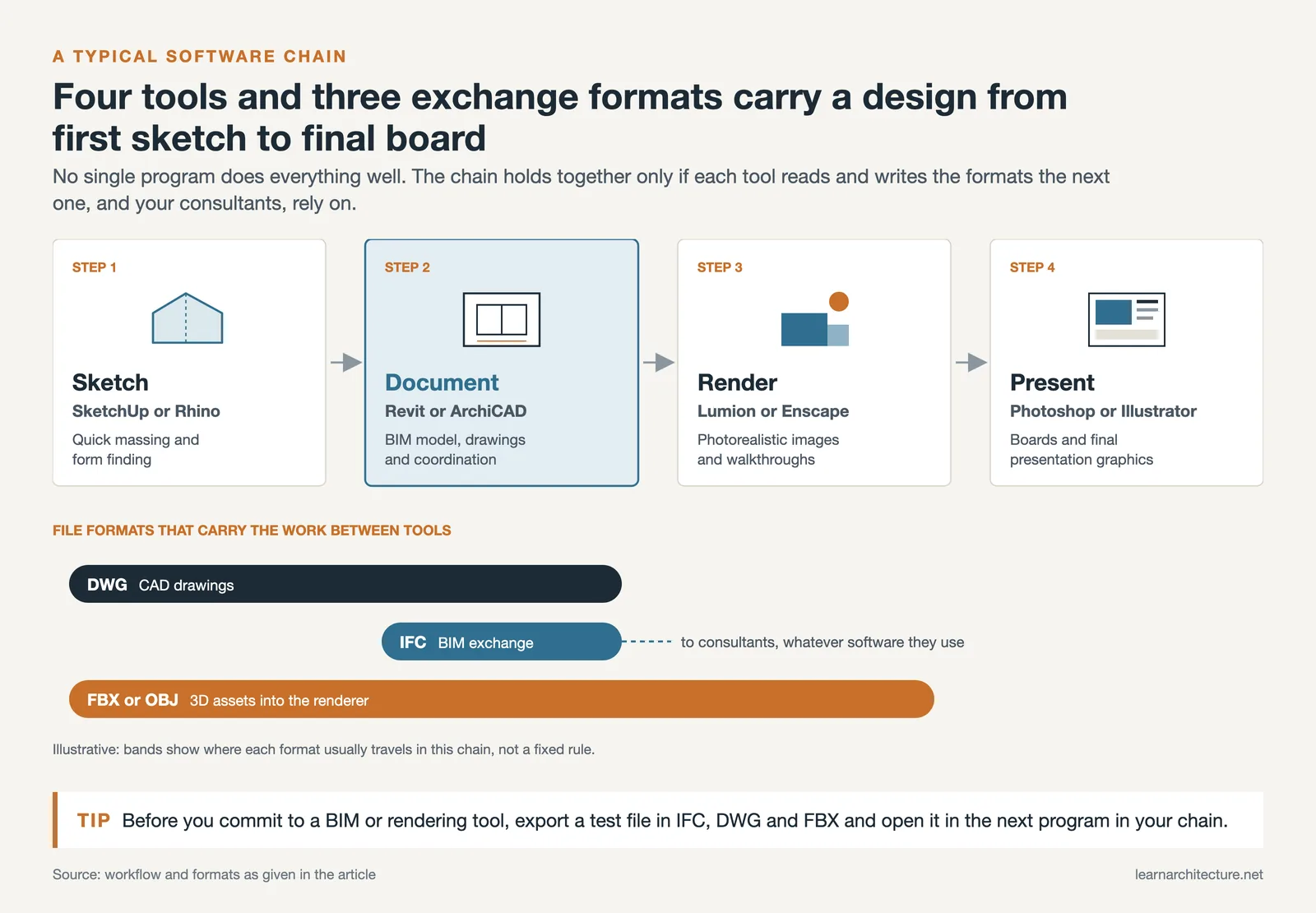
File interoperability is the glue that holds this chain together. Formats like IFC (for BIM exchange), DWG (for CAD drawings), and FBX or OBJ (for 3D assets) let you move data between programs without rebuilding from scratch. Before committing to any BIM modeling software or rendering tool, test whether it reads and writes the formats your collaborators rely on.
If you are a student or recent graduate, take advantage of free educational licenses from Autodesk, Graphisoft, and McNeel (Rhino). These give you full access to professional tools at no cost, so you can build skills and a portfolio before entering the job market. For ongoing learning resources, learnarchitecture.net’s resource library curates tutorials across all the major platforms.
How Do You Choose the Right Architecture Software?
Start by identifying your most common project types. Residential designers may get everything they need from SketchUp and a rendering plugin, while a mid-size commercial firm will likely require Revit plus a visualization tool. Consider your operating system, team size, and collaboration requirements. Trial versions and educational licenses let you test before you buy, so there is no reason to commit without hands-on experience first.
What Are the Best Free 3D Architectural Design Software Options?
Blender and FreeCAD are the strongest free 3D tools available today. Blender offers modeling, rendering, and animation in a single package, with an active community that produces architecture-specific tutorials. FreeCAD focuses on parametric modeling and supports IFC export for BIM workflows. SketchUp Free provides browser-based 3D modeling suitable for simple projects and learning.

Can BIM Software Replace Traditional CAD Entirely?
For most new projects, yes. BIM platforms like Revit and ArchiCAD produce 2D drawings directly from the 3D model, which eliminates the need for separate CAD drafting in many cases. However, some firms still prefer AutoCAD for quick detail sketches, site plans, or coordination with consultants who have not adopted BIM. The trend across the industry, as documented by the Royal Institute of British Architects (RIBA), points firmly toward BIM as the standard.
Which Architectural Rendering Programs Offer Real-Time Output?
Enscape, Twinmotion, and Lumion all produce real-time or near-real-time renders. Enscape integrates directly into Revit, SketchUp, ArchiCAD, and Rhino as a plugin. Twinmotion is free for small projects and supports Revit and ArchiCAD syncing. Lumion offers the largest asset library but runs only on Windows. For ray-traced accuracy at the cost of longer render times, V-Ray remains the industry benchmark.
Is Rhino Suitable for Full Architectural Projects?
Rhino excels at form-finding and complex geometry but lacks built-in BIM documentation tools. Most firms use Rhino during early design stages and then transition to Revit or ArchiCAD for construction documentation. Plugins like VisualARQ add BIM-like features to Rhino, bridging part of that gap. For projects where design expression is the priority, Rhino paired with Grasshopper offers unmatched flexibility.
- 3D architectural rendering software
- 3d architectural visualization software
- architectural rendering programs
- architecture software for mac
- bim modeling software
- bim softwares
- construction cad software
- free 3d architectural design software
- free architectural design software
- rhino architecture software
- top rated interior design software











This article explains a lot about different architecture software. It seems like there are many options available for various needs. I appreciate the comparison table at the end.