


Table of Contents Show
Choosing between SketchUp vs Rhino 8 is one of the most common decisions architects face when building their digital toolkit. Both programs handle 3D modeling well, but they approach the task from fundamentally different angles. SketchUp prioritizes speed and simplicity with its polygon-based engine, while Rhino 8 leans into mathematical precision through NURBS geometry and the Grasshopper visual programming environment. The right choice depends on the kind of projects you take on, your budget, and how much complexity your designs typically involve.
This comparison breaks down the key differences between these two popular 3D modeling tools for architects, covering modeling capabilities, pricing, learning curves, rendering, and plugin ecosystems so you can make a confident decision.

Modeling Technology: NURBS vs Polygon-Based Geometry
The core difference between Rhino 3D vs SketchUp comes down to how each program builds geometry. Rhino 8 uses NURBS (Non-Uniform Rational B-Splines), which are mathematical representations of curves and surfaces. This means you can create smooth, organic forms with extreme precision, and those forms remain accurate at any scale. Rhino 8 also introduced SubD Creases and improved mesh tools, giving you even more flexibility when working with freeform shapes.
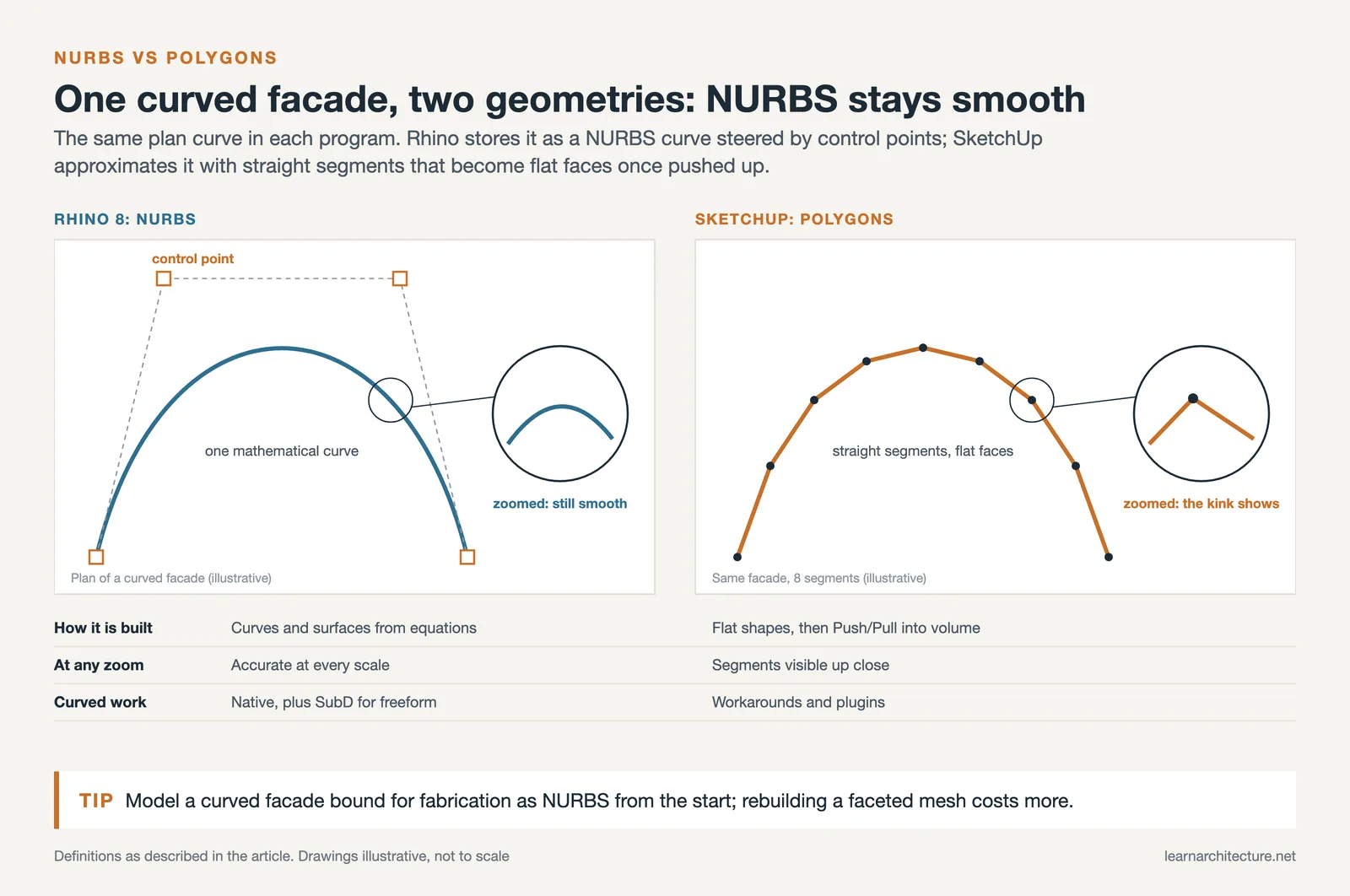
SketchUp works with polygons. You draw flat shapes, then push and pull them into 3D volumes. This approach is incredibly fast for rectilinear buildings, room layouts, and quick massing studies. The Push/Pull tool remains one of the most intuitive modeling features in any 3D software. However, curved or organic surfaces require workarounds and additional plugins in SketchUp, and the results rarely match Rhino’s smoothness.

SketchUp vs Rhino 8: Feature-by-Feature Comparison
The following table summarizes the key differences between SketchUp and Rhino 8 across categories that matter most to practicing architects.
Comparison of SketchUp vs Rhino 8 for Architecture
This overview covers the most important features side by side:
| Feature | SketchUp Pro | Rhino 8 |
|---|---|---|
| Modeling Approach | Polygon/mesh-based (Push/Pull) | NURBS + SubD + mesh |
| Parametric Design | Limited (via plugins) | Built-in Grasshopper |
| Learning Curve | Days to weeks | Weeks to months |
| Pricing Model | Annual subscription ($399/yr Pro) | One-time purchase (~$995) |
| Built-in Rendering | Basic (Studio includes V-Ray) | Cycles-based render engine |
| BIM Integration | IFC support, Revit importer (Studio) | Rhino.Inside.Revit, IFC export |
| File Format Support | DWG, DXF, IFC, 3DS, OBJ | 50+ formats including IGES, STEP |
| Best For | Conceptual design, client presentations | Complex geometry, computational design |
Grasshopper and Parametric Design: Rhino’s Biggest Advantage
If parametric or computational design matters to your practice, Rhino 8 pulls ahead significantly. Grasshopper, the visual programming editor bundled with Rhino, allows you to create geometry through algorithmic rules rather than manual drawing. You connect nodes on a canvas, adjust parameters with sliders, and watch your model update in real time. No coding experience is required to start.
According to McNeel’s architecture resources, firms like Zaha Hadid Architects, BIG, and LMN Architects rely on Grasshopper for everything from facade optimization to structural form-finding. The plugin ecosystem around Grasshopper is equally impressive. Karamba handles structural analysis, LadyBug and HoneyBee run environmental simulations, and Kangaroo manages physics-based form studies.
SketchUp does not offer anything comparable out of the box. While extensions like Profile Builder and a handful of parametric plugins exist in the Extension Warehouse, they cannot match Grasshopper’s depth or the size of its developer community.

Pricing and Cost of Ownership
The pricing structures of these two programs differ drastically. Rhino 8 follows a perpetual license model at approximately $995 for a new commercial license. You pay once and own the software permanently, with no annual fees. Upgrades to future versions are optional and cost less than the full license. According to McNeel’s online store, student and educational licenses are also available at reduced rates.
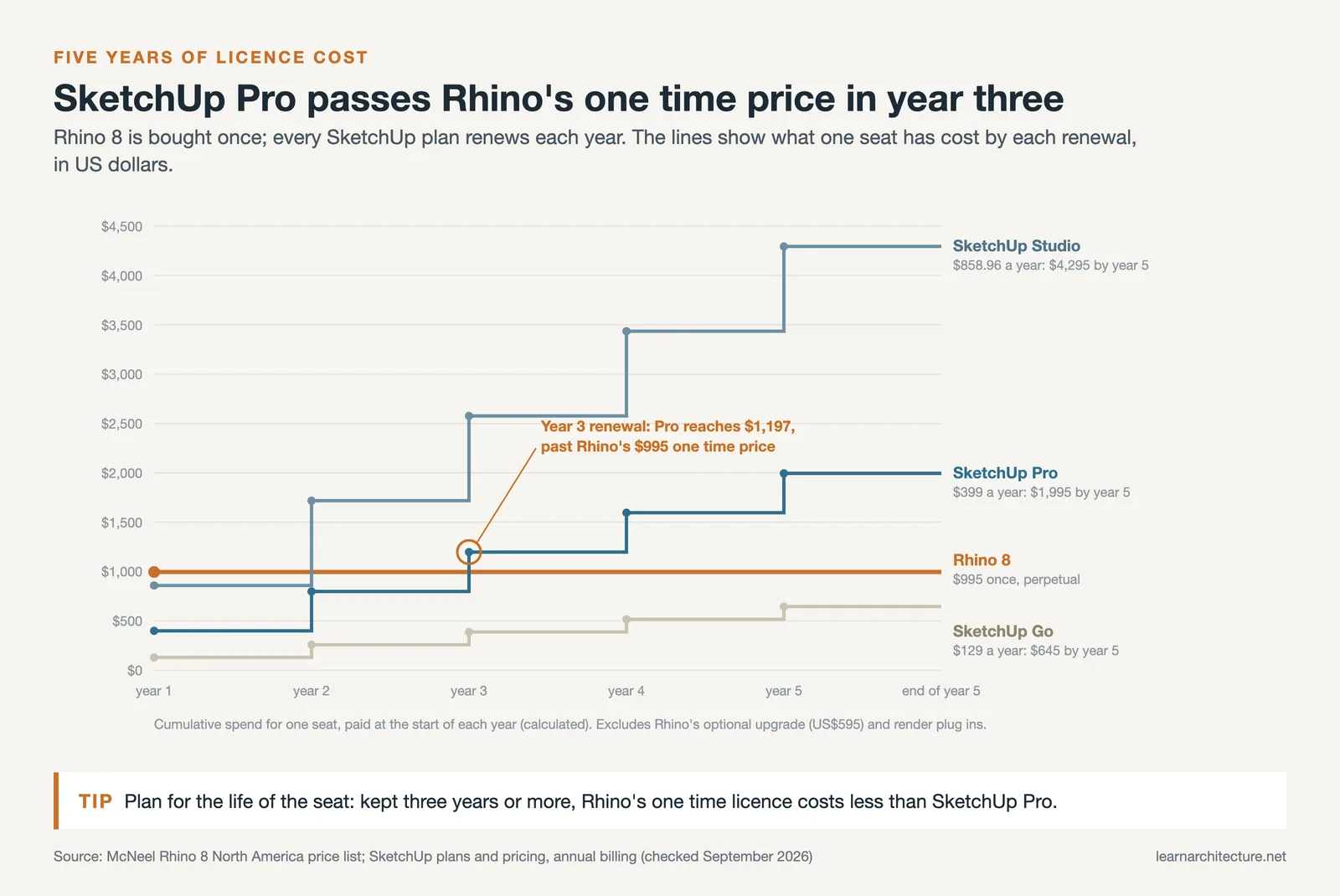
SketchUp moved to a subscription model under Trimble. As of September 2026, SketchUp Pro costs $399 per year, with the Go tier at $129/year and Studio at $858.96/year. Studio bundles V-Ray rendering and Revit import tools. Over a three-year period, SketchUp Pro subscriptions total $1,197, while Rhino’s one-time cost remains $995. For budget-conscious practices, this difference adds up quickly.
User Interface and Learning Curve
SketchUp’s interface is famously minimal. New users can start creating building volumes within an hour. The tool palette is small, the orbiting controls are intuitive, and the 3D Warehouse gives you instant access to thousands of pre-made components like furniture, fixtures, and vegetation. This accessibility has made SketchUp a staple in architecture schools worldwide.
Rhino 8 requires more initial investment. The interface presents a command line alongside toolbars and panels, which can feel overwhelming at first. That said, Rhino 8 introduced several improvements aimed at reducing this friction, including PushPull workflows that mirror SketchUp’s core functionality, smarter Auto CPlanes, and a more customizable UI with window layouts. According to Architosh’s analysis of Rhino 8, these features signal McNeel’s intent to compete directly in the standard architectural modeling market that SketchUp has dominated for over a decade.

Rendering and Visualization Capabilities
Rhino 8 ships with an updated Cycles-based render engine that supports GPU-accelerated raytracing on both Windows and Mac. You can produce presentable images without purchasing any additional software. The Monochrome display mode, new in Rhino 8, is particularly useful for clean architectural diagrams and portfolio presentations.
SketchUp’s built-in rendering is limited to basic shading. For photorealistic output, most architects pair SketchUp with V-Ray ($540/year separately) or choose the SketchUp Studio plan ($858.96/year as of September 2026) that bundles V-Ray. Other popular rendering plugins include Enscape and Lumion, which integrate directly into SketchUp’s interface. While the rendering results can be excellent, the added cost and plugin dependency is worth factoring into your budget.
Rhino vs SketchUp for Architecture: Which Should You Choose?
The decision between SketchUp vs Rhino 8 ultimately depends on the type of architecture you practice. Here is a practical framework:
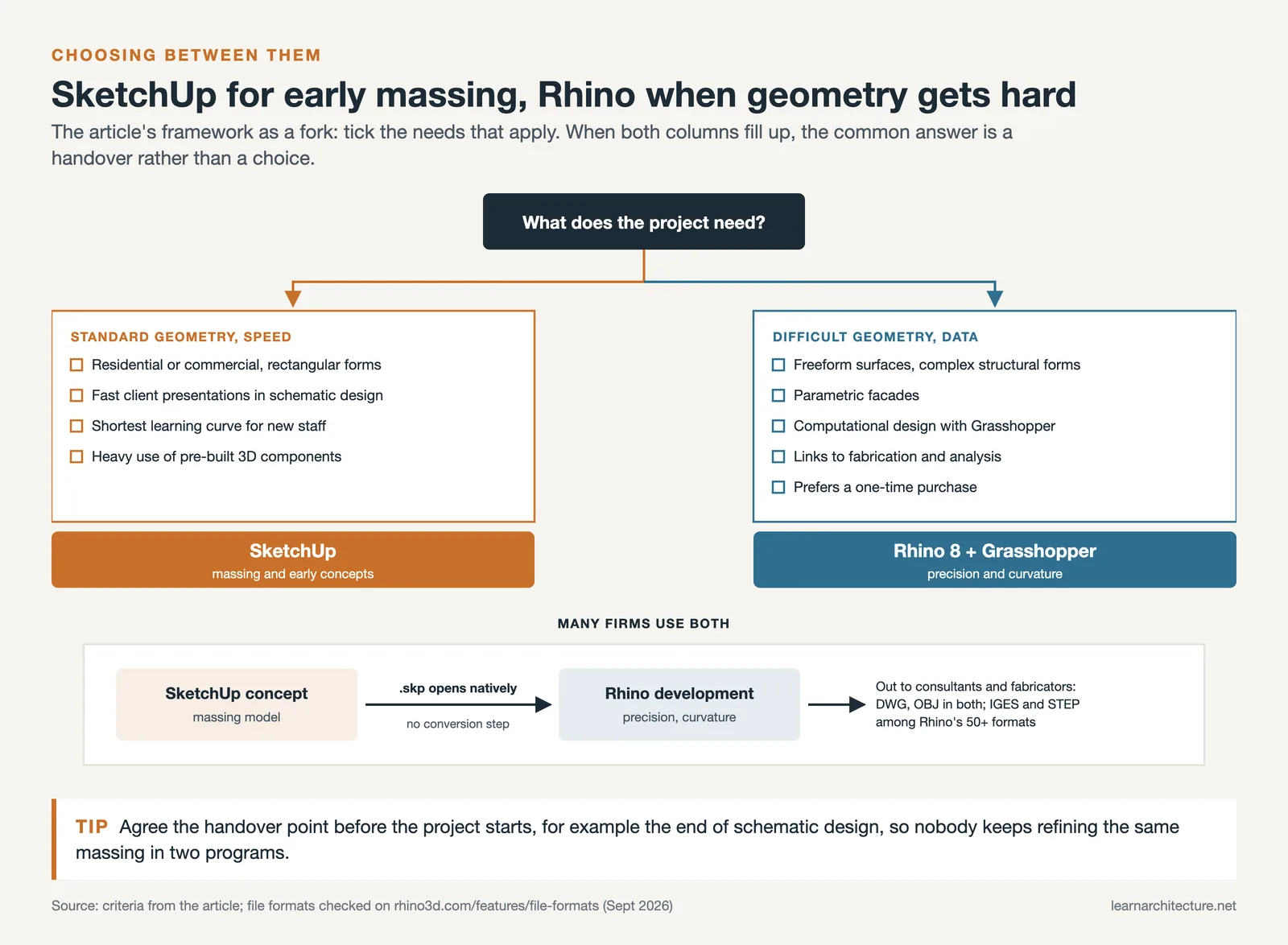
Choose SketchUp if you primarily design residential or commercial buildings with standard geometries, need fast client presentations during schematic design, want the shortest possible learning curve for new team members, or rely heavily on a library of pre-built 3D components.
Choose Rhino 8 if your projects involve freeform surfaces, parametric facades, or complex structural forms. Rhino also makes more sense if you want to explore computational design with Grasshopper, need a tool that connects smoothly to fabrication and analysis workflows, or prefer a one-time purchase over recurring subscriptions.
Many successful firms use both. SketchUp excels during the earliest stages of concept development, where speed and simplicity matter most. Rhino takes over when the design requires precision, complex curvature, or data-driven optimization. The two programs exchange files relatively well, since Rhino can open SketchUp’s .skp format and both support common interchange formats like DWG and OBJ (IFC is not among Rhino’s native formats).
Frequently Asked Questions
Is Rhino better than SketchUp?
Only for certain work. Rhino 8 is better when geometry gets difficult, freeform surfaces, parametric facades, complex structural forms, or anything heading toward fabrication. SketchUp is better when speed matters more than precision, which describes most schematic design and client presentation work. Rhino is the more capable program; that is not the same as the better choice for your projects.
Which is easier to learn, SketchUp or Rhino?
SketchUp, clearly. Most new users are producing building volumes within an hour, thanks to a small tool palette, intuitive orbit controls, and the 3D Warehouse full of ready-made components. Rhino 8 presents a command line alongside toolbars and panels, which feels overwhelming at first. Rhino 8 has narrowed the gap with PushPull workflows and smarter Auto CPlanes, but SketchUp still wins the first week comfortably.
Which is better for architecture, Rhino or SketchUp?
It depends on the geometry your practice actually produces. For residential and commercial buildings with standard geometries, fast client presentations, and teams that need a short learning curve, SketchUp fits. For freeform surfaces, parametric facades, computational design, or workflows that connect to fabrication and analysis, Rhino fits. Many firms run both and hand the model over as the project develops.
Which is better for interior design, Rhino or SketchUp?
SketchUp, for most interior work. Its 3D Warehouse gives you immediate access to thousands of furniture, fixture, and vegetation components, which is exactly what interior visualisation consumes. Rhino’s advantages, NURBS precision and Grasshopper, matter less when you are arranging catalogue objects in rectilinear rooms. Rhino becomes worth it for bespoke joinery, curved millwork, or custom fabricated elements.
What is Grasshopper, and does SketchUp have an equivalent?
Grasshopper is the visual programming editor bundled with Rhino. Instead of drawing geometry by hand, you connect nodes on a canvas and drive the model with sliders, so it updates in real time, and no coding experience is needed to start. Its plugin ecosystem is deep: Karamba for structural analysis, Ladybug and Honeybee for environmental simulation, Kangaroo for physics-based form finding. SketchUp has no equivalent out of the box. Extensions such as Profile Builder exist, but they do not match Grasshopper’s depth or developer community.
Which costs more, Rhino or SketchUp?
SketchUp costs more over time, despite the lower entry price. Rhino 8 is a perpetual licence at roughly $995 that you own permanently, with optional paid upgrades. SketchUp Pro is a $399 per year subscription (Go $129, Studio $858.96, as of September 2026). Over three years SketchUp Pro totals $1,197 against Rhino’s one-off $995, and photorealistic rendering pushes SketchUp higher still, since V-Ray costs about $540 per year separately unless you take the Studio tier.
Can Rhino open SketchUp files?
Yes, natively. Rhino reads .skp files directly, so importing a SketchUp massing model into Rhino for refinement is a normal workflow rather than a workaround. Both programs also support the common interchange formats DWG and OBJ (IFC is not among Rhino’s native formats), and Rhino handles more than fifty formats in total, including IGES and STEP for engineering and fabrication handoffs.
Do architects use both SketchUp and Rhino?
Frequently, and it is often the most practical answer. SketchUp handles the earliest concept stages where speed and simplicity matter most, then the massing model moves into Rhino for design development once the project needs precision, complex curvature, or data-driven optimisation. Because Rhino reads .skp natively, the handover costs almost nothing.
Software pricing and features referenced in this article reflect publicly available information as of early 2026. Prices may vary by region, and features can change with software updates. Always confirm current pricing on the official vendor websites before purchasing.










Leave a comment