


Table of Contents Show
The best AI tools for architecture students in 2026 cover four core needs: concept generation, AI rendering, site analysis, and diagramming. These tools do not replace design thinking but remove the friction between a sketch and a presentation-ready image, helping you move faster through the iterative stages of studio work.

Why AI Tools Matter for Architecture Students Right Now
Studio deadlines are unforgiving, and the gap between a rough concept and a polished presentation has historically eaten up enormous time. AI tools for architecture students have closed that gap in a measurable way. A 2025 survey by Architizer and Chaos found that excitement around AI experimentation among architecture professionals rose by 20% compared to 2024, with 11% of firms already integrating AI directly into design processes. Meanwhile, tools that once required high-end workstations now run in a browser on a standard student laptop.
The students getting the most out of these tools are not the ones chasing every new release. They are the ones who picked two or three tools that fit their workflow and got genuinely good at using them. That is the approach this guide is built around.
🔢 Quick Numbers
- 41% of architectural firms had adopted some form of AI by 2025 (Royal Institute of British Architects, 2025)
- 68.94% of AI usage in architecture occurs during the early design phase (Automation in Construction journal, 2025)
- The generative AI in architecture market was valued at $1.48 billion in 2025 and is projected to reach $5.85 billion by 2029 (The Business Research Company, 2025)

What Should Free AI Tools for Architecture Students Actually Do?
Before picking any tool, it helps to define what you actually need it for. The student workflow breaks into roughly four phases: ideation, concept development, visualization, and presentation. Not every tool covers all four, and trying to force one tool to do everything usually produces mediocre results in each area.
Free AI tools for architecture should ideally handle at least one phase without requiring you to rebuild your entire workflow around them. The best options plug into software you already use, such as Rhino, SketchUp, or Revit, or they operate independently as web-based tools you can access without installation.
When evaluating any new tool, ask: does it save me real time on a task I repeat every week? If the answer is yes, it belongs in your toolkit. If it only produces impressive outputs in demos but slows you down in practice, skip it.
The 7 Best AI Tools for Architecture Students in 2026
1. Autodesk Forma: Site Analysis and Early Massing
Autodesk Forma is the strongest tool on this list for data-driven early design. It performs real-time environmental analysis, including solar radiation, wind simulation, and noise mapping, directly on your massing model. Students working on urban sites or climate-sensitive projects get genuine engineering-grade feedback without needing a separate energy modeling background.
Forma integrates with Revit and runs as a web application, which means you do not need a dedicated machine to run it. Autodesk offers an educational license through the Autodesk Education Community, making it accessible without cost for enrolled students. Forma is the product formerly called Spacemaker: Autodesk acquired the Oslo startup in 2020, and its AI site planning tools now live inside Forma rather than in a separate app.
💡 Pro Tip
Use Autodesk Forma during your first site analysis pin-up, not your final review. Run solar and wind analysis on three to four massing alternatives before your first critique so that your early design decisions are already grounded in site performance data. Professors consistently respond better to design moves that can be justified with environmental reasoning, even at schematic stage.

2. Midjourney: Concept Visualization and Mood Boards
Midjourney remains the most capable tool for pure visual exploration among all current AI apps for architecture school. Its strength is atmosphere and texture, producing images that communicate the emotional intent of a space before the geometry is resolved. That is exactly what early-stage design work requires.
Students use Midjourney primarily for mood boards, competition entries, and exploring material combinations. The key is learning to write architecture-specific prompts. Generic prompts produce generic results. Specifying medium, subject, structural elements, and atmospheric conditions (such as “raking evening light, concrete brutalist volume, overcast sky, wide-angle photograph on a large-format camera”) consistently produces stronger outputs than broad descriptions alone.
Midjourney operates through Discord and requires a paid subscription starting at $10 per month. For students on a budget, the Basic plan provides enough credits for weekly studio use without exhausting your allowance. Learn more about architectural prompting techniques on Architizer’s Midjourney guide.
3. Veras by EvolveLAB: Sketch-to-Render Inside Your Modeling Software
Veras is a plugin for SketchUp, Revit, Rhino, ArchiCAD, and Vectorworks that converts your existing model viewport directly into a styled render using AI. Unlike Midjourney, where you work with text prompts disconnected from your model, Veras reads the geometry you have already built and applies a visual style on top of it. The result is much closer to your actual design intent.
The geometry slider is Veras’s most useful student feature. Turning it toward higher adherence keeps the output close to your model’s massing. Lowering it allows the AI to introduce creative variation while still respecting the basic form. This is useful when you want to show a client or critic what a space could feel like without committing to final material choices. Veras supports Revit versions through 2026 and SketchUp versions through 2025, so it works with current educational licenses.
4. Maket.ai: AI Floor Plan Generation for Residential Projects
Maket.ai is a generative design tool built specifically for floor plan development. You input site constraints, room sizes, adjacency requirements, and preferred design style, and it generates multiple layout options automatically. For students working on housing studios or early residential projects, it significantly compresses the time needed to reach a working plan from first principles. You can read more about how these tools work in the overview of AI architectural plan generators on learnarchitecture.net.
The important caveat: Maket.ai outputs require architectural judgment to refine. Not every generated layout is structurally viable or spatially coherent. Use it as a starting generator, not a final answer. The value is in seeing twenty spatial configurations in the time it would take to manually draw two, then applying your design knowledge to select and develop the most promising direction.
⚠️ Common Mistake to Avoid
Many students submit AI-generated floor plans directly without checking structural logic. An AI floor plan generator for students is a starting point, not a deliverable. Always verify load-bearing wall placement, circulation widths (minimum 900mm for accessible corridors), and daylight access before bringing a generated plan into a critique. Professors will spot structurally impossible configurations immediately.

5. Adobe Firefly: Post-Production and Presentation Editing
Adobe Firefly integrates into Photoshop through generative fill, making it the most practical AI tool for fixing and refining rendered images. In architecture school, you rarely have a perfectly clean render. Firefly lets you remove unwanted elements, replace skies, adjust material appearances, and add contextual elements such as vegetation or people using text prompts, all without leaving Photoshop.
Students with an Adobe Creative Cloud subscription through their institution already have access to Firefly at no additional cost. For students not using Creative Cloud, Firefly is also available as a standalone web tool with a free plan that refreshes a limited number of generations every day. The Adobe Firefly education plan provides additional credits for enrolled students.
Firefly’s particular strength is its training on licensed content, which means outputs are commercially usable without licensing concerns, an important consideration when building a portfolio for employment.
6. ChatGPT (with Vision): Research, Writing, and Design Analysis
ChatGPT may seem like a general-purpose tool, but it fits cleanly into the architectural design process in several specific ways. Students use it to generate design brief summaries, write program narratives, research building codes and precedents, draft site analysis reports, and check the logic of structural or environmental decisions before reviews.
The Vision feature allows you to upload images of your drawings or models and ask questions about them. You can describe a plan sketch and ask for feedback on circulation logic, or upload a section and ask about spatial proportions. One architect at the University of Miami’s RAD Lab described AI as having become “a core part of how we ideate, iterate, and communicate architectural proposals,” reflecting how deeply it has entered professional and educational practice by 2025.
For architecture students specifically, use ChatGPT to prepare for reviews. Run your design concept through a series of questions the way a critic might ask them. The process of articulating answers often reveals gaps in the design logic before the actual presentation. You can also explore what to include in an architecture student portfolio with AI-assisted drafting to strengthen your presentation materials.
7. D5 Render: Real-Time Rendering with Built-in AI
D5 Render is a real-time renderer that connects to SketchUp, Revit, Rhino, 3ds Max, Archicad, Blender and Vectorworks, so you can open a studio model and see light, materials and planting update as you work. Its AI tools target the slow parts of visualization: AI Atmosphere Match builds sky and lighting from a reference image, AI Material Snap creates a material from a photo, AI Enhancer and AI Style Transfer work on finished renders, and AI Inpainting repaints sky, water or vegetation in one area.
Access is what puts it on a student list. The Community version is free for everyone, and the D5 Educational License is free for students with proof of enrollment, unlocks most Pro features and assets without watermarks, and runs for 180 days before you reapply (as of September 2026). Free accounts get a limited number of AI credits; unlimited AI comes with D5 Pro, which starts at $38 per month. D5 needs a Windows PC with a ray tracing graphics card such as NVIDIA RTX, AMD RX or Intel Arc, so check your laptop against the system requirements before you apply.
💡 Pro Tip
Save two or three camera views in D5 early in the semester and re-render the same views after every major model change. Placing them side by side at your final review shows professors how the design developed, and real-time rendering keeps each update quick.

How to Build an AI Tools Workflow for Architectural Drawings
The most effective student AI workflow moves in a clear sequence: ideation tools first, analysis tools second, rendering and post-production tools third. Using AI tools for architectural drawings in the wrong order wastes time and produces results that look disconnected from your actual design.
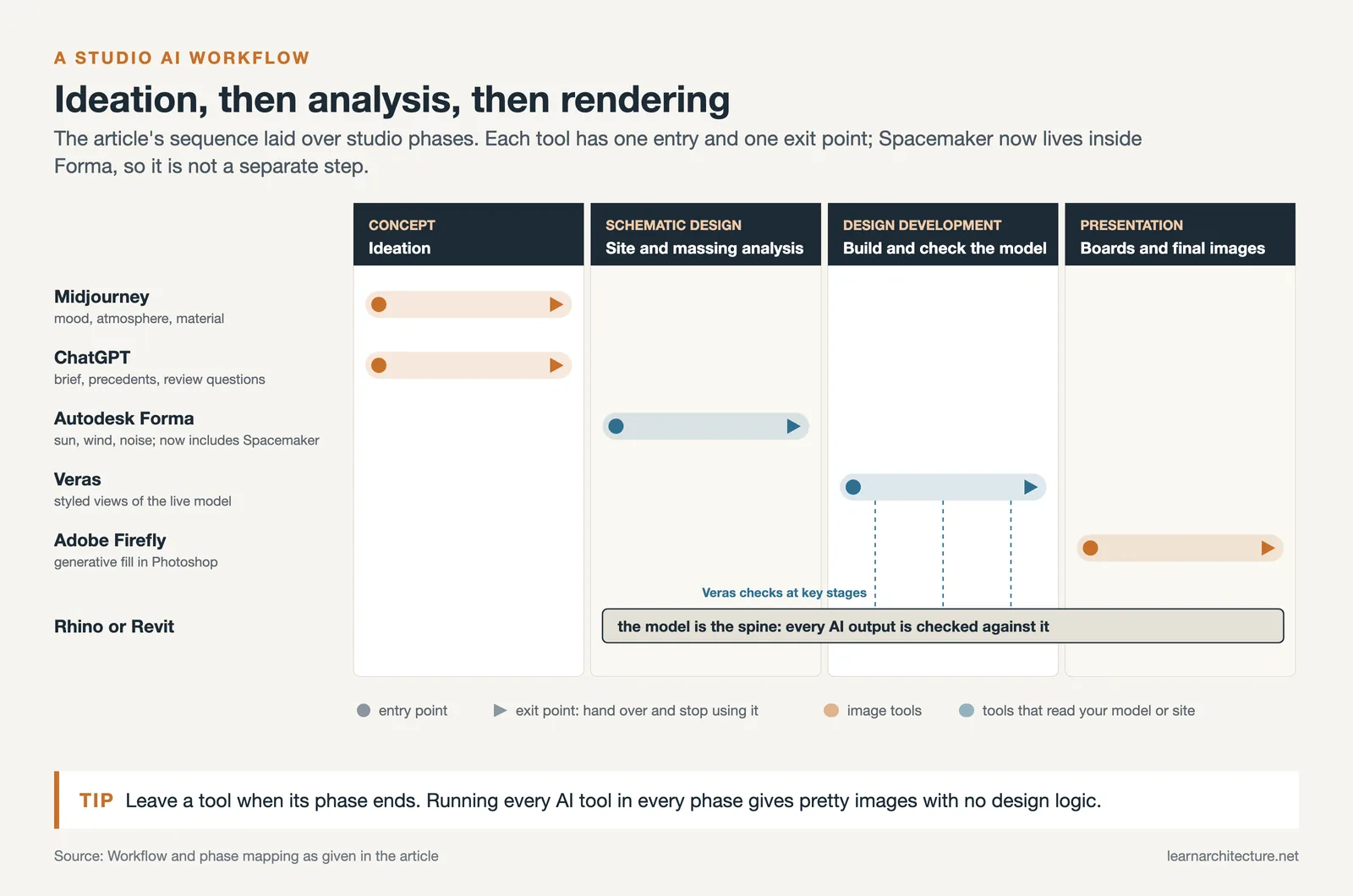
A practical studio workflow looks like this: Start with Midjourney or ChatGPT to explore the conceptual and atmospheric direction. Move into Autodesk Forma for site-level massing and analysis. Build out your design in Rhino or Revit, using Veras or D5 Render to check how your model looks at key stages. When you have a near-final model, use Firefly in Photoshop to refine the output for presentation boards.
Each tool has a defined entry and exit point. The mistake most students make is jumping between tools without a clear purpose for each one, which results in a portfolio of pretty images with no underlying design logic. The tools that matter are the ones that solve a specific problem in your workflow, not the ones that look impressive in a demo. For a broader view of how software fits into professional practice, the guide to essential apps for architects is worth reviewing alongside any AI-specific toolset.
Which AI Tools Are Free for Architecture Students?
Several tools on this list are either free or covered under educational licenses. Autodesk Forma, which now includes the former Spacemaker tools, is available at no cost through the Autodesk Education Community for enrolled students. Adobe Firefly offers a free plan with limited daily generations and is included in the Creative Cloud education plan. ChatGPT’s free version covers most student use cases, including limited image uploads, with the paid tiers adding higher limits and more advanced reasoning. D5 Render has a free Community version and a free 180 day Educational License for enrolled students.
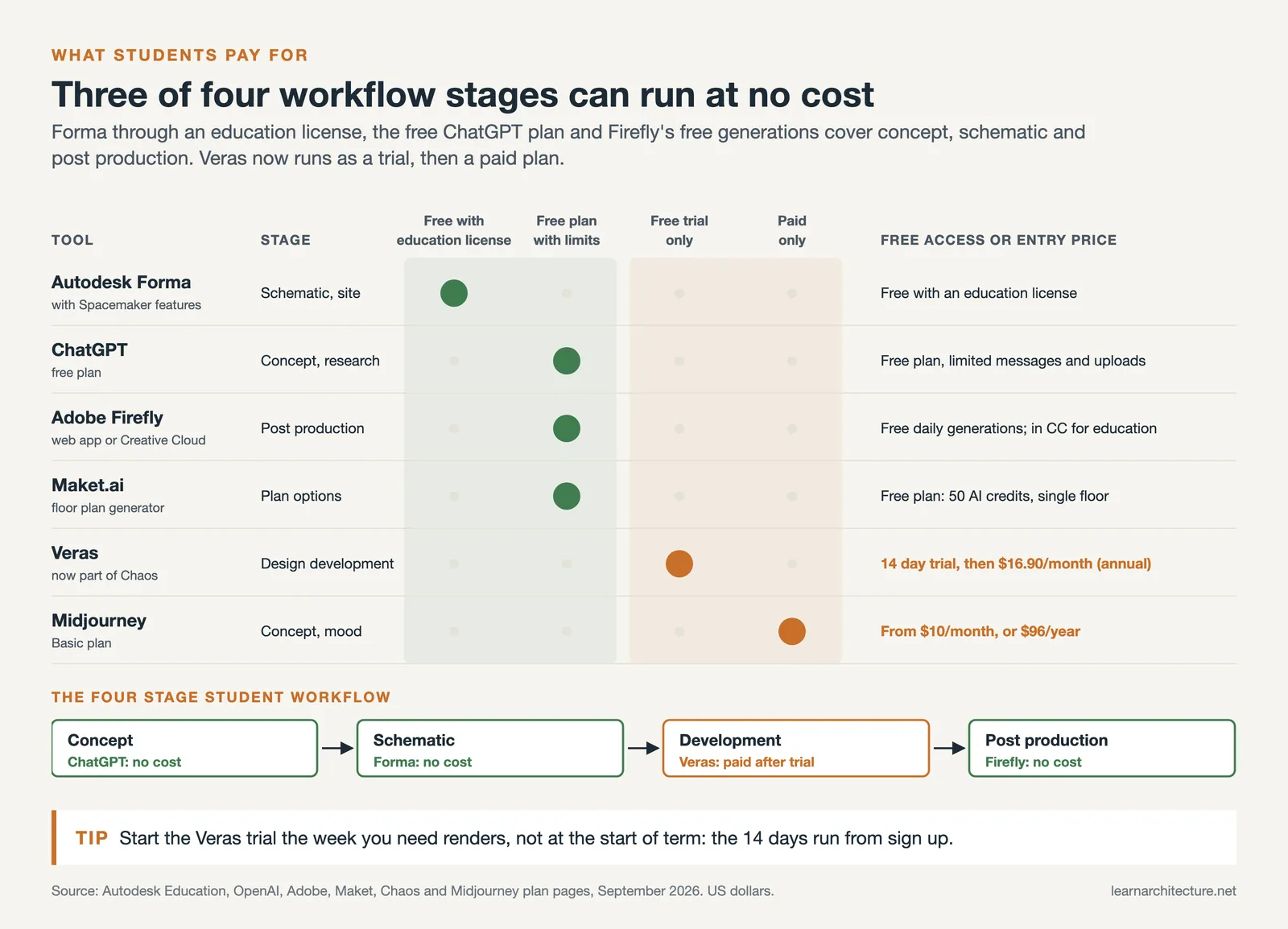
Midjourney is the main paid tool without a meaningful free option. Veras now offers a 14 day free trial rather than a free tier, with paid plans from $16.90 per month billed annually (as of September 2026). Maket.ai has a freemium model with access to core floor plan generation on the free plan. For students on a tight budget, Autodesk Forma, Adobe Firefly, and ChatGPT cover three of the four core workflow stages at no cost.
🎓 Expert Insight
“AI has had an influence in all fields. But AI is only as good as the instructions given. Learning how to prompt or ask questions of an app like ChatGPT is crucial.”
Rodolphe el-Khoury, Dean, University of Miami School of Architecture
This observation captures the core challenge students face with AI tools for design. The output quality scales directly with the quality of the input. Students who invest time in learning how to write specific, architecturally grounded prompts consistently outperform those who treat AI as a one-click solution.

AI Tools and Academic Integrity in Architecture School
Most architecture programs in 2026 have moved past blanket AI bans. The more common approach is a disclosure requirement: you acknowledge which tools were used and in what capacity. Using AI for visualization, iteration, and analysis is generally accepted. Using AI to generate the design itself, without understanding the spatial and structural logic behind it, is where most faculty draw the line.
The practical approach is to keep your hand-drawn process running alongside your AI workflow. Use physical sketching and analog modeling to develop your design thinking, and bring AI tools in when the task shifts to representation and communication. This way, the design knowledge genuinely belongs to you, and the AI work accelerates the parts of the process that are time-consuming rather than creatively formative.
For an in-depth look at how AI is reshaping the profession as a whole, the coverage on illustrarch.com’s AI architecture design overview provides a useful professional context alongside the student perspective here.
✅ Key Takeaways
- The 7 best AI tools for architecture students in 2026 cover ideation, analysis, rendering, and post-production, and using them in sequence produces better results than using any single tool for everything.
- Autodesk Forma and Adobe Firefly are available free under educational licenses, making three of four core workflow stages accessible at no cost.
- AI tools for architectural drawings work best when they solve a specific, repeated problem in your workflow, not when used for general experimentation without a clear purpose.
- AI floor plan generators and concept tools require architectural judgment to refine outputs. Generated content is a starting point, not a submission-ready deliverable.
- Most programs in 2026 permit AI use with disclosure. Maintaining a parallel analog design process ensures the core design thinking stays yours.
Frequently Asked Questions About AI Tools for Architecture Students
What is the best AI tool for architecture students who are just starting out?
For students new to AI, Autodesk Forma is the best entry point because it works directly with your site and massing model, produces analysis that has clear design implications, and is free under an educational license. It teaches you to connect environmental data to design decisions from the start, which is a habit that carries into professional practice. Midjourney is the second recommendation for students who need to quickly build visual communication skills for presentations and competitions.

How do AI tools for architectural drawings fit into a real studio workflow?
AI tools work best when they map to a specific phase of studio work. Ideation tools like Midjourney and ChatGPT belong in the early concept phase. Analysis tools like Autodesk Forma belong during schematic design. Rendering tools like Veras and Firefly belong during design development and presentation preparation. Students who try to use AI throughout all phases simultaneously tend to lose track of their own design direction.
Will my professors know I used AI tools for architecture school?
Most faculty in 2026 can identify AI-generated content, particularly images that have the characteristic texture and atmospheric quality of Midjourney outputs. The more important point is that disclosure is now standard practice in most programs. Label AI-generated or AI-assisted images in your portfolio and presentations. Employers and academics value knowing that you understand how to control these tools, not just that you can produce outputs with them.
- ai architecture design student
- ai floor plan generator students
- ai for architecture students 2026
- ai study tools architecture
- ai tools for architectural drawings
- ai tools for architecture students
- ai tools for design students
- best ai apps for architecture school
- best ai tools architecture students
- free ai tools for architecture











Leave a comment