


Table of Contents Show
Daylight analysis is the process of measuring and simulating how natural light enters and distributes across interior spaces. Architects use it to evaluate metrics like illuminance levels, glare risk, and daylight autonomy, helping them design buildings that reduce electric lighting demand and improve occupant comfort.
These packages model daylight inside a room. If what you need first is the position of the sun outside it, our sun path diagram generator gives altitude, azimuth and day length for any site without an install.
Natural light does more than brighten a room. It affects sleep patterns, productivity, mood, and long-term energy costs. Yet many design teams still treat daylighting as an afterthought, running a quick check late in the design process instead of integrating it from schematic design onward. The result is often oversized windows that cause glare, undersized apertures that leave deep floor plates in darkness, or shading devices added as an expensive retrofit. A structured approach to daylight analysis avoids these problems by giving you measurable data early enough to act on it.
This guide covers the key metrics behind daylight analysis in architecture, walks through how Revit and other platforms handle daylighting simulation, and compares eight software tools that range from free plugins to full-featured cloud platforms.
What Is Daylight Analysis and Why Does It Matter?
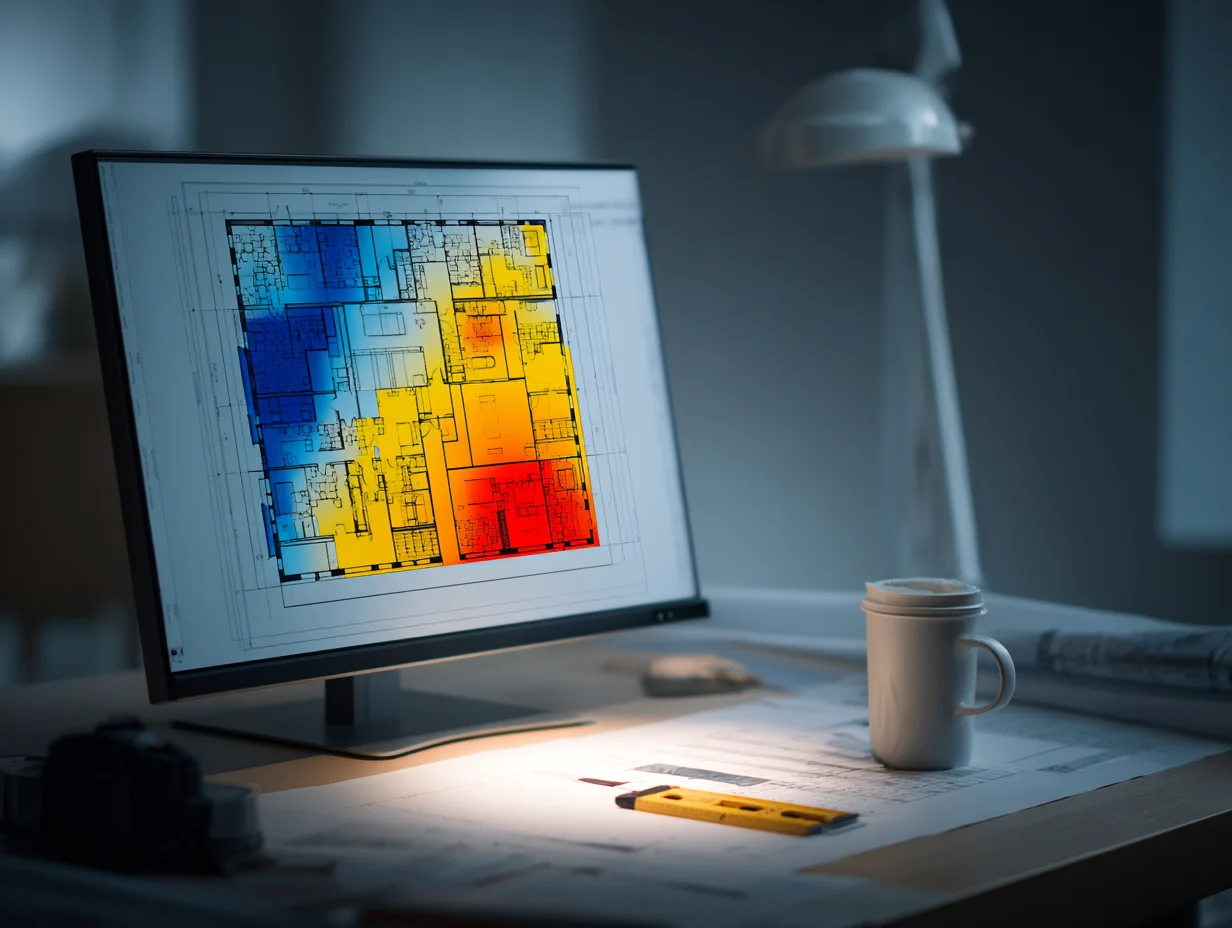
Daylight analysis measures the quantity, quality, and distribution of natural light within a building. At its simplest, it answers the question: will occupants have enough daylight to work, live, or learn without relying on electric lights during daytime hours? At a more advanced level, it predicts glare conditions, tracks how light levels change across the year, and calculates the energy savings tied to reduced artificial lighting.
Green building certification systems like LEED award credits for meeting specific daylighting thresholds. LEED v4.1, for example, awards its first daylight point at an average spatial daylight autonomy (sDA) of 40% across regularly occupied floor area, and asks any space where annual sunlight exposure (ASE) exceeds 10% of floor area receiving 1000 lux or more for at least 250 hours per year to show how glare is addressed. Meeting these targets without simulation is nearly impossible on anything beyond a small, single-story building.
Beyond certification, daylighting has real performance consequences. According to the IEA Energy Efficiency 2025 report, buildings account for roughly 30% of global energy demand, and lighting is a significant portion of that load. Well-designed daylighting strategies can reduce electric lighting consumption by 40% to 75%, depending on building type and climate zone.
🔢 Quick Numbers
- Buildings consume about 30% of global energy demand (IEA, 2025)
- Effective daylighting can cut electric lighting energy use by up to 75% (Danpal / industry research, 2020)
- Lighting in buildings and outdoor applications accounts for roughly 8% of global electricity demand, about 2,200 TWh (IEA, 2024)
Key Daylight Analysis Metrics Every Architect Should Know


Running a simulation is only useful if you understand what the numbers mean. Here are the metrics you will encounter most often in daylight analysis architecture workflows.
Daylight Factor (DF)
The daylight factor is the ratio of indoor illuminance to outdoor illuminance under an overcast sky, expressed as a percentage. A DF of 2% means a point inside receives 2% of the light available outside. It is the oldest and simplest metric, but it ignores building orientation, local climate, and direct sunlight. Many European standards still reference DF, so you will see it in projects targeting EN 17037 compliance.
Spatial Daylight Autonomy (sDA)
Spatial daylight autonomy measures the percentage of occupied floor area that receives at least 300 lux from daylight alone for at least 50% of annual occupied hours. LEED v4.1 awards points from an average sDA of 40%, with higher scores at 55% and 75%. This metric accounts for climate, orientation, and shading, making it far more accurate than daylight factor for predicting real-world performance.
Annual Sunlight Exposure (ASE)
ASE flags potential glare problems. It measures the percentage of floor area that receives more than 1000 lux of direct sunlight for 250 or more hours per year. In LEED v4.1, any regularly occupied space above 10% must show how the design addresses glare. High ASE values signal the need for better shading or glazing specification.
📐 Technical Note
LEED v4.1 EQ Credit: Daylight awards 1 point for an average sDA(300/50%) of at least 40%, 2 points for 55% or 3 points for 75%, measured on a horizontal work plane at 30 inches (762 mm) above finished floor. Any regularly occupied space with ASE(1000/250) above 10% must show how the design addresses glare. Simulations use hourly typical meteorological year (TMY) data, or an equivalent, for the nearest available weather station.
Useful Daylight Illuminance (UDI)
UDI goes a step further by defining a range of useful light levels, typically 100 to 3000 lux. Light below 100 lux is too dim; light above 3000 lux is likely to cause discomfort. UDI reports what percentage of occupied hours fall within the useful range. It gives a more complete picture than sDA alone because it also penalizes excessive brightness.
How Daylight Analysis Works in Revit
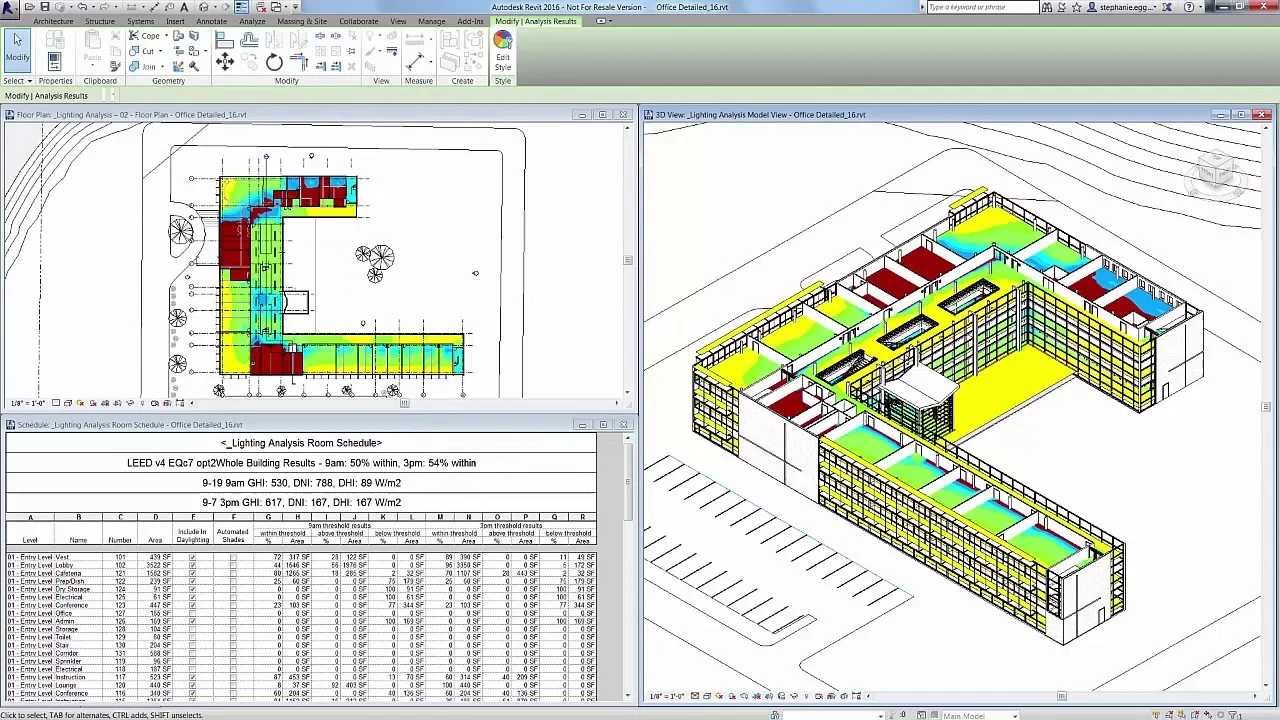
Revit daylight analysis has improved significantly over the past few releases. Autodesk Insight, which integrates directly into Revit, handles both energy and daylighting analysis within the BIM environment. You place rooms, define window geometry, assign glazing properties, and then run a cloud-based simulation without leaving the model.
The workflow for revit daylighting analysis follows a general pattern. First, ensure your model has properly enclosed rooms with floors, walls, ceilings, and windows. Assign accurate glazing materials, because visual transmittance (VT) directly affects simulation accuracy. Then set the project location and true north orientation. From the Analyze tab, select Lighting and choose the daylighting study type. Insight processes the simulation on Autodesk’s cloud servers and returns color-coded floor plans showing illuminance distribution, sDA results, or daylight factor values.
💡 Pro Tip
When setting up a Revit model for daylight analysis, always check that your room boundaries are fully enclosed. Gaps between walls and floors, or rooms without ceilings, cause the simulation engine to produce inaccurate results. A quick way to verify is to run a room volume check before submitting the analysis.
The revit daylight analysis plugin ecosystem also includes third-party options. LightStanza connects directly to Revit and runs Radiance-based simulations in the cloud, returning LEED-ready sDA and ASE reports. For teams that need faster iteration during design meetings, Enscape provides real-time sunlight walkthroughs, though it is a visualization tool rather than a validated simulation engine.
8 Best Daylight Analysis Software Tools for Architects

Choosing the right daylight analysis software depends on your modeling platform, project complexity, and certification requirements. The table below compares eight tools across key criteria.
Comparison of Daylight Analysis Software
The following table summarizes the features, pricing, and platform compatibility of eight popular daylight analysis tools.
| Software | Platform | Key Metrics | Pricing | Best For |
|---|---|---|---|---|
| Autodesk Insight (Revit) | Revit plugin | sDA, ASE, DF, illuminance | Included with Revit | BIM-integrated LEED workflows |
| ClimateStudio | Rhino plugin | sDA, ASE, UDI, DF, glare | From $600/year | Parametric design optimization |
| LightStanza | Cloud / Revit plugin | sDA, ASE, UDI, illuminance | Subscription-based | LEED documentation, Revit users |
| Ladybug + Honeybee | Rhino / Grasshopper | sDA, ASE, UDI, DF, glare | Free (open-source) | Advanced parametric workflows |
| VELUX Daylight Visualizer | Standalone / imports | DF, illuminance, luminance, sDA | Free | Quick residential studies |
| Autodesk Forma | Cloud-based | Daylight potential, sun hours | AEC Collection or standalone | Early-stage massing studies |
| DIALux | Standalone (Windows) | DF, illuminance, luminaire layout | Free | Combined daylight + electric lighting |
| Sefaira (SketchUp) | SketchUp plugin | sDA, ASE, energy | Included with SketchUp Studio | SketchUp-based concept design |
Autodesk Insight for Revit
Insight is the default choice for teams already working in Revit. It handles both energy and daylight analysis in Revit through cloud-based Radiance simulations. You can generate sDA and ASE maps directly within the model, compare design options side by side, and export LEED-ready documentation. The main limitation is speed: because simulations run in the cloud, complex models can take 15 to 30 minutes to process.
ClimateStudio for Rhino
ClimateStudio by Solemma is built on Radiance and runs as a plugin for Rhinoceros 3D. It is widely regarded as one of the fastest and most accurate daylight simulation engines available. The software supports Grasshopper for parametric studies, letting you test hundreds of facade configurations in a single batch run. Firms like Behnisch Architekten and Perkins&Will use it for performance-driven design.
Ladybug and Honeybee
This open-source plugin set for Rhino and Grasshopper connects to Radiance, EnergyPlus, and OpenStudio. Honeybee handles daylight simulation while Ladybug provides environmental data visualization (sun paths, wind roses, radiation maps). The learning curve is steep, but the flexibility is unmatched. For academic research and firms with computational design teams, Ladybug and Honeybee remain the most powerful free option.
🎓 Expert Insight
“ClimateStudio is the fastest and most accurate environmental performance analysis software for the AEC sector.”
Solemma LLC, ClimateStudio Product Team
This claim is backed by benchmark tests comparing ClimateStudio’s path-tracing engine against traditional Radiance workflows. For architects running iterative facade studies in Grasshopper, the speed difference can mean completing in minutes what previously took hours.
LightStanza
LightStanza is a cloud-based platform that integrates with Revit. It produces sDA, ASE, UDI, and illuminance calculations using Radiance-validated methods. The interface is more approachable than Ladybug, making it a good fit for mid-size firms that need LEED documentation without a dedicated simulation specialist. It works on both PC and Mac because the heavy computation happens on remote servers.
VELUX Daylight Visualizer
VELUX offers a free standalone tool with a built-in 3D modeler and import support for common CAD formats. It calculates daylight factor, illuminance, luminance, and now supports climate-based metrics like sDA. For residential projects or early feasibility studies where a full BIM setup would be overkill, VELUX Daylight Visualizer provides reliable results with minimal setup time.
Autodesk Forma
Forma (formerly Spacemaker) is a cloud-based pre-design tool that includes autodesk daylight analysis features. Its daylight potential analysis evaluates how massing decisions affect natural light access at the neighborhood scale. Forma is best suited for early-stage site planning, helping you test building heights, orientations, and setbacks before committing to detailed design in Revit.
DIALux
DIALux is a free lighting design tool from DIAL GmbH that handles both daylight and artificial lighting in a single environment. While its daylighting capabilities are more basic (daylight factor and point-in-time illuminance rather than annual climate-based metrics), it excels at combined lighting layouts where you need to verify that electric fixtures fill the gaps left by natural light.
Sefaira for SketchUp
Sefaira, now part of the SketchUp Studio subscription, uses Radiance and DaySim engines to calculate sDA and ASE. It runs analyses from within the SketchUp interface, making it the easiest entry point for designers who prefer SketchUp’s modeling environment. Results update as you modify geometry, which encourages iterative testing during concept design.
💡 Pro Tip
If your office uses both Revit and Rhino across different project phases, consider pairing Autodesk Insight for BIM-stage LEED documentation with ClimateStudio for early parametric facade studies. This split approach gives you speed during concept design and compliance-ready output during design development.
How to Run an Accurate Daylight Analysis: Step-by-Step
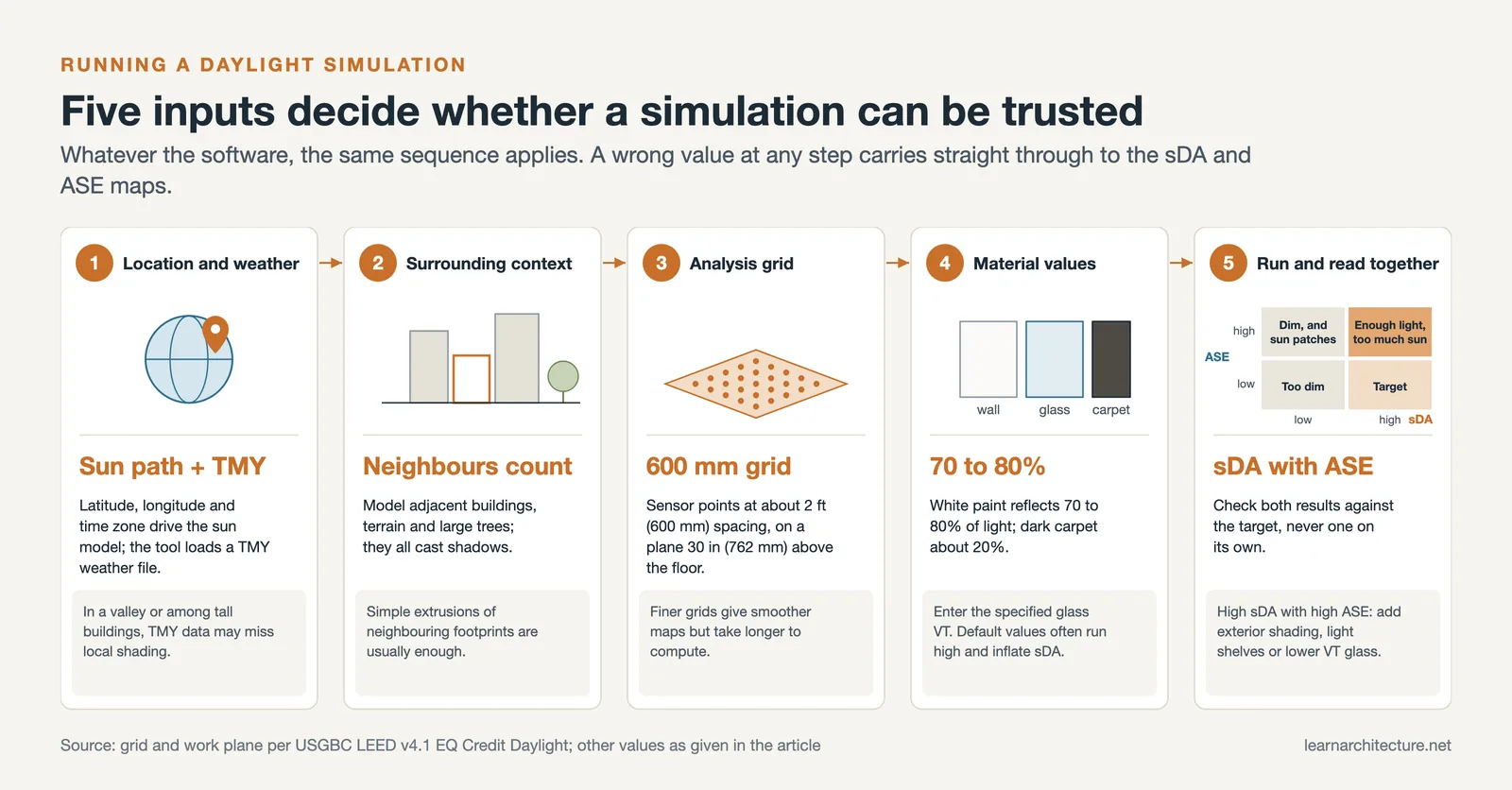
Regardless of which software you choose, the simulation workflow follows a consistent sequence. Getting each step right is the difference between useful data and misleading results.
Start by setting your project location accurately. Latitude, longitude, and time zone determine the sun path model that drives the entire simulation. Most tools pull TMY (Typical Meteorological Year) weather files based on the nearest weather station. If your site is in a microclimate (surrounded by tall buildings or in a valley), note that TMY data may not capture local shading conditions.
Next, model the surrounding context. Neighboring buildings, terrain features, and large trees all cast shadows that affect daylight access. In Revit, you can import context geometry as massing elements. In Rhino, simple extrusions of adjacent building footprints are usually sufficient.
Define your analysis grid. Most standards specify a horizontal work plane at 30 inches (762 mm) above finished floor. Place sensor points at a regular spacing, typically 600 mm (about 2 feet). Finer grids produce smoother maps but increase computation time.
Assign accurate material properties. The two most critical values are glazing visual transmittance (VT) and interior surface reflectance. A typical clear double-pane window has a VT around 0.65 to 0.70. White-painted walls reflect about 70% to 80% of light, while a dark carpet might reflect only 20%.
Run the simulation and review results against your targets. For LEED projects, check both sDA and ASE. High sDA with high ASE means you have enough light but also too much direct sun, which calls for exterior shading, light shelves, or lower-VT glazing.
⚠️ Common Mistake to Avoid
Many designers run daylight simulations with default glazing values instead of specifying the actual glass product. Default VT in Revit is often set higher than real-world performance glazing, which inflates sDA results and hides potential glare problems. Always update glazing properties to match your specification before running any analysis you plan to submit for certification.
Daylight Analysis for Interior Designers
Daylight analysis is not only an architecture-side concern. Interior designers directly influence how natural light performs once it enters a space. Furniture placement, partition heights, material finishes, and window treatment selections all affect how deep daylight reaches into a room and whether occupants experience glare.
For interior design projects, tools like AI-powered space planning platforms can now incorporate basic lighting metrics into layout optimization. VELUX Daylight Visualizer and DIALux are both approachable options for interior designers who do not work in Revit or Rhino daily. They allow you to test how changes in wall color, furniture arrangement, or ceiling height affect light distribution without a full BIM model.
In open-plan offices, daylight analysis helps determine where to place workstations to avoid glare on screens while keeping ambient light levels above 300 lux. In healthcare facilities, adequate daylight in patient rooms has been linked to shorter recovery times and lower medication use. In schools, studies show that students in classrooms with better daylighting perform 20% to 26% better on standardized tests compared to those in poorly lit spaces.
Video: Daylighting Analysis in Revit Using Insight
This tutorial from eMexperience walks through the process of running a daylighting analysis in Revit 2024 using the Insight plugin, including setup for LEED-compliant illuminance and daylight factor calculations.
Revit Daylight Analysis Plugins Worth Considering
While Insight covers the essentials, several third-party plugins extend what you can do with revit daylight analysis. LightStanza, as mentioned above, adds cloud-based Radiance simulations with a Revit-native interface. Its strength is producing LEED-submittal-ready reports directly from the BIM model, without exporting geometry to another platform.
Sefaira’s Revit connector (part of SketchUp Studio but also available for Revit) provides real-time energy and daylighting feedback as you design. It is less precise than ClimateStudio for certification work, but the speed of iteration makes it useful during early design phases when you are still deciding on window-to-wall ratios and building orientation.
For firms that use Grasshopper inside Revit (through Rhino.Inside.Revit), the full Ladybug/Honeybee toolkit becomes available. This workflow lets you run parametric daylighting studies on live Revit geometry without duplicating the model in Rhino. It is technically demanding to set up, but the payoff for facade optimization projects is significant.
🏗️ Real-World Example
The Edge (Amsterdam, 2015): Designed by PLP Architecture for Deloitte, this office building achieved BREEAM’s highest-ever sustainability score of 98.36%. The design team used extensive daylight analysis to position atrium voids and floor plates so that 100% of workstations receive natural light. Automated blinds and LED panels respond to real-time daylight sensors, and the building uses 70% less electricity than comparable office buildings, while its LED lighting system cuts lighting energy use by 50% compared to conventional systems.
Daylighting Strategies That Improve Simulation Results

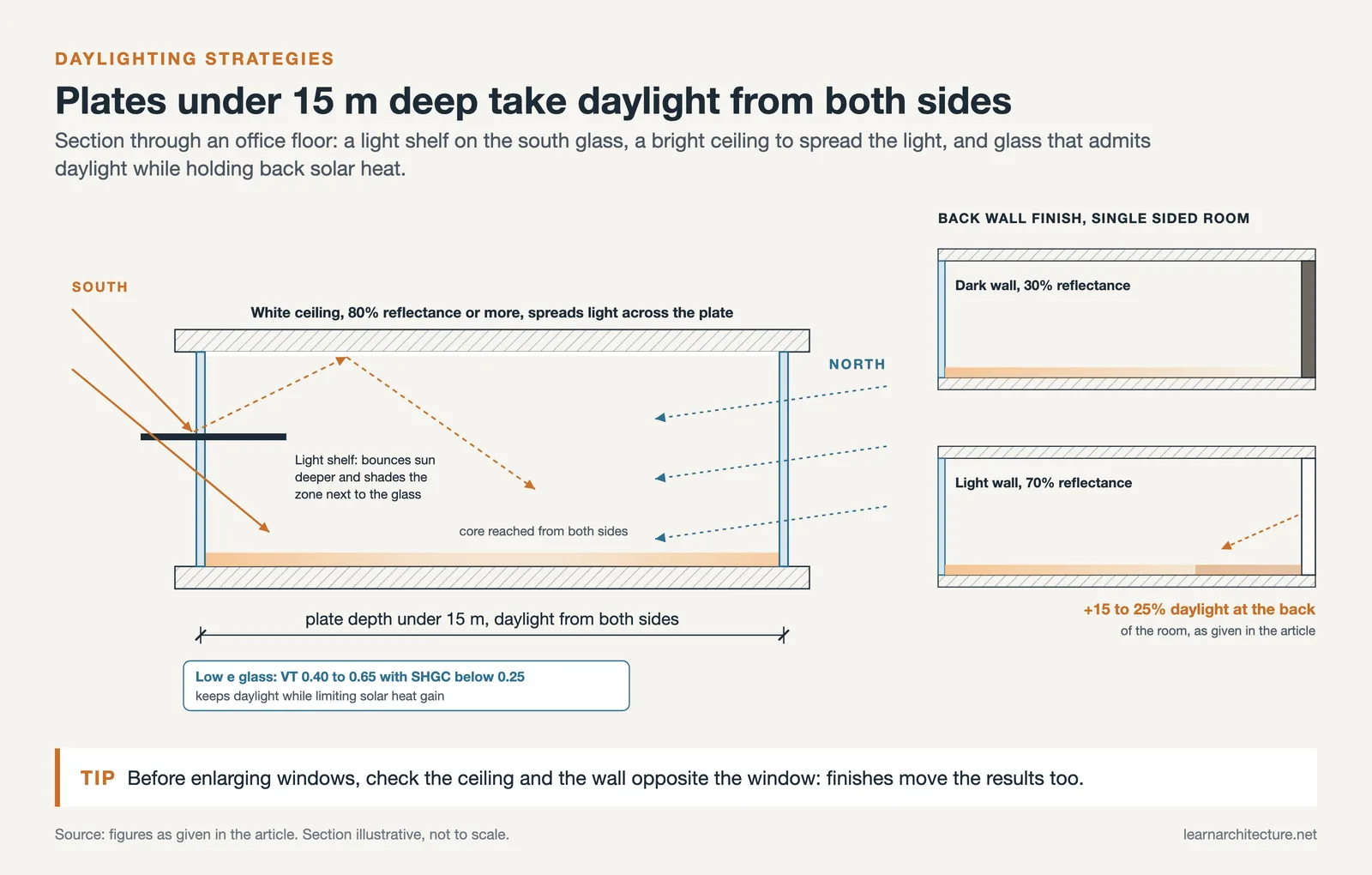
Software gives you numbers, but design decisions are what move those numbers in the right direction. Several strategies consistently improve daylight performance across building types.
Building orientation is the single most impactful decision. In the northern hemisphere, south-facing facades receive the most consistent daylight throughout the year. East and west facades get intense, low-angle sun that is harder to control and more likely to cause glare. Narrow floor plates (under 15 meters deep) allow daylight to reach the building core from both sides, which dramatically improves sDA scores.
Light shelves, horizontal elements mounted on the exterior or interior of a window, bounce direct sunlight deeper into the room while shading the area closest to the glass. They are especially effective on south facades. Clerestory windows and skylights bring light into deep floor plates and interior zones that side windows cannot reach.
Interior surface finishes matter more than many designers realize. Switching from a dark accent wall (30% reflectance) to a light-colored finish (70% reflectance) on the wall opposite a window can increase daylight levels at the back of a room by 15% to 25%. Ceiling reflectance is even more critical because ceilings act as the primary surface for redistributing incoming light across the floor plate. A white ceiling with 80% or higher reflectance is standard practice in well-designed lighting layouts.
Glazing selection balances visible light transmission with solar heat gain. High-performance low-e coatings can maintain a VT of 0.40 to 0.65 while keeping the solar heat gain coefficient (SHGC) below 0.25. Spectrally selective glass is the best option for climates where you want daylight without the associated cooling load.
Integrating Daylight Analysis into Your Design Workflow
The biggest return on daylight analysis comes when you start simulations during schematic design, not after construction documents are underway. At the massing stage, tools like Autodesk Forma or a quick Grasshopper script can tell you whether your building footprint and orientation are fundamentally compatible with your daylighting goals. This takes minutes and can prevent costly design changes later.
During design development, run detailed simulations in Revit with Insight or in Rhino with ClimateStudio. Test specific glazing products, shading devices, and interior finish options. Compare at least three facade configurations before finalizing the design.
For construction documentation, use your final simulation results to justify glazing specifications to the client, support LEED credit submissions, and coordinate with the electrical engineer on daylight-responsive lighting controls. The simulation model becomes part of the project record, not a one-off exercise.
Teams that integrate daylighting analysis from day one consistently produce buildings with better occupant satisfaction, lower energy bills, and smoother certification processes. The latest AI-driven design tools are making this even more accessible by automating parts of the simulation setup and providing instant feedback during modeling.
✅ Key Takeaways
- Daylight analysis measures how natural light enters and distributes within a building, directly affecting energy use, occupant health, and green building certification.
- Key metrics include sDA (from 40% for a first LEED point), ASE (spaces above 10% must address glare), daylight factor, and UDI. Each tells a different part of the story.
- Revit users can run daylight analysis through Autodesk Insight or third-party plugins like LightStanza. Rhino users benefit from ClimateStudio or the free Ladybug/Honeybee toolkit.
- Accurate simulations depend on correct glazing VT values, interior surface reflectance, surrounding context modeling, and location-specific weather data.
- Start simulations at the massing stage rather than during construction documents. Early analysis prevents expensive redesigns and produces better-performing buildings.
Final Thoughts
Daylight analysis has moved from a specialist consulting task to a standard part of the architectural design process. Free tools like VELUX Daylight Visualizer and Ladybug make it possible for any designer to run meaningful simulations, while professional platforms like ClimateStudio and Revit with Insight deliver certification-grade results. The tools are ready. The question is whether your workflow puts them to work early enough to make a difference.












Leave a comment