


Table of Contents Show
AI tools for architectural visualization allow architects to generate photorealistic renders, explore design variations, and produce client-ready visuals from sketches, 3D models, or text descriptions. Several of these platforms offer free tiers or trials that are practical enough for everyday project work, not just limited demos.
Two years ago, producing a single presentation-quality render meant hours of scene setup, material assignment, and render farm processing. Today, a growing number of AI-powered platforms compress that entire pipeline into seconds. According to the 2024/25 State of Architectural Visualization report by Chaos and Architizer, excitement around AI experimentation grew 20% year-over-year, while only 11% of firms were already using AI in their visualization workflow. The follow-up 2026 State of AI in Architecture survey by Chaos found that 64% of respondents have experimented with AI tools, 20% have fully embraced them, and 74% say they are likely to increase their AI use over the next 12 months.
But not every tool fits every workflow. Some plug directly into BIM software like Revit or SketchUp. Others work as standalone web apps where you upload a sketch and get a styled render back. A third category uses text prompts to generate images from scratch. Choosing the right AI tools for architectural visualization depends on your project stage, your existing software stack, and what kind of output you actually need.
This guide covers ten of the best free AI tools for architectural visualization, organized by how they fit into real design workflows.
How AI Rendering Tools for Architecture Visualization Work

Traditional architectural rendering required building a detailed 3D scene, assigning materials, configuring lighting, and waiting for ray-traced output. AI rendering tools for architecture visualization compress that process. Some generate photorealistic visuals from text descriptions alone. Others sit inside your modeling software and apply style, atmosphere, and materiality to live geometry. A few convert hand-drawn sketches into polished concept images without any 3D model at all.
The underlying technology varies by platform. Most use diffusion models, a class of machine learning architecture trained on large image datasets, to generate or enhance visuals. What matters for architects is the practical output: can the tool produce images that are accurate enough to communicate design intent at the right project stage?
⚠️ Common Mistake to Avoid
Many architects try AI rendering tools for the first time on a nearly finished project and expect construction-document-level accuracy. AI visualization works best during early design phases, where speed and iteration matter more than pixel-perfect precision. The 2024/25 Chaos and Architizer survey found that 67% of professionals were satisfied with AI renders during initial design, but only 30% found them adequate for later stages. Start with massing studies and concept presentations, not final marketing shots.
The tools below fall into three categories: BIM-integrated plugins that work inside your modeling software, standalone platforms where you upload images and receive AI-generated renders, and general-purpose image generators that create visuals from text prompts. Each category serves a different stage of the architectural visualization workflow.
Best Free BIM-Integrated AI Visualization Plugins
If you already work in Revit, SketchUp, Rhino, or ArchiCAD, BIM-integrated plugins offer the shortest path from model to AI-enhanced render. These tools read your live geometry and apply AI-driven styling without requiring file exports or uploads.
Veras by EvolveLAB (Chaos)
Veras is a plugin for Revit, SketchUp, and Rhino that generates styled renders from your live 3D model using AI. You select a camera view, choose a style preset or write a custom prompt, and the tool produces a rendered image in seconds. The Geometry Override Slider controls how much the AI deviates from your actual design, while Render Same Seed keeps iterations visually consistent so you can compare options side by side.
Since early 2025, Veras has been part of the Chaos ecosystem alongside V-Ray and Enscape. It offers a free trial with limited renders, which is enough to test the tool on a real project before committing to a subscription. For firms already using Chaos products, the integration is natural. Veras is particularly useful during schematic design when you need to present multiple atmosphere and material options to a client quickly.
Chaos AI Enhancer for Enscape
Enscape is already a standard real-time visualization plugin in many architecture offices. The Chaos AI Enhancer, included for active Enscape subscribers, adds two AI-powered features: improved entourage asset quality (people and vegetation look more realistic through cloud-based AI processing) and an AI Material Generator that converts photographs into PBR-ready materials you can apply directly to your scene. If your firm already pays for Enscape, these AI features come at no additional cost.
Vizbase
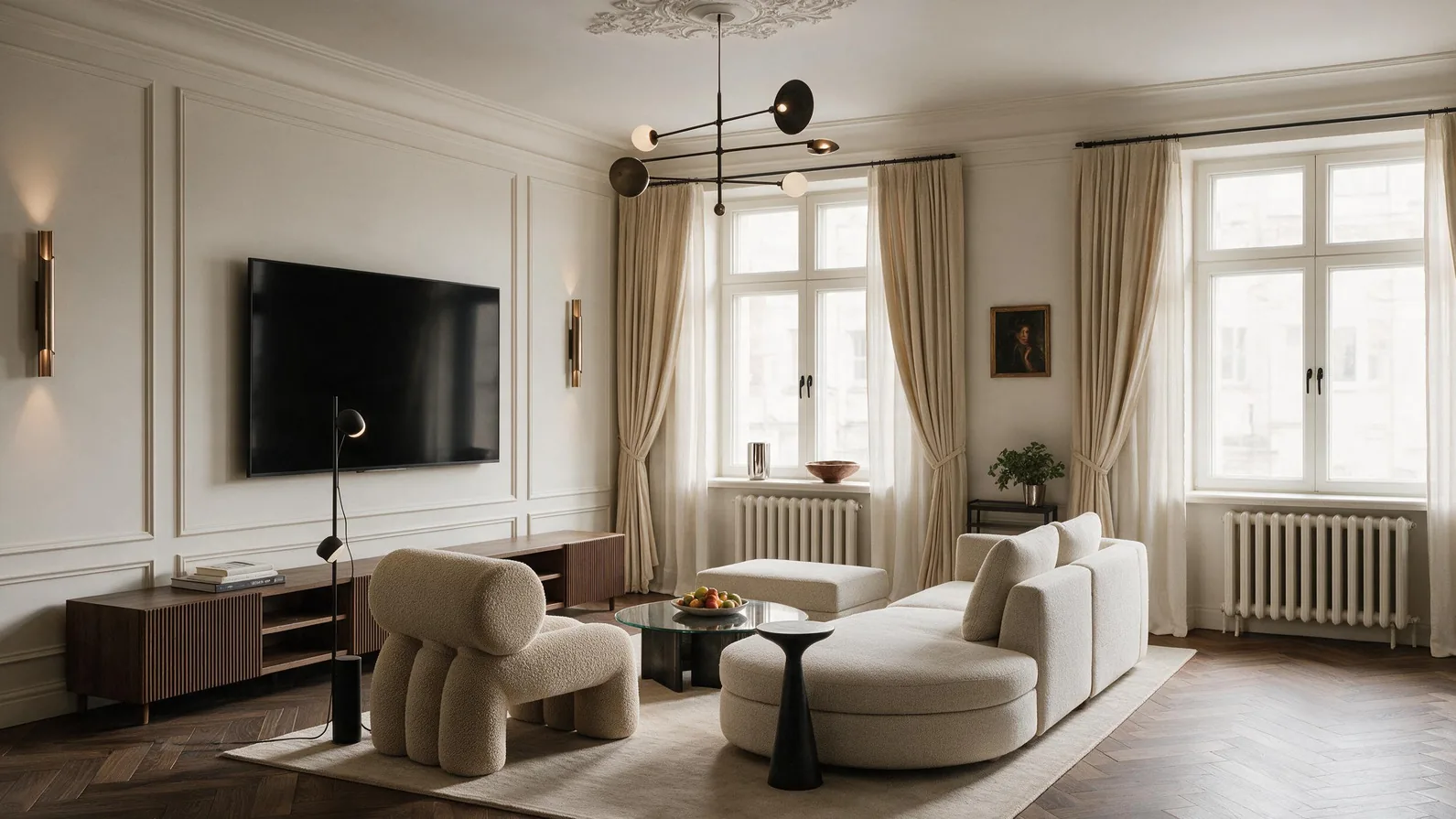
Vizbase is an AI rendering tool for architects and interior designers with a SketchUp plugin that captures the current view and renders it in the cloud, so no GPU or render engine is needed; views from Revit, Rhino or Blender, or a hand sketch, can also be uploaded in the browser. It detects walls, floors, cabinets and fixtures in the view, and each element gets its own material from plain language, a reference photo or a library of more than 2,000 materials, which makes it useful for comparing finish options for one room. The free plan includes 5 credits a month (up to 10 renders) with no card required and works with the SketchUp plugin; 4K to 8K exports come with paid plans from €29 a month.
Graphisoft AI Visualizer for ArchiCAD
ArchiCAD users can generate presentation-ready visuals directly from their live BIM model using a built-in AI feature. The tool uses prompt-based controls to apply atmosphere, materiality, and styling to your model geometry. Because it runs natively inside ArchiCAD, there is no file export step, no separate subscription, and no learning curve beyond writing a short description of what you want the image to look like.
💡 Pro Tip
Start AI visualization at the massing study stage rather than waiting for design development. Quick conceptual renders from rough SketchUp or Rhino models give clients something tangible to react to, which reduces revision cycles later. Most firms find the best results come from a hybrid approach: AI for early concepts, traditional renderers like V-Ray for final marketing images.
Top Free Standalone AI Rendering Platforms

Standalone platforms operate independently of your modeling software. You upload images, sketches, or model screenshots and receive AI-generated renders back. These tools are especially useful for smaller studios without dedicated visualization teams, or for architects who need quick concept visuals from hand-drawn sketches.
MyArchitectAI
MyArchitectAI converts CAD exports, sketches, and line drawings into photorealistic renders in under 10 seconds. The platform is browser-based, so it requires no local hardware or software installation. Its Style Transfer feature blends your design with reference images, and the AI editing mode applies material and lighting changes without a full re-render. New users receive 10 free renders, which is enough to test the tool on a real project. For studios that need client-ready visuals quickly without a dedicated visualization team, MyArchitectAI is a practical starting point.
LookX
LookX focuses on early-concept iteration. Upload reference images or massing model screenshots, and the AI generates styled variations. Features like Style Adapter and Vocab Template give you control over how the AI interprets your input, while a Prompt Assistant helps refine descriptions for architectural accuracy. LookX offers a free tier with limited monthly generations. It works well for architects who want to explore multiple design directions during the concept phase without spending hours on each variation.
Rerender AI
Rerender AI takes existing renders or 3D model screenshots and applies AI-based style transfer and enhancement. Rather than generating images from scratch, it transforms what you already have into a different visual style. This approach gives you more control over the output because the AI starts from your actual geometry rather than interpreting a text prompt. Rerender AI offers free credits for new accounts, making it accessible for testing on a current project.
🔢 Quick Numbers
- 64% of respondents have experimented with AI tools, but only 20% have fully embraced them (Chaos, State of AI in Architecture, 2026)
- 85% of AI users report that AI has saved time in their workflow (Chaos, State of AI in Architecture, 2026)
- 48% of designers say their biggest time savings from AI come during the concept design phase (Chaos and Architizer, 2026)
Best Free Text-to-Image AI Tools for Architecture Visualization

Text-to-image generators create visuals from written descriptions alone. You do not need a 3D model, a sketch, or even a reference photo. Type a prompt describing the building, the environment, the lighting, and the style, and the AI produces an image. These tools are most useful during very early ideation, when you want to test a mood, explore a spatial concept, or generate reference imagery before any modeling work begins.
Midjourney
Midjourney is one of the most capable AI image generators for architectural subjects. It handles spatial aesthetics, material realism, shadow behavior, and compositional balance better than most general-purpose generators. Architects use Midjourney primarily for concept ideation, generating images that capture a mood, a massing idea, or a material palette before committing to a detailed 3D model. Midjourney currently offers a limited free trial for new users.
The key to getting architectural results from Midjourney is prompt specificity. Include the perspective type (aerial, eye-level, interior), the time of day, the material palette, and the architectural style. Adding parameters like --ar 16:9 for wide compositions and --style raw for less stylized output improves results for professional use.
Stable Diffusion (via ComfyUI)
Stable Diffusion is an open-source image generation model that runs locally on your own hardware at zero cost. Using it through interfaces like ComfyUI, architects can build custom workflows that include ControlNet for sketch-to-render conversion, style transfer nodes, and batch processing. The trade-off is setup time: unlike browser-based tools, Stable Diffusion requires a GPU, some technical knowledge, and time to configure. For architects comfortable with that overhead, it offers complete control and unlimited free generations.
🎓 Expert Insight
“Generative AI tools are changing my entire perspective about what architecture is and what makes architecture beautiful.”
Hassan Ragab, Architect and Conceptual Artist, speaking to RIBA in 2023
This reflects a broader shift in how design firms approach visualization. AI is not replacing the architect’s vision but expanding the range of ideas that can be tested and communicated within a single project timeline.
Blender + AI Add-ons (Fully Free)
Blender is a free, open-source 3D suite with built-in rendering engines (Cycles and Eevee) that already produce professional-quality architectural visuals. What makes Blender relevant here is the growing ecosystem of AI-powered add-ons. Community-developed plugins connect Blender to Stable Diffusion for AI-assisted texturing, style transfer, and image enhancement directly inside the viewport. Because both Blender and Stable Diffusion are free and open-source, this combination is the only fully zero-cost pipeline for AI-enhanced architectural visualization available today.
Comparison of Free AI Tools for Architectural Visualization

The following table summarizes the key differences between these ten tools to help you choose based on your workflow, software stack, and project needs:
| Tool | Type | Free Tier | Best For | Input Required |
|---|---|---|---|---|
| Veras | BIM Plugin | Free trial (limited renders) | Schematic design presentations | Live 3D model (Revit, SketchUp, Rhino) |
| Chaos AI Enhancer | BIM Plugin | Included with Enscape subscription | Enhancing existing Enscape renders | Enscape scene |
| Vizbase | SketchUp plugin + browser | 5 credits/month (up to 10 renders) | Comparing finish options with per-element materials | SketchUp view, any 3D screenshot or sketch |
| Graphisoft AI Visualizer | BIM Plugin | Built into ArchiCAD | Quick renders from BIM model | ArchiCAD model |
| MyArchitectAI | Standalone | 10 free renders | Sketch-to-render conversion | Sketch, CAD export, or photo |
| LookX | Standalone | Limited monthly generations | Early concept iteration | Reference images or model screenshots |
| Rerender AI | Standalone | Free credits for new accounts | Style transfer on existing renders | Existing render or 3D screenshot |
| Midjourney | Text-to-Image | Limited free trial | Concept ideation and mood boards | Text prompt |
| Stable Diffusion | Text-to-Image (local) | 100% free (open-source) | Custom AI workflows with full control | Text prompt, sketch (via ControlNet) |
| Blender + AI Add-ons | 3D Suite + AI | 100% free (open-source) | Full modeling-to-render pipeline | 3D model (created in Blender) |
How to Choose the Right AI Visualization Tool for Your Workflow
The best AI tools for architectural visualization in 2026 are not universally “best.” They are best for specific situations. Here is a practical decision framework:
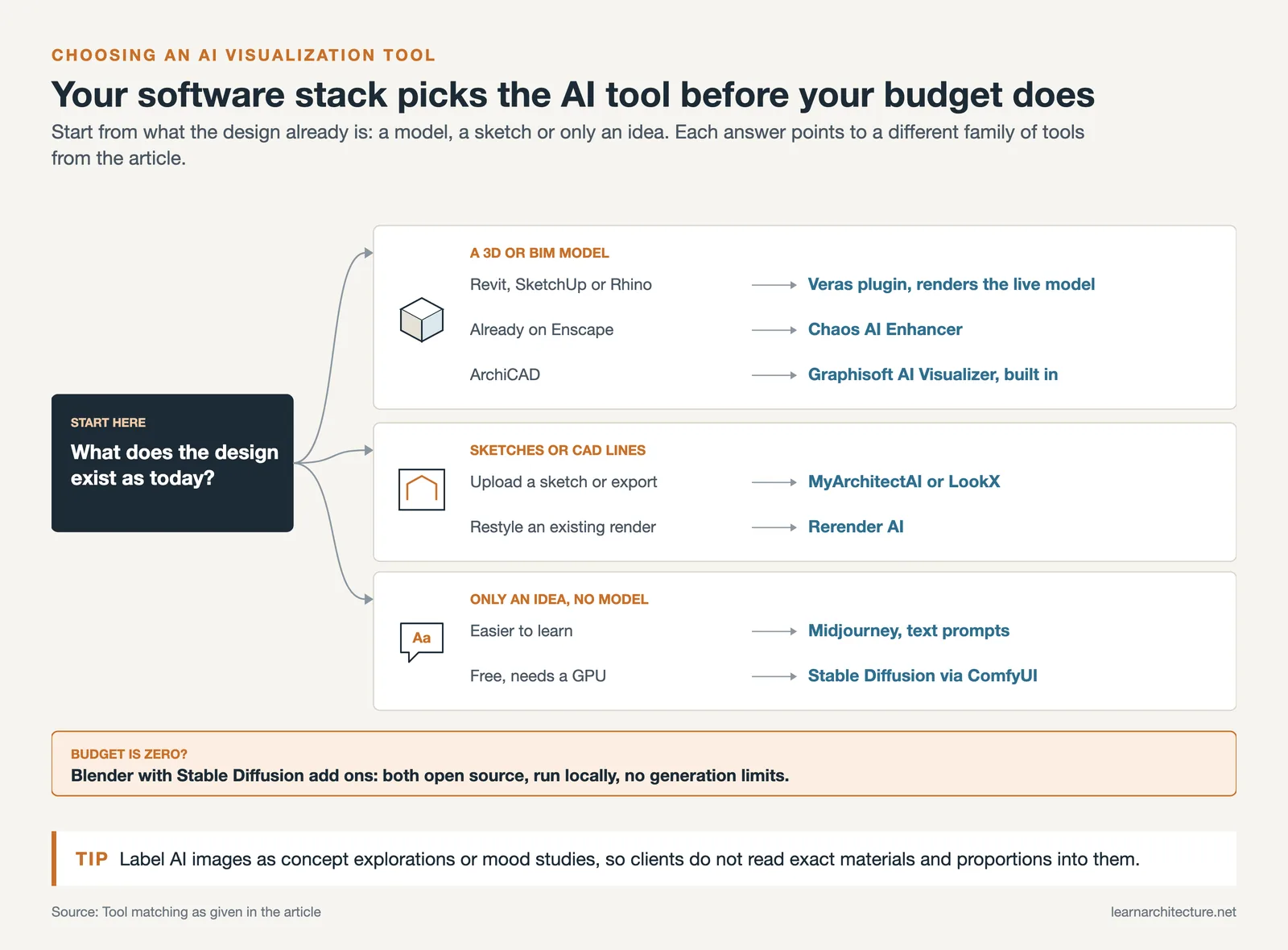
If you work in Revit, SketchUp, or Rhino and want AI renders without leaving your modeling environment, start with Veras. If you already use Enscape, activate the AI Enhancer since it is included in your subscription. ArchiCAD users should try the built-in AI Visualizer before looking at third-party options.
If you do not use BIM software daily, or if you work primarily from hand sketches and CAD line drawings, standalone platforms like MyArchitectAI and LookX will get you the fastest results. Upload a sketch, pick a style, and receive a rendered image in seconds.
If you are at the very beginning of a project and want to test spatial ideas, material palettes, or design moods before any modeling work, text-to-image tools like Midjourney or Stable Diffusion are the right starting point. Midjourney is easier to learn; Stable Diffusion is free and more customizable but requires technical setup.
If budget is your primary concern, the Blender + Stable Diffusion combination is the only fully free, end-to-end AI architectural visualization software pipeline available. Both tools are open-source, run locally, and have no generation limits.
💡 Pro Tip
For professional client work, always label AI-generated images as “concept explorations” or “design mood studies” rather than presenting them as final renders. Clients may assume AI visuals represent exact material colors and spatial proportions, which can create mismatched expectations during construction. Setting the right framing up front avoids difficult conversations later.
What AI Visualization Tools Cannot Do Yet


AI visualization tools are powerful at the concept stage, but they have real limitations that architects should understand before relying on them for project deliverables.
Geometric accuracy is the biggest gap. Most AI tools generate images that look architecturally plausible but do not preserve exact dimensions, window-to-wall ratios, or structural proportions from your input. If you upload a SketchUp model with a 3-meter ceiling height, the AI render might show a space that reads as 4 meters. This is acceptable for mood boards but problematic for anything a client might interpret as a commitment.
Material consistency across multiple views is another challenge. Generate two renders of the same building from different angles, and the AI may interpret the facade material differently in each image. Traditional renderers like V-Ray maintain material definitions across all camera angles because they work from actual 3D data. AI tools work from 2D image generation, which does not carry that kind of consistency.
For final marketing renders, construction documentation visuals, or any image where dimensional accuracy matters, traditional rendering pipelines remain the better choice. The most productive approach for most firms is a hybrid workflow: AI for speed during early design, traditional tools for precision during later stages. The top AI visualization tools for architects work best when paired with, not substituted for, established rendering software.
🏗️ Real-World Example
Zaha Hadid Architects (London, 2024-2025): The firm has been publicly experimenting with AI image generation tools including Midjourney to accelerate the early concept stage of competition entries and client presentations. Principal Patrik Schumacher has discussed how AI-generated concept imagery allows the team to explore a wider range of formal possibilities within compressed competition timelines, while traditional parametric modeling and rendering pipelines handle the later design development and documentation phases.
✅ Key Takeaways
- AI tools for architectural visualization work best during early design phases. Use them for concept exploration, client buy-in on mood and materiality, and rapid design iteration.
- BIM-integrated plugins (Veras, Chaos AI Enhancer, Graphisoft AI Visualizer) offer the fastest path from model to AI render if you already work in Revit, SketchUp, Rhino, or ArchiCAD.
- Standalone platforms (MyArchitectAI, LookX, Rerender AI) are ideal for studios working from sketches or CAD exports without dedicated visualization hardware.
- Blender combined with Stable Diffusion is the only fully free, end-to-end AI visualization pipeline available for architects on a limited budget.
- AI-generated renders lack geometric accuracy and material consistency across views. Pair them with traditional renderers for later project stages and final deliverables.
Final Thoughts
The best free AI tools for architectural visualization in 2026 are not a single platform but a toolkit matched to project stage. Use text-to-image generators for early ideation, standalone renderers for sketch-to-visual conversion, and BIM plugins for model-based concept presentations. Keep traditional renderers in your pipeline for final deliverables where precision matters. The firms getting the most value from AI visualization are those treating it as one layer in a larger workflow, not a replacement for the entire rendering process.
Free tier availability and feature sets for AI visualization tools change frequently. Verify current pricing and capabilities directly on each platform’s website before making workflow decisions.
- ai architectural visualization software
- ai rendering tools for architecture visualization
- ai tools for architectural visualization
- ai tools for architectural visualization 2026
- ai tools for architecture visualization
- best ai tools for architectural visualization
- best ai tools for architectural visualization 2026
- free ai tools for architectural visualization
- top ai visualization tools for architects












Leave a comment