



Table of Contents Show
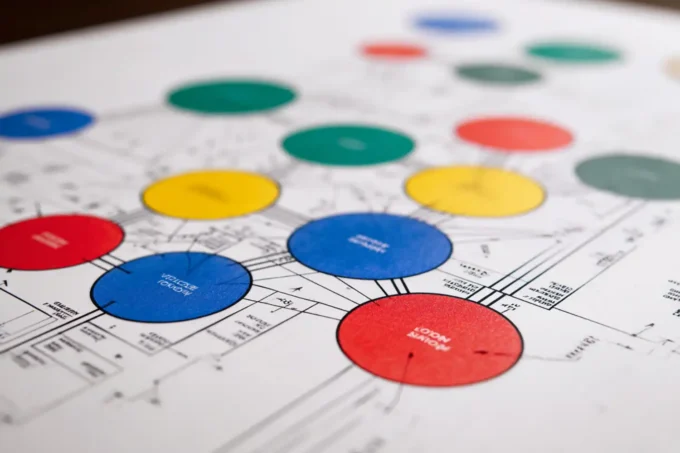
A bubble diagram in architecture is a freehand sketch that uses circles to represent rooms or functional zones and lines to show how those spaces relate to each other. Architects draw them at the very start of a project, before any measurements or floor plans exist, to test which rooms should sit close together and which ones need separation.

How Bubble Diagrams Fit Into the Design Process
Every building project follows a sequence: programming, schematic design, design development, and construction documents. The bubble diagram sits right at the boundary between programming and schematic design. During programming, the architect collects a list of required spaces, their approximate sizes, and the activities each space must support. The bubble diagram takes that written list and turns it into a visual map.
At this stage, precision is not the goal. The value lies in speed. You can redraw a bubble diagram in minutes, shift rooms around, and test entirely different configurations without erasing a single wall. According to the American Institute of Architects (AIA), changes made during the schematic phase cost roughly 1% of the total project budget, while the same adjustments after construction documents are finalized can cost ten times more.
🎓 Expert Insight
“The diagram is where you win or lose the project. If the relationships are wrong at this stage, no amount of detailing will fix them later.” – Licensed architect with 20+ years of residential and commercial practice
This reflects a common reality in practice: spatial logic established in the bubble diagram carries through every later phase, so getting adjacencies right early saves significant time and cost down the line.

Key Elements of an Architectural Bubble Diagram
A bubble diagram in architecture consists of a few simple graphic elements, each carrying specific meaning:
Bubbles (circles or ovals) represent individual spaces such as a kitchen, living room, bedroom, or office. The relative size of each bubble suggests how much area that space requires compared to the others. A large circle for a living room next to a smaller one for a powder room instantly communicates their proportional relationship.
Lines and arrows between bubbles indicate connections. A solid line typically means a direct physical connection (a doorway or open passage), while a dashed line can signal a visual connection or a relationship that does not require a door. Arrows often mark circulation paths, showing how people move from one zone to another.
Color coding helps group related zones. Public spaces like the entry, living room, and dining area might share one color, while private zones like bedrooms and bathrooms share another. Service areas such as laundry, storage, and mechanical rooms get a third color. This grouping makes it easy to spot conflicts, for example, a noisy utility room placed next to a quiet bedroom.
Labels inside each bubble identify the space by name and sometimes include a target area in square meters or square feet. Some architects also add notes about natural light requirements, views, or acoustic separation needs directly on the diagram.
How to Make a Bubble Diagram Step by Step
Drawing your first bubble diagram does not require any special software. A sheet of trace paper and a few colored markers are enough. Here is a practical approach:
Start by listing every space the project requires. For a single-family house, that list might include entry, living room, kitchen, dining area, master bedroom, secondary bedrooms, bathrooms, laundry, garage, and outdoor terrace. Write the approximate area next to each item. You can find a more detailed breakdown of bubble diagram creation on our site.
Next, build an adjacency matrix. This is a simple grid where you mark which spaces need to be close to each other, which ones should be separated, and which ones have no strong relationship. For instance, the kitchen should be close to the dining area but separated from the bedrooms.
Now draw your bubbles. Place the most important or largest space near the center of your sheet and arrange related spaces around it. Use bubble size to reflect relative area. Connect related bubbles with lines and add arrows for circulation. Group zones by color.
💡 Pro Tip
Draw at least three different versions of your bubble diagram before settling on one. Experienced designers often produce five or more variations because the first layout that feels right is rarely the best one. Each iteration reveals adjacency conflicts or circulation dead-ends you missed in earlier versions.
Review the diagram by tracing a typical daily routine through it. Imagine waking up, walking to the bathroom, going to the kitchen for breakfast, and heading to the front door. If the path feels indirect or passes through private zones unnecessarily, adjust the bubbles. Once you are satisfied with the spatial logic, this diagram becomes the foundation for your floor plan.

Bubble Diagrams in Landscape Architecture
A bubble diagram landscape architecture project follows the same logic but applies it to outdoor spaces. Instead of rooms, the bubbles represent functional zones like a patio, vegetable garden, lawn area, water feature, parking zone, or natural buffer planting. The connections between them define paths, sight lines, and grading transitions.
Landscape architects rely on bubble diagrams because outdoor projects involve large, irregularly shaped sites where rigid geometry does not apply from the start. A bubble diagram helps establish which areas need full sun, which ones serve as windbreaks, and how pedestrian circulation flows from the building entrance to the farthest corner of the site. For related reading, our guide on architecture zoning diagrams covers how zone-based thinking extends beyond the building footprint.
Common Tools for Creating Bubble Diagrams
Hand sketching remains the fastest method for bubble diagrams architecture beginners. Trace paper lets you overlay multiple versions, and colored markers make zone grouping immediate. Archisoup’s diagramming guide is a good reference for learning graphic conventions.
Digital options include Figma, Adobe Illustrator, or even PowerPoint for quick circle-and-line layouts. Dedicated architecture tools like AutoCAD offer more precision, and BibLus covers how BIM-integrated platforms handle spatial planning from the diagram stage onward. Whichever tool you pick, remember that a rough diagram with correct spatial logic beats a polished one with poor adjacencies every time.
📌 Did You Know?
Bubble diagrams have roots in mid-20th-century practice. Architects like Le Corbusier used freeform spatial sketches to test programmatic relationships long before committing to formal drawings. The technique predates CAD software by decades, and its core principle has remained unchanged since.

How Does a Bubble Diagram Differ From a Floor Plan?
A floor plan is a scaled drawing with exact wall positions, door swings, window placements, and dimensions. A bubble diagram carries none of that detail. It works at the level of spatial relationships only, answering questions like “Should the kitchen be next to the dining room?” rather than “How wide is the kitchen counter?”
Think of the bubble diagram as the strategy and the floor plan as the execution. You can also compare it with other early-stage tools: a parti diagram captures the single big idea behind a design, while a concept diagram expresses the driving design intent visually. The ideal workflow moves from bubble diagram (who belongs next to whom) to parti (what is the core concept) to schematic floor plan (how does it all actually fit).
For interior-focused projects, the same principles apply at a smaller scale. Our guide on bubble diagrams in interior design walks through how designers adapt these sketches for room-level planning.
Putting It All Together
Your Next Step: Grab a sheet of paper and list every room your current or next project needs. Assign each room a rough area, build a quick adjacency matrix, and sketch three different bubble layouts in under 30 minutes. Compare them side by side, and you will immediately see which arrangement supports the best circulation and functional grouping.

Frequently Asked Questions
What is the purpose of a bubble diagram in architecture?
A bubble diagram maps out which spaces belong next to each other and how people move between them. It gives architects a fast, low-commitment way to test layout ideas before investing time in detailed floor plans.
How many bubbles should a typical diagram include?
There is no fixed number. A small residential project might have 8 to 12 bubbles, while a large commercial building could have 30 or more. The key is to include every distinct functional zone the project requires, without splitting spaces so finely that the diagram becomes unreadable.
Can I use software to create a bubble diagram?
Yes. Figma, Adobe Illustrator, AutoCAD, and dedicated diagramming platforms all work well. Hand sketching on trace paper remains popular during early brainstorming sessions where speed matters more than precision.
What is the difference between a bubble diagram and a zoning diagram?
A bubble diagram focuses on individual rooms and their connections. A zoning diagram groups multiple rooms into broader categories such as public, private, and service zones. Architects often create both: the zoning diagram for big-picture organization and the bubble diagram for room-level relationships within each zone.
Are bubble diagrams only used in architecture?
No. Interior designers, landscape architects, urban planners, and event planners all use bubble diagrams to organize spatial relationships. The technique applies wherever you need to figure out how different areas should relate to each other physically.









Leave a comment