


Table of Contents Show
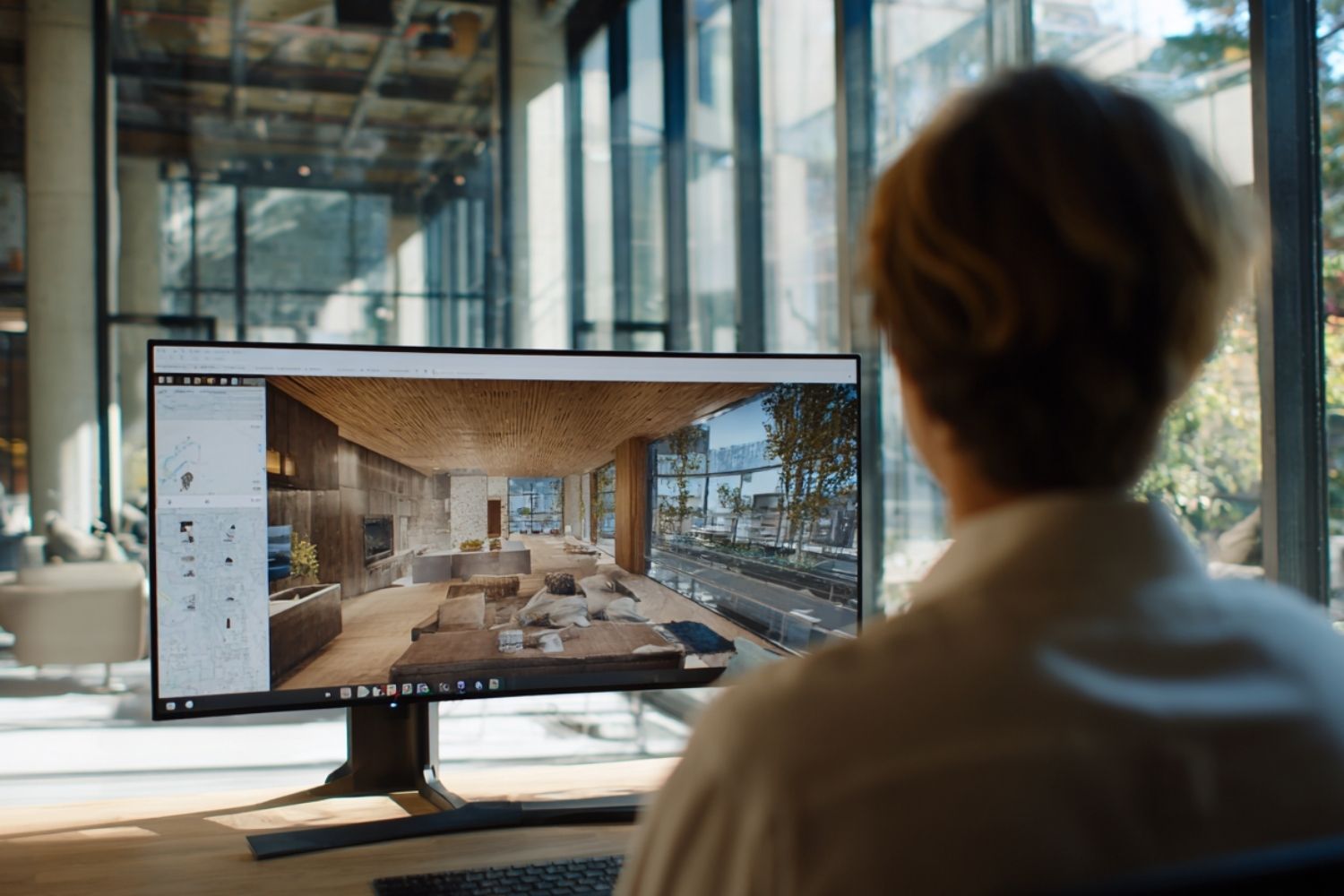
AI video generation tools allow architecture and urban design studios to produce walkthrough animations, client presentations, and social media content directly from renders, sketches, or text prompts. These tools compress weeks of traditional animation work into minutes, making video a practical deliverable at every project stage.
Until recently, producing a flythrough or walkthrough video required a full 3D scene, hours of keyframing, and expensive render farm processing. That workflow still exists, but a new category of ai video generation tools has opened a faster path. Studios are now converting static renders into cinematic clips, generating concept animations from text descriptions, and editing footage with AI-assisted controls that understand camera language, lighting, and physics. The shift is not about replacing visualization specialists. It is about giving design teams a way to communicate spatial ideas through motion without waiting for a dedicated production pipeline.
This article breaks down the most relevant ai video generator tools for architecture and urban design work, covers what to look for when choosing one, and walks through practical tips for getting usable results from day one.
Why Architecture Studios Need AI Video Tools
Static renders have been the standard deliverable in architecture for decades, but clients increasingly expect motion. A walkthrough video reveals spatial sequences, material transitions, and lighting conditions that a single image cannot communicate. The problem has always been production time. Traditional architectural animation involves building a complete 3D scene, setting camera paths, rendering thousands of frames, and compositing the result. Even with real-time engines like Twinmotion or Lumion, producing a polished video takes days of focused work.
AI video creation tools change this equation. Several platforms can now take a single architectural render or photograph and generate a short cinematic clip with realistic camera movement in under five minutes. Others accept text prompts and produce videos showing building exteriors, interiors, or urban scenes without any 3D model at all. For competition submissions, early-stage client meetings, or social media content, this speed matters. Studios that previously reserved video for final-stage marketing can now use it as a design communication tool throughout the project.
💡 Pro Tip
Start with image-to-video generation rather than text-to-video when working on real projects. Feeding the AI a high-quality render you have already approved gives you far more control over the output than describing a building from scratch in a text prompt. Save text-to-video for early concept exploration where accuracy matters less.
Top AI Video Generator Tools for Architecture in 2026
The ai video generator tool market has expanded rapidly, but not every platform suits architectural work. General-purpose generators often struggle with spatial coherence, straight lines, and material accuracy. The tools listed below have been selected based on their relevance to architecture and urban design workflows, output quality, and practical usability for design professionals.
Runway Gen-4 and Gen-4.5
Runway remains the most widely adopted ai video tool among creative professionals. Gen-4.5, released in late 2025, topped the Artificial Analysis text-to-video benchmark with a 1,247 Elo score, placing it ahead of Google Veo 3 and OpenAI Sora 2 at launch. For architecture studios, Runway’s strength lies in its image-to-video capabilities and granular camera controls. You can upload a completed render, specify a slow dolly forward or an orbital pan, and receive a 10-second clip with believable physics and consistent materials. The Motion Brush feature lets you isolate movement to specific areas of the frame, useful for adding subtle tree sway or water reflections without distorting the building geometry. Runway starts at $12/month for standard access.
Google Veo 3.1
Google Veo 3.1 introduced synchronized audio-video generation, producing ambient sound, dialogue, and environmental noise alongside the visual output in a single pass. For architecture, this means a walkthrough video can arrive with footstep sounds, wind, and room ambience already layered in. The model supports both 16:9 and 9:16 aspect ratios at up to 4K resolution and generates clips of 4 to 8 seconds that can be extended through scene chaining. Veo 3.1 handles material rendering well, particularly glass, water, and polished concrete, making it a strong choice for exterior and interior visualization sequences. Access is available through Google AI Studio and select third-party platforms.
Kling 3.0 by Kuaishou
Kling AI reached $100 million in annual recurring revenue within 10 months of launch, driven largely by its generous output durations. Where most competitors cap at 10 to 20 seconds, Kling generates clips up to 2 minutes long at native 4K resolution. Its multi-shot storyboard mode lets you script a sequence of scenes with consistent visual style, which is directly applicable to architectural presentations that need to move from exterior approach, through entry, into interior spaces. The lighting engine handles sunlight through windows, reflections on glass, and the interplay of artificial and natural light with particular accuracy. Plans start at $10/month.
Fenestra (Architecture-Specific)
Fenestra is purpose-built for architects and designers. Unlike general-purpose generators, it offers preset camera paths designed for architectural presentations: orbit, pan, zoom, and custom trajectories. You upload a single render or 3D model screenshot, and the platform generates a cinematic animation without requiring a complete 3D scene or keyframe setup. Fenestra recently integrated Seedance 2.0 for its video engine, producing 720p cinematic output with automatic audio for both interior and exterior shots. For studios that want architecture-specific controls without learning a general-purpose AI video platform, Fenestra removes significant friction.
🎓 Expert Insight
“Generative AI tools are changing my entire perspective about what architecture is and what makes architecture beautiful.”
Hassan Ragab, Architect and Conceptual Artist, speaking to RIBA in 2023
This observation reflects a growing recognition among practitioners that AI video and rendering tools are not just efficiency gains. They are reshaping how architects think about visual communication and the role of motion in design storytelling.
Pika
Pika offers one of the most accessible entry points into ai video creation tools, with a free basic tier and paid plans starting at $8/month. It achieved a 74% usable result rate in extensive testing, with an average render time of 42 seconds per video. For architecture studios producing frequent social media content, Pika’s speed and low cost make it practical for generating quick concept clips and Instagram Reels from existing renders. The V6 model handles architectural scenes reasonably well, though it lacks the spatial precision of architecture-specific tools like Fenestra.
Luma Dream Machine
Luma AI specializes in fast, cinematic image-to-video conversion with strong depth perception. Upload an architectural photograph or render, and the platform generates a 5-second clip with smooth camera movement that respects the spatial depth of the original image. For architects who need quick before-and-after animations or site documentation clips, Luma’s speed and visual quality make it a useful addition to the toolkit. It works well for generating short clips of existing buildings or site conditions for competition analysis boards.
How to Choose the Right AI Video Tool for Your Studio
Selecting an ai video tool depends on three factors: what input you are starting from, what output quality you need, and how the tool fits into your existing workflow.
If your studio already produces high-quality renders using V-Ray, Enscape, or Lumion, image-to-video tools like Runway, Veo, or Luma will give you the best results because they work with your existing visual assets. If you are in early concept stages and want to explore spatial ideas quickly, text-to-video capabilities in Kling or Veo let you generate scenes from written descriptions without any 3D modeling.
Output resolution matters for client presentations. Kling 3.0 and Veo 3.1 both support 4K natively, while Runway Gen-4.5 outputs 720p and Pika caps at 1080p (with upscaling available). Duration is another practical consideration. A 5-second clip works for social media, but a client walkthrough typically needs 30 to 60 seconds of continuous footage. Kling’s 2-minute generation limit and scene-extension features in Veo 3.1 address this need directly.
Comparison of AI Video Tools for Architecture
The following table summarizes the key differences between the major platforms:
| Tool | Best For | Max Resolution | Max Duration | Starting Price |
|---|---|---|---|---|
| Runway Gen-4.5 | Camera control, editing | 720p (upscale available) | 10 seconds | $12/month |
| Google Veo 3.1 | Audio-visual sync, realism | 4K | 8 sec (extendable) | Varies by platform |
| Kling 3.0 | Long clips, storyboarding | 4K | 2 minutes | $10/month |
| Fenestra | Architecture-specific presets | 720p | 50 seconds | Free tier available |
| Pika | Quick social content | 1080p | 15 seconds | Free / $8/month |
| Luma Dream Machine | Fast image-to-video | 1080p | 5 seconds | $9.99/month |
⚠️ Common Mistake to Avoid
Many architects try text-to-video first and get disappointed by inaccurate building geometry or warped proportions. General-purpose AI models are not trained on architectural accuracy. Always use image-to-video mode with your own renders as input when spatial precision matters. Reserve text-to-video for mood boards, concept exploration, or social media teasers where exactness is less critical.
Practical Tips for Using AI Video Tools in Architecture Workflows
Getting good results from free ai video creation tools and paid platforms alike requires adjusting your input and expectations. Here are specific techniques that improve output quality for architectural content.
Use high-resolution source images. AI video generators analyze pixel-level detail to infer depth, materials, and geometry. A 4K render with clear material definition produces significantly better results than a compressed JPEG exported from a presentation deck. When composing the source image, think about the camera path you want. If you need a forward dolly movement, frame the shot with clear depth cues: foreground elements, middle ground architecture, and a visible background.
Specify camera language in your prompts. Terms like “slow dolly forward,” “orbital pan left to right,” “low-angle tracking shot,” and “bird’s-eye descent” give AI models concrete direction. Vague prompts like “show the building” produce unpredictable results. Write prompts the way you would brief a cinematographer, not the way you would describe a design concept.
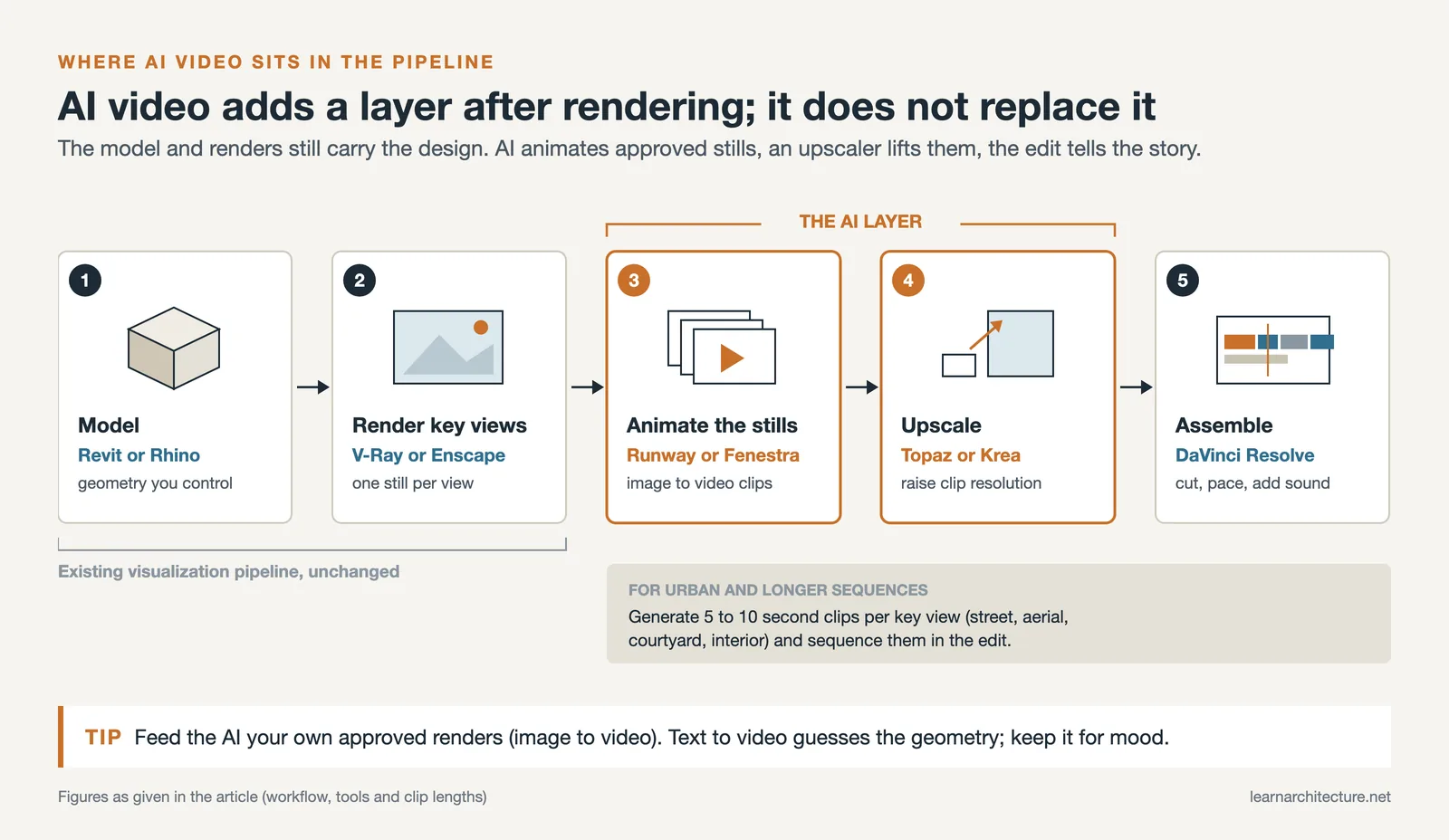
For urban design presentations, sequence multiple short clips rather than trying to generate one long continuous video. Generate individual 5 to 10-second clips for each key view (street level, aerial, courtyard, interior), then assemble them in a simple editing tool like DaVinci Resolve (free) or Adobe Premiere. This approach gives you control over pacing and narrative flow while using AI for the heavy lifting of animation generation.
💡 Pro Tip
When generating walkthrough sequences, maintain consistent lighting across all source renders. If your exterior shot uses golden hour lighting but your interior render has cool daylight, the AI will produce clips with conflicting atmospheres that look jarring when edited together. Match your rendering settings before feeding images into the video generator.
What Can AI Video Editing Tools Add to the Process?
Beyond generation, ai video editing tools handle tasks that previously required manual post-production. Runway’s video-to-video mode can restyle existing footage, applying material changes or atmosphere adjustments to walkthrough clips you have already produced. Krea AI offers upscaling specifically optimized for architectural content, taking 720p AI-generated clips to crisp 4K with sharpened material textures and reconstructed detail. Topaz Video AI provides frame interpolation and denoising that smooths out artifacts common in AI-generated architectural footage, particularly along straight edges and glass surfaces.
For studios already producing traditional walkthrough videos with Lumion or Twinmotion, these editing tools can enhance existing output. AI upscaling improves render quality without re-rendering, and style transfer can apply different atmospheric conditions (rain, fog, golden hour) to a single base animation, multiplying your deliverables without multiplying your production time.
Video: AI Video Generation for Architectural Walkthroughs
This tutorial covers how Google VEO 3 can be applied specifically to architecture, landscape, and urban design video production, with practical prompt strategies for different project types.
Limitations You Should Know About
AI video generation has improved dramatically, but it still has clear weaknesses for architectural use. Straight lines and precise geometry remain a challenge. Columns, window mullions, and structural grids can warp or drift during camera movement, particularly in text-to-video mode. Fine text on signage or building facades often becomes illegible. Complex hand and finger movements in scenes showing people interacting with buildings can produce visible artifacts.
Temporal coherence, the ability to maintain consistent visual elements across frames, is the primary technical differentiator between platforms in 2026. Cheaper or older models may produce clips where materials shift color, shadows flicker, or building elements change shape between frames. Testing any tool with your own renders before committing to a paid plan is essential.
Copyright and intellectual property questions around AI-generated video remain evolving. If you are producing content for a paying client, check the commercial use terms of whichever platform you choose. Runway, Kling, and Veo all include commercial usage rights on their paid tiers, but terms vary and may change.
📌 Did You Know?
According to the 2024/25 State of Architectural Visualization report by Chaos and Architizer, 56% of design professionals now actively use AI tools in their visualization workflows. However, only 30% found AI-generated results adequate for later project stages, meaning most firms still use AI output for early design and concept work rather than final client deliverables.
How AI Video Fits into Broader Architectural Visualization
AI video generation does not replace the established visualization pipeline. It adds a layer. Firms using AI tools for architectural visualization are finding that the best results come from combining traditional rendering with AI-powered animation and post-production. A typical workflow might look like this: model in Revit or Rhino, render key views in V-Ray or Enscape, feed those renders into Runway or Fenestra for animation, upscale with Topaz or Krea, and assemble in DaVinci Resolve.
For firms exploring AI in architecture design more broadly, video generation is one piece of a larger shift. The same platforms that produce walkthrough animations also offer image generation, style transfer, and real-time design iteration. Understanding how these tools connect helps studios build efficient pipelines rather than treating each AI tool as an isolated experiment.
Urban design studios have a particular opportunity here. Generating video of streetscapes, public spaces, and neighborhood-scale interventions has historically been expensive and time-consuming. AI video tools make it practical to show stakeholders and communities what a proposed urban intervention will feel like at pedestrian level, with moving people, changing light, and ambient sound. This kind of experiential communication was previously limited to studios with dedicated animation departments. For more on digital tools that support urban-scale work, see this guide to urban mapping tools for planners.
✅ Key Takeaways
- AI video generation tools compress architectural animation from days of work into minutes, making video practical for every project stage.
- Image-to-video mode produces better architectural results than text-to-video because it preserves the geometry and materials from your existing renders.
- Fenestra is the only current platform purpose-built for architecture; general tools like Runway, Veo, and Kling require more careful prompting but offer broader capabilities.
- Sequence multiple short clips and assemble them in a video editor for professional walkthrough presentations rather than relying on a single long generation.
- AI video output works best for early-stage design communication and social media; final client deliverables still benefit from traditional rendering pipelines enhanced by AI post-production.
Final Thoughts
The best ai video generation tools for architecture are the ones that fit into how your studio already works. If you produce renders, start with image-to-video platforms like Runway or Fenestra. If you need long-format walkthrough content, Kling’s 2-minute generation and storyboarding features give you the most room to work. If synchronized audio matters for immersive presentations, Veo 3.1 handles that natively. The technology will keep improving, and spatial accuracy and duration limits will expand with each model update. What matters now is building the habit of using motion as a communication tool, because clients, communities, and competition juries increasingly expect it.
Pricing and feature details reflect information available as of early 2026. AI video platforms update their models and pricing frequently, so verify current terms on each platform’s website before subscribing.





Leave a comment