



Table of Contents Show
BIM collaboration platforms let architects, engineers, and contractors share, review, and coordinate building models in a cloud-based environment. Trimble Connect, Speckle, BIMcollab Zoom, Dalux BIM Viewer, and Allplan BIMPLUS are compared here by what you can actually use for free as of September 2026: Speckle, BIMcollab Zoom, and Dalux offer free access with no time limit, Trimble Connect offers a 30 day free trial, and BIMPLUS is a paid subscription with no free tier listed.
Running a multi-discipline building project without a shared model environment creates version conflicts, duplicate work, and missed clashes. A cloud-based BIM platform solves this by giving every stakeholder access to the same up-to-date project data, whether they sit in the office or stand on the construction site. According to a buildingSMART International survey, 77% of AEC firms consider a common data environment (CDE) the most effective way to share large volumes of project information. Yet many small practices still rely on email attachments and shared folders because they assume CDE platforms are expensive. The five platforms below show how far free access goes today, and where it stops.

What Makes a Good Free BIM Collaboration Platform?
Before comparing individual tools, it helps to know what separates a useful free BIM collaboration platform from a basic file-sharing folder. The core function is model viewing: the platform should open IFC files and other common formats directly in a browser or lightweight desktop app, without requiring expensive authoring licenses. Beyond viewing, look for issue tracking tied to 3D locations, version management so you can compare model states over time, and role-based access so external consultants only see what they need. Mobile access matters too, because site teams need to reference models on a phone or tablet. Free tiers always come with limits on storage, user counts, or advanced features like clash detection. The question is whether those limits block real work or simply cap scale. For teams evaluating their broader digital toolset, the guide to free architectural digital tools on learnarchitecture.net covers additional options beyond BIM-specific platforms.

1. Trimble Connect
Trimble Connect is a cloud-based common data environment built for the AEC industry. It supports uploading, viewing, and annotating 2D drawings, 3D models, and project documents in a centralized workspace. The platform handles IFC, DWG, PDF, and over 45 other file formats, which means most team members can contribute regardless of their authoring software. Paid plans, with a 30 day free trial, provide access through web, desktop (Windows), and mobile apps (iOS and Android), with basic project management features including to-do lists, activity logs, and model markup.
Where Trimble Connect stands out is its tight integration with the Trimble ecosystem. If your team already uses Trimble’s Tekla or SketchUp, or Autodesk Revit through the Trimble Connect for Revit add-in, Trimble Connect acts as a natural extension for sharing and reviewing models. Its augmented reality (AR) feature on mobile lets you overlay BIM models on physical spaces during site walks, which is useful for verifying installations against the design. The 30 day free trial opens every feature, including issue management tied to specific model locations, making it a capable starting point for teams new to cloud-based BIM collaboration tools.
💡 Pro Tip
When setting up Trimble Connect for the first time, create a clear folder structure by discipline (Architecture, Structure, MEP) before uploading any models. Teams that skip this step often end up with a flat pile of files that becomes unmanageable within a few weeks, especially when external consultants start contributing.
2. Speckle
Speckle takes a fundamentally different approach from most BIM collaboration platforms. It is open-source software, originally developed from a research project at University College London, and it treats BIM data as a stream of versioned objects rather than static files. You can push geometry, parameters, and metadata from Revit, Rhino, Grasshopper, ArchiCAD, Blender, AutoCAD, and other tools into a centralized server, then pull that data into any other connected application.
If you self-host the open-source Speckle server, which is licensed under Apache 2.0, you pay no license fee, although the workspace module is covered by a separate Enterprise Edition license. The hosted version offers a free Explore plan with one project, up to three users, and 30 days of version history (as of September 2026). Paid plans are now quoted as custom plans for teams that need more projects and users. Speckle’s real strength is data connectivity. Architects working in Rhino can share live model updates with structural engineers in Revit, without anyone needing to export IFC files manually. This makes it the strongest open source BIM collaboration tool currently available and a good fit for tech-savvy teams running custom data workflows. For teams interested in computational and parametric workflows, the parametric design tools guide covers tools that pair well with Speckle’s data streaming approach.
🎓 Expert Insight
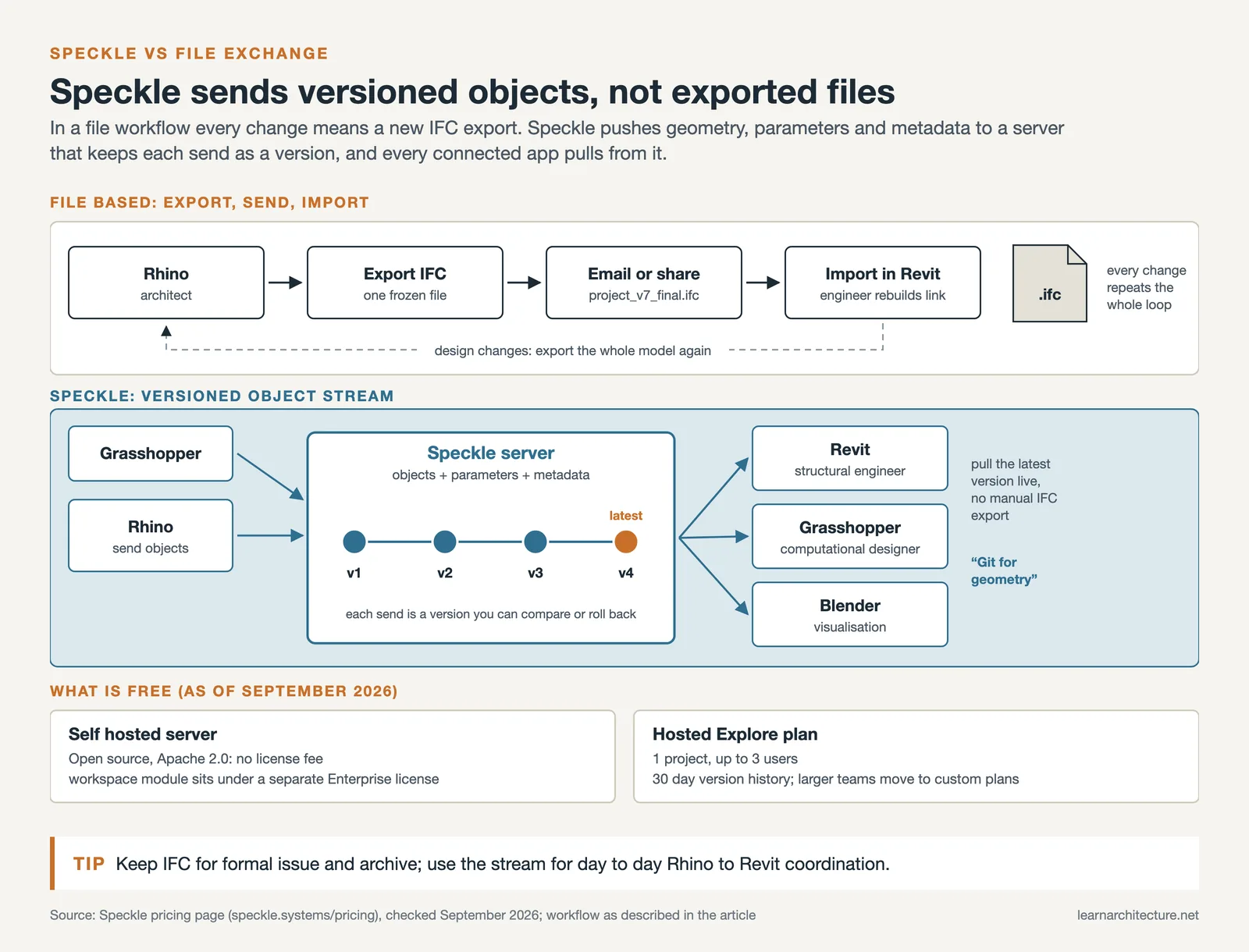
The Speckle team describes their platform’s philosophy as treating BIM data like code: versioned, branchable, and accessible through APIs rather than locked inside proprietary files. This “Git for geometry” approach makes it popular among computational designers who need programmatic access to model data across multiple applications.
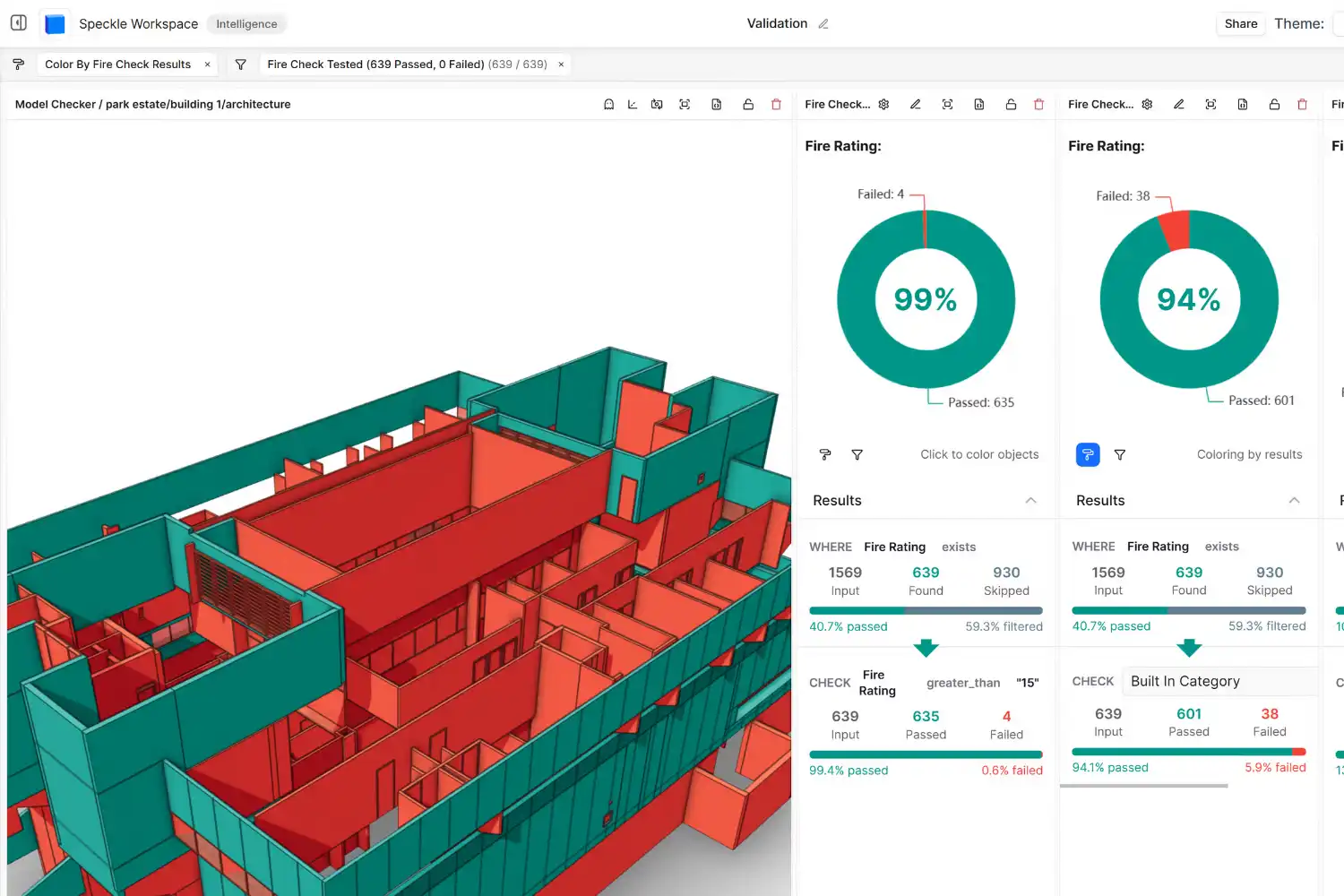
3. BIMcollab Zoom
BIMcollab Zoom is a desktop application that works as a free IFC model viewer with built-in issue management. Unlike browser-based tools, it runs locally on your machine, which means fast loading times and smooth navigation even with large, federated models containing hundreds of thousands of objects. The free Viewer version lets you open and combine multiple IFC files, apply smart views to filter and color-code elements by property, measure distances, create sections, and connect to a BIMcollab Nexus project for issue tracking.
Issues are tied to specific locations in the 3D model, with each issue carrying a responsible person, status, priority, and full audit trail. The BCF (BIM Collaboration Format) standard sits at the heart of BIMcollab’s workflow, so issues created in BIMcollab Zoom can be opened directly in Revit, ArchiCAD, Navisworks, or any other BCF-compatible software. This cross-platform compatibility is what makes BIMcollab Zoom one of the best free BIM platforms for teams focused on model quality and coordination. The paid license adds rule-based clash detection, automated checking, and data extraction, and a 30 day trial unlocks all of it. The free Viewer has no time limit and covers the core viewing and BCF issue loop, but the shared BIMcollab project space it connects to is a paid plan, starting at €12.50 per user per month on annual billing (as of September 2026).
⚠️ Common Mistake to Avoid
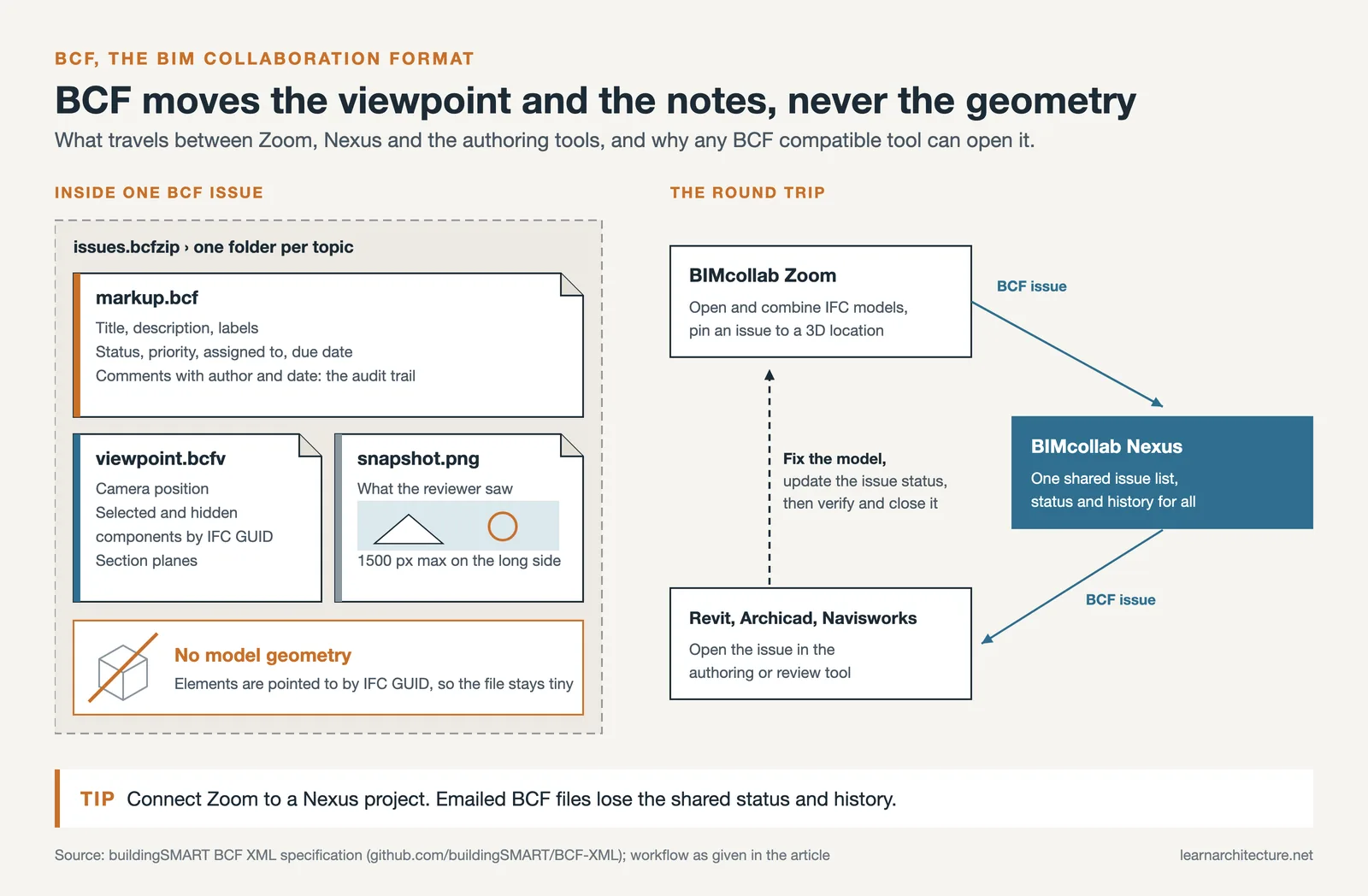
Many teams start using BIMcollab Zoom but forget to set up a BIMcollab Nexus space (also available as a free trial) for centralized issue management. Without it, BCF files get emailed back and forth and lose their audit trail. Connecting Zoom to a Nexus project keeps every issue, comment, and status change in one place visible to the whole team.
4. Dalux BIM Viewer
Dalux BIM Viewer focuses on getting BIM models into the hands of field teams. The platform is completely free for viewing and commenting, with no user limit, and it runs on web, desktop (Windows), and mobile devices (iOS and Android). It accepts IFC and Revit uploads directly, plus it has plugins for Navisworks, Tekla, and ArchiCAD to push models into the viewer without manual file export. Dalux claims over one million users across more than 115 countries, and its speed with large, complex models is a frequently cited strength.
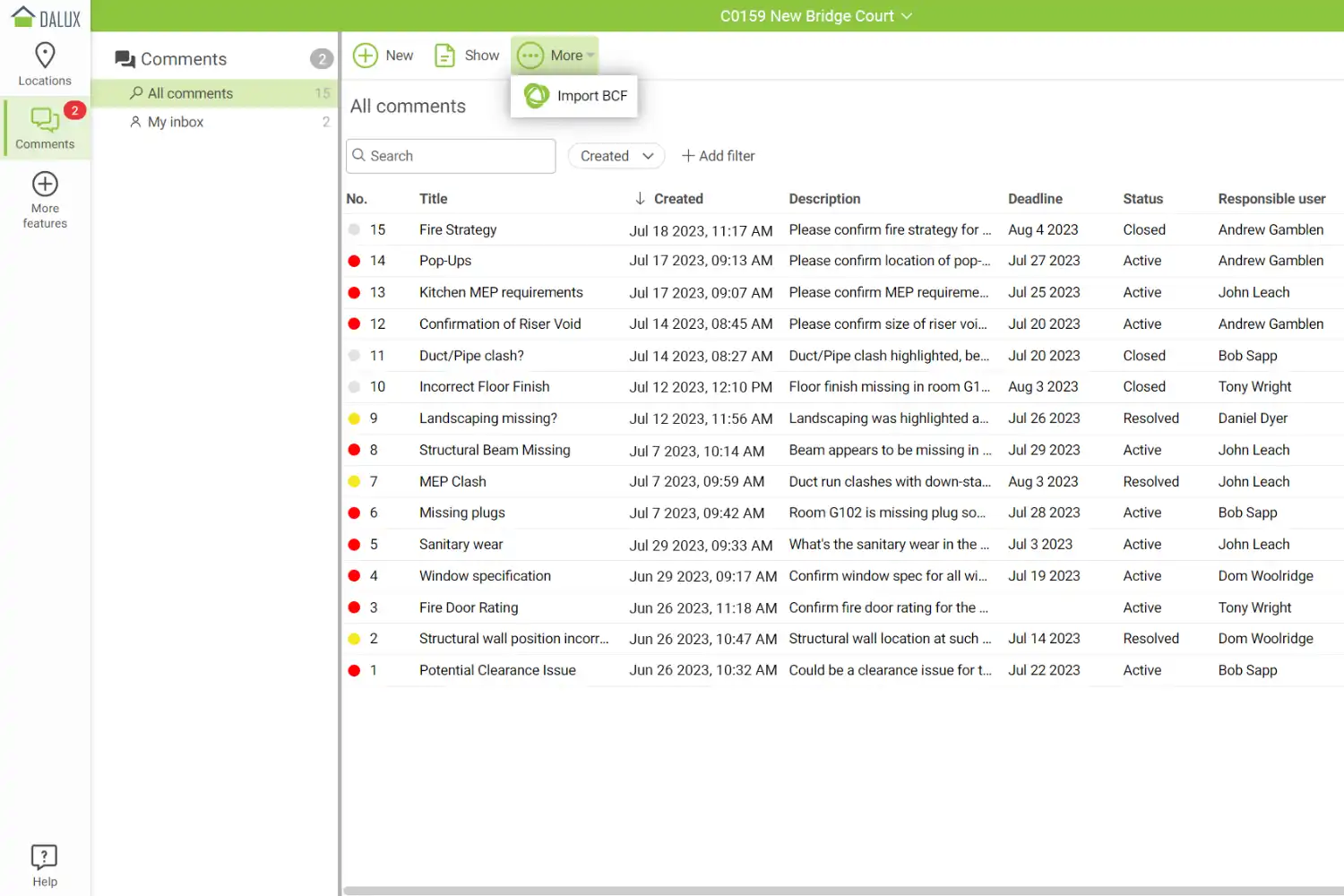
The free tier includes 2D and 3D viewing in a single federated environment, a measurement tool, commenting with responsible persons and audit trails, and the ability to import clashes from Solibri or Navisworks for review. Custom property filters let you color-code and isolate specific building elements. For site teams, this is one of the most practical free BIM tools for architects because it puts the full model in your pocket with offline access. Dalux also offers a separate free product called Dalux Field Basic for snagging, task management, and quality inspection on site. If your team needs a mobile-first collaboration tool without configuration overhead, Dalux is the fastest path from signup to use.
5. Allplan BIMPLUS
Allplan BIMPLUS is a cloud-based openBIM collaboration platform from the Nemetschek Group. It supports IFC import and export, model federation, clash detection, and task management across web and mobile interfaces. No free tier is listed on the BIMPLUS site; the Professional plan includes 10 GB of cloud storage from €26 per user per month on an annual subscription (as of September 2026). BIMPLUS stands out for firms already working within the Nemetschek software ecosystem, which includes Allplan, Vectorworks, and Graphisoft ArchiCAD.
The platform organizes projects by discipline with configurable rights and roles, and it supports model topology management so you can structure your building hierarchy logically. Recent updates have added IFC 4.3 import and GLB export for better visualization. For European teams where Nemetschek products have strong market share, BIMPLUS provides a vendor-neutral collaboration space where consultants using different authoring tools can contribute without friction. Its integration with BIM coordination workflows makes it a reasonable choice for teams focused on structured model management.
📌 Did You Know?
The BCF (BIM Collaboration Format) standard, used by BIMcollab, Trimble Connect, and BIMPLUS, was developed by buildingSMART International specifically to allow issue and comment exchange between different BIM software. A BCF file contains a 3D viewpoint, a screenshot, and issue metadata but no geometry, keeping file sizes tiny and enabling fast cross-platform coordination.
Comparison of BIM Collaboration Platforms and Their Free Access
The following table summarizes what each of the five platforms offers for free, or what it costs, as of September 2026:
| Platform | Type | Free Access and Highlights | Best For |
|---|---|---|---|
| Trimble Connect | Cloud CDE | No free plan: 30 day free trial, then Pro from $349 per user per year; web, desktop, mobile access; 45+ file formats; AR overlay | Small teams needing a full CDE with mobile and broad format support |
| Speckle | Open-source data hub | Free hosted Explore plan: 1 project, up to 3 users, 30 day version history; open-source server free to self-host | Tech-savvy teams running custom data pipelines across multiple apps |
| BIMcollab Zoom | Desktop IFC viewer | Free Viewer with no time limit: IFC viewing, smart views, measurements, BCF issues; full features in a 30 day trial | Teams focused on issue tracking and model quality via BCF workflows |
| Dalux BIM Viewer | Cloud + mobile viewer | Free viewer: unlimited users, Revit/IFC upload, commenting, offline mobile access | Site teams needing fast mobile access to large, federated models |
| Allplan BIMPLUS | Cloud openBIM platform | No free tier or trial listed; Professional plan from €26 per user per month (annual) with 10 GB storage, IFC support, clash detection, role-based access | European teams in the Nemetschek ecosystem (Allplan, Vectorworks, ArchiCAD) |
How to Choose the Right BIM Collaboration Platform for Your Team
Picking the best BIM collaboration platform, and deciding whether its free access is enough, depends on three factors: your team’s technical comfort level, the size and complexity of your projects, and which authoring tools your collaborators use. If you need a straightforward CDE with broad file format support and mobile access, Dalux BIM Viewer is the free option, while Trimble Connect offers the fuller CDE only as a 30 day free trial before a paid Pro plan from $349 per user per year (as of September 2026). For teams focused specifically on issue tracking and model quality, BIMcollab Zoom’s free viewer combined with BCF-based workflows is hard to beat, although a shared BIMcollab issue space requires a paid plan after its 30 day trial. And if your firm sits within the European Nemetschek ecosystem (Allplan, ArchiCAD, Vectorworks), BIMPLUS offers a collaboration space designed for that software family, but as a paid subscription with no free tier listed.
Speckle occupies a different niche. If your practice uses multiple authoring tools and you want to move data between them without relying on IFC exports, or if you have developers on your team who can work with APIs, Speckle gives you more control over your data than any other option here, and its free Explore plan lets you test that before paying. The open-source server can also be self-hosted without a license fee, which makes it especially attractive for firms with their own IT infrastructure. For a broader view of essential software in an architect’s toolkit, the guide to essential apps for architects covers tools across design, visualization, and project management categories.
💡 Pro Tip

Before committing to any platform, run a pilot with one real project and at least three team members for two weeks. Pay attention to how easily external consultants can join, whether the mobile experience actually works on site, and how the platform handles your typical model sizes. A platform that looks great in a demo can fall apart under real project conditions.

Final Thoughts
The most important step is simply to start using one. Even a basic cloud-based BIM platform replaces hours of email-based coordination with a centralized, visual, and traceable workflow. As of September 2026, Speckle, BIMcollab Zoom, and Dalux BIM Viewer can be used for free with no time limit, Trimble Connect can be tested for 30 days at no cost, and BIMPLUS needs a paid subscription from the start. Once your team experiences the difference between emailing Navisworks clash reports and reviewing issues directly on a 3D model with status tracking, the case for BIM collaboration makes itself. Start small, test with a live project, and scale up as your team builds confidence with the tool. For architects looking to improve their broader digital workflow, the guide to AI in architecture design covers additional tools that can complement your BIM collaboration setup.








Leave a comment