



Table of Contents Show
Building an automated design workflow with AI tools means connecting software platforms that handle repetitive architecture tasks (site analysis, massing studies, rendering, code compliance checks) into a sequence that runs with minimal manual input. The result is faster iteration, fewer errors, and more time spent on actual design decisions.
Most architects already use some form of AI in isolated tasks. They generate concept images in Midjourney, run sun-path analyses in Autodesk Forma, or produce quick floor plan studies with tools like Finch 3D. The problem is that these tools usually sit in separate silos. Each one requires its own file export, manual upload, and format conversion. An automated design workflow connects these steps so that output from one tool feeds directly into the next, reducing the friction that slows down every project phase.

What Is an Automated Design Workflow?
An automated design workflow is a structured sequence where AI tools handle defined tasks in a chain. Instead of opening five applications and transferring files between them manually, architects set up a pipeline: a concept sketch enters at one end, and a set of analyzed, rendered, and documented options comes out at the other. The key difference from a traditional process is that data moves between stages without the architect acting as a human file converter.
In architecture, this typically covers four stages: concept generation, environmental analysis, visualization, and documentation. AI can automate large portions of each. AI architecture design tools in 2026 already handle tasks from massing optimization to material selection, and more firms are connecting these into end-to-end pipelines each year.
📌 Did You Know?
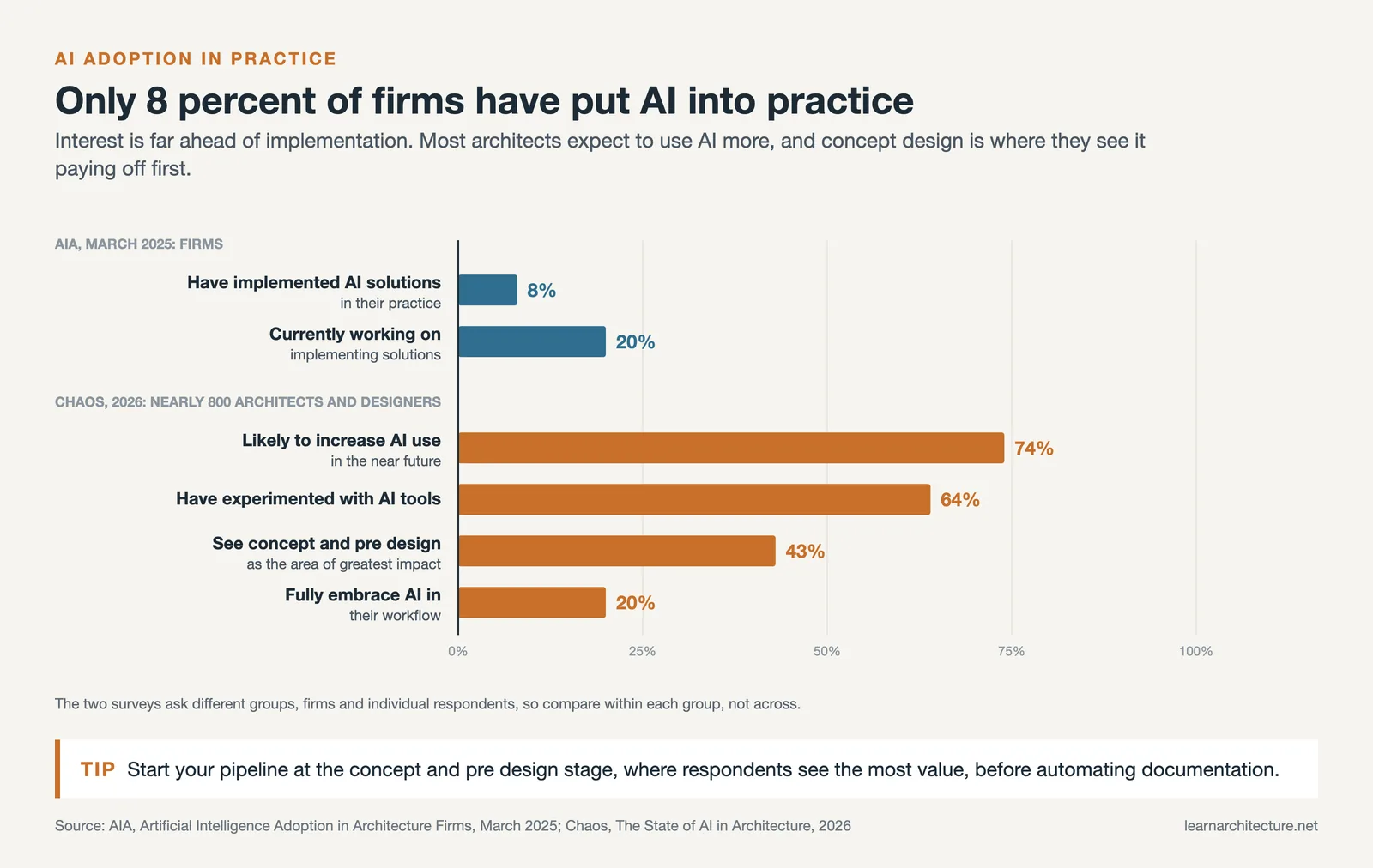
According to a 2026 survey by Chaos Group, 74% of architects say they are likely to increase their use of AI tools in the near future, with 43% identifying the conceptual and pre-design phases as the area where AI adds the most value (Source: Chaos, The State of AI in Architecture, 2026).

Why Architects Need AI Design Automation Now
The practical case for automating your design workflow comes down to three things: speed, consistency, and competitive pressure. A 2025 AIA report found that only 8% of architecture firms had implemented AI solutions, with another 20% actively working on it. Firms that build working AI pipelines now gain a real advantage over competitors still running manual processes.
Speed is the most obvious benefit. An AI workflow for architects can generate and analyze dozens of massing options in the time it takes to sketch three by hand. Consistency matters just as much. When environmental analysis runs automatically on every generated option, nothing slips through the cracks. Parametric tools like Grasshopper for Rhino already allow rule-based automation; adding AI to that pipeline takes it further by introducing learned patterns and prediction rather than just preset rules.
Step-by-Step: Setting Up Your AI Design Pipeline
Building an automated design workflow with AI tools does not require a complete overhaul of your current process. Start with one bottleneck and expand from there.
Step 1: Audit Your Current Process
Map every task in your typical project workflow, from initial brief to construction documents. Identify the steps where you spend the most time on repetitive work: site analysis, option generation, rendering, or compliance checking. These are your automation targets. In many firms, a large share of early-phase work turns out to be data gathering and format conversion, which is exactly what AI can handle.

Step 2: Choose the Right AI Tools for Each Stage
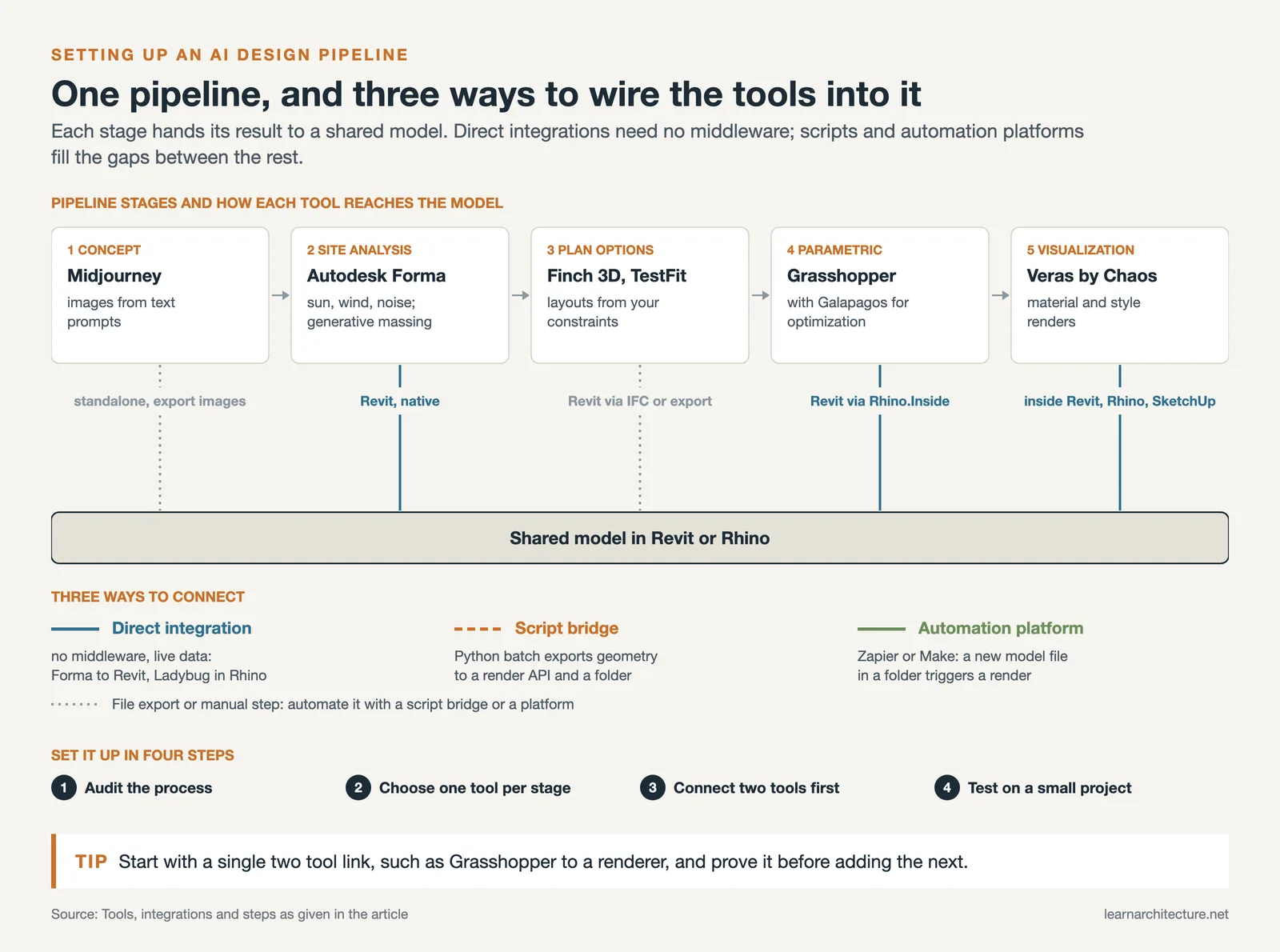
Match tools to tasks, not the other way around. For concept generation, platforms like Midjourney and AI-generated architecture tools produce quick visual explorations. For site and environmental analysis, Autodesk Forma runs real-time sun, wind, and noise studies directly on your massing models. For plan optimization, Finch 3D and TestFit generate layout options from constraints you define. For rendering, tools like Veras by Chaos convert rough models into material-applied visualizations inside Revit or Rhino.
💡 Pro Tip
Pick tools that share file formats or have direct integrations. Forma exports to Revit. Grasshopper definitions can feed geometry into Veras. If two tools require a manual FBX-to-OBJ conversion every time, that connection becomes a workflow bottleneck rather than an accelerator.
Step 3: Connect Tools Into a Working Pipeline
The connection layer is where most architects struggle. There are three practical approaches:
Direct integrations are the simplest. Autodesk Forma connects to Revit natively. Grasshopper plugins like Ladybug and Honeybee run environmental analysis within the Rhino environment. These built-in connections require no middleware and transfer data in real time.
Script-based bridges work when direct integration is not available. A Python script can, for example, batch-export Grasshopper geometry as OBJ files, send them to a rendering API, and save results to a shared project folder. This approach requires basic scripting knowledge but handles many tool-to-tool gaps. Parametric architecture design with Grasshopper already supports Python and C# scripting for exactly this kind of automation.
Workflow automation platforms like Zapier or Make (formerly Integromat) can connect cloud-based AI tools. If your rendering service has an API and your project management tool has one too, you can trigger a render automatically when a new model file appears in a specific folder.

Step 4: Test, Measure, and Refine
Run your pipeline on a small test project before applying it to live work. Track two metrics: time saved per task and error rate compared to your manual process. Most firms see meaningful time savings after two or three rounds of refinement, not on the first attempt.
⚠️ Common Mistake to Avoid
Trying to automate the entire workflow at once. Architects who attempt to connect every tool from day one usually abandon the effort within weeks. Start with a single two-tool connection (for example, Grasshopper to a rendering engine), prove it works, then add the next link in the chain.
AI Tools That Fit Into an Architecture Workflow
The following table shows widely used design automation tools, organized by the workflow stage they serve best.
Comparison of AI Design Automation Tools by Workflow Stage
| Workflow Stage | Tool | Primary Function | Integrates With |
|---|---|---|---|
| Concept Generation | Midjourney | AI image generation from text prompts | Standalone (export to any editor) |
| Site Analysis | Autodesk Forma | Sun, wind, noise analysis + generative massing | Revit, SketchUp (via OBJ) |
| Plan Optimization | Finch 3D | AI floor plan generation from constraints | Revit (via IFC), Rhino |
| Parametric Design | Grasshopper + Galapagos | Algorithmic optimization and form-finding | Rhino, Revit (via Rhino.Inside) |
| Visualization | Veras by Chaos | AI-powered material and style rendering | Revit, Rhino, SketchUp |
| Feasibility | TestFit | Real-time building configurator for multi-family | Revit, Rhino (via export) |
For a broader list of AI platforms available to architects, see this overview of the best AI apps for architects and designers.
💡 Pro Tip
Before committing to a paid AI tool, test it on a completed project where you already know the outcome. Compare the AI-generated results against your manual work. This gives you a realistic benchmark instead of relying on marketing demos.
Where to Go From Here
Your Next Step: Pick the single most time-consuming repetitive task in your current design process and connect one AI tool to handle it this week. Whether that is running Forma analyses on your next site model or setting up a Grasshopper definition that auto-generates facade panel variations, starting with one working connection will teach you more than any amount of planning. Explore how AI enhances architectural design and construction processes to identify where your firm can benefit most.
Frequently Asked Questions
What are the best AI tools for automating an architecture workflow?
The most effective tools depend on the workflow stage. Autodesk Forma handles site analysis and generative massing. Grasshopper with optimization plugins like Galapagos covers parametric design. Midjourney and Veras by Chaos work well for concept visualization. Finch 3D and TestFit automate floor plan and feasibility studies.
How much time does an AI design pipeline actually save?
Results vary by firm and project type, and there is no reliable industry figure yet, but architects who have implemented AI design automation tools report noticeably faster early design phases. The biggest gains come from eliminating manual format conversions and running parallel option studies instead of sequential ones.
Do I need coding skills to set up an automated design workflow?
Not necessarily for the first stage. Many AI tools offer direct integrations (Forma to Revit, Veras inside Rhino) that require no code. For more advanced connections, basic Python scripting helps. Parametric design tools like Grasshopper use visual programming rather than traditional code, making automation accessible to architects without software engineering backgrounds.
Can small architecture firms benefit from AI workflow automation?
Yes. Smaller firms often benefit more because they have fewer staff to absorb repetitive work. Cloud-based tools like Forma and Finch 3D require no local hardware investment. A solo practitioner can set up a two-tool pipeline in a single afternoon and start seeing results on the next project.









Leave a comment