



Table of Contents Show
Free CAD blocks are pre-drawn 2D or 3D elements (doors, windows, furniture, trees, fixtures) in DWG or DXF format that architects insert into their drawings instead of drafting from scratch. The right block library saves hours on every project while keeping drawings consistent and professional.
Every architectural drawing relies on repeated elements. Doors, windows, bathroom fixtures, furniture layouts, landscaping symbols, and human figures appear across nearly every project. Drawing each of these from scratch wastes time that could go toward actual design work. That is why building a reliable collection of free CAD blocks has become a standard practice for architects, students, and drafters worldwide. A well-organized block library speeds up production, keeps your drawing set consistent, and reduces errors during documentation.
This guide covers the best free sources for architectural CAD blocks, explains what to look for in downloaded files, and shares practical tips for managing your library over time.

What Are CAD Blocks and Why Do Architects Need Them?
CAD blocks (sometimes called architecture block CAD files) are reusable drawing components saved as individual files or grouped into libraries. When you insert a block into your project, AutoCAD or similar software treats it as a single object, which keeps file sizes small and makes global edits simple. If you update a block definition, every instance of that block in the drawing updates automatically.
Blocks typically arrive as .dwg files, though .dxf is also common. The most useful collections include both plan and elevation views, and some sites also provide architectural 3D CAD blocks for presentations and renderings. For architects working on construction documents, architectural details CAD blocks (wall sections, connection details, waterproofing assemblies) can be just as valuable as furniture or fixture symbols.
💡 Pro Tip
Before inserting any downloaded block, check its unit system (metric vs. imperial) and insertion base point. A block drawn in millimeters will appear enormous in an inches-based drawing. Run the UNITS command first, then use INSERT with “Specify On-screen” for scale to catch mismatches before they cascade through your sheet set.

Top 8 Free CAD Block Sites for Architecture
The following sites have been tested for download reliability, file quality, and category range. Each one offers genuinely free content, though some also sell premium packs.
Comparison of Free CAD Block Sites
The table below summarizes what each resource offers so you can pick the right one for your project needs.
| Site | Best For | Registration | Formats |
|---|---|---|---|
| CAD-Blocks.net | Quick furniture, people, vehicle blocks | Not required | DWG |
| Bibliocad | Large library, 3D models, Revit families | Free account (daily limit) | DWG, RVT, 3DS |
| CADblocksfree | Broad category range, multi-platform | Not required | DWG, SKP, RVT, 3DS |
| CADdetails | Manufacturer-verified product blocks | Free account | DWG, PDF, RVT |
| Dimensions.com | Dimensionally accurate reference drawings | Free (limited), paid plans | DWG, SVG, 3DM, SKP |
| Arcat | Building product CAD drawings and PDFs | Not required | DWG, PDF |
| DWG Models | Community-sourced furniture and landscape | Not required | DWG |
| Freecads | Architecture details, MEP, multi-format | Free account | DWG, DXF, SKP, RVT |
1. CAD-Blocks.net
CAD-Blocks.net is one of the longest-running free CAD block sites and remains a reliable first stop for everyday 2D CAD blocks. The library covers furniture, bathrooms, kitchens, vehicles, landscaping elements, and people. Files are compatible with AutoCAD 2004 and later, and no registration is required. The interface is straightforward: pick a category, preview the block, and download the .dwg file directly.

2. Bibliocad
Bibliocad hosts one of the largest online collections of CAD and BIM content, with over 120,000 files contributed by a global community of professionals. Free registration gives you access to a daily download allowance. The library goes beyond simple 2D blocks, offering Revit families, 3D models, and complete project files. For architectural CAD blocks used in professional documentation, Bibliocad offers depth that smaller sites cannot match.
3. CADblocksfree
CADblocksfree provides tens of thousands of free downloads across AutoCAD, Revit, SketchUp, Blender, and other platforms. The site categorizes blocks clearly, and most files are available without registration. Users can also upload and sell their own content, which keeps the library growing. For architecture cad blocks covering furniture collections or landscape elements, this site covers a broad range.
4. CADdetails
CADdetails stands apart because its blocks come directly from building product manufacturers. This means the dimensions, specifications, and details are accurate to the actual products you might specify in a project. Registration is free, and downloads are available in DWG, PDF, and Revit formats. If you are putting together construction documents and need manufacturer-verified architectural details CAD blocks rather than generic symbols, CADdetails is the right choice.
🎓 Expert Insight
“All of our .dwg CAD blocks and drawings have been researched and drawn in-house for quality control and include Imperial and Metric scales that can be measured to confirm that any imported drawings are scaled correctly when used.”
Dimensions.com, About page
This approach to in-house quality control addresses one of the biggest frustrations with free CAD block sites: unreliable scaling. When blocks are drawn and verified by professionals rather than crowdsourced without review, the risk of insertion errors drops significantly.
5. Dimensions.com
Dimensions.com takes a different approach from traditional block libraries. Instead of offering massive file dumps, it provides carefully researched, dimensionally accurate drawings of everyday objects, spaces, and furnishings. Founded by architect Bryan Maddock through the practice Fantastic Offense, every drawing is produced in-house with verified measurements. Downloads are available in DWG, SVG, and 3D formats (3DM, SKP, OBJ). If dimensional accuracy matters more than quantity, this is the resource to bookmark.

6. Arcat
Arcat offers a large library of CAD drawings spanning all building products. Every 2D CAD block can be downloaded and dragged directly into AutoCAD. Files come in DWG format and are also available as PDFs, which is handy for quick reference on the construction site. No registration is needed, and the collection is particularly strong for building product specifications and architectural elevation CAD blocks.
7. DWG Models
DWG Models is a community-driven library of AutoCAD drawings covering furniture, cars, people, architectural elements, and symbols. The database is regularly updated with contributions from users worldwide. Most blocks are available in plan, front, and side elevation views, which makes them practical for both floor plans and section drawings.

8. Freecads
Freecads supports a wide range of professional file formats including DWG, DXF, PDF, SKP, RVT, IFC, and more. The library covers architecture details, MEP systems, safety layouts, and accessibility design. Free members can upload files and earn ad revenue, which encourages the community to keep the collection growing. Premium membership removes ads and adds unlimited uploads for a small annual fee.
Which Site for Which Block Type
The sites above overlap heavily, but each has categories it does better than the others. Knowing which to open first saves the half hour that usually goes on searching four libraries for the same sofa.
Furniture
The most downloaded category on every block site, because sofas, tables, beds, desks and chairs appear in almost every plan from a house to an office fit-out. CAD-Blocks.net and CADblocksfree both keep well-organised furniture sections. Dimensions.com is the one to use when the measurement matters rather than the outline, for instance when you are checking clearance around a dining table or wheelchair turning space at a workstation, because its content is built around verified dimensions rather than downloadable geometry alone.
Trees, planting and landscape
A good tree block is the difference between a site plan that reads as designed and one that reads as unfinished. Look for blocks that provide both views: a plan-view canopy and a species-specific elevation silhouette, since using a plan symbol in elevation is an immediately visible error. CAD-Blocks.net carries a solid deciduous and evergreen selection, and Freecads and DWG Models both hold wider vegetation libraries including shrubs and ground cover. Watch the scale on these more than any other category, as vegetation blocks from different sources frequently arrive with inconsistent unit settings.
Doors, windows, stairs and construction details
ARCAT and CADdetails are the strongest here, and for a specific reason: both are manufacturer-backed, so their content reflects products that actually exist with dimensions that match a real catalogue item. That matters more for construction detailing than for space planning, where a generic door is usually sufficient. Use the generic libraries during design development and switch to manufacturer blocks once products are being specified.
People, vehicles and scale references
The thinnest category on most free block sites, and the one where quality varies most. Vehicles are widely available and generally reliable, since a car is a car. Human figures are the weak point: many free blocks are poorly drawn or wrongly scaled, and a badly proportioned figure damages a drawing more than no figure at all. Check the height of any human block against a known dimension before using it, and be wary of anything that arrives without a stated scale.
How to Choose Quality Free CAD Blocks
Not all free blocks are equal. A poorly drawn block can introduce errors into your construction documents, create scaling headaches, and even corrupt your drawing file. Here are the key factors to evaluate before using any downloaded block.
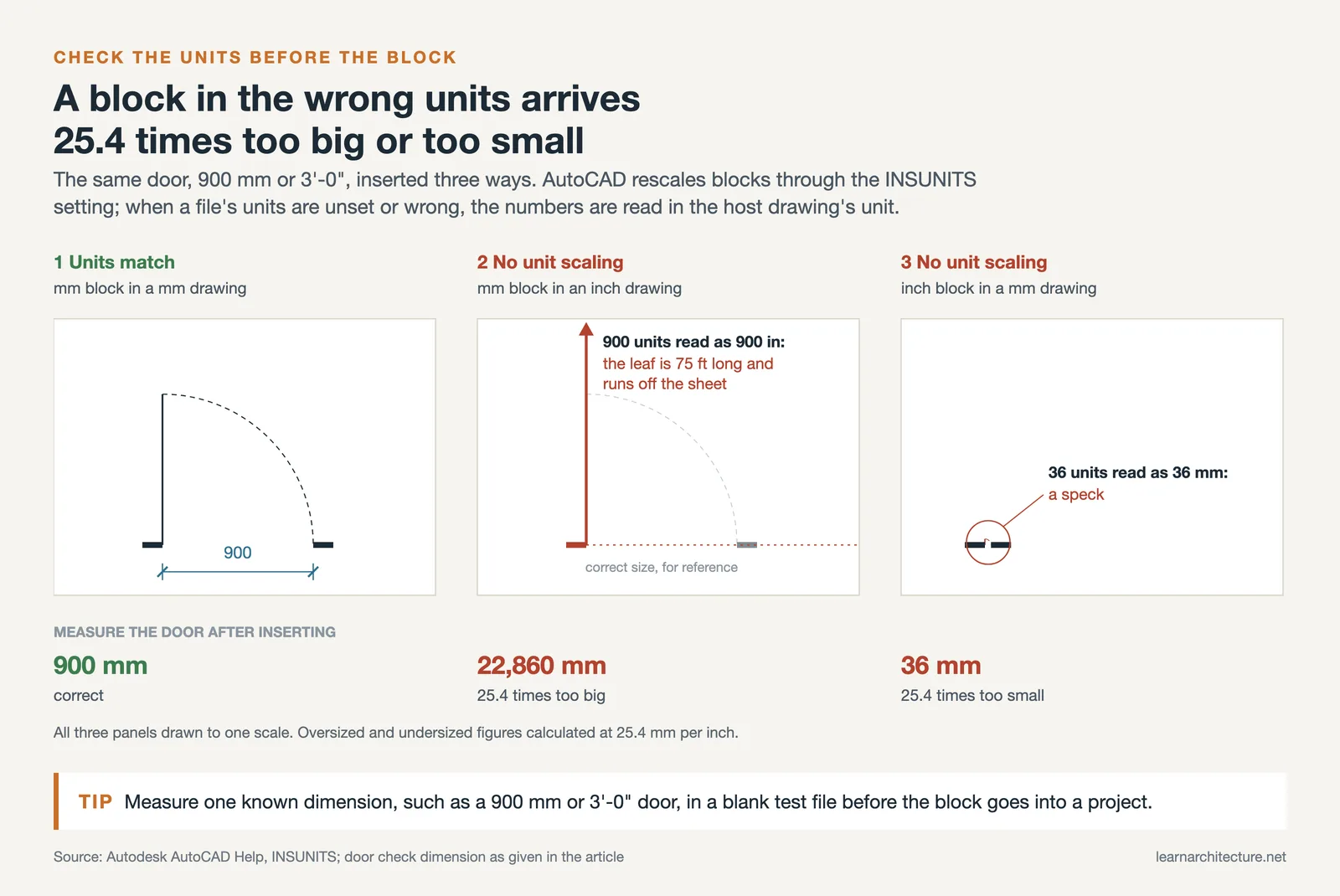
First, check the layer structure. Well-made blocks use layer 0 or a clean, logical layer naming system. Blocks with dozens of random layers will clutter your drawing and make printing a headache. Second, verify the scale by measuring a known dimension (a standard door at 900 mm or 3′-0″, for example). Third, look at the geometry itself: are lines clean, or do you see overlapping segments and stray points? Run the OVERKILL command in AutoCAD after inserting any community-sourced block to clean up duplicate geometry.
⚠️ Common Mistake to Avoid
Many architects download blocks and insert them directly into live project files without testing first. Always insert downloaded blocks into a blank test file, run AUDIT and PURGE, check the units and scale, and only then copy the cleaned block into your working drawing. A corrupt or oversized block can bloat your file and cause crashes during plotting.

Where to Find Architectural Elevation CAD Blocks and 3D Content
While most free sites focus on plan-view 2D CAD blocks for free download, some projects require elevation symbols or full 3D models. Bibliocad and CADblocksfree both offer architectural 3D CAD blocks alongside their 2D libraries. For elevation-specific content (building facades, section details, window assemblies), sites like Freecads’ architecture section carry dedicated collections of architectural elevation CAD blocks.
If you work in 3D architectural design software like SketchUp or Revit, you can also find blocks tailored to those platforms. SketchUp’s 3D Warehouse, for instance, contains millions of free models that can be inserted directly into your scenes. For a comparison of how different tools handle 3D content, see our SketchUp vs Rhino guide.
How to Organize Your CAD Block Library
Downloading blocks is only half the process. Without a clear organization system, you will waste as much time searching for the right block as you would drawing one from scratch. Here is a practical folder structure that scales well from student projects to professional offices:
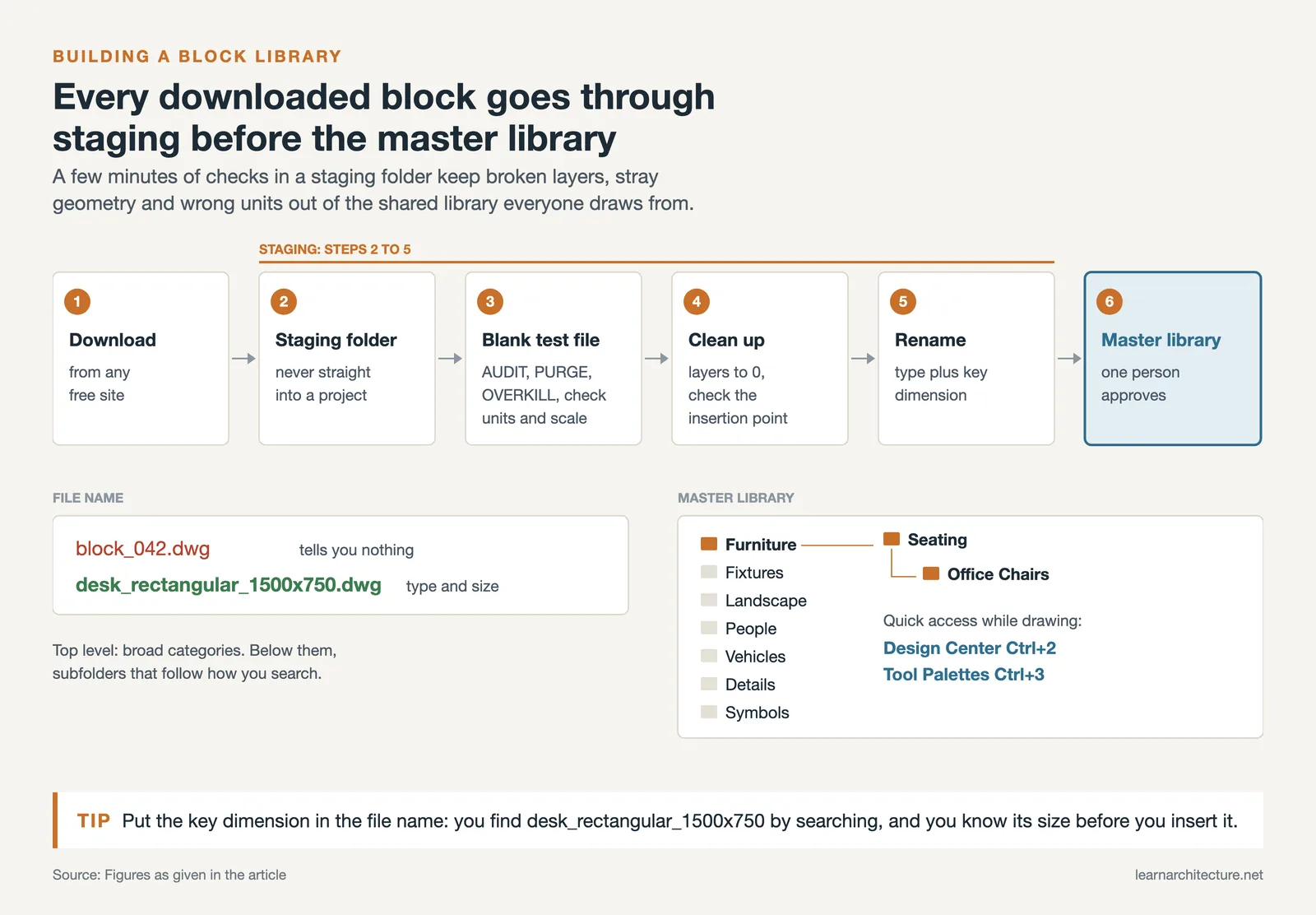
Start with broad categories at the top level: Furniture, Fixtures, Landscape, People, Vehicles, Details, Symbols. Within each category, add subcategories based on how you actually search (e.g., Furniture > Seating > Office Chairs). Name files descriptively, including the type and key dimension: “desk_rectangular_1500x750.dwg” is far more useful than “block_042.dwg”.
Use AutoCAD’s Design Center (Ctrl+2) or Tool Palettes (Ctrl+3) to create quick-access panels for your most-used blocks. This removes the need to browse through folders during production. If your firm uses a shared server, maintain a single master library that everyone draws from, and assign one person to review and approve new additions.
💡 Pro Tip
Create a “staging” folder for newly downloaded blocks. Before moving anything into your master library, open each file, run PURGE and AUDIT, reset layers to 0, verify the insertion point, and rename the file to match your naming convention. This five-minute habit prevents hours of troubleshooting later when a block misbehaves in a live project.
Licensing Considerations for Free CAD Blocks
The word “free” does not always mean “use however you want.” Many free CAD block sites permit downloads for personal and educational use but restrict or prohibit commercial application without attribution or a paid license. Before using any downloaded block in client-facing construction documents, check the site’s terms of service. Sites like CADdetails provide manufacturer-authorized content that is explicitly cleared for professional use, while community-sourced libraries may have more restrictive terms.
For architectural practice, the safest approach is to treat downloaded blocks as references. Modify them to fit your project standards, integrate them into your own library system, and document where you sourced them. This protects your firm and ensures your drawings remain under your control.
Understanding file standards is also important when working with blocks. For more on reading and interpreting architectural symbols used in professional drawings, our dedicated guide covers lineweights, tags, and notation conventions.
📌 Did You Know?
Dimensions.com was founded by architect Bryan Maddock specifically to solve the quality problem with free CAD downloads. Unlike most block sites that rely on user uploads, every drawing on Dimensions.com is researched and produced in-house with verified measurements in both imperial and metric scales. The project grew out of the architecture practice Fantastic Offense and now serves designers across architecture, interior design, game design, and illustration.
What Is a Block in AutoCAD?
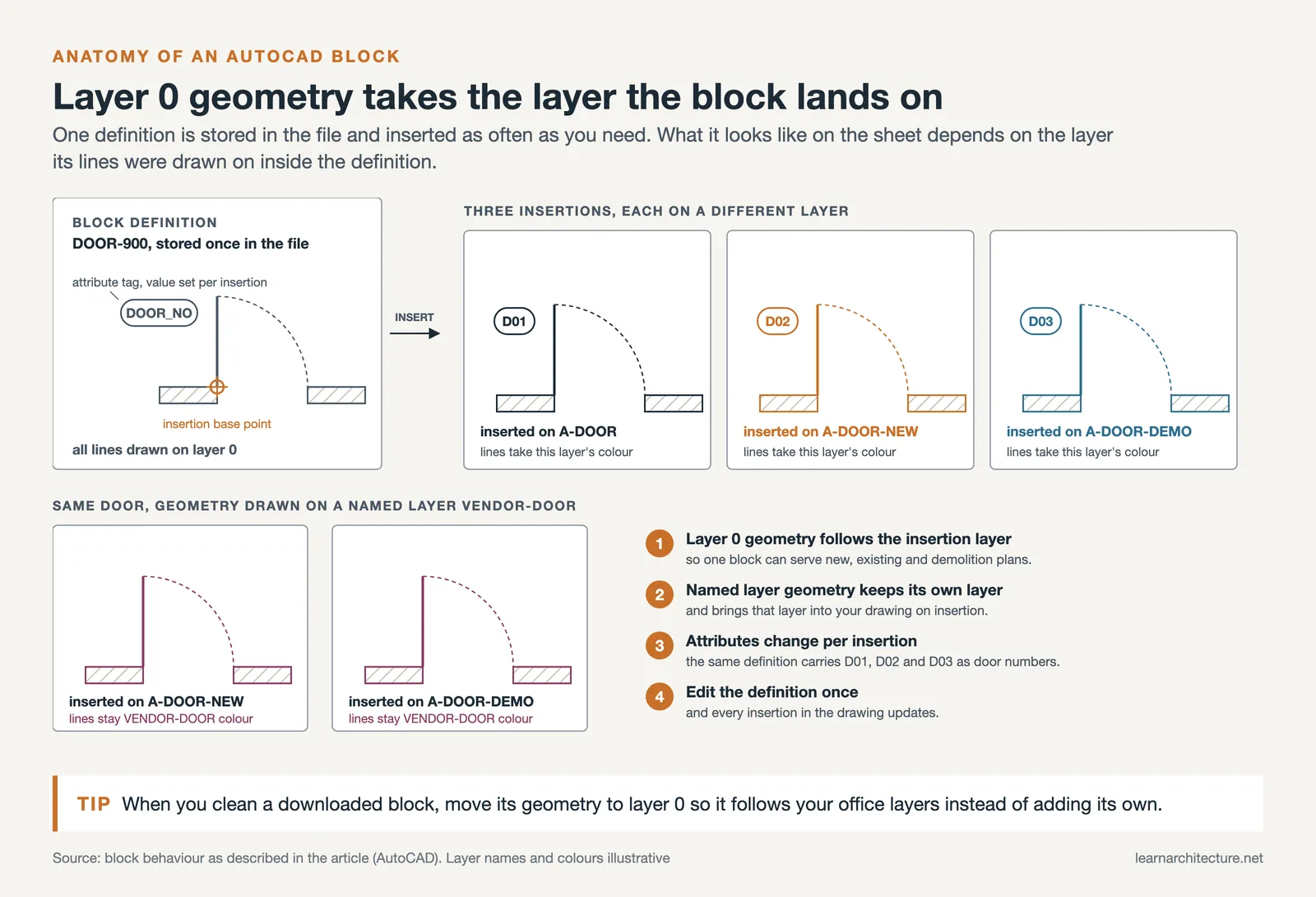
It also helps to understand what a block in AutoCAD actually is. A block is a collection of objects grouped into a single named entity. Once defined, a block can be inserted repeatedly across one drawing or many drawings without redrawing each element. AutoCAD stores only one definition of the block regardless of how many times it appears, which keeps file sizes manageable. Blocks can also carry attributes (text fields that change per insertion, such as a door number or room tag), and dynamic blocks allow you to stretch, rotate, or flip components within set parameters.

Tips for Managing Downloaded CAD Blocks
The staging routine above (AUDIT, PURGE, a units check, a clean insertion point) and the licensing check earlier in this guide deal with a block before it enters your library. The habit that still causes trouble after that point is layer assignment.
Downloaded blocks often arrive on Layer 0, which is actually ideal, because AutoCAD assigns Layer 0 objects to whatever layer the block is inserted onto. However, some blocks come with custom layers that may conflict with your office layer naming conventions. The SETBYLAYER command helps reassign nested object properties to match your standard. For related reading on setting up efficient architectural technology workflows, browse the technology section of learnarchitecture.net.

Frequently Asked Questions
Where can I download free CAD blocks?
CAD-Blocks.net, Bibliocad, CADblocksfree, CADdetails, Arcat, DWG Models and Freecads all offer free libraries, and Dimensions.com is the best reference when you need verified measurements rather than downloadable geometry. Manufacturer-backed sites such as Arcat and CADdetails carry content matching real products, which matters once you are specifying rather than space planning. Check the licence on each site, since free to download does not always mean free to use commercially.
What is a block in AutoCAD?
A block is a named group of objects that AutoCAD stores once as a definition and places as many times as you need, so editing the definition updates every copy in the drawing. The rest is detail: attributes add text that changes with each insertion, such as door numbers, and dynamic blocks let one block stretch, flip or rotate within set limits.
Are free CAD blocks safe and legal to use?
Legally it depends entirely on the licence, which varies by site and sometimes by individual block. Some allow commercial use freely, others restrict it or require attribution, and manufacturer blocks are usually offered on the understanding that you may specify their product. Read the terms rather than assuming. Technically, download only DWG and DXF files from sites you recognise, and be cautious with files bundled as executables or archives with unexpected contents.
How do I keep a CAD block library organised?
Store blocks in a folder structure by category rather than by download date, name files consistently enough that they sort usefully, and standardise units on import so blocks from different sources do not arrive at different scales. Build an office block library that everyone draws from rather than letting each project accumulate its own, and purge unused block definitions from drawings periodically, since inherited blocks from consultants’ files are a common cause of bloated file sizes.
What scale should CAD blocks be at?
Blocks should be drawn at real-world size, one unit to one millimetre or one inch depending on your drawing units, and scaled by the viewport rather than by resizing the block. Problems almost always come from mixing sources: a block created in inches inserted into a millimetre drawing arrives twenty-five times too small. Check one known dimension after inserting any block from a new source before using it across a drawing.
Final Thoughts
A strong free CAD blocks library is one of the most practical investments an architect can make. The eight sites listed above cover everything from quick furniture symbols to manufacturer-verified product drawings and dimensionally precise reference files. The key is not just downloading, but organizing, verifying, and maintaining your collection so it remains a reliable production tool rather than a cluttered folder of unknown files.
Pair your block library with solid software skills. If you are choosing between drafting platforms, our comparisons of ArchiCAD vs SketchUp and architectural visualization tools can help you pick the right workflow for your projects.
















Leave a comment