


Table of Contents Show
Smart home systems refer to the network of connected devices, sensors, and automated controls that manage lighting, climate, security, and energy use within a building. For architects, understanding these systems is no longer optional; specifying conduit paths, structured wiring, and protocol-compatible infrastructure during the design phase directly affects a project’s long-term functionality and client satisfaction.
Residential clients now expect their homes to respond to voice commands, adjust lighting based on time of day, and lock doors remotely. Architects who understand how a smart home system works can make better decisions about wall cavities, ceiling voids, electrical panel sizing, and network closet placement before construction begins. The result is a cleaner installation, fewer change orders, and a home that adapts as technology changes.
How Smart Home Automation Systems Work

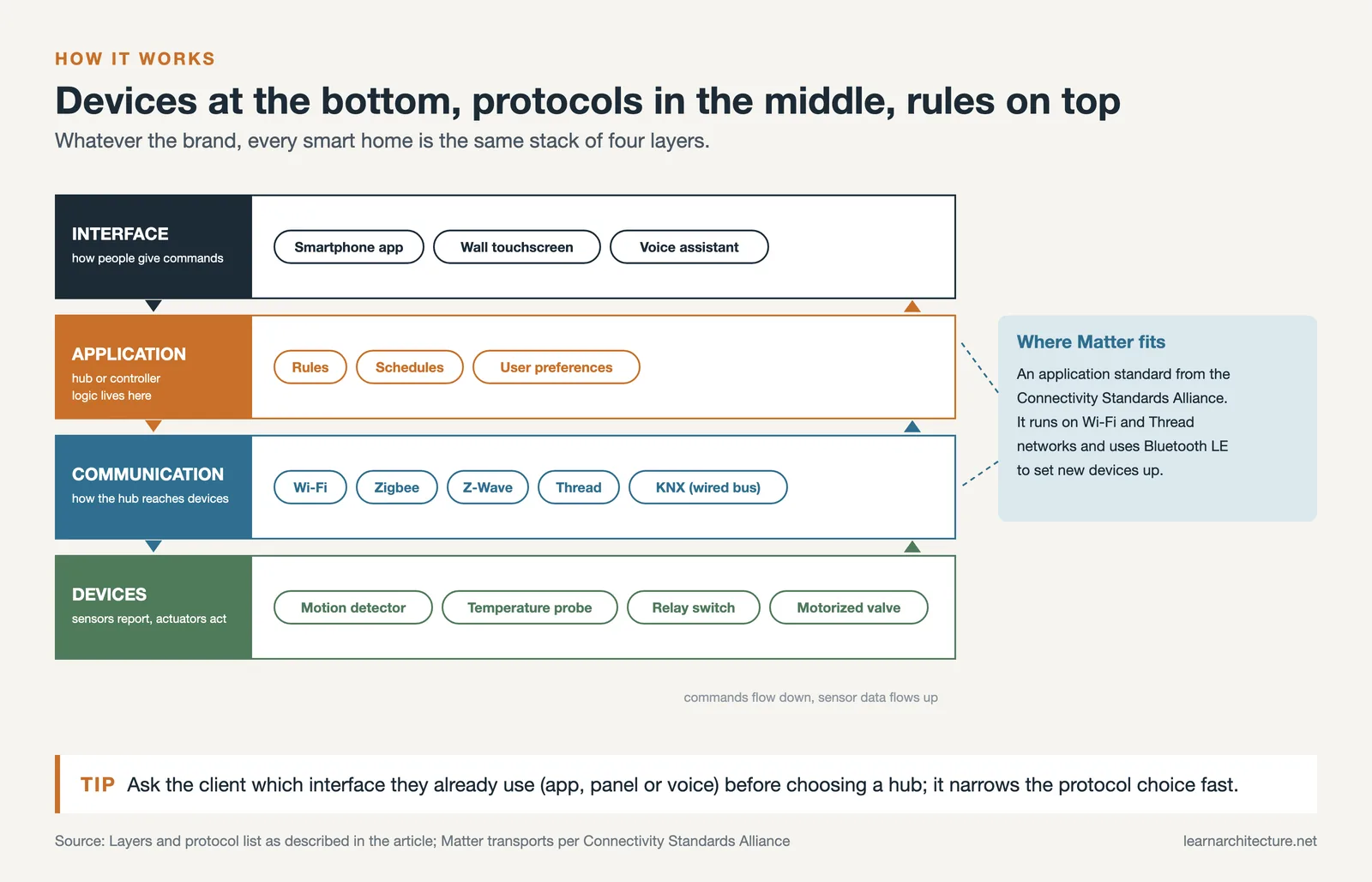
A smart home automation system connects individual devices (thermostats, light switches, door locks, cameras, motorized shades) to a central controller or hub. That hub communicates with the devices over one or more wireless or wired protocols. The user interacts with the system through a smartphone app, a wall-mounted touchscreen, or a voice assistant like Amazon Alexa, Google Home, or Apple Home.
The architecture behind these systems follows a straightforward hierarchy. At the bottom are the sensors and actuators: motion detectors, temperature probes, relay switches, and motorized valves. In the middle sits the communication layer, which can be Wi-Fi, Zigbee, Z-Wave, Thread, or a hardwired bus like KNX. At the top is the application layer, where logic rules, schedules, and user preferences are stored and executed. When an architect understands this layered structure, specifying the right infrastructure becomes a design task rather than an afterthought.
📐 Technical Note
The Matter protocol (developed by the Connectivity Standards Alliance) operates as an application layer over IPv6 networks, primarily using Wi-Fi and Thread for transport. Matter 1.3, finalized in 2024 and rolling through 2025-2026 product cycles, expanded device support to include energy management devices, water leak sensors, and robot vacuum mapping. Architects specifying smart home infrastructure should confirm that networking hardware supports IPv6 and Thread border routers.
Smart Home Control Systems and Protocols
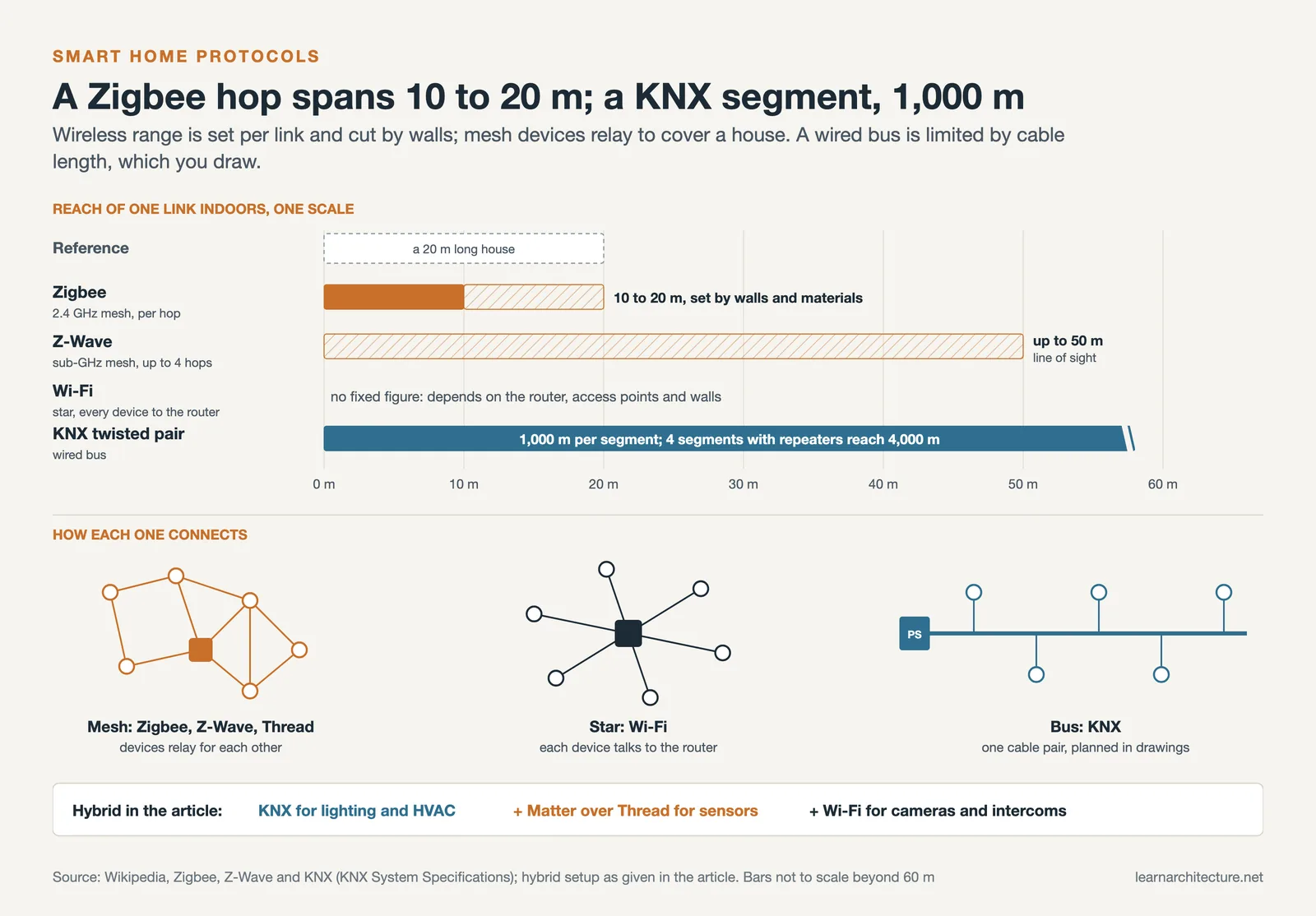
Choosing the right smart home control system starts with understanding the communication protocols available. Each protocol has strengths and trade-offs that affect range, latency, power consumption, and device compatibility. For residential projects, the most relevant protocols in 2026 are Matter/Thread, KNX, Zigbee, Z-Wave, and Wi-Fi.
Comparing Major Smart Home Protocols
The table below summarizes the key differences between the protocols architects encounter most frequently:
| Protocol | Connection Type | Best For | Range | Ecosystem Lock-In |
|---|---|---|---|---|
| Matter/Thread | Wireless (mesh) | Cross-platform interoperability | Whole home via mesh | None (open standard) |
| KNX | Wired (twisted pair bus) | High-end residential, commercial | Up to 1,000 m per line segment (4,000 m with repeaters) | None (open standard) |
| Zigbee | Wireless (mesh) | Battery-powered sensors | 10-20 m per hop | Low (hub dependent) |
| Z-Wave | Wireless (mesh) | Security and access control | 30 m per hop | Moderate |
| Wi-Fi | Wireless (star) | Cameras, displays, speakers | Router dependent | Varies by vendor |
For most mid-to-high-end residential projects, a hybrid approach works well: KNX for hardwired lighting and HVAC control, Matter/Thread for wireless sensors and accessories, and Wi-Fi for high-bandwidth devices like cameras and intercoms. This combination gives the homeowner reliability where it matters most (lighting, climate) and flexibility for devices that may be swapped or upgraded over time.
💡 Pro Tip
Even in projects where the client chooses a fully wireless smart home system, always run empty conduit (20 mm minimum) from the electrical panel to each room’s switch location and to the ceiling void. This costs under $200 per run during construction but saves thousands if the homeowner later decides to upgrade to a wired bus system like KNX or Lutron HomeWorks.
Smart Home Lighting Systems

Smart home lighting systems are often the first automation layer clients request, and for good reason. Lighting accounts for roughly 15% of a typical home’s electricity use, and automated scheduling, dimming, and occupancy sensing can cut that figure significantly. More importantly for architects, smart home lighting allows the design intent of a space to be preserved long after handover: scenes can be programmed to match specific activities, daylight harvesting sensors adjust artificial light in response to natural light, and tunable-white fixtures shift color temperature from warm evening tones to cool task lighting.
Three tiers of smart lighting systems are common in residential projects. Entry-level setups use smart bulbs (Philips Hue, LIFX) that connect over Zigbee or Wi-Fi. These are easy to install but create reliability issues when someone physically turns off the switch. Mid-range systems replace standard switches with smart dimmers (Lutron Caseta, Legrand) that maintain control regardless of bulb type. High-end installations use centralized dimming panels (Lutron RadioRA 3, Crestron, KNX actuators) connected to a well-planned electrical layout with dedicated circuits per zone.
From an architectural perspective, the key decision happens during schematic design: how many independently controllable lighting zones does each room need? A living room might require five zones (general downlights, accent wall washers, cove lighting, table lamps, exterior landscape) while a bedroom may need only three. This zone count directly affects the number of switch legs, circuit breakers, and control modules required.
What Should Architects Know About HVAC Automation?
HVAC automation is where smart home systems deliver the most measurable return on investment. A properly configured smart thermostat, paired with zone valves and occupancy sensors, can reduce heating and cooling costs by 20-30% compared to a manually operated system. For architects focused on energy-efficient building design, specifying HVAC automation is a direct path to better performance without changing the mechanical system itself.
Smart thermostats like the Ecobee, Google Nest, and Honeywell T-series learn occupancy patterns over time and adjust setpoints accordingly. More advanced setups use room-by-room temperature sensors that feed data to a central controller, which then opens or closes zone dampers to direct conditioned air only where it’s needed. This matters for open-plan homes where solar gain varies dramatically from one side of the house to the other throughout the day.
⚠️ Common Mistake to Avoid
Placing a smart thermostat on an interior wall near a kitchen or laundry room creates false temperature readings from heat-generating appliances. Position the main thermostat on an interior wall of a regularly occupied room, away from direct sunlight, HVAC registers, and heat sources. Supplement it with wireless room sensors in bedrooms and living areas for accurate zone control.
Architects should also consider how HVAC automation interacts with green building strategies. Automated systems can coordinate with motorized window shades and operable skylights to prioritize natural ventilation before activating mechanical cooling, a strategy that aligns with passive design principles and can contribute to LEED and USGBC certification goals.
Security and Access Control Integration

A smart home security system today goes well beyond basic alarm panels. Modern systems integrate video doorbells, IP cameras with local AI processing, smart locks with audit trails, motion and glass-break sensors, and environmental monitors for smoke, CO, and water leaks. For architects, the design implications are practical: where do you mount exterior cameras for optimal coverage without dead zones? Where do structured wiring runs need to terminate for PoE (Power over Ethernet) camera installations?
Access control is another area where architectural decisions shape system performance. Smart locks (Yale, Schlage, August) work well on standard residential doors, but multi-point locking systems on European-profile doors or sliding glass walls require compatible motorized lock modules. Specifying the door hardware early allows the integrator to source compatible smart lock mechanisms rather than retrofitting after installation.
Integration is the real advantage. A well-configured smart home control system can trigger a “leaving home” scene that locks all doors, arms the security system, adjusts the thermostat to setback mode, and turns off all non-essential lights with a single command. This kind of cross-system coordination requires a central controller (Control4, Savant, Home Assistant, or Apple Home) and a network backbone designed to handle multiple protocols simultaneously.
🔢 Quick Numbers
- Market research estimates of smart home adoption and market size vary widely from firm to firm, and most of the underlying data sits in paid reports, so treat any single headline figure with caution.
- Matter 1.5, released by the Connectivity Standards Alliance on 20 November 2025, added cameras, soil sensors and a unified closures model covering shades, drapes, awnings, gates and garage doors (CSA).
- Matter 1.6 followed on 17 June 2026 with NFC-based setup and Joint Fabric for sharing devices across ecosystems, so as of September 2026 it is worth naming the Matter version a specified device is certified to (CSA).
Planning Smart Home Infrastructure During Design

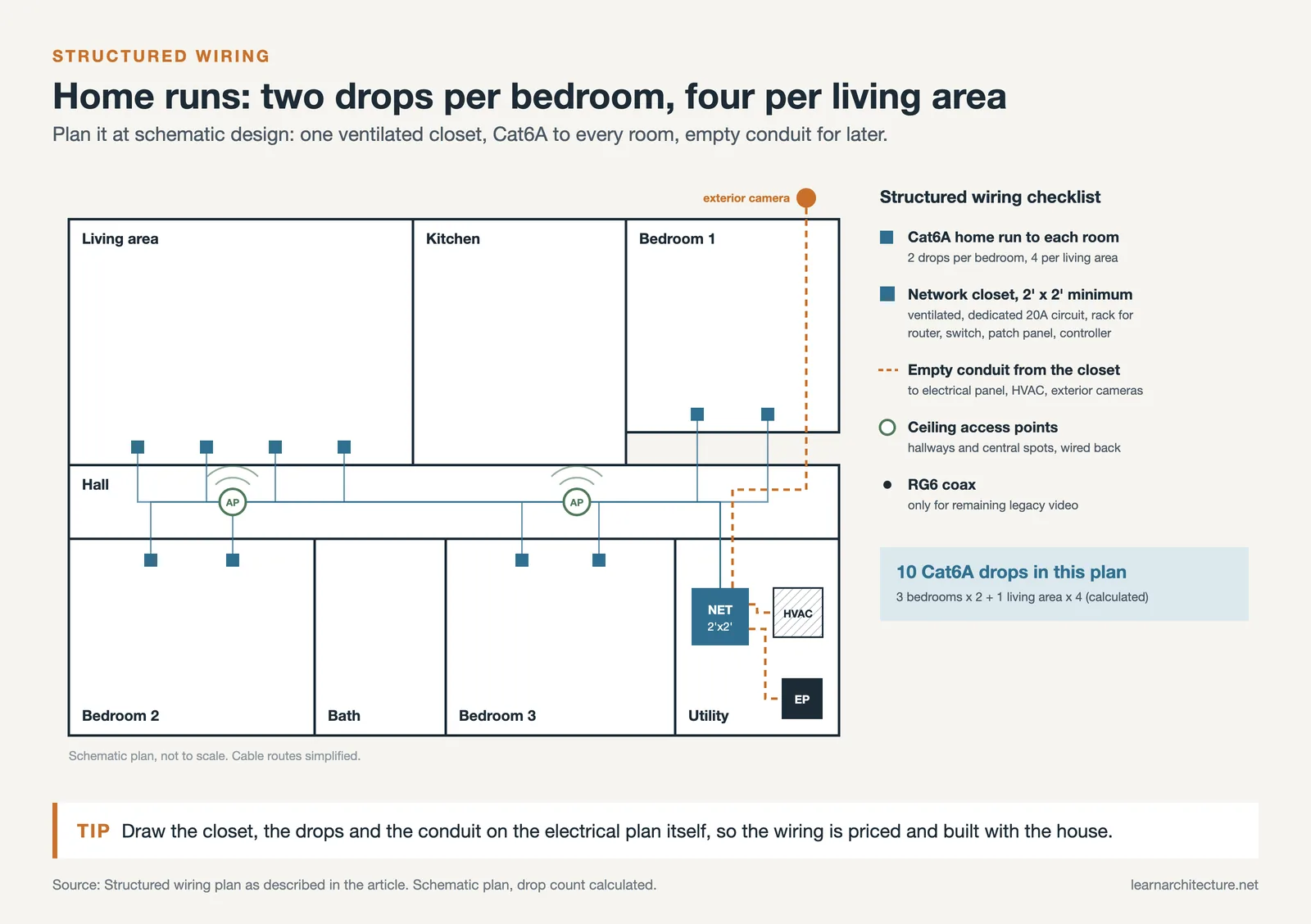
The most cost-effective time to plan smart home infrastructure is during schematic design, not after drywall is up. Architects who treat structured wiring, network closets, and conduit runs as core building systems (similar to plumbing and HVAC) give their clients a home that supports current technology and adapts to future devices without renovation.
A structured wiring plan for a smart-home-ready residence should include a central network closet with adequate ventilation, a dedicated 20A circuit, and enough rack space for a router, switch, patch panel, and automation controller. From that closet, Cat6A Ethernet cables run to every room (two drops per bedroom, four per living area), with RG6 coax for any remaining legacy video connections. Dedicated conduit paths should connect the network closet to the electrical panel, the HVAC equipment location, and any exterior camera mounting points.
For wireless coverage, the closet should also house a controller-based Wi-Fi access point system (Ubiquiti, TP-Link Omada, or Ruckus) with ceiling-mounted access points placed for consistent coverage. Wireless access points placed in hallways and central locations outperform consumer-grade mesh systems because they connect back to the controller via Ethernet rather than repeating a wireless signal. Architects familiar with AI-driven design tools can also use wireless planning software to model signal propagation before finalizing access point locations.
💡 Pro Tip
Include a pull string in every conduit run during rough-in. Electricians often skip this step, which turns a five-minute cable pull into a two-hour fishing job years later. Adding pull strings costs almost nothing during construction and makes future upgrades dramatically easier for the homeowner.
Choosing the Best Smart Home System for a Project
There is no single best smart home system for every project. The right choice depends on budget, client technical comfort, the level of professional integration desired, and whether the system needs to work with existing construction or is being installed in new build.
For budget-conscious clients building or renovating smaller homes, consumer ecosystems like Google Home, Amazon Alexa, or Apple Home paired with Matter-compatible devices offer a low-cost entry point. These systems require no professional integrator and can be expanded incrementally. The trade-off is limited scene complexity and dependence on cloud connectivity for many functions.
For mid-range projects, platforms like Lutron RadioRA 3 for lighting combined with a Sonos audio system and Ring or UniFi Protect for security strike a good balance between professional-grade reliability and owner-manageable interfaces. An electrician with Lutron training can install the lighting system, and the homeowner manages day-to-day operation through the respective apps.
For high-end custom homes, centralized platforms like Control4, Savant, or Crestron deliver full integration of lighting, HVAC, audio/video, security, and motorized shading under one interface. These systems require a certified integrator for programming and ongoing support, and the initial investment is significantly higher. The benefit is a single, cohesive user experience and deep cross-system automation that consumer platforms cannot match.
Regardless of the system tier, architects should coordinate with the smart home integrator during design development, just as they would with a mechanical or electrical engineer. The integrator provides point counts, wiring schedules, and equipment location requirements that feed directly into the architectural drawings. On sustainable architecture projects especially, early integrator involvement ensures that energy monitoring, solar inverter data, and battery storage status can all be surfaced through the home’s smart system.
Where to Go From Here
Your Next Step: On your next residential project, add a “Smart Home Infrastructure” section to your specifications. Start with three items: a minimum 2′ x 2′ ventilated network closet, Cat6A home runs to every room, and 20 mm empty conduit from the panel to each switch location. These three elements cost a fraction of the overall electrical budget and position the home for any level of automation the client chooses now or in the future.











Leave a comment