


Table of Contents Show
Construction cost-estimator apps help homeowners, small builders, and contractors calculate material, labor, and total project costs for residential construction projects using a phone, tablet, or computer. These tools replace error-prone spreadsheets with automated calculations, built-in pricing databases, and professional PDF reports that speed up bidding and reduce budget surprises.
Small residential projects, from kitchen remodels to single-family new builds, require accurate cost projections before the first nail is driven. Manual estimating with pen and paper or basic spreadsheets introduces errors that compound as a project moves forward. A wrong material quantity or an outdated labor rate can push a budget off by thousands of dollars. That is where a dedicated construction cost-estimator app becomes practical. These tools automate quantity calculations, pull from regional pricing databases, and produce clean estimates you can share with clients or lenders in minutes rather than hours.
Spreadsheet-based estimating is prone to small, repeated errors in material quantities, and dedicated estimating software reduces them by automating takeoffs.

What to Look for in a Construction Cost-Estimator App
Choosing a construction cost estimator app for residential architecture projects starts with matching features to how you actually work. A solo remodeler bidding three jobs a week needs a different tool than a small builder managing a crew and multiple subcontractors. Here are the capabilities that matter most for small residential construction projects.
Digital takeoff is the ability to measure areas, lengths, and counts directly from uploaded blueprints or PDFs. This eliminates scaling by hand and cuts measurement time significantly. Not every app includes built-in takeoff, so check before committing. A reliable cost database is equally important. Some apps connect to localized pricing sources like RSMeans or Craftsman Costbooks, while others let you build a custom cost library from your own supplier quotes. For residential projects where material prices fluctuate seasonally, a database you can update quickly saves rework. If you are weighing material options for a sustainable build, our guide to eco-friendly materials in architectural design covers cost-effective choices worth considering at the estimating stage.
Mobile access matters if you create or adjust estimates on the job site. Cloud-based construction cost-estimator apps let you work from any device, sync changes in real time, and share estimates with clients without returning to an office. Finally, integration with accounting tools like QuickBooks or Xero keeps your numbers consistent from estimate to invoice to payment.
💡 Pro Tip
Before subscribing to any estimating app, recreate one of your recent residential bids inside the free trial. Compare the output against your actual job cost. This test reveals whether the app’s default pricing is close enough to your regional rates or requires heavy customization before it becomes useful.

6 Best Construction Cost-Estimator Apps for Residential Projects
The apps below are selected specifically for small residential construction projects. Each one addresses a different workflow, from quick on-site quotes to full project management with estimating built in. Pricing reflects publicly available information as of early 2026.
Comparison of Top Construction Cost-Estimator Apps
The following table summarizes the key differences between the six apps covered in this section:
| App | Best For | Starting Price | Platform | Key Strength |
|---|---|---|---|---|
| Buildxact | Residential builders and remodelers | Free tier; paid from $169/mo billed annually (as of September 2026) | Web, iOS, Android | AI-powered takeoff with supplier integration |
| Joist | Solo contractors and tradespeople | From $10/mo ($8.34 billed annually, as of September 2026) | Web, iOS, Android | Fast mobile estimates with client signatures |
| Clear Estimates | Remodelers needing localized pricing | From $79/mo ($59 billed annually, as of September 2026) | Web | Built-in RSMeans cost data for US markets |
| SimplyWise | Quick photo-based field estimates | Free tier available | iOS, Android | AI photo-to-estimate with before/after visuals |
| Buildertrend | Builders wanting all-in-one management | Quote based on annual revenue (as of September 2026) | Web, iOS, Android | Estimating + scheduling + client portal combined |
| Contractor Foreman | Budget-conscious small teams | From $49/mo | Web, iOS, Android | Affordable estimating with project management |
Buildxact
Buildxact is built specifically for residential builders and remodelers. Its takeoff feature lets you upload floor plans and measure quantities directly on-screen, then auto-populates cost items from supplier price lists. The scheduling and purchase order features link back to your estimate, so any scope change updates your budget automatically. Buildxact works well for small builders managing two to five active residential projects at a time.

Joist
Joist is a mobile-first app cost estimator aimed at solo contractors and small trade teams. You can build an estimate on your phone at the job site, add line items from your saved catalog, apply markups, and send a branded PDF to the client for electronic signature, all in under ten minutes. For small residential projects like bathroom remodels or deck builds, Joist removes friction between the site visit and the bid.
Clear Estimates
Clear Estimates includes localized cost data powered by RSMeans, covering labor and material rates for specific US zip codes. This makes it a strong choice for remodelers who want region-accurate pricing without maintaining their own cost database. You select a project type, adjust the scope, and the system generates an itemized estimate you can customize and export.
⚠️ Common Mistake to Avoid
Many homeowners and new contractors assume that a construction cost estimator app replaces the need for local supplier quotes. App databases provide useful baseline figures, but actual material pricing varies by supplier, order volume, and season. Always cross-check app-generated estimates against at least two local quotes before finalizing a residential project budget.

SimplyWise
SimplyWise takes a different approach by using AI to generate estimates from job-site photos. You snap a picture, describe the project in plain language, and the app returns a cost breakdown with material and labor line items. It also includes a 3D room scanning feature using phone LiDAR for accurate measurements. The free tier covers basic estimating, with paid plans adding before-and-after visualization and advanced invoicing.
Buildertrend
Buildertrend is a full construction management platform that includes estimating as one module within a larger system. For small residential builders who also need scheduling, client communication, change order tracking, and financial management, having everything in one place reduces tool-switching. The trade-off is a higher price point and a steeper learning curve compared to standalone estimating apps. If your workflow also relies on Autodesk products for drafting, our overview of top Autodesk apps for architects explains how tools like Revit handle cost prediction alongside BIM modeling.

Contractor Foreman
Contractor Foreman offers estimating templates, proposal generation, and project management at a price point accessible to small teams. You can build estimates from templates, send branded proposals, and track client approvals with timestamps and electronic signatures. It is a practical middle ground for contractors who want more than a basic construction cost estimator app but are not ready for enterprise-level software.
🔢 Quick Numbers
- 73% of small contractors who adopted estimating software in 2025 chose cloud-based platforms (ConstructionBids.ai, 2026)
How to Choose the Right App for Your Project Size
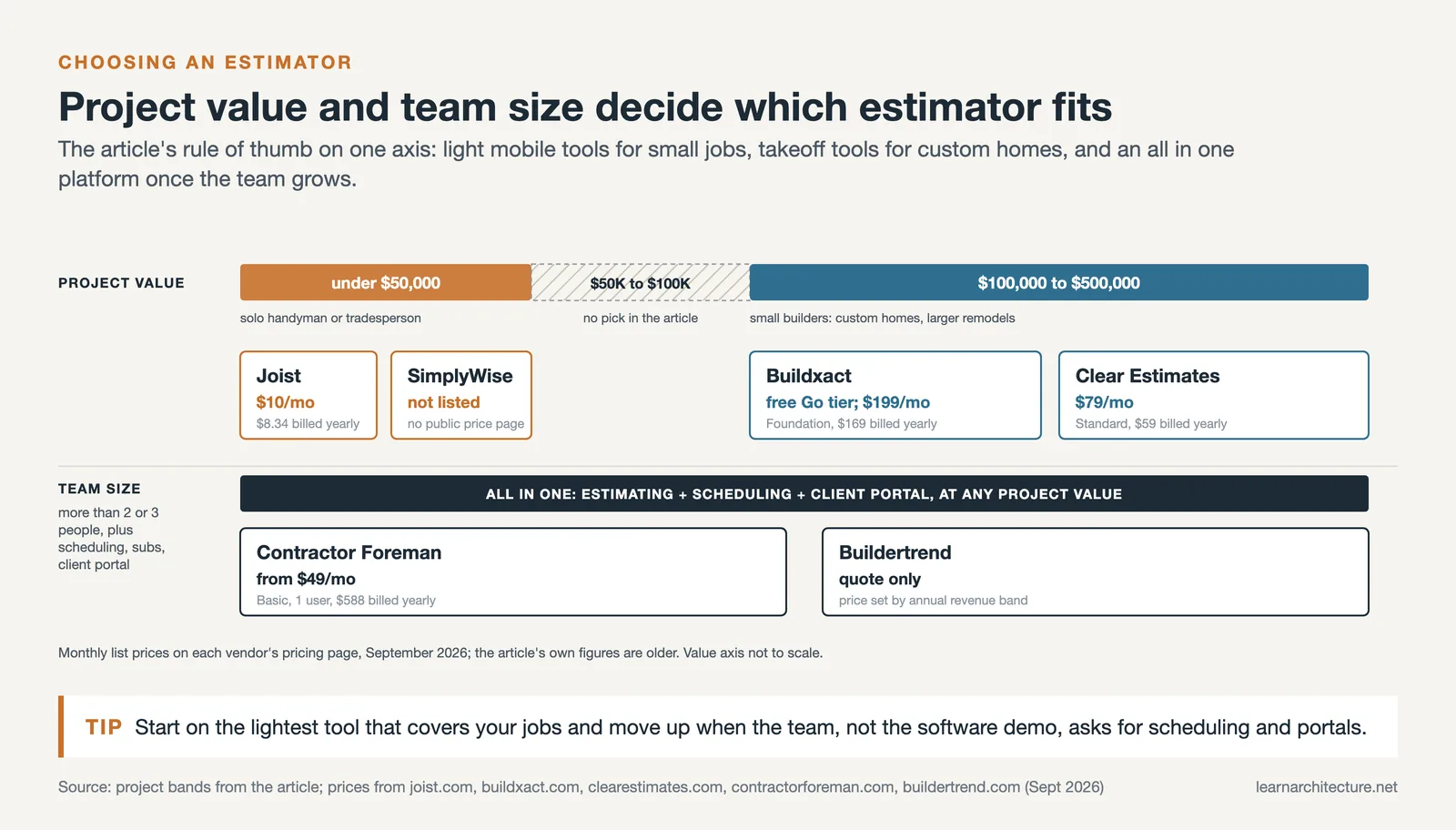
The best app cost estimator for your situation depends on project volume, team size, and how tightly you need estimating linked to the rest of your workflow. For a solo handyman or tradesperson running small residential projects under $50,000, Joist or SimplyWise will cover most needs at minimal cost. The estimates are fast, mobile, and professional enough for homeowner-facing work.
For small builders managing custom homes or larger remodels in the $50,000 to $500,000 range, Buildxact or Clear Estimates provide the takeoff depth and pricing accuracy that residential construction projects at this scale demand. Pairing your estimating workflow with strong visualization can also help clients approve budgets faster; our article on enhancing architectural designs with AI rendering tools covers that angle. If your team has grown beyond two or three people and you also need scheduling, subcontractor coordination, and client portals, Buildertrend or Contractor Foreman bundles those features alongside estimating.
A common pattern among growing residential firms is to start with a lightweight construction cost-estimator app like Joist, then graduate to a more feature-rich platform as project complexity increases. The key is to avoid paying for capabilities you do not use yet while ensuring your estimates remain accurate enough to protect your margins.
🎓 Expert Insight
The estimating errors that hurt small builders most are rarely big, obvious ones; they are small, repeated mistakes in quantities and rates that accumulate across every line item.
This observation highlights why automated quantity takeoff and pre-loaded cost databases matter so much in residential work. Even a 5% material overestimate on every bid adds up to significant lost profit over a year of projects.

Tips for Getting Accurate Estimates on Residential Projects
A construction cost estimator app is only as good as the data you feed it. Even the best tool will produce misleading numbers if your inputs are sloppy or your cost library is outdated. Here are practical steps to improve estimate accuracy on small residential projects.
Update your cost database at least quarterly. Material prices for framing lumber, concrete, and roofing products shift throughout the year. If your app allows custom pricing, pull fresh quotes from your top two suppliers each season and update the relevant line items. This single habit eliminates the most common source of residential estimating errors.
Break complex projects into phases. A whole-house remodel estimate is more accurate when you estimate the kitchen, bathrooms, framing, and finishes as separate scopes and then combine them. Most construction cost-estimator apps support this structure through project folders or estimate sections. Use them.
Build a contingency line into every estimate. For residential projects, a 10% to 15% contingency is standard practice. Some apps let you add this as a global markup, while others require a separate line item. Either way, the contingency should be visible to your client and explained upfront. Skipping it is one of the fastest ways to lose money on a job.
💡 Pro Tip
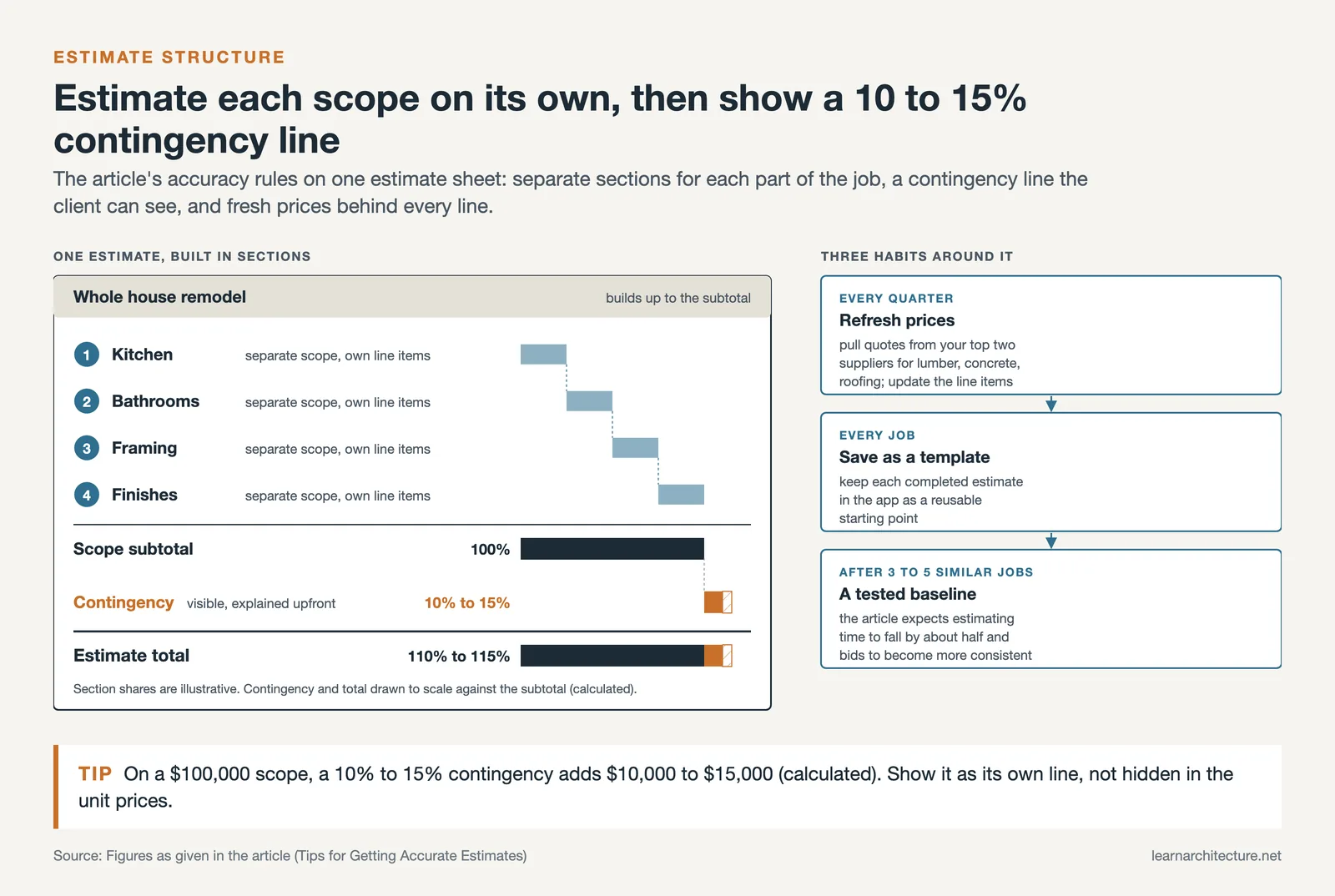
Save every completed estimate as a template in your app. After three to five residential projects of a similar type, you will have a reusable baseline that cuts future estimating time in half and improves consistency across bids.
How AI Is Changing Construction Cost Estimation
Several of the apps listed above already use AI features. SimplyWise generates full estimates from photos. Buildxact applies AI to takeoff measurements. These features are not just marketing buzzwords; they address real bottlenecks in the estimating process for residential architecture projects.
AI-powered estimating works by analyzing photos, drawings, or text descriptions to identify project scope, then matching those inputs against a cost database to produce an itemized estimate. The output still requires human review, especially for custom work, but the time savings are significant. Tasks that took 14 hours by spreadsheet now take three to four hours with dedicated software, and AI features push that number even lower for standard residential projects.
For a broader look at how AI is reshaping design tools in the architecture industry, see our guide to AI-powered architecture design software and our comparison of the best AI tools for architectural visualization.
Final Thoughts
Construction cost-estimator apps remove guesswork from the bidding process and protect your margins on residential construction projects. Whether you are a homeowner planning a kitchen renovation or a small builder pricing a custom home, the right tool pays for itself within the first few jobs. Start with a free trial, recreate a past estimate, and compare the results against your actual costs. That exercise alone will tell you whether the app fits your workflow.
Cost figures and subscription pricing mentioned in this article are approximate and may vary by region, plan tier, and provider updates. Always verify current pricing on the vendor’s website before making a purchase decision.











Leave a comment